
Strange "not secure" message.


britgeezer

Well-known member
Member
Local time
1:11 PM
Posts
104
Location
New Joisey
OS
Windows 11 25H2 OS Build 26200.8117
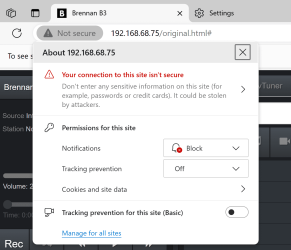
So, I have a Brennan Digitial Media server in my wired network with a reserved IP address. It is working fine, but always has a message about being not secure.
When I open that message, I see the detail below.
I'm unable to change the options to "allow or ask" and the change all settings link makes no sense to me.
It's not a site it's a device.
What's causing this and is it safe to ignore?
1720193505394.png
 
Windows Build/Version
Windows 11, version 23H2

My Computers My Computers

  • At a glance

    Windows 11 25H2 OS Build 26200.8117Intel Core Ultra 7-265K32GB Corsair Vengeance DDR5 PC6400Intel ARC B580
    OS
    Windows 11 25H2 OS Build 26200.8117
    Computer type
    PC/Desktop
    Manufacturer/Model
    Self Build
    CPU
    Intel Core Ultra 7-265K
    Motherboard
    Gigabyte Aorus Elite WiFi7 ICE Z890
    Memory
    32GB Corsair Vengeance DDR5 PC6400
    Graphics Card(s)
    Intel ARC B580
    Sound Card
    On board
    Monitor(s) Displays
    LG
    Hard Drives
    1+2GB NVME, 2GB SSD x 2
    PSU
    MSI 650W
    Case
    Fractal Design 7 Solid
    Cooling
    Air
    Keyboard
    Logitech MX key S
    Mouse
    Logitech MX keyS
    Internet Speed
    1GB
    Browser
    Edge and Chrome
    Other Info
    Also have two Dell LT's using W11 Pro and 25H2
  • At a glance

    Windows 11 24H2 OS Build 26100.2705AMD Ryzen 5600G32 GB Corsair VengeanceIntegrated
    Operating System
    Windows 11 24H2 OS Build 26100.2705
    Computer type
    PC/Desktop
    Manufacturer/Model
    self build
    CPU
    AMD Ryzen 5600G
    Motherboard
    Gigabyte Aorus B550
    Memory
    32 GB Corsair Vengeance
    Graphics card(s)
    Integrated
    Sound Card
    onboard
    Monitor(s) Displays
    TV/ Monitor
    Hard Drives
    Crucial 500GB NVME
    2x 12TB Seagate spinners.
    2 x 8TB WD spinner
    PSU
    650W
    Case
    Micro ATX box
    Cooling
    Air
    Internet Speed
    1GB
    Browser
    Edge and Chrome
    Antivirus
    Malwarebytes
    Other Info
    Its my Server / occasional user.
    The 12TB drives use Stablebit Drivepool :)

My Computers My Computers

  • At a glance

    Windows 11 Pro 25H2 26200.8655i9-10900 10 core 20 threads32 gbnone-Intel UHD Graphics 630
    OS
    Windows 11 Pro 25H2 26200.8655
    Computer type
    PC/Desktop
    Manufacturer/Model
    Dell Optiplex 7080
    CPU
    i9-10900 10 core 20 threads
    Motherboard
    DELL 0J37VM
    Memory
    32 gb
    Graphics Card(s)
    none-Intel UHD Graphics 630
    Sound Card
    Integrated Realtek
    Monitor(s) Displays
    Benq 27
    Screen Resolution
    2560x1440
    Hard Drives
    2x1tb Solidigm m.2 nvme /External drives 512gb Samsung m.2 sata+2tb Kingston m2.nvme
    PSU
    500w
    Case
    MT
    Cooling
    Dell Premium
    Keyboard
    Logitech wired
    Mouse
    Logitech wireless
    Internet Speed
    so slow I'm too embarrassed to tell
    Browser
    #1 Edge #2 Firefox
    Antivirus
    Defender+MWB Premium
  • At a glance

    Windows 11 Pro 24H2 26200.8457AMD Ryzen 7 6800U32 gbintegrated
    Operating System
    Windows 11 Pro 24H2 26200.8457
    Computer type
    PC/Desktop
    Manufacturer/Model
    Beelink Mini PC SER5
    CPU
    AMD Ryzen 7 6800U
    Memory
    32 gb
    Graphics card(s)
    integrated
    Sound Card
    integrated
    Monitor(s) Displays
    Benq 27
    Screen Resolution
    2560x1440
    Hard Drives
    1TB Crucial nvme
    Keyboard
    Logitech wired
    Mouse
    Logitech wireless
    Internet Speed
    still too embarrassed to tell
    Browser
    Firefox
    Antivirus
    Defender
    Other Info
    System 3 is non compliant Dell 9020 i7-4770/24gb ram Win11 PRO 26200.8457
It's your own site (local network). No reason why you should worry about your local network connection. Those are just normal warning when URL addresses does not start with "https". If you are doing online banking or any transactions, that's when those warnings matter most.
 

My Computers My Computers

  • At a glance

    Windows 11 ProAMD Ryzen 7 9800X3D32GB DDR5 CL30 Kingston FuryASUS Prime Radeon RX 9060 XT OC Edition 16GB
    OS
    Windows 11 Pro
    Computer type
    PC/Desktop
    CPU
    AMD Ryzen 7 9800X3D
    Motherboard
    MSI PRO B850-P Wifi
    Memory
    32GB DDR5 CL30 Kingston Fury
    Graphics Card(s)
    ASUS Prime Radeon RX 9060 XT OC Edition 16GB
    Monitor(s) Displays
    LG Ultrawide 34" + LG 27" 1080p
    Screen Resolution
    3440x1440
    Hard Drives
    Main Boot Drive : 512GB Adata XPG RGB Gen3x4 NVMe M.2 SSD
    PSU
    EVGA 750 Watts 80+ Gold
    Case
    Deepcool Genome II
    Cooling
    Thermalright Burst Assassin 120
    Internet Speed
    1Gbps
    Browser
    Chrome
    Antivirus
    "Moderna"
  • At a glance

    Windows 11 Proi7-4790K16GB Corsair Vengeance ProMSI R9 290
    Operating System
    Windows 11 Pro
    Computer type
    PC/Desktop
    CPU
    i7-4790K
    Motherboard
    ASRock Xtreme6 Z97
    Memory
    16GB Corsair Vengeance Pro
    Graphics card(s)
    MSI R9 290
    Monitor(s) Displays
    LG Ultrawide 34"
    Screen Resolution
    3440x1440
    Hard Drives
    500GB Adata SSD (OS Only)
    PSU
    Thermaltake 475 Watts 80 Bronze
    Case
    Thermaltake Commander I Snow Edition
    Cooling
    Deep Cool Archer Air Cooler
    Keyboard
    Armageddon MKA-5R RGB-Hornet
    Mouse
    Logitech G402
    Internet Speed
    1Gbps
    Browser
    Chrome
    Antivirus
    Moderna :)

My Computers My Computers

  • At a glance

    Windows 11 25H2 OS Build 26200.8117Intel Core Ultra 7-265K32GB Corsair Vengeance DDR5 PC6400Intel ARC B580
    OS
    Windows 11 25H2 OS Build 26200.8117
    Computer type
    PC/Desktop
    Manufacturer/Model
    Self Build
    CPU
    Intel Core Ultra 7-265K
    Motherboard
    Gigabyte Aorus Elite WiFi7 ICE Z890
    Memory
    32GB Corsair Vengeance DDR5 PC6400
    Graphics Card(s)
    Intel ARC B580
    Sound Card
    On board
    Monitor(s) Displays
    LG
    Hard Drives
    1+2GB NVME, 2GB SSD x 2
    PSU
    MSI 650W
    Case
    Fractal Design 7 Solid
    Cooling
    Air
    Keyboard
    Logitech MX key S
    Mouse
    Logitech MX keyS
    Internet Speed
    1GB
    Browser
    Edge and Chrome
    Other Info
    Also have two Dell LT's using W11 Pro and 25H2
  • At a glance

    Windows 11 24H2 OS Build 26100.2705AMD Ryzen 5600G32 GB Corsair VengeanceIntegrated
    Operating System
    Windows 11 24H2 OS Build 26100.2705
    Computer type
    PC/Desktop
    Manufacturer/Model
    self build
    CPU
    AMD Ryzen 5600G
    Motherboard
    Gigabyte Aorus B550
    Memory
    32 GB Corsair Vengeance
    Graphics card(s)
    Integrated
    Sound Card
    onboard
    Monitor(s) Displays
    TV/ Monitor
    Hard Drives
    Crucial 500GB NVME
    2x 12TB Seagate spinners.
    2 x 8TB WD spinner
    PSU
    650W
    Case
    Micro ATX box
    Cooling
    Air
    Internet Speed
    1GB
    Browser
    Edge and Chrome
    Antivirus
    Malwarebytes
    Other Info
    Its my Server / occasional user.
    The 12TB drives use Stablebit Drivepool :)
It's your own site (local network). No reason why you should worry about your local network connection. Those are just normal warning when URL addresses does not start with "https". If you are doing online banking or any transactions, that's when those warnings matter most.
Thanks for the reply. There is a deeper reason to want to solve this.
I'm currently using 23H2 - even though I'm not on the early release list MS sent me the update for 24H2, which seemed to break my access to a Digital Media device where I had set access to it via NAS. I had removed start up Pin or PW and when I wanted to revert to 23H2, W11 wanted me to sign in with a User / PW I no longer recalled.
I used the instruction from Shawn Brink (thanks SB) to create a local account and was able to create a User/ PW and revert to 23H2. But I got the subject error message, when using a GUI to the media device - although it works to let me play my music, it didn't however let me access the NAS function, and I'm back to W11 asking me to sign in.

1720389571658.png

Despite my setting start up to use PW, it defaults to wanting a Pin, but will allow password, however the same username or Admin and the Login PW will not allow access to the IP of the device which is wired into my network. This is the only device that has this issue. W11 "My network" as ever is no good, but \\IP address allows me to access my other PC's. Any other sites I want access do get Prefix https:// automatically.

I contacted MS "support", and they stated it's an issue with my Internet Provider....... that they are not prefixing https: - I think it's more likely to be related to my Deco /Archer XE75Pro, where I have reserved the IP address for the Media player, other PC's and my network printer. Maybe even that I defined a different DNS server, but this stuff is not in my wheelhouse.

I'm looking for a way to input the correct Username and password to solve failing to access NAS (suggestions please) and if that doesn't work which I will create a local account again and see if that help me.
Yes, I will contact my service provider Planet Networks and see what they say.
Just for fun I could mention that windows update wants me to install 24H2 - so I keep turning that of.

All help appreciated.
 

My Computers My Computers

  • At a glance

    Windows 11 25H2 OS Build 26200.8117Intel Core Ultra 7-265K32GB Corsair Vengeance DDR5 PC6400Intel ARC B580
    OS
    Windows 11 25H2 OS Build 26200.8117
    Computer type
    PC/Desktop
    Manufacturer/Model
    Self Build
    CPU
    Intel Core Ultra 7-265K
    Motherboard
    Gigabyte Aorus Elite WiFi7 ICE Z890
    Memory
    32GB Corsair Vengeance DDR5 PC6400
    Graphics Card(s)
    Intel ARC B580
    Sound Card
    On board
    Monitor(s) Displays
    LG
    Hard Drives
    1+2GB NVME, 2GB SSD x 2
    PSU
    MSI 650W
    Case
    Fractal Design 7 Solid
    Cooling
    Air
    Keyboard
    Logitech MX key S
    Mouse
    Logitech MX keyS
    Internet Speed
    1GB
    Browser
    Edge and Chrome
    Other Info
    Also have two Dell LT's using W11 Pro and 25H2
  • At a glance

    Windows 11 24H2 OS Build 26100.2705AMD Ryzen 5600G32 GB Corsair VengeanceIntegrated
    Operating System
    Windows 11 24H2 OS Build 26100.2705
    Computer type
    PC/Desktop
    Manufacturer/Model
    self build
    CPU
    AMD Ryzen 5600G
    Motherboard
    Gigabyte Aorus B550
    Memory
    32 GB Corsair Vengeance
    Graphics card(s)
    Integrated
    Sound Card
    onboard
    Monitor(s) Displays
    TV/ Monitor
    Hard Drives
    Crucial 500GB NVME
    2x 12TB Seagate spinners.
    2 x 8TB WD spinner
    PSU
    650W
    Case
    Micro ATX box
    Cooling
    Air
    Internet Speed
    1GB
    Browser
    Edge and Chrome
    Antivirus
    Malwarebytes
    Other Info
    Its my Server / occasional user.
    The 12TB drives use Stablebit Drivepool :)
You can go into your Control Panel > Internet Options > Security >Trusted sites and add that devices details
 

My Computers My Computers

  • At a glance

    Windows 11 Enterprise 25H2 26200 7462Intel XEON E5-2699 v364GB Teamgroup UD4-3600NVIDIA GeForce GTX 1080 Ti
    OS
    Windows 11 Enterprise 25H2 26200 7462
    Computer type
    PC/Desktop
    Manufacturer/Model
    Custom Build
    CPU
    Intel XEON E5-2699 v3
    Motherboard
    ASUS X99-A
    Memory
    64GB Teamgroup UD4-3600
    Graphics Card(s)
    NVIDIA GeForce GTX 1080 Ti
    Sound Card
    Integrated
    Monitor(s) Displays
    ACER X34 Predator
    Screen Resolution
    3440 x 1440
    Hard Drives
    Crucial CT1000P 3P SSD8 1TB
    Crucial CT1000 BX500 SSD 1TB
    PSU
    GameMax Pro
    Case
    Fractal Design
    Cooling
    Corsair H110iGT + 6 140mm Fans
    Keyboard
    Corsair K4
    Mouse
    G-Skill G502
    Internet Speed
    300MBs
    Browser
    Chrome
    Antivirus
    OEM
    Other Info
    ASUS RT-AC87U Router
  • At a glance

    25H2 26200.50748GB
    Operating System
    25H2 26200.5074
    Computer type
    Laptop
    Manufacturer/Model
    ASUS X555LA
    Memory
    8GB
    Browser
    Chrome
    Antivirus
    OEM
It's telling you that the connection is not secure because it is not an HTTPS connection. That's all.
 

My Computers My Computers

  • At a glance

    Win11 Pro 25H2 (RTM+)Intel i7-14650HX32 GBNo GPU - Built-in Intel Graphics
    OS
    Win11 Pro 25H2 (RTM+)
    Computer type
    PC/Desktop
    Manufacturer/Model
    Acemagic
    CPU
    Intel i7-14650HX
    Memory
    32 GB
    Graphics Card(s)
    No GPU - Built-in Intel Graphics
    Sound Card
    Integrated
    Monitor(s) Displays
    Varies as machine will often be moved to locations with different monitors
    Screen Resolution
    Varies
    Hard Drives
    1 x 1TB Gen 4 NVMe SSD
    PSU
    120W Power Brick
    Keyboard
    Corsair K70 Max RGB Magnetic Keyboard
    Mouse
    Logitech MX Master 3
    Internet Speed
    1Gb Up / 1 Gb Down
    Browser
    Edge
    Antivirus
    Windows Defender
  • At a glance

    Win11 Pro 25H2 (RTM+)Intel i7-1255U16 GBIntel Iris Xe Graphics
    Operating System
    Win11 Pro 25H2 (RTM+)
    Computer type
    Laptop
    Manufacturer/Model
    Lenovo ThinkBook 13x Gen 2
    CPU
    Intel i7-1255U
    Memory
    16 GB
    Graphics card(s)
    Intel Iris Xe Graphics
    Sound Card
    Realtek® ALC3306-CG codec
    Monitor(s) Displays
    13.3-inch IPS Display
    Screen Resolution
    WQXGA (2560 x 1600)
    Hard Drives
    2 TB 4 x 4 NVMe SSD
    PSU
    USB-C / Thunderbolt 4 Power / Charging
    Keyboard
    Backlit, spill resistant keyboard
    Mouse
    Buttonless Glass Precision Touchpad
    Internet Speed
    1Gb Up / 1Gb Down
    Browser
    Edge
    Antivirus
    Windows Defender
    Other Info
    WiFi 6e / Bluetooth 5.1 / Facial Recognition / Fingerprint Sensor / ToF (Time of Flight) Human Presence Sensor

Latest Support Threads

Back
Top Bottom




