Strange things happening with updated Secure Boot certificates and files


SkuSiPolicy is responsible for the winload.efi problem. But it won't cause a SVN problem. SVN is a self-enforcement mechanism written inside the boot manager. It will trigger even if you don't have any SkuSiPolicy.
 

My Computer

System One

  • OS
    Windows 7
Rebuild the USB drive from scratch. Do not use bcdboot to update it.
Code:
copy C:\Windows\Boot\EFI_EX\bootmgfw_EX.efi D:\EFI\Boot\bootx64.efi
Thanks. I will do it but in my system creating a recovery drive takes more than two hours with Microsoft's RecoveryDrive. When I finish it and test, I will advise.

Microsoft advises that, in case we have boot problem, we should copy SecureBootRecovery.efi to boot media and rename it to bootx64.efi.

But I will follow your advice first.
 

My Computers

System One System Two

  • OS
    Windows 11 Pro build 26200.8524
    Computer type
    PC/Desktop
    Manufacturer/Model
    Home Built
    CPU
    Intel i7-4790
    Motherboard
    Asus H97 Pro Gamer with add-on TPM1.2 module
    Memory
    Teams DDR3-1600 4x4 GB
    Graphics Card(s)
    MSI Nvidia GeForce GTX 1050Ti
    Sound Card
    Realtek ALC1150
    Monitor(s) Displays
    Dell P2425D
    Screen Resolution
    2560 by 1440 pixels
    Hard Drives
    Corsair NVMe M.2 Core XT 1000 GB (Windows 11 v.25H2); Samsung SATA Evo 870 500 GB (Windows 11 v.25H2);
    PSU
    Corsair HX850
    Case
    Gigabyte Solo 210
    Cooling
    Zalman CNPS7X Tower
    Keyboard
    Microsoft AIO Wireless (includes touchpad)
    Mouse
    HP S1000 Plus Wireless
    Internet Speed
    500 Mb fiber optic
    Browser
    Chrome; MS Edge
    Antivirus
    Windows Defender
  • Operating System
    MacOS 12 Monterey
    Computer type
    Laptop
    Manufacturer/Model
    Apple Macbook Air
    CPU
    Intel Core i5
    Memory
    8 GB
    Graphics card(s)
    Intel integrated
    Screen Resolution
    1440 by 900 pixels
    Hard Drives
    128 GB
    Keyboard
    Built-in
    Mouse
    Microsoft Wireless
    Internet Speed
    802.11 ac
    Browser
    Chrome; Safari
    Antivirus
    N/A
No. SecureBootRecovery.efi is a special EFI file used in case you accidentally erase your SecureBoot certs.
 

My Computer

System One

  • OS
    Windows 7
I tried my recovery disk that I created before upgrading to SVN 8.0. On the laptop, it works fine, there's no red error message like you're getting asking for SVN 8.0.

I get the white message indicating that the 2023 certificate is already present, exactly as I did the first time I tried it.

It works the same way on my desktop.

Each computer has the SkuSiPolicy applied.
Did you boot from the recovery disk from the boot menu (accessed by pressing an FX key) rather than from the BIOS?
 

My Computer

System One

  • OS
    windows 11
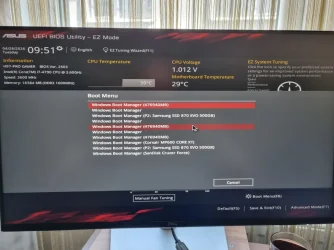
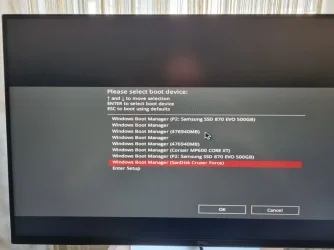
@itsme1 Thanks. I have always booted from the BIOS menu till now whenever I booted to Windows Install Media or Recovery media. BIOS is easy to get into by pressing one key "Del". Boot menu is slightly difficult to get into. I have to press "Fn + F8" keys together. BIOS menu has boot priority selection menu which is equivalent to boot menu of "Fn + F8" keys.

BIOS boot priority menu

bios-boot1.webp

Fn + F8 boot selection menu

F8-boot1.webp

But I tested Fn + F8 menu, too. Same. My PC does not boot to USB Recovery Media.
 

My Computers

System One System Two

  • OS
    Windows 11 Pro build 26200.8524
    Computer type
    PC/Desktop
    Manufacturer/Model
    Home Built
    CPU
    Intel i7-4790
    Motherboard
    Asus H97 Pro Gamer with add-on TPM1.2 module
    Memory
    Teams DDR3-1600 4x4 GB
    Graphics Card(s)
    MSI Nvidia GeForce GTX 1050Ti
    Sound Card
    Realtek ALC1150
    Monitor(s) Displays
    Dell P2425D
    Screen Resolution
    2560 by 1440 pixels
    Hard Drives
    Corsair NVMe M.2 Core XT 1000 GB (Windows 11 v.25H2); Samsung SATA Evo 870 500 GB (Windows 11 v.25H2);
    PSU
    Corsair HX850
    Case
    Gigabyte Solo 210
    Cooling
    Zalman CNPS7X Tower
    Keyboard
    Microsoft AIO Wireless (includes touchpad)
    Mouse
    HP S1000 Plus Wireless
    Internet Speed
    500 Mb fiber optic
    Browser
    Chrome; MS Edge
    Antivirus
    Windows Defender
  • Operating System
    MacOS 12 Monterey
    Computer type
    Laptop
    Manufacturer/Model
    Apple Macbook Air
    CPU
    Intel Core i5
    Memory
    8 GB
    Graphics card(s)
    Intel integrated
    Screen Resolution
    1440 by 900 pixels
    Hard Drives
    128 GB
    Keyboard
    Built-in
    Mouse
    Microsoft Wireless
    Internet Speed
    802.11 ac
    Browser
    Chrome; Safari
    Antivirus
    N/A
@garlin Hi.

Unfortunately, my PC does not boot to USB Windows Recovery Drive made by RecoveryDrive.exe of Windows or Rufus-made Windows Install Media. I used a different USB drive for recovery media this time. But nothing changed.

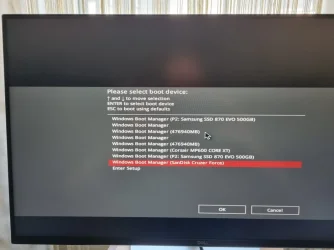
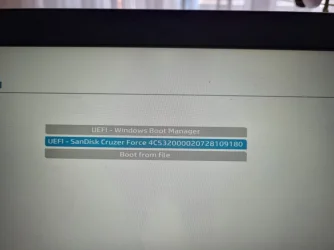
One thing I noticed is, every time I insert a bootable USB flash disk, a Windows Boot Manager entry is recorded in the boot device menu and strange I do not see the USB (FAT) label before Sandisk Cruzer Force, which is USB 2.0 flash disk drive formatted by Windows RecoveryDrive.exe in FAT32 file system.

F8-boot1.webp

I am not a heavy computer user. I have not used a recovery drive at all till now. All I tried to do is, prepare a Recovery drive and test it in case I may need it one day. I should wait for some time and try again.

Thanks for your trying to help.
 

My Computers

System One System Two

  • OS
    Windows 11 Pro build 26200.8524
    Computer type
    PC/Desktop
    Manufacturer/Model
    Home Built
    CPU
    Intel i7-4790
    Motherboard
    Asus H97 Pro Gamer with add-on TPM1.2 module
    Memory
    Teams DDR3-1600 4x4 GB
    Graphics Card(s)
    MSI Nvidia GeForce GTX 1050Ti
    Sound Card
    Realtek ALC1150
    Monitor(s) Displays
    Dell P2425D
    Screen Resolution
    2560 by 1440 pixels
    Hard Drives
    Corsair NVMe M.2 Core XT 1000 GB (Windows 11 v.25H2); Samsung SATA Evo 870 500 GB (Windows 11 v.25H2);
    PSU
    Corsair HX850
    Case
    Gigabyte Solo 210
    Cooling
    Zalman CNPS7X Tower
    Keyboard
    Microsoft AIO Wireless (includes touchpad)
    Mouse
    HP S1000 Plus Wireless
    Internet Speed
    500 Mb fiber optic
    Browser
    Chrome; MS Edge
    Antivirus
    Windows Defender
  • Operating System
    MacOS 12 Monterey
    Computer type
    Laptop
    Manufacturer/Model
    Apple Macbook Air
    CPU
    Intel Core i5
    Memory
    8 GB
    Graphics card(s)
    Intel integrated
    Screen Resolution
    1440 by 900 pixels
    Hard Drives
    128 GB
    Keyboard
    Built-in
    Mouse
    Microsoft Wireless
    Internet Speed
    802.11 ac
    Browser
    Chrome; Safari
    Antivirus
    N/A
@garlin

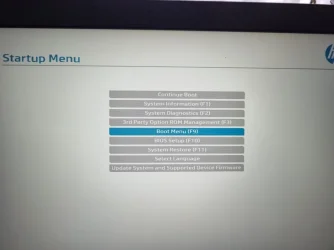
I remembered I have another PC (HP EliteBook 840 G5 from 2018). I tested the Recovery Drive made in desktop PC in it.

The Recovery Drive worked perfectly on HP notebook.

1.webp

2.webp

3.webp


This may rather prove that the old BIOS firmware of my desktop PC may be the cause of recent boot problems from USB drives, either Recovery Drive or Windows Install Media.

Please be advised.
 

My Computers

System One System Two

  • OS
    Windows 11 Pro build 26200.8524
    Computer type
    PC/Desktop
    Manufacturer/Model
    Home Built
    CPU
    Intel i7-4790
    Motherboard
    Asus H97 Pro Gamer with add-on TPM1.2 module
    Memory
    Teams DDR3-1600 4x4 GB
    Graphics Card(s)
    MSI Nvidia GeForce GTX 1050Ti
    Sound Card
    Realtek ALC1150
    Monitor(s) Displays
    Dell P2425D
    Screen Resolution
    2560 by 1440 pixels
    Hard Drives
    Corsair NVMe M.2 Core XT 1000 GB (Windows 11 v.25H2); Samsung SATA Evo 870 500 GB (Windows 11 v.25H2);
    PSU
    Corsair HX850
    Case
    Gigabyte Solo 210
    Cooling
    Zalman CNPS7X Tower
    Keyboard
    Microsoft AIO Wireless (includes touchpad)
    Mouse
    HP S1000 Plus Wireless
    Internet Speed
    500 Mb fiber optic
    Browser
    Chrome; MS Edge
    Antivirus
    Windows Defender
  • Operating System
    MacOS 12 Monterey
    Computer type
    Laptop
    Manufacturer/Model
    Apple Macbook Air
    CPU
    Intel Core i5
    Memory
    8 GB
    Graphics card(s)
    Intel integrated
    Screen Resolution
    1440 by 900 pixels
    Hard Drives
    128 GB
    Keyboard
    Built-in
    Mouse
    Microsoft Wireless
    Internet Speed
    802.11 ac
    Browser
    Chrome; Safari
    Antivirus
    N/A
I should add HP notebook PC is at the same level, regarding Secure Boot certificates and SKUSiPolicy, with my desktop PC.

This is the certificate check of HP notebook:

Windows 11 25H2 (26200.8246)

Secure Boot: ON
Virtualization Based Security: ON
BitLocker on (C:) OFF

BIOS Firmware
-------------
HP HP EliteBook 840 G5
Version: Q78 Ver. 01.31.00
Date: 2025-03-10

Factory Default UEFI PK Cert
----------------------------
HP UEFI Secure Boot PK 2017

UEFI PK Cert
------------
HP UEFI Secure Boot PK 2017

Factory Default UEFI KEK Certs
------------------------------
Microsoft Corporation KEK CA 2011
HP UEFI Secure Boot KEK 2017

UEFI KEK Certs
--------------
Microsoft Corporation KEK CA 2011
HP UEFI Secure Boot KEK 2017
Microsoft Corporation KEK 2K CA 2023

Factory Default UEFI DB Certs
-----------------------------
Microsoft Corporation UEFI CA 2011
Microsoft Windows Production PCA 2011
HP UEFI Secure Boot DB 2017

UEFI DB Certs
-------------
Microsoft Corporation UEFI CA 2011
Microsoft Windows Production PCA 2011
HP UEFI Secure Boot DB 2017
Microsoft Option ROM UEFI CA 2023
Microsoft UEFI CA 2023
Windows UEFI CA 2023

Factory Default UEFI DBX Certs
------------------------------
(NONE)
EFI_CERT_SHA256_GUID Signatures: 1

UEFI DBX Certs
--------------
Microsoft Windows Production PCA 2011
Windows BootMgr SVN 8.0
EFI_CERT_SHA256_GUID Signatures: 283

EFI Files
---------
Disk 0: Windows Boot Manager [Windows UEFI CA 2023] is ALLOWED.
bootmgfw.efi File version: 28000.322

Registry: WindowsUEFICA2023Capable = 2
[Windows UEFI CA 2023] in UEFI DB, and Windows is starting from CA 2023 Boot Manager.

Disk 0: SkuSiPolicy.p7b (for VBS) is CURRENT.


AUDIT REPORT
============


STATUS REPORT
-------------
Registry: UEFICA2023Status = Updated

SUCCESS: NO UPDATES ARE REQUIRED.
 

My Computers

System One System Two

  • OS
    Windows 11 Pro build 26200.8524
    Computer type
    PC/Desktop
    Manufacturer/Model
    Home Built
    CPU
    Intel i7-4790
    Motherboard
    Asus H97 Pro Gamer with add-on TPM1.2 module
    Memory
    Teams DDR3-1600 4x4 GB
    Graphics Card(s)
    MSI Nvidia GeForce GTX 1050Ti
    Sound Card
    Realtek ALC1150
    Monitor(s) Displays
    Dell P2425D
    Screen Resolution
    2560 by 1440 pixels
    Hard Drives
    Corsair NVMe M.2 Core XT 1000 GB (Windows 11 v.25H2); Samsung SATA Evo 870 500 GB (Windows 11 v.25H2);
    PSU
    Corsair HX850
    Case
    Gigabyte Solo 210
    Cooling
    Zalman CNPS7X Tower
    Keyboard
    Microsoft AIO Wireless (includes touchpad)
    Mouse
    HP S1000 Plus Wireless
    Internet Speed
    500 Mb fiber optic
    Browser
    Chrome; MS Edge
    Antivirus
    Windows Defender
  • Operating System
    MacOS 12 Monterey
    Computer type
    Laptop
    Manufacturer/Model
    Apple Macbook Air
    CPU
    Intel Core i5
    Memory
    8 GB
    Graphics card(s)
    Intel integrated
    Screen Resolution
    1440 by 900 pixels
    Hard Drives
    128 GB
    Keyboard
    Built-in
    Mouse
    Microsoft Wireless
    Internet Speed
    802.11 ac
    Browser
    Chrome; Safari
    Antivirus
    N/A
I think you've entered the wrong command line.

Recreate the recovery disk. Once it's finished, type these two commands in cmd as administrator or PowerShell as administrator:

Code:
md D:\EFI\BOOT
Code:
copy C:\windows\boot\efi\securebootrecovery.efi D:\efi\boot\bootx64.efi

Replace the letter D with the letter of your USB drive.

Edit: The command lines I provided are for reapplying the 2023 certificate in the BIOS.

The command lines in your first post are for reinstalling Windows. A backup program is a better option.
 
Last edited:

My Computer

System One

  • OS
    windows 11
I think you've entered the wrong command line.

Recreate the recovery disk. Once it's finished, type these two commands in cmd as administrator or PowerShell as administrator:

Code:
md D:\EFI\BOOT
Code:
copy C:\windows\boot\efi\securebootrecovery.efi D:\efi\boot\bootx64.efi

Replace the letter D with the letter of your USB drive.

Edit: The command lines I provided are for reapplying the 2023 certificate in the BIOS.

The command lines in your first post are for reinstalling Windows. A backup program is a better option.

Thank you. The command is correct. Besides, recovery drive already contains efi\boot directory. No need to make one.

Your suggestion can be used if the Secure Boot certificates are reset to defaults after applying mitigations and Windows will not boot.

This is taken from an article by Microsoft:

default.webp


Please refer to: How to manage the Windows Boot Manager revocations for Secure Boot changes associated with CVE-2023-24932 - Microsoft Support for more information.

In one of the posts above, @garlin also said that securebootrecovery.efi should not be used to troubleshoot and address my issue at hand.

@garlin is an expert on these matters and on other computer subjects. Following the works here in this reputable forum, I see that @garlin has done a comprehensive work on the subject of secure boot and developed many scripts to automate the installation of new CA 2023 certificates on consumer as well as enterprize PCs. @garlin is spending a huge amount of time (this is my guess. @garlin may do all these in less time) to make improvements in the scripts alongside creating new ones.

Secure Boot world should be thankful and indebted to @garlin .
 

My Computers

System One System Two

  • OS
    Windows 11 Pro build 26200.8524
    Computer type
    PC/Desktop
    Manufacturer/Model
    Home Built
    CPU
    Intel i7-4790
    Motherboard
    Asus H97 Pro Gamer with add-on TPM1.2 module
    Memory
    Teams DDR3-1600 4x4 GB
    Graphics Card(s)
    MSI Nvidia GeForce GTX 1050Ti
    Sound Card
    Realtek ALC1150
    Monitor(s) Displays
    Dell P2425D
    Screen Resolution
    2560 by 1440 pixels
    Hard Drives
    Corsair NVMe M.2 Core XT 1000 GB (Windows 11 v.25H2); Samsung SATA Evo 870 500 GB (Windows 11 v.25H2);
    PSU
    Corsair HX850
    Case
    Gigabyte Solo 210
    Cooling
    Zalman CNPS7X Tower
    Keyboard
    Microsoft AIO Wireless (includes touchpad)
    Mouse
    HP S1000 Plus Wireless
    Internet Speed
    500 Mb fiber optic
    Browser
    Chrome; MS Edge
    Antivirus
    Windows Defender
  • Operating System
    MacOS 12 Monterey
    Computer type
    Laptop
    Manufacturer/Model
    Apple Macbook Air
    CPU
    Intel Core i5
    Memory
    8 GB
    Graphics card(s)
    Intel integrated
    Screen Resolution
    1440 by 900 pixels
    Hard Drives
    128 GB
    Keyboard
    Built-in
    Mouse
    Microsoft Wireless
    Internet Speed
    802.11 ac
    Browser
    Chrome; Safari
    Antivirus
    N/A
For information only.

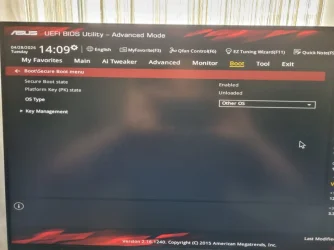
I disabled Secure Boot in BIOS of my desktop PC and tried to boot to Recovery Drive.

PC booted to recovery drive in no time.

This is how Asus disables secure boot (please note Secure Boot state reads enabled because I have not yet saved the change and exited BIOS):

Asus1.webp

This is after saving the change and booting to recovery drive:

Asus2.webp

Therefore, a Recovery drive made with Microsoft Windows RecoveryDrive.exe executable works but this drive does not work on my PC when secure boot is enabled. So if I want to install an OS from scratch (clean-install) with Secure Boot enabled, it seems I am out of luck. If I disable Secure Boot, I can install Windows of new versions provided that I can bypass Secure Boot checks. New Windows versions in the future may restrict bypass of secure boot checks.
 

My Computers

System One System Two

  • OS
    Windows 11 Pro build 26200.8524
    Computer type
    PC/Desktop
    Manufacturer/Model
    Home Built
    CPU
    Intel i7-4790
    Motherboard
    Asus H97 Pro Gamer with add-on TPM1.2 module
    Memory
    Teams DDR3-1600 4x4 GB
    Graphics Card(s)
    MSI Nvidia GeForce GTX 1050Ti
    Sound Card
    Realtek ALC1150
    Monitor(s) Displays
    Dell P2425D
    Screen Resolution
    2560 by 1440 pixels
    Hard Drives
    Corsair NVMe M.2 Core XT 1000 GB (Windows 11 v.25H2); Samsung SATA Evo 870 500 GB (Windows 11 v.25H2);
    PSU
    Corsair HX850
    Case
    Gigabyte Solo 210
    Cooling
    Zalman CNPS7X Tower
    Keyboard
    Microsoft AIO Wireless (includes touchpad)
    Mouse
    HP S1000 Plus Wireless
    Internet Speed
    500 Mb fiber optic
    Browser
    Chrome; MS Edge
    Antivirus
    Windows Defender
  • Operating System
    MacOS 12 Monterey
    Computer type
    Laptop
    Manufacturer/Model
    Apple Macbook Air
    CPU
    Intel Core i5
    Memory
    8 GB
    Graphics card(s)
    Intel integrated
    Screen Resolution
    1440 by 900 pixels
    Hard Drives
    128 GB
    Keyboard
    Built-in
    Mouse
    Microsoft Wireless
    Internet Speed
    802.11 ac
    Browser
    Chrome; Safari
    Antivirus
    N/A
Let's assume there's nothing wrong with the USB drive (it works on another PC). Maybe this PC's Secure Boot data is corrupted, and we need to wipe the variables memory and start over with updates.

1. Disable Secure Boot mode.
2. If this was a factory supported PC, then select Reset to Factory Keys. If this was an unsupported PC, then Delete All Keys.
3. Restart Windows. Run the update script again, including the -Revoke option.
4. Confirm we have SVN 8.0, and test our USB drive.
 

My Computer

System One

  • OS
    Windows 7
@garlin Thanks for your advice.

Before resetting and re-installing certs, I wanted to make some more tests. To this end, I used Microsoft Media Creation Tool to build a new Windows install disk.

After the USB install disk is finished, I checked the certificates on bootx64.efi and bootmgfw.efi. They are still using old certs. Therefore, I also updated both files on this disk with new CA 2023 certs.

By the way, MediaCreationTool now formats the USB disk in FAT32 file system and splits the big install.esd into 2 install.swm files.
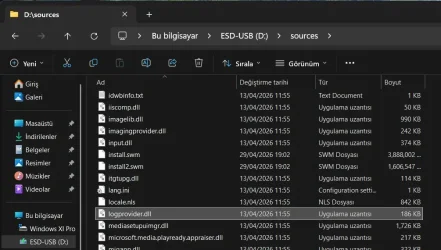
mediacreation.webp

Then I started to check bootability of this USB disk.

When I got into BIOS and Boot priority menu, I saw two versions of my USB disk. One was UEFI (FAT) Dahua U106 and the other was Dahua U106.
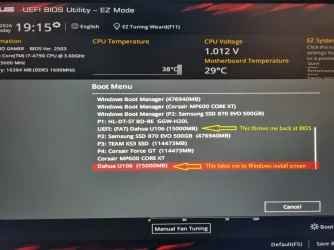
bootmenu.webp

I chose UEFI (FAT) Dahua U106 first because my system is UEFI and pressed Enter to see if Windows install would start. Unfortunately Windows installation did not start. Pressing Enter threw me back at BIOS.

Then I went into the Boot priority menu again and this time chose Dahua U106. To my surprise, Windows installation started.

I have taken a video with my mobile phone but I can not add it here unfortunately. The video is on my desktop.

I am bewildered. What recent changes were introduced into Windows and when ? I very rarely clean-install Windows. Therefore, I can not closely follow changes made to Windows, if any.

I hope this post helps members of this forum experiencing my issue.

P.S. If there is a way to attached local video files to posts, please someone advise me.

 

My Computers

System One System Two

  • OS
    Windows 11 Pro build 26200.8524
    Computer type
    PC/Desktop
    Manufacturer/Model
    Home Built
    CPU
    Intel i7-4790
    Motherboard
    Asus H97 Pro Gamer with add-on TPM1.2 module
    Memory
    Teams DDR3-1600 4x4 GB
    Graphics Card(s)
    MSI Nvidia GeForce GTX 1050Ti
    Sound Card
    Realtek ALC1150
    Monitor(s) Displays
    Dell P2425D
    Screen Resolution
    2560 by 1440 pixels
    Hard Drives
    Corsair NVMe M.2 Core XT 1000 GB (Windows 11 v.25H2); Samsung SATA Evo 870 500 GB (Windows 11 v.25H2);
    PSU
    Corsair HX850
    Case
    Gigabyte Solo 210
    Cooling
    Zalman CNPS7X Tower
    Keyboard
    Microsoft AIO Wireless (includes touchpad)
    Mouse
    HP S1000 Plus Wireless
    Internet Speed
    500 Mb fiber optic
    Browser
    Chrome; MS Edge
    Antivirus
    Windows Defender
  • Operating System
    MacOS 12 Monterey
    Computer type
    Laptop
    Manufacturer/Model
    Apple Macbook Air
    CPU
    Intel Core i5
    Memory
    8 GB
    Graphics card(s)
    Intel integrated
    Screen Resolution
    1440 by 900 pixels
    Hard Drives
    128 GB
    Keyboard
    Built-in
    Mouse
    Microsoft Wireless
    Internet Speed
    802.11 ac
    Browser
    Chrome; Safari
    Antivirus
    N/A
O.K. I found the way to upload local video file.

file-1.webp
But now I got video file size too large. I guess it must be the resolution of the video making it large.


file-2.webp

I must find a way to reduce the file size. I have to find a video converter.
 

My Computers

System One System Two

  • OS
    Windows 11 Pro build 26200.8524
    Computer type
    PC/Desktop
    Manufacturer/Model
    Home Built
    CPU
    Intel i7-4790
    Motherboard
    Asus H97 Pro Gamer with add-on TPM1.2 module
    Memory
    Teams DDR3-1600 4x4 GB
    Graphics Card(s)
    MSI Nvidia GeForce GTX 1050Ti
    Sound Card
    Realtek ALC1150
    Monitor(s) Displays
    Dell P2425D
    Screen Resolution
    2560 by 1440 pixels
    Hard Drives
    Corsair NVMe M.2 Core XT 1000 GB (Windows 11 v.25H2); Samsung SATA Evo 870 500 GB (Windows 11 v.25H2);
    PSU
    Corsair HX850
    Case
    Gigabyte Solo 210
    Cooling
    Zalman CNPS7X Tower
    Keyboard
    Microsoft AIO Wireless (includes touchpad)
    Mouse
    HP S1000 Plus Wireless
    Internet Speed
    500 Mb fiber optic
    Browser
    Chrome; MS Edge
    Antivirus
    Windows Defender
  • Operating System
    MacOS 12 Monterey
    Computer type
    Laptop
    Manufacturer/Model
    Apple Macbook Air
    CPU
    Intel Core i5
    Memory
    8 GB
    Graphics card(s)
    Intel integrated
    Screen Resolution
    1440 by 900 pixels
    Hard Drives
    128 GB
    Keyboard
    Built-in
    Mouse
    Microsoft Wireless
    Internet Speed
    802.11 ac
    Browser
    Chrome; Safari
    Antivirus
    N/A
I reduced the video file size from 23.5 MB to 11.4 MB but this size is still too large for this forum. I will try to reduce the size further if I can.
 

My Computers

System One System Two

  • OS
    Windows 11 Pro build 26200.8524
    Computer type
    PC/Desktop
    Manufacturer/Model
    Home Built
    CPU
    Intel i7-4790
    Motherboard
    Asus H97 Pro Gamer with add-on TPM1.2 module
    Memory
    Teams DDR3-1600 4x4 GB
    Graphics Card(s)
    MSI Nvidia GeForce GTX 1050Ti
    Sound Card
    Realtek ALC1150
    Monitor(s) Displays
    Dell P2425D
    Screen Resolution
    2560 by 1440 pixels
    Hard Drives
    Corsair NVMe M.2 Core XT 1000 GB (Windows 11 v.25H2); Samsung SATA Evo 870 500 GB (Windows 11 v.25H2);
    PSU
    Corsair HX850
    Case
    Gigabyte Solo 210
    Cooling
    Zalman CNPS7X Tower
    Keyboard
    Microsoft AIO Wireless (includes touchpad)
    Mouse
    HP S1000 Plus Wireless
    Internet Speed
    500 Mb fiber optic
    Browser
    Chrome; MS Edge
    Antivirus
    Windows Defender
  • Operating System
    MacOS 12 Monterey
    Computer type
    Laptop
    Manufacturer/Model
    Apple Macbook Air
    CPU
    Intel Core i5
    Memory
    8 GB
    Graphics card(s)
    Intel integrated
    Screen Resolution
    1440 by 900 pixels
    Hard Drives
    128 GB
    Keyboard
    Built-in
    Mouse
    Microsoft Wireless
    Internet Speed
    802.11 ac
    Browser
    Chrome; Safari
    Antivirus
    N/A
Post a OneDrive, Google Drive, Box or other file-sharing service link. That will work for most forum members, including yours truly.
HTH,
--Ed--
 

My Computers

System One System Two

  • OS
    Windows 11
    Computer type
    Laptop
    Manufacturer/Model
    Lenovo X380 Yoga
    CPU
    i7-8650U (8th Gen/Kaby Lake)
    Motherboard
    20LH000MUS (U3E1)
    Memory
    16 GB
    Graphics Card(s)
    Intel UHD Graphics 620
    Sound Card
    Integrated Conexant SmartAudio HD
    Monitor(s) Displays
    FlexView Display
    Screen Resolution
    1920x1080
    Hard Drives
    Toshiba 1 TB PCIe x3 NVMe SSD
    external 5TB Seagate USB-C attached HDD
    PSU
    Lenovo integrated 65W power brick
    Case
    Laptop
    Cooling
    Laptop
    Keyboard
    Integrated Lenovo ThinkPad keyboard
    Mouse
    touchscreen, touchpad
    Internet Speed
    GbE (Spectrum/Charter)
    Browser
    all of em
    Antivirus
    Defender
    Other Info
    Purchased early 2019 as Windows Insider test PC
  • Operating System
    Windows 11
    Computer type
    PC/Desktop
    Manufacturer/Model
    DIY
    CPU
    Ryzen 5800X
    Motherboard
    Asrock B550 Extreme4
    Memory
    128 GB (4x32 DDR5-5600)
    Graphics card(s)
    NVIDIA 3070Ti
    Sound Card
    built-in
    Monitor(s) Displays
    2xDell 2707
    Screen Resolution
    1980x1200
    Hard Drives
    2XNVMe, multiple HDDs from 3 to 12 TB
    PSU
    Seasonic 650
    Case
    NZXT Flo 6
    Cooling
    dual-fan air cooler
    Keyboard
    Logitech Wave
    Mouse
    Logitech Logi
    Internet Speed
    GbE
    Browser
    all of 'em
    Antivirus
    Defender
    Other Info
    temperamental UEFI
@Ed Tittel Thanks.

This is the Google Drive link of the video. I hope the link works and the video is informative.


Edit: The video link had two different properties. 1) restricted 2) everyone. The first link is restricted. The second link is for everyone. Whatever that means.
 

My Computers

System One System Two

  • OS
    Windows 11 Pro build 26200.8524
    Computer type
    PC/Desktop
    Manufacturer/Model
    Home Built
    CPU
    Intel i7-4790
    Motherboard
    Asus H97 Pro Gamer with add-on TPM1.2 module
    Memory
    Teams DDR3-1600 4x4 GB
    Graphics Card(s)
    MSI Nvidia GeForce GTX 1050Ti
    Sound Card
    Realtek ALC1150
    Monitor(s) Displays
    Dell P2425D
    Screen Resolution
    2560 by 1440 pixels
    Hard Drives
    Corsair NVMe M.2 Core XT 1000 GB (Windows 11 v.25H2); Samsung SATA Evo 870 500 GB (Windows 11 v.25H2);
    PSU
    Corsair HX850
    Case
    Gigabyte Solo 210
    Cooling
    Zalman CNPS7X Tower
    Keyboard
    Microsoft AIO Wireless (includes touchpad)
    Mouse
    HP S1000 Plus Wireless
    Internet Speed
    500 Mb fiber optic
    Browser
    Chrome; MS Edge
    Antivirus
    Windows Defender
  • Operating System
    MacOS 12 Monterey
    Computer type
    Laptop
    Manufacturer/Model
    Apple Macbook Air
    CPU
    Intel Core i5
    Memory
    8 GB
    Graphics card(s)
    Intel integrated
    Screen Resolution
    1440 by 900 pixels
    Hard Drives
    128 GB
    Keyboard
    Built-in
    Mouse
    Microsoft Wireless
    Internet Speed
    802.11 ac
    Browser
    Chrome; Safari
    Antivirus
    N/A
Back
Top Bottom