Solved Stuck in boot menu


cinetapes

Member
Local time
7:03 PM
Posts
3
OS
Linux
Hi everyone im not a tech nerd and dont know a lot of the terms so this is hard to explain but please try to help me anyways, i dont want to lose my laptop

I switched to linux a few months ago, not dual boot. Just a full linux install (mint) ive decided its not for me and wanted to switch back to windows.

So i took my usb that had the mint installation and tried to clear it(something mustve gone wrong i think) and put my windows iso on the usb. (Theres a few partions on it but it wont let me delete them and i dont even know what they are)

Downloaded ventoy (i think thats the name) because i followed a tutorial and thats what it said.

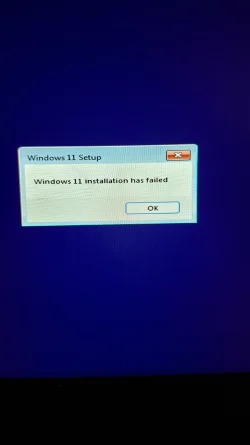
So i start up my laptop again and try to install windows. It fails, tried a few diffrent things to get it to fix, disabling the secure boot, installing right from the windows installation menu. I lost track of what i did and just kept shutting of my laptop and starting again.

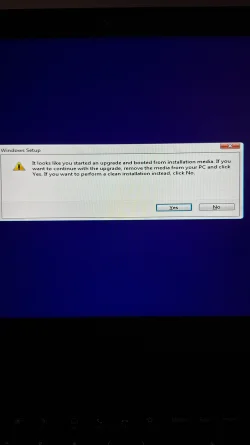
Now im stuck in the ventoy menu, i can exit and enter the lenovo menu too. But i cant do anything else, the install fails everytime and i cant enter linux again.

What did i do wrong and what should i do to just install windows
 

My Computer My Computer

At a glance

Linux
OS
Linux
Computer type
Laptop
Manufacturer/Model
Lenovo thinkpad quatro t2000
Did you in Bios set Boot from USB first.. if you did that and you ran the windows installer and it reboots, it will then boot in to ventoy again if it was set to boot from USB first.
So if you remove ventoy and restart the computer it should boot on the internal disk and continue the installation.
 

My Computers My Computers

  • At a glance

    Linux: Debian, Kali-linux, Alma, Win:7,10IoT,...i3, i5 and i7 From 2gen to 9th gen... Server ...
    OS
    Linux: Debian, Kali-linux, Alma, Win:7,10IoT,2012R
    Manufacturer/Model
    HP Elitebook 840, AsusX53, Aspire E1-572. AsusUX32A, HP Pro3130mt+3010mt, HP Proliant ML150, 3xCustom-PC, i3, i5, i7
    CPU
    i3, i5 and i7 From 2gen to 9th gen... Server dual Xenon
    Hard Drives
    Sata, M.2, SAS
  • At a glance

    Retro: 2003server.XPpro, Win2000, Win98SE, Wi...Oldest intel 8088 up to P4 dual core
    Operating System
    Retro: 2003server.XPpro, Win2000, Win98SE, Win95, Win3.11, MS-DOS, IBM-DOS
    Manufacturer/Model
    Commodore, AST, Fujitsu, Compaq, etc etc. etc Around 15 desktops and 20 laptops in the collection
    CPU
    Oldest intel 8088 up to P4 dual core
    Hard Drives
    MFM, IDE, SCSI
If you already have the windows iso downloaded use the Rufus method to create installation media. Create Windows 11 Bootable USB Installation Media


My Computers My Computers

  • At a glance

    Windows 11 Pro 25H2 26200.9457i9-10900 10 core 20 threads32 gbnone-Intel UHD Graphics 630
    OS
    Windows 11 Pro 25H2 26200.9457
    Computer type
    PC/Desktop
    Manufacturer/Model
    Dell Optiplex 7080
    CPU
    i9-10900 10 core 20 threads
    Motherboard
    DELL 0J37VM
    Memory
    32 gb
    Graphics Card(s)
    none-Intel UHD Graphics 630
    Sound Card
    Integrated Realtek
    Monitor(s) Displays
    Benq 27
    Screen Resolution
    2560x1440
    Hard Drives
    2x1tb Solidigm m.2 nvme /External drives 512gb Samsung m.2 sata+2tb Kingston m2.nvme
    PSU
    500w
    Case
    MT
    Cooling
    Dell Premium
    Keyboard
    Logitech wired
    Mouse
    Logitech wireless
    Internet Speed
    so slow I'm too embarrassed to tell
    Browser
    #1 Edge #2 Firefox
    Antivirus
    Defender+MWB Premium
  • At a glance

    Windows 11 Pro 24H2 26200.9457AMD Ryzen 7 6800U32 gbintegrated
    Operating System
    Windows 11 Pro 24H2 26200.9457
    Computer type
    PC/Desktop
    Manufacturer/Model
    Beelink Mini PC SER5
    CPU
    AMD Ryzen 7 6800U
    Memory
    32 gb
    Graphics card(s)
    integrated
    Sound Card
    integrated
    Monitor(s) Displays
    Benq 27
    Screen Resolution
    2560x1440
    Hard Drives
    1TB Crucial nvme
    Keyboard
    Logitech wired
    Mouse
    Logitech wireless
    Internet Speed
    still too embarrassed to tell
    Browser
    Firefox
    Antivirus
    Defender
  • System 3 is non compliant Dell 9020 i7-4770/24gb ram Win11 PRO 26200.9457
I f you literally copied the ISO to the drive, that's your problem.

For some PCs, copying the contents of the ISO to the USB drive would be sufficient to use it as a bootable drive. Some older PCs need to have the USB drive prepared as bootable.
 

My Computers My Computers

  • At a glance

    Windows 11 26300.9278Amd Threadripper 7970X128GB (4 X 32) G.Skill DDR5 6400 (RDIMM)Gigabyte RTX 4090 OC
    OS
    Windows 11 26300.9278
    Computer type
    PC/Desktop
    Manufacturer/Model
    homebuilt
    CPU
    Amd Threadripper 7970X
    Motherboard
    Gigabyte TRX50 Aero D Rev. 1.0
    Memory
    128GB (4 X 32) G.Skill DDR5 6400 (RDIMM)
    Graphics Card(s)
    Gigabyte RTX 4090 OC
    Sound Card
    none (USB to speakers), Realtek
    Monitor(s) Displays
    Innocn 32" OLED
    Screen Resolution
    3840 X 2160 @ 60Hz
    Hard Drives
    Crucial T700 2TB M.2 NVME SSD
    WD 4TB Blue SATA SSD
    Seagate 18TB IronWolf Pro
    PSU
    BeQuiet! Straight Power 12 1500W
    Case
    Lian Li 011 Dynamic Evo XL
    Cooling
    SilverStone Technology XE360-TR5, with 3 Phanteks T30 fans
    Keyboard
    Cherry KC 500 MX LP (mechanical)
    Mouse
    Logitech M500s (wired)
    Internet Speed
    2000/250 Mbps (down/up)
    Other Info
    xFinity gateway
  • At a glance

    windows 11 26300.9278Intel I9-13900K64GB G.Skill DDR5-6000Gigabyte RTX 3090 ti
    Operating System
    windows 11 26300.9278
    Computer type
    PC/Desktop
    Manufacturer/Model
    homebuilt
    CPU
    Intel I9-13900K
    Motherboard
    Asus RoG Strix Z690-E
    Memory
    64GB G.Skill DDR5-6000
    Graphics card(s)
    Gigabyte RTX 3090 ti
    Sound Card
    built in Realtek
    Monitor(s) Displays
    Philips 27E1N8900 27" OLED
    Screen Resolution
    3840 X 2160 @60Hz
    Hard Drives
    WDC SN850 1TB
    8TB Seagate Ironwolf
    4TB Seagate Ironwolf
    PSU
    eVGA SuperNOVA 1300 GT
    Case
    Lian Li 011 Dynamic Evo
    Cooling
    Corsair iCUE H150i ELITE CAPELLIX Liquid CPU Cooler
    Keyboard
    Cherry Streaming (wired)
    Mouse
    Logitech M500s (wired)
If you already have the windows iso downloaded use the Rufus method to create installation media. Create Windows 11 Bootable USB Installation Media

i used Rufus in the past.. then i discovered Ventoy and i will never go back again. 😁
Is soooo nice to have one multi installer solution... and is so easy and super lazy to update an old ISO to a new by just download the ISO directly to Ventoy's partition for ISO's instead of reburning a USB over and over and over again. 😇 I have around 30-40ish different ISO's to boot from my Ventoy USBdrive.
But if you really like Rufus, do not try Ventoy as you might never want to go back to Rufus again. ;-)*LOL*😅
 

My Computers My Computers

  • At a glance

    Linux: Debian, Kali-linux, Alma, Win:7,10IoT,...i3, i5 and i7 From 2gen to 9th gen... Server ...
    OS
    Linux: Debian, Kali-linux, Alma, Win:7,10IoT,2012R
    Manufacturer/Model
    HP Elitebook 840, AsusX53, Aspire E1-572. AsusUX32A, HP Pro3130mt+3010mt, HP Proliant ML150, 3xCustom-PC, i3, i5, i7
    CPU
    i3, i5 and i7 From 2gen to 9th gen... Server dual Xenon
    Hard Drives
    Sata, M.2, SAS
  • At a glance

    Retro: 2003server.XPpro, Win2000, Win98SE, Wi...Oldest intel 8088 up to P4 dual core
    Operating System
    Retro: 2003server.XPpro, Win2000, Win98SE, Win95, Win3.11, MS-DOS, IBM-DOS
    Manufacturer/Model
    Commodore, AST, Fujitsu, Compaq, etc etc. etc Around 15 desktops and 20 laptops in the collection
    CPU
    Oldest intel 8088 up to P4 dual core
    Hard Drives
    MFM, IDE, SCSI
I f you literally copied the ISO to the drive, that's your problem.
He said he used Ventoy, but if it won't boot, it sounds like something went haywire when Ventoy created the drive.
Why not use Media CreationTool, or, my preference, Rufus to create the install nedia.
 

My Computers My Computers

  • At a glance

    Windows 11 Pro 25H2 26200.9457i9-10900 10 core 20 threads32 gbnone-Intel UHD Graphics 630
    OS
    Windows 11 Pro 25H2 26200.9457
    Computer type
    PC/Desktop
    Manufacturer/Model
    Dell Optiplex 7080
    CPU
    i9-10900 10 core 20 threads
    Motherboard
    DELL 0J37VM
    Memory
    32 gb
    Graphics Card(s)
    none-Intel UHD Graphics 630
    Sound Card
    Integrated Realtek
    Monitor(s) Displays
    Benq 27
    Screen Resolution
    2560x1440
    Hard Drives
    2x1tb Solidigm m.2 nvme /External drives 512gb Samsung m.2 sata+2tb Kingston m2.nvme
    PSU
    500w
    Case
    MT
    Cooling
    Dell Premium
    Keyboard
    Logitech wired
    Mouse
    Logitech wireless
    Internet Speed
    so slow I'm too embarrassed to tell
    Browser
    #1 Edge #2 Firefox
    Antivirus
    Defender+MWB Premium
  • At a glance

    Windows 11 Pro 24H2 26200.9457AMD Ryzen 7 6800U32 gbintegrated
    Operating System
    Windows 11 Pro 24H2 26200.9457
    Computer type
    PC/Desktop
    Manufacturer/Model
    Beelink Mini PC SER5
    CPU
    AMD Ryzen 7 6800U
    Memory
    32 gb
    Graphics card(s)
    integrated
    Sound Card
    integrated
    Monitor(s) Displays
    Benq 27
    Screen Resolution
    2560x1440
    Hard Drives
    1TB Crucial nvme
    Keyboard
    Logitech wired
    Mouse
    Logitech wireless
    Internet Speed
    still too embarrassed to tell
    Browser
    Firefox
    Antivirus
    Defender
  • System 3 is non compliant Dell 9020 i7-4770/24gb ram Win11 PRO 26200.9457
He said he used Ventoy, but if it won't boot, it sounds like something went haywire when Ventoy created the drive.
Why not use Media CreationTool, or, my preference, Rufus to create the install nedia.

i use Rufus which also has the option settings before creating the bootable USB
Ventoy will only boot on my system with secure boot disable where as Rufus boots with secure enabled

i have found Rufus to be my first choice
best of luck Steve ..
 

My Computers My Computers

  • At a glance

    Windows 11 HomeRyzen 7 5825u64GB DDR4 3200Ryzen 7 5825u
    OS
    Windows 11 Home
    Computer type
    PC/Desktop
    Manufacturer/Model
    HP 24" AiO
    CPU
    Ryzen 7 5825u
    Motherboard
    HP
    Memory
    64GB DDR4 3200
    Graphics Card(s)
    Ryzen 7 5825u
    Sound Card
    Realtek External 5w speaker bar.
    Monitor(s) Displays
    24" HP AiO
    Screen Resolution
    1920 x 1080 @60 Hz
    Hard Drives
    1TB WD Blue SN580 M2 SSD Partitioned C:/D: drives.
    2x 1TB USB HDD External Backup/Storage.
    all VeraCrypt encrypted.
    PSU
    90W external power brick
    Case
    24" All in One
    Cooling
    Default Air Cooling
    Keyboard
    Dell WiFi UK extended
    Mouse
    Dell WiFi 3 Button
    Internet Speed
    1GB full fibre
    Browser
    Vivaldi Browser/Email/Calendar
    Antivirus
    AVG Internet Security/Windows Defender
    Other Info
    Mainly Open Source Software
  • At a glance

    Ubuntu 22.04.5 LTSi5 7200u16GB DDR4Intel
    Operating System
    Ubuntu 22.04.5 LTS
    Computer type
    Laptop
    Manufacturer/Model
    Dell 13" Latitude 2017
    CPU
    i5 7200u
    Motherboard
    Dell
    Memory
    16GB DDR4
    Graphics card(s)
    Intel
    Sound Card
    Intel
    Monitor(s) Displays
    13" Dell Laptop
    Hard Drives
    250GB Crucial 2.5" SSD
    Mouse
    Generic WiFi 3 button
    Internet Speed
    WiFi only
    Browser
    Firefox
    Antivirus
    ClamAV TK
    Other Info
    Mainly Open Source Software
nice to have one multi installer solution.
Sure it is....if one's use requires it. Most of us here run multipe OSes, versions, and other bootable tools. For one OS, though, and for the normal user, MCT or Rufus makes more sense. I've never had either of those fail to boot. I can't say the same for Ventoy.
 

My Computers My Computers

  • At a glance

    Windows 11 Pro 25H2 26200.9457i9-10900 10 core 20 threads32 gbnone-Intel UHD Graphics 630
    OS
    Windows 11 Pro 25H2 26200.9457
    Computer type
    PC/Desktop
    Manufacturer/Model
    Dell Optiplex 7080
    CPU
    i9-10900 10 core 20 threads
    Motherboard
    DELL 0J37VM
    Memory
    32 gb
    Graphics Card(s)
    none-Intel UHD Graphics 630
    Sound Card
    Integrated Realtek
    Monitor(s) Displays
    Benq 27
    Screen Resolution
    2560x1440
    Hard Drives
    2x1tb Solidigm m.2 nvme /External drives 512gb Samsung m.2 sata+2tb Kingston m2.nvme
    PSU
    500w
    Case
    MT
    Cooling
    Dell Premium
    Keyboard
    Logitech wired
    Mouse
    Logitech wireless
    Internet Speed
    so slow I'm too embarrassed to tell
    Browser
    #1 Edge #2 Firefox
    Antivirus
    Defender+MWB Premium
  • At a glance

    Windows 11 Pro 24H2 26200.9457AMD Ryzen 7 6800U32 gbintegrated
    Operating System
    Windows 11 Pro 24H2 26200.9457
    Computer type
    PC/Desktop
    Manufacturer/Model
    Beelink Mini PC SER5
    CPU
    AMD Ryzen 7 6800U
    Memory
    32 gb
    Graphics card(s)
    integrated
    Sound Card
    integrated
    Monitor(s) Displays
    Benq 27
    Screen Resolution
    2560x1440
    Hard Drives
    1TB Crucial nvme
    Keyboard
    Logitech wired
    Mouse
    Logitech wireless
    Internet Speed
    still too embarrassed to tell
    Browser
    Firefox
    Antivirus
    Defender
  • System 3 is non compliant Dell 9020 i7-4770/24gb ram Win11 PRO 26200.9457
He said he used Ventoy, but if it won't boot, it sounds like something went haywire when Ventoy created the drive.
Why not use Media CreationTool, or, my preference, Rufus to create the install nedia.
I'm unfamiliar with Ventoy.

But I still guess that the OP doesn't have a good ISO.
 

My Computers My Computers

  • At a glance

    Windows 11 26300.9278Amd Threadripper 7970X128GB (4 X 32) G.Skill DDR5 6400 (RDIMM)Gigabyte RTX 4090 OC
    OS
    Windows 11 26300.9278
    Computer type
    PC/Desktop
    Manufacturer/Model
    homebuilt
    CPU
    Amd Threadripper 7970X
    Motherboard
    Gigabyte TRX50 Aero D Rev. 1.0
    Memory
    128GB (4 X 32) G.Skill DDR5 6400 (RDIMM)
    Graphics Card(s)
    Gigabyte RTX 4090 OC
    Sound Card
    none (USB to speakers), Realtek
    Monitor(s) Displays
    Innocn 32" OLED
    Screen Resolution
    3840 X 2160 @ 60Hz
    Hard Drives
    Crucial T700 2TB M.2 NVME SSD
    WD 4TB Blue SATA SSD
    Seagate 18TB IronWolf Pro
    PSU
    BeQuiet! Straight Power 12 1500W
    Case
    Lian Li 011 Dynamic Evo XL
    Cooling
    SilverStone Technology XE360-TR5, with 3 Phanteks T30 fans
    Keyboard
    Cherry KC 500 MX LP (mechanical)
    Mouse
    Logitech M500s (wired)
    Internet Speed
    2000/250 Mbps (down/up)
    Other Info
    xFinity gateway
  • At a glance

    windows 11 26300.9278Intel I9-13900K64GB G.Skill DDR5-6000Gigabyte RTX 3090 ti
    Operating System
    windows 11 26300.9278
    Computer type
    PC/Desktop
    Manufacturer/Model
    homebuilt
    CPU
    Intel I9-13900K
    Motherboard
    Asus RoG Strix Z690-E
    Memory
    64GB G.Skill DDR5-6000
    Graphics card(s)
    Gigabyte RTX 3090 ti
    Sound Card
    built in Realtek
    Monitor(s) Displays
    Philips 27E1N8900 27" OLED
    Screen Resolution
    3840 X 2160 @60Hz
    Hard Drives
    WDC SN850 1TB
    8TB Seagate Ironwolf
    4TB Seagate Ironwolf
    PSU
    eVGA SuperNOVA 1300 GT
    Case
    Lian Li 011 Dynamic Evo
    Cooling
    Corsair iCUE H150i ELITE CAPELLIX Liquid CPU Cooler
    Keyboard
    Cherry Streaming (wired)
    Mouse
    Logitech M500s (wired)
For Marie SWE
"have around 30-40ish different ISO's to boot from my Ventoy USBdrive."
I'm blown away by the amount of ISO's
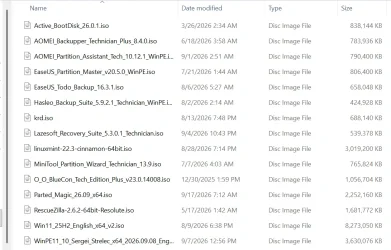
I've attached a picture of my Ventoy, thought it was pretty cool.
Would you be willing to show me your ISO collection so that I can possibly further enhance my Ventoy toolbox?
I just joined the forum a few minutes ago and ran across your post when reading the "Stuck in boot menu" thread.
This is a fascinating forum.
 

Attachments

  • My Ventoy.webp
    My Ventoy.webp
    89.5 KB · Views: 1

My Computer My Computer

At a glance

Windows 11 Pro
OS
Windows 11 Pro
Computer type
Laptop
Manufacturer/Model
HP EB840G9 i7-1265U 14 16GB/512 PC (7H5E2UP) Serial number: 5CG252048L Product number: 7H5E2UP
Now im stuck in the ventoy menu, i can exit and enter the lenovo menu too. But i cant do anything else, the install fails everytime and i cant enter linux again.

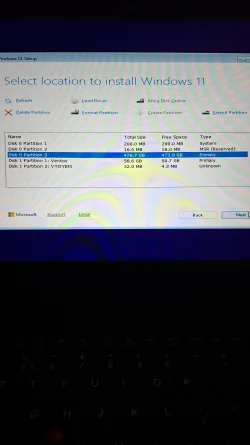
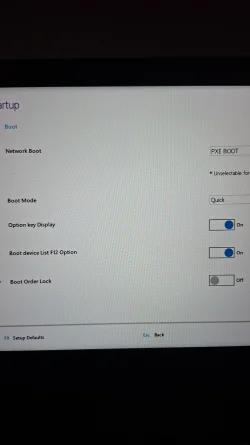
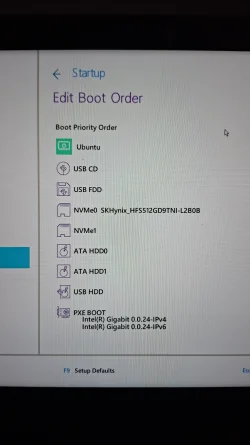
Please post clear photos of the Lenovo F12 boot menu, the BIOS boot-order screen, the Windows Setup "Select location to install Windows 11" screen, and any exact error message you get when the installation fails. Also tell us the exact ThinkPad model, such as P53, P1 Gen 2, etc.

I f you literally copied the ISO to the drive, that's your problem.

Ventoy works quite differently from Rufus. Rufus normally creates a dedicated Windows installation USB from one ISO and can modify/customize that installation media during creation. Ventoy is installed to the USB drive once; afterward, you simply copy one or more unmodified ISO files onto the main Ventoy partition. At boot, Ventoy presents those ISOs in a menu and boots the selected one directly.
 
Last edited:

My Computers My Computers

  • At a glance

    Windows 11 ProAMD Ryzen 9 9950X3DKingston FURY Beast 64GB (2x32GB) DDR5 6000MT/sASUS TUF Gaming Radeon RX 9070 OC Edition 16G...
    OS
    Windows 11 Pro
    Computer type
    PC/Desktop
    CPU
    AMD Ryzen 9 9950X3D
    Motherboard
    ASRock B650E Taichi Lite
    Memory
    Kingston FURY Beast 64GB (2x32GB) DDR5 6000MT/s
    Graphics Card(s)
    ASUS TUF Gaming Radeon RX 9070 OC Edition 16GB GDDR6
    Hard Drives
    Solidigm P44 Pro 2TB M.2 NVMe SSD
  • At a glance

    Windows 11 HomeIntel Core Ultra 9 275HX64GB (2x 32GB) DDR5-6400NVIDIA GeForce RTX 5080 16GB GDDR7 Laptop GPU
    Operating System
    Windows 11 Home
    Computer type
    Laptop
    Manufacturer/Model
    Lenovo Legion Pro 7i Gen 10 16"
    CPU
    Intel Core Ultra 9 275HX
    Memory
    64GB (2x 32GB) DDR5-6400
    Graphics card(s)
    NVIDIA GeForce RTX 5080 16GB GDDR7 Laptop GPU
    Hard Drives
    2x 1TB M.2 NVMe SSD (SK Hynix)
He said he used Ventoy, but if it won't boot, it sounds like something went haywire when Ventoy created the drive.
Why not use Media CreationTool, or, my preference, Rufus to create the install nedia.
But how do i
Please post clear photos of the Lenovo F12 boot menu, the BIOS boot-order screen, the Windows Setup "Select location to install Windows 11" screen, and any exact error message you get when the installation fails. Also tell us the exact ThinkPad model, such as P53, P1 Gen
I think i have a p53, idk the model exactly, it has a quatro t2000 and i7
 

Attachments

  • 20260923_093855.webp
    20260923_093855.webp
    470.2 KB · Views: 1
  • 20260923_093931.webp
    20260923_093931.webp
    465.5 KB · Views: 1
  • 20260923_094134.webp
    20260923_094134.webp
    505.9 KB · Views: 1
  • 20260923_094408.webp
    20260923_094408.webp
    962.2 KB · Views: 1
  • 20260923_094316.webp
    20260923_094316.webp
    1.5 MB · Views: 1

My Computer My Computer

At a glance

Linux
OS
Linux
Computer type
Laptop
Manufacturer/Model
Lenovo thinkpad quatro t2000
The Ubuntu entry is probably a leftover UEFI boot entry from Linux Mint. Because it is currently first in the boot order, it may interfere with booting from the internal drive after Windows Setup restarts.

First, edit the Lenovo boot order settings and move NVMe0 SKHynix_HFS512GD9TNI-L2B0B above the Ubuntu entry. You can leave the USB lower in the permanent boot order, because you will select it manually for the installation.

Then restart the laptop and, when the Lenovo logo appears, press F12 to open the one-time Boot Menu. Select the Ventoy USB drive there. On a ThinkPad P53, F12 is the key for the temporary boot-device menu.


Windows Setup sees your single internal SSD and the Ventoy USB flash drive correctly.

Disk 0 is the laptop's internal 512 GB SK hynix NVMe SSD.
Disk 1 is the 64 GB Ventoy USB flash drive.

If there is nothing on the internal SSD that you need to keep, delete all three partitions on Disk 0.

When Disk 0 becomes one large Unallocated Space, select it and click Next. Windows Setup will create the necessary Windows partitions automatically.

When Windows Setup restarts the laptop, do not start the Windows ISO from Ventoy again. Let the computer boot from the internal SSD. After Windows has been installed, you should see a Windows Boot Manager entry in the Lenovo boot settings; that should be above the obsolete Ubuntu entry.

Edit:

Windows Setup automatically creates a UEFI boot entry (Windows Boot Manager) in NVRAM (Non-Volatile Random-Access Memory) that points to \EFI\Microsoft\Boot\bootmgfw.efi on the EFI system partition. bootmgfw.efi is the Windows Boot Manager. It reads the Boot Configuration Data (BCD) store, which is also located on the EFI system partition. The BCD contains the Windows boot configuration, including the available Windows boot entries and settings that control how they are presented and started.

Edit:

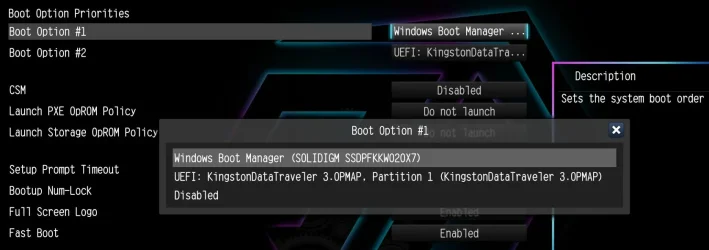
On modern computers configured for UEFI boot with CSM/Legacy boot disabled, the boot order settings normally show UEFI boot entries and UEFI-bootable devices. For example, they may show Windows Boot Manager (if Windows is installed) and the Windows installation USB flash drive (if it is connected and recognized as UEFI-bootable).

Windows Boot Manager is not itself a drive; it is a UEFI boot entry pointing to Microsoft's UEFI bootloader on the internal drive's EFI system partition.

ASRock B650E Taichi.webp

On both laptops and desktops, you normally do not need to change the permanent boot order to boot from a Windows installation USB flash drive. Instead, use the computer's one-time boot menu. For example, common desktop motherboard boot menu keys include ASRock F11, ASUS F8, Gigabyte F12, and MSI F11.

Permanent boot order adjustments are mainly useful when multiple UEFI boot entries exist, for example, Windows Boot Manager and Ubuntu, and you want to specify which operating system or bootloader should start by default.
 
Last edited:

My Computers My Computers

  • At a glance

    Windows 11 ProAMD Ryzen 9 9950X3DKingston FURY Beast 64GB (2x32GB) DDR5 6000MT/sASUS TUF Gaming Radeon RX 9070 OC Edition 16G...
    OS
    Windows 11 Pro
    Computer type
    PC/Desktop
    CPU
    AMD Ryzen 9 9950X3D
    Motherboard
    ASRock B650E Taichi Lite
    Memory
    Kingston FURY Beast 64GB (2x32GB) DDR5 6000MT/s
    Graphics Card(s)
    ASUS TUF Gaming Radeon RX 9070 OC Edition 16GB GDDR6
    Hard Drives
    Solidigm P44 Pro 2TB M.2 NVMe SSD
  • At a glance

    Windows 11 HomeIntel Core Ultra 9 275HX64GB (2x 32GB) DDR5-6400NVIDIA GeForce RTX 5080 16GB GDDR7 Laptop GPU
    Operating System
    Windows 11 Home
    Computer type
    Laptop
    Manufacturer/Model
    Lenovo Legion Pro 7i Gen 10 16"
    CPU
    Intel Core Ultra 9 275HX
    Memory
    64GB (2x 32GB) DDR5-6400
    Graphics card(s)
    NVIDIA GeForce RTX 5080 16GB GDDR7 Laptop GPU
    Hard Drives
    2x 1TB M.2 NVMe SSD (SK Hynix)
The Ubuntu entry is probably a leftover UEFI boot entry from Linux Mint. Because it is currently first in the boot order, it may interfere with booting from the internal drive after Windows Setup restarts.

First, edit the Lenovo boot order settings and move NVMe0 SKHynix_HFS512GD9TNI-L2B0B above the Ubuntu entry. You can leave the USB lower in the permanent boot order, because you will select it manually for the installation.

Then restart the laptop and, when the Lenovo logo appears, press F12 to open the one-time Boot Menu. Select the Ventoy USB drive there. On a ThinkPad P53, F12 is the key for the temporary boot-device menu.


Windows Setup sees your single internal SSD and the Ventoy USB flash drive correctly.

Disk 0 is the laptop's internal 512 GB SK hynix NVMe SSD.
Disk 1 is the 64 GB Ventoy USB flash drive.

If there is nothing on the internal SSD that you need to keep, delete all three partitions on Disk 0.

When Disk 0 becomes one large Unallocated Space, select it and click Next. Windows Setup will create the necessary Windows partitions automatically.

When Windows Setup restarts the laptop, do not start the Windows ISO from Ventoy again. Let the computer boot from the internal SSD. After Windows has been installed, you should see a Windows Boot Manager entry in the Lenovo boot settings; that should be above the obsolete Ubuntu entry.

Edit:

Windows Setup automatically creates a UEFI boot entry (Windows Boot Manager) in NVRAM (Non-Volatile Random-Access Memory) that points to \EFI\Microsoft\Boot\bootmgfw.efi on the EFI system partition. bootmgfw.efi is the Windows Boot Manager. It reads the Boot Configuration Data (BCD) store, which is also located on the EFI system partition. The BCD contains the Windows boot configuration, including the available Windows boot entries and settings that control how they are presented and started.
I finally got it to work thank u all 🙏
 

My Computer My Computer

At a glance

Linux
OS
Linux
Computer type
Laptop
Manufacturer/Model
Lenovo thinkpad quatro t2000
But how do i

I think i have a p53, idk the model exactly, it has a quatro t2000 and i7
Use your Ventoy USB and boot in Windows 11 setup. At the disks screen click on each partition of disk 0 (the target disk) and delete it. Delete all the partitions and leave all disk 0 as unallocated. Then click on next to start installation of Windows 11.

Reminder: If your CPU doesn't support SSE4.2 instructions you can install only Windows 11 21H1, 22H2 and 23H2. If it supports SSE4.2, then you can install all versions including 25H2 and then switch to 26H2 by installing the 26H2 Enablement Package. You can verify with the CPU-Z tool.
 

My Computers My Computers

  • At a glance

    Windows 11 Pro 23H2 (7582), 25H2 (9457)Mobile DualCore Intel Core 2 Duo T7250, 2000 MHz4GBMobile Intel(R) GMA 4500M (Mobile 4 series)
    OS
    Windows 11 Pro 23H2 (7582), 25H2 (9457)
    Computer type
    Laptop
    Manufacturer/Model
    Acer Extensa 5630EZ
    CPU
    Mobile DualCore Intel Core 2 Duo T7250, 2000 MHz
    Motherboard
    Acer Extensa 5630
    Memory
    4GB
    Graphics Card(s)
    Mobile Intel(R) GMA 4500M (Mobile 4 series)
    Sound Card
    Realtek ALC268 @ Intel 82801IB ICH9 - High Definition Audio Controller
    Monitor(s) Displays
    1
    Screen Resolution
    1280x800
    Hard Drives
    Samsung SSD 850 EVO 250GB SATA Device (250 GB, SATA-III)
    Internet Speed
    802.11g wireless 54 Mbps
    Browser
    MICROSOFT EDGE
    Antivirus
    WINDOWS DEFENDER
    Other Info
    Legacy MBR installation, no TPM, no Secure Boot, no WDDM 2.0 graphics drivers, no SSE4.2, cannot get more unsupported ;) This is only my test laptop. I had installed Windows 11 here before upgrading my main PC. For my main PC I use everyday see my 2nd system specs.
  • At a glance

    Windows 11 Pro 25H2 (build 26200.9457)Intel Core-i7 3770 3.40GHz s1155 (3rd generat...2x Kingston Hyper-X Blu 8GB DDR3-1600GIGABYTE GeForce RTX 3050 WINDFORCE OC V2 6GB...
    Operating System
    Windows 11 Pro 25H2 (build 26200.9457)
    Computer type
    PC/Desktop
    Manufacturer/Model
    Custom-built PC
    CPU
    Intel Core-i7 3770 3.40GHz s1155 (3rd generation)
    Motherboard
    Asus P8H61 s1155 ATX
    Memory
    2x Kingston Hyper-X Blu 8GB DDR3-1600
    Graphics card(s)
    GIGABYTE GeForce RTX 3050 WINDFORCE OC V2 6GB (GV-N3050WF2OCV2-6GD)
    Sound Card
    Realtek HD audio (ALC887)
    Monitor(s) Displays
    Sony Bravia KDL-19L4000 19" LCD TV via VGA
    Screen Resolution
    1440x900 32-bit 60Hz
    Hard Drives
    WD Blue SA510 2.5 1000GB SSD as system disk, Western Digital Caviar Purple 4TB SATA III (WD40PURZ) as second
    PSU
    Thermaltake Litepower RGB 550W Full Wired
    Case
    SUPERCASE MIDI-TOWER
    Cooling
    Deepcool Gamma Archer CPU cooler, 1x 8cm fan at the back
    Keyboard
    Mitsumi 101-key PS/2
    Mouse
    Microsoft Compact Optical Mouse
    Internet Speed
    802.11ac 5GHz wireless 260Mpbs
    Browser
    Microsoft Edge, Mozilla Firefox
    Antivirus
    Microsoft Windows Defender
    Other Info
    Legacy BIOS (MBR) installation, no TPM, no Secure Boot, WDDM 3.0 graphics drivers, WEI score 7.4

My Computers My Computers

  • At a glance

    Windows 11 Pro 23H2 (7582), 25H2 (9457)Mobile DualCore Intel Core 2 Duo T7250, 2000 MHz4GBMobile Intel(R) GMA 4500M (Mobile 4 series)
    OS
    Windows 11 Pro 23H2 (7582), 25H2 (9457)
    Computer type
    Laptop
    Manufacturer/Model
    Acer Extensa 5630EZ
    CPU
    Mobile DualCore Intel Core 2 Duo T7250, 2000 MHz
    Motherboard
    Acer Extensa 5630
    Memory
    4GB
    Graphics Card(s)
    Mobile Intel(R) GMA 4500M (Mobile 4 series)
    Sound Card
    Realtek ALC268 @ Intel 82801IB ICH9 - High Definition Audio Controller
    Monitor(s) Displays
    1
    Screen Resolution
    1280x800
    Hard Drives
    Samsung SSD 850 EVO 250GB SATA Device (250 GB, SATA-III)
    Internet Speed
    802.11g wireless 54 Mbps
    Browser
    MICROSOFT EDGE
    Antivirus
    WINDOWS DEFENDER
    Other Info
    Legacy MBR installation, no TPM, no Secure Boot, no WDDM 2.0 graphics drivers, no SSE4.2, cannot get more unsupported ;) This is only my test laptop. I had installed Windows 11 here before upgrading my main PC. For my main PC I use everyday see my 2nd system specs.
  • At a glance

    Windows 11 Pro 25H2 (build 26200.9457)Intel Core-i7 3770 3.40GHz s1155 (3rd generat...2x Kingston Hyper-X Blu 8GB DDR3-1600GIGABYTE GeForce RTX 3050 WINDFORCE OC V2 6GB...
    Operating System
    Windows 11 Pro 25H2 (build 26200.9457)
    Computer type
    PC/Desktop
    Manufacturer/Model
    Custom-built PC
    CPU
    Intel Core-i7 3770 3.40GHz s1155 (3rd generation)
    Motherboard
    Asus P8H61 s1155 ATX
    Memory
    2x Kingston Hyper-X Blu 8GB DDR3-1600
    Graphics card(s)
    GIGABYTE GeForce RTX 3050 WINDFORCE OC V2 6GB (GV-N3050WF2OCV2-6GD)
    Sound Card
    Realtek HD audio (ALC887)
    Monitor(s) Displays
    Sony Bravia KDL-19L4000 19" LCD TV via VGA
    Screen Resolution
    1440x900 32-bit 60Hz
    Hard Drives
    WD Blue SA510 2.5 1000GB SSD as system disk, Western Digital Caviar Purple 4TB SATA III (WD40PURZ) as second
    PSU
    Thermaltake Litepower RGB 550W Full Wired
    Case
    SUPERCASE MIDI-TOWER
    Cooling
    Deepcool Gamma Archer CPU cooler, 1x 8cm fan at the back
    Keyboard
    Mitsumi 101-key PS/2
    Mouse
    Microsoft Compact Optical Mouse
    Internet Speed
    802.11ac 5GHz wireless 260Mpbs
    Browser
    Microsoft Edge, Mozilla Firefox
    Antivirus
    Microsoft Windows Defender
    Other Info
    Legacy BIOS (MBR) installation, no TPM, no Secure Boot, WDDM 3.0 graphics drivers, WEI score 7.4
Sure it is....if one's use requires it. Most of us here run multipe OSes, versions, and other bootable tools. For one OS, though, and for the normal user, MCT or Rufus makes more sense. I've never had either of those fail to boot. I can't say the same for Ventoy.
I agree.. if you only do one install every other year with windows or linux only.. i agree a multi installer solution might be a bit overkill.
But it can also be used as a trouble shooting tool with backup functions etc if you use Ventoy on an external SSD instead of a sick :-)

But i agree.. i have never have a boot failure with Rufus or other.. I have not use the Microsoft Creaton Tool thogh.. so i actually dont even know how that one works. 😊
 

My Computers My Computers

  • At a glance

    Linux: Debian, Kali-linux, Alma, Win:7,10IoT,...i3, i5 and i7 From 2gen to 9th gen... Server ...
    OS
    Linux: Debian, Kali-linux, Alma, Win:7,10IoT,2012R
    Manufacturer/Model
    HP Elitebook 840, AsusX53, Aspire E1-572. AsusUX32A, HP Pro3130mt+3010mt, HP Proliant ML150, 3xCustom-PC, i3, i5, i7
    CPU
    i3, i5 and i7 From 2gen to 9th gen... Server dual Xenon
    Hard Drives
    Sata, M.2, SAS
  • At a glance

    Retro: 2003server.XPpro, Win2000, Win98SE, Wi...Oldest intel 8088 up to P4 dual core
    Operating System
    Retro: 2003server.XPpro, Win2000, Win98SE, Win95, Win3.11, MS-DOS, IBM-DOS
    Manufacturer/Model
    Commodore, AST, Fujitsu, Compaq, etc etc. etc Around 15 desktops and 20 laptops in the collection
    CPU
    Oldest intel 8088 up to P4 dual core
    Hard Drives
    MFM, IDE, SCSI
For Marie SWE
"have around 30-40ish different ISO's to boot from my Ventoy USBdrive."
I'm blown away by the amount of ISO's
I've attached a picture of my Ventoy, thought it was pretty cool.
Would you be willing to show me your ISO collection so that I can possibly further enhance my Ventoy toolbox?
I just joined the forum a few minutes ago and ran across your post when reading the "Stuck in boot menu" thread.
This is a fascinating forum.

I cant show it as a printscreen as i have some tools on there that classifies as hacking tools.
The forum Rule 4 says: No discussion or facilitation of piracy, cracking, hacking, or copyright infringement.

But i can write the list what normal ISO's i have

Code:
Alma Linux three versions (as IBM killed CentOS this one and Rocky Linux is forks)
Debian 10,12,13 Live+install
IpredaOS
Kali Linux full ISO 13GB or what it is.. live+install
KodachiOS
LMDE 3,4,5,6
Manjaro one or two versions
Mint 20,21,22
PfSence
PoP_OS one or two versions.
Proxmox
Tails OS
Truenas
Qubes OS
Xcp-ng
Caine
CloneZilla
Hiren's BootCD both old and new versions
RescueZilla
SystemRescue i think i have old and new of this too
Trinity Rescue Kit.
Tsurugi
Windows 2000 (Workstation and Server)
Windows XP Home and Pro
Windows 2003
Windows 7 all versions
Windows 2008R2
Windows 8.1 all versions
Windows 2012R2
Windows 10 All versions and three different builds
Windows 2019+2021 LTSC versions
Windows 11 All versions an older build
Windows 2024 LTSC versions
 

My Computers My Computers

  • At a glance

    Linux: Debian, Kali-linux, Alma, Win:7,10IoT,...i3, i5 and i7 From 2gen to 9th gen... Server ...
    OS
    Linux: Debian, Kali-linux, Alma, Win:7,10IoT,2012R
    Manufacturer/Model
    HP Elitebook 840, AsusX53, Aspire E1-572. AsusUX32A, HP Pro3130mt+3010mt, HP Proliant ML150, 3xCustom-PC, i3, i5, i7
    CPU
    i3, i5 and i7 From 2gen to 9th gen... Server dual Xenon
    Hard Drives
    Sata, M.2, SAS
  • At a glance

    Retro: 2003server.XPpro, Win2000, Win98SE, Wi...Oldest intel 8088 up to P4 dual core
    Operating System
    Retro: 2003server.XPpro, Win2000, Win98SE, Win95, Win3.11, MS-DOS, IBM-DOS
    Manufacturer/Model
    Commodore, AST, Fujitsu, Compaq, etc etc. etc Around 15 desktops and 20 laptops in the collection
    CPU
    Oldest intel 8088 up to P4 dual core
    Hard Drives
    MFM, IDE, SCSI
Thank you !
 

My Computer My Computer

At a glance

Windows 11 Pro
OS
Windows 11 Pro
Computer type
Laptop
Manufacturer/Model
HP EB840G9 i7-1265U 14 16GB/512 PC (7H5E2UP) Serial number: 5CG252048L Product number: 7H5E2UP
I have mostly .wim files on my ventoyed usb

I dont know how many, must be dozens
 

My Computers My Computers

  • At a glance

    Win7,Win11i7-97002x16gb 3600mhz
    OS
    Win7,Win11
    Computer type
    PC/Desktop
    CPU
    i7-9700
    Motherboard
    gigabyte b365m ds3h
    Memory
    2x16gb 3600mhz
    Monitor(s) Displays
    benq gw2480
    PSU
    bequiet pure power 11 400CM
    Cooling
    cryorig m9i
  • At a glance

    win7,win11i5-84002x8gb 3200
    Operating System
    win7,win11
    Computer type
    PC/Desktop
    CPU
    i5-8400
    Motherboard
    gigabyte b365m ds3h
    Memory
    2x8gb 3200
    PSU
    xfx pro 450
Back
Top Bottom