Stuck on Preview 25309.1000 updated on 04/03/2023


AdamE

Well-known member
VIP
Local time
4:01 AM
Posts
99
OS
W11 Pro
Hi All, I've been running insider builds for years with no update problems. My Insider page on settings hasn't shown the insider level for many builds now, and I gave up trying to fix it.

However, I suddenly noticed that I hadn't had any major updates recently... and when I checked my last one was on 3rd MARCH!!

On my Insiders panel in Settings all it says is:
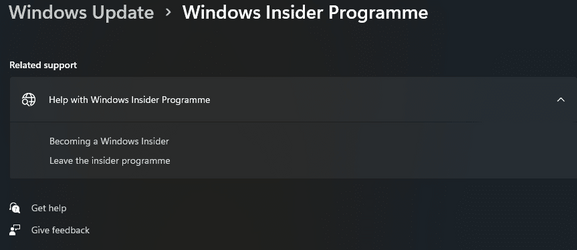
1690477593270.png

No way to check the level. If I go to the insiders web page all it says is that I am registered.... (by clicking the 'Becoming a Windows Insider' link in the pic above).

This is the version I am on:

1690477753987.png

Has anyone got any ideas? I tried resetting flight signing as described in various places and nothing changed.

Thanks
 

My Computer

System One

  • OS
    W11 Pro
    Computer type
    PC/Desktop
    Manufacturer/Model
    Dell XPS One 2720
    CPU
    Intel(R) Core(TM) i7-4770
    Motherboard
    Dell
    Memory
    16GB
    Graphics Card(s)
    Intel HD 4600 & GeForce GT 750M
    Sound Card
    Realtek HD Audio
    Monitor(s) Displays
    27"
    Screen Resolution
    2560*1440
    Hard Drives
    512GB SSD boot drive connected via mSATA card
    2TB SSD Data Drive
    Case
    AIO
    Internet Speed
    1GB Fibre
    Antivirus
    Microsoft
I'm not an insider, but I believe your issue is because 25309.1000 has expired. reference - Updating from an expiring Insider Preview build - Windows Insider Program
That article says: To move off the Insider Preview build expiring on your device, you can either get preview builds in the Dev Channel, reinstall Windows using a Windows Insider ISO to move to the Beta channel, or start fresh with a clean installation
The MS articles gives instructions how to get Insider preview builds in the Device Channel or get Insider Beta Channel.
 

My Computers

System One System Two

  • OS
    Windows 11 Pro 25H2 26200.8655
    Computer type
    PC/Desktop
    Manufacturer/Model
    Dell Optiplex 7080
    CPU
    i9-10900 10 core 20 threads
    Motherboard
    DELL 0J37VM
    Memory
    32 gb
    Graphics Card(s)
    none-Intel UHD Graphics 630
    Sound Card
    Integrated Realtek
    Monitor(s) Displays
    Benq 27
    Screen Resolution
    2560x1440
    Hard Drives
    2x1tb Solidigm m.2 nvme /External drives 512gb Samsung m.2 sata+2tb Kingston m2.nvme
    PSU
    500w
    Case
    MT
    Cooling
    Dell Premium
    Keyboard
    Logitech wired
    Mouse
    Logitech wireless
    Internet Speed
    so slow I'm too embarrassed to tell
    Browser
    #1 Edge #2 Firefox
    Antivirus
    Defender+MWB Premium
  • Operating System
    Windows 11 Pro 24H2 26200.8457
    Computer type
    PC/Desktop
    Manufacturer/Model
    Beelink Mini PC SER5
    CPU
    AMD Ryzen 7 6800U
    Memory
    32 gb
    Graphics card(s)
    integrated
    Sound Card
    integrated
    Monitor(s) Displays
    Benq 27
    Screen Resolution
    2560x1440
    Hard Drives
    1TB Crucial nvme
    Keyboard
    Logitech wired
    Mouse
    Logitech wireless
    Internet Speed
    still too embarrassed to tell
    Browser
    Firefox
    Antivirus
    Defender
    Other Info
    System 3 is non compliant Dell 9020 i7-4770/24gb ram Win11 PRO 26200.8457
Hi All, I've been running insider builds for years with no update problems. My Insider page on settings hasn't shown the insider level for many builds now, and I gave up trying to fix it.

However, I suddenly noticed that I hadn't had any major updates recently... and when I checked my last one was on 3rd MARCH!!

On my Insiders panel in Settings all it says is:

View attachment 65946

No way to check the level. If I go to the insiders web page all it says is that I am registered.... (by clicking the 'Becoming a Windows Insider' link in the pic above).

This is the version I am on:

View attachment 65947

Has anyone got any ideas? I tried resetting flight signing as described in various places and nothing changed.

Thanks
Hi @AdamE,
You still have until Sept.15 as your screenshot states.
I think the problem you are encountering is because of the addition of the Canary channel.
Did you actually try to leave the Insider Program(me)? If not, after you have rebooted,
see if you can join again the Canary Channel, since that is the branch you are on.
If this has been done already, your only choice short of a clean install is to get the latest Canary ISO
from Microsoft.
Keep in mind that you are stuck on that branch and only a clean install will take you out of it.
This and when the next MS open window to switch comes up.
 
Last edited:

My Computers

System One System Two

  • OS
    All Branches but Release
    Computer type
    Laptop
    Manufacturer/Model
    Acer Nitro ANV15-51
    CPU
    AMD Ryzen 7 7735HS 3200-4500 Mhz 8 cores x 2
    Motherboard
    Sportage_RBH
    Memory
    32 GB DDR5
    Graphics Card(s)
    Radeon Graphic / NVIDIA GeForce RTX 4060 8 GB GDDR6
    Sound Card
    AMD/Realtek(R) Audio
    Monitor(s) Displays
    Integrated Monitor (15.3"vis)
    Screen Resolution
    FHD 1920X1080 16:9 144Hz
    Hard Drives
    KINGSTON OM8SEP4512Q-AA 1TB
    Western Digital 256GB
    PSU
    19V DC 6.32 A 120 W
    Cooling
    Dual Fans
    Mouse
    MS Bluetooth
    Internet Speed
    Fiber 1GB Cox -us & 1GB Orange-fr
    Browser
    Edge Canary- Firefox Nightly-Chrome Dev-Chrome Dev
    Antivirus
    Windows Defender
  • Operating System
    Windows 11 Beta
    Computer type
    Laptop
    Manufacturer/Model
    Asus X751BP
    CPU
    AMD A9-9420
    Memory
    8 GB of DDR4
    Graphics card(s)
    AMD Radeon R5
    Screen Resolution
    1600x900
    Hard Drives
    Seagate 1 TB
Hi @AdamE,
You still have until Sept.15 as your screenshot states.
I think the problem you are encountering is because of the addition of the Canary channel.
Did you actually try to leave the Insider Program(me)? If not, after you have rebooted,
see if you can join again the Canary Channel, since that is the branch you are on.
If this has been done already, your only choice short of a clean install is to get the latest Canary ISO
from Microsoft.
Keep in mind that you are stuck on that branch and only a clean install will take you out of it.
This and when the next MS open window to switch comes up.

@OAT Thanks for the info. I never left the channel, as far as I remember. I can't actually see what channel I am on as the silly screen on the settings page that should tell me is blank... there doesn't seem to be anywhere that actually tells me which is crazy! Unless I am missing somewhere to see?

I am happy downloading the ISO, I presume I can just 'upgrade' from that rather than reinstall (which is such a pain). Although funnily enough as my PC is not 'officially' supported as it's a Gen4 i7 4770S , I wanted to try shoehorning in an mSATA to SATA adapter and trying out a newer standard size SSD with more capacity for my boot drive (Dell says only up to 256GB but people have fitted 1TB mSATA in without issue) so can't see why a standard SSD wouldn't be OK as the adapter only changes the socket essentially). Might almost be worth a clean install to try that!
 

My Computer

System One

  • OS
    W11 Pro
    Computer type
    PC/Desktop
    Manufacturer/Model
    Dell XPS One 2720
    CPU
    Intel(R) Core(TM) i7-4770
    Motherboard
    Dell
    Memory
    16GB
    Graphics Card(s)
    Intel HD 4600 & GeForce GT 750M
    Sound Card
    Realtek HD Audio
    Monitor(s) Displays
    27"
    Screen Resolution
    2560*1440
    Hard Drives
    512GB SSD boot drive connected via mSATA card
    2TB SSD Data Drive
    Case
    AIO
    Internet Speed
    1GB Fibre
    Antivirus
    Microsoft

Latest Support Threads

Back
Top Bottom