
Suggestions for Getting Rid of a Peculiar Virus


Catnip

Forum Nitwit
Power User
VIP
Local time
7:29 AM
Posts
800
OS
Win 11 Pro 25H2
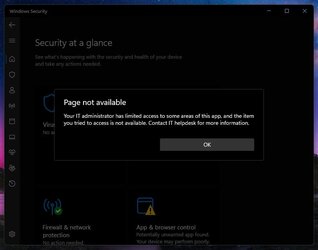
I have a virus on my old hard disk that MSert, MalwareBytes, SuperAntiSpyware, and Windows Defender either will not detect, or will not touch. WD is the only anti-virus that would even detect this virus, but wouldn't remove it. When I got the toast notification that it had been found and to click for options, I got this:
Windows.jpg

Which surprised the hell out of me. I am the "IT administrator" and I am "El Super User" on my machine. Nothing has been limited in any way. At least not by me.

I am wondering if there is a way to get rid of this virus somehow. I did a clean install to a new hard drive, but that is turning into a nightmare. My old installation was running like a top, except for this virus I can't get rid of.

Does anyone have a recommendation for a decent anti-virus? Something with some teeth that will take on this thing?
 

My Computer My Computer

At a glance

Win 11 Pro 25H2Intel i7 13700KF32 GB Team Group DDR5 - 6000 CL 30ASUS TUF GAMING RTX 3070 Ti
OS
Win 11 Pro 25H2
Computer type
PC/Desktop
Manufacturer/Model
Self build
CPU
Intel i7 13700KF
Motherboard
Gigabyte Z790 UD AC
Memory
32 GB Team Group DDR5 - 6000 CL 30
Graphics Card(s)
ASUS TUF GAMING RTX 3070 Ti
Sound Card
On board Realtek
Monitor(s) Displays
ACER 34 inch
Screen Resolution
4K
Hard Drives
1 TB Samsung 980 Pro Nvme, 1 TB Samsung 970 EVO Nvme, 2 x Samsung 970 2TB SSD SATA
PSU
EVGA 1000Q
Case
Rosewill something or other
Cooling
Noctua NH-D15. A whole schwak of Noctua case fans. $$$
Keyboard
Logitech G815
Mouse
Logitech G502 Hero
Internet Speed
700 up, 600 down
Browser
Firefox
Antivirus
MalwareBytes
What is the name of this virus you think you have?
From the looks of the background window Defender has detected a potentially unwanted app, not a virus.
Such an app is restricted due to it's potential to mess about with settings that could cause Windows to fail in some way, but such interference is usually initiated by the user, not the app.

What have you installed lately that might be such an app? Any 3rd party monitoring, customisation tools or browser extensions?

The message about the IT Administrator limiting acccess can be caused by a 3rd party app/ utility or by user settings (just changing some defaults can do it) and is not in itself a sign of anything suspicious.

More detail is required for anyone to help you.
 

My Computer My Computer

At a glance

Windows 11 Pro 22H2, build: 22621.521Intel i7-12700K 3.6GHz Base (5.0GHz Turbo)64GB DDR 3600MhzAsus Tuff RTX 3080 10GB OC
OS
Windows 11 Pro 22H2, build: 22621.521
Computer type
PC/Desktop
Manufacturer/Model
Scan 3XS Custom 1700
CPU
Intel i7-12700K 3.6GHz Base (5.0GHz Turbo)
Motherboard
Asus ProArt Creator B660 D4
Memory
64GB DDR 3600Mhz
Graphics Card(s)
Asus Tuff RTX 3080 10GB OC
Sound Card
Onboard Realtek
Monitor(s) Displays
Gigabyte G32QC 32inch 16:9 curved @2560 x 1440p 165Hz Freesync Premium Pro/ Dell SE2422H 24inch 16:9 1920 x 1080p 75Hz Freesync
Screen Resolution
2560 x 1440p & 1920 x 1080p
Hard Drives
WD SN570 1TB NVME (Boot), Samsung 870QVO 1TB (SSD), SanDisk 3D Ultra 500Gb (SSD) x2, Seagate 3Tb Expansion Desk (Ext HDD), 2x Toshiba 1Tb P300 (Ext HDD)
PSU
Corsair RM1000X Modular
Case
Corsair 4000D Airflow Desktop
Cooling
Corsair Hydro H150i RGB Pro XT 360mm Liquid Cooler, 3 x 120mm fans, 1x Exhaust
Keyboard
Microsoft Ergonomic
Mouse
Logitech G402
Internet Speed
800Mbs
Browser
Edge Chromium
Antivirus
Defender, Malwarebytes
Being a Malware Removal Specialist i would like to know what Defender claimed it to be ?
Also have you ran AdwareCleaner ?
Malwarebytes AdwCleaner >>> Download AdwCleaner

Please download AdwCleaner and save it to your Desktop
* Close all open programs and browsers
* Right click on the icon and select Run as administrator
* Click Scan now
* Allow the program to Quarantine what it finds except for Pre-installed applications if you would like to keep those or other entries you would like to keep
* When completed click View Scan Log File
* Copy and paste the contents in your reply
* Click Skip Basic Repair if it appears then close the program

Thanks !
 

My Computer My Computer

At a glance

Windows11 23H2 (OS Build 22631.2428)2.90 gigahertz Intel Core i7-1070016214 Megabytes Usable Installed Memor
OS
Windows11 23H2 (OS Build 22631.2428)
Computer type
PC/Desktop
Manufacturer/Model
HP HP ENVY TE01
CPU
2.90 gigahertz Intel Core i7-10700
Motherboard
Board: HP 8767 A (SMVB)
Memory
16214 Megabytes Usable Installed Memor
Hard Drives
1511.52 Gigabytes Usable Hard Drive Capacity
1418.15 Gigabytes Hard Drive Free Space
Keyboard
Logitech wireless
Mouse
M 185 wireless
Internet Speed
12 ms Jitter 8 ms Download 10.5 Mbps Upload 1.7
Browser
Edge & FF
Antivirus
Windows Defender
Unfortunately, I don't know the name of the supposed app or virus as I couldn't get past the screen I posted above for any details. Windows Defender will not let me look at it.

The only thing that I installed prior to this problem was Macrium Reflect. Then I had a whole host of other problems that prompted this adventure in the first place.

@flashh4 I will reconnect the drive and try AdwCleaner. Maybe that will work. Thank you for the tip.
 

My Computer My Computer

At a glance

Win 11 Pro 25H2Intel i7 13700KF32 GB Team Group DDR5 - 6000 CL 30ASUS TUF GAMING RTX 3070 Ti
OS
Win 11 Pro 25H2
Computer type
PC/Desktop
Manufacturer/Model
Self build
CPU
Intel i7 13700KF
Motherboard
Gigabyte Z790 UD AC
Memory
32 GB Team Group DDR5 - 6000 CL 30
Graphics Card(s)
ASUS TUF GAMING RTX 3070 Ti
Sound Card
On board Realtek
Monitor(s) Displays
ACER 34 inch
Screen Resolution
4K
Hard Drives
1 TB Samsung 980 Pro Nvme, 1 TB Samsung 970 EVO Nvme, 2 x Samsung 970 2TB SSD SATA
PSU
EVGA 1000Q
Case
Rosewill something or other
Cooling
Noctua NH-D15. A whole schwak of Noctua case fans. $$$
Keyboard
Logitech G815
Mouse
Logitech G502 Hero
Internet Speed
700 up, 600 down
Browser
Firefox
Antivirus
MalwareBytes
Back
Top Bottom




