- Local time
- 11:59 AM
- Posts
- 12,376
- Location
- The Lone Star State of Texas
- OS
- Windows 11 Pro 25H2 26200.9457
I've thought long and hard on my dilemma and feel that no matter which way I go, I'm liable to end up in a mess. I'm a stickler for organization but guess in my old age I have gotten lax....or just didn't think about what I was getting myself into.
I used nothing but Firefox for years. Before I slowly transitioned from FF to Edge I exported FF bookmarks into Edge favorites. For a while I used both browsers regularly. So along with the original bookmarks I ended up with a lot of new ones, some in Edge, some in FF. Same goes for deleting a lot of bookmarks in both browsers as well as retagging bookmark names.
Needless to say, I've ended up with a bookmark mess. Some bookmarks I can find in one browser or the other and some bookmarks are in both browsers.
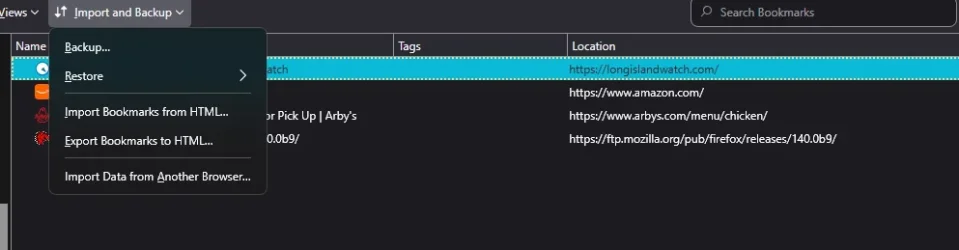
What suggestion do you have for me to best organize my bookmarks in one browser without having to look at every individual bookmark in both browsers and straighten them out one at a time. Is there a way to merge them without ending up with a ton of duplication or omission? Any app, etc that can help me do it? Over time, each browser now has different folders and subfolders. Once I can get one browser organized I know I can remove all bookmarks in the other and then export/import again to make them the same.
I would guess that Edge Favorites are closer to being more organized than FF but there are still a lot of newer FF bookmarks I do not want to lose.
I might add that I am syncing both browsers to all my other computers so if I screw up one system, they will all be screwed up.
I used nothing but Firefox for years. Before I slowly transitioned from FF to Edge I exported FF bookmarks into Edge favorites. For a while I used both browsers regularly. So along with the original bookmarks I ended up with a lot of new ones, some in Edge, some in FF. Same goes for deleting a lot of bookmarks in both browsers as well as retagging bookmark names.
Needless to say, I've ended up with a bookmark mess. Some bookmarks I can find in one browser or the other and some bookmarks are in both browsers.
What suggestion do you have for me to best organize my bookmarks in one browser without having to look at every individual bookmark in both browsers and straighten them out one at a time. Is there a way to merge them without ending up with a ton of duplication or omission? Any app, etc that can help me do it? Over time, each browser now has different folders and subfolders. Once I can get one browser organized I know I can remove all bookmarks in the other and then export/import again to make them the same.
I would guess that Edge Favorites are closer to being more organized than FF but there are still a lot of newer FF bookmarks I do not want to lose.
I might add that I am syncing both browsers to all my other computers so if I screw up one system, they will all be screwed up.
My Computers
-
At a glance
Windows 11 Pro 25H2 26200.9457i9-10900 10 core 20 threads32 gbnone-Intel UHD Graphics 630- OS
- Windows 11 Pro 25H2 26200.9457
- Computer type
- PC/Desktop
- Manufacturer/Model
- Dell Optiplex 7080
- CPU
- i9-10900 10 core 20 threads
- Motherboard
- DELL 0J37VM
- Memory
- 32 gb
- Graphics Card(s)
- none-Intel UHD Graphics 630
- Sound Card
- Integrated Realtek
- Monitor(s) Displays
- Benq 27
- Screen Resolution
- 2560x1440
- Hard Drives
- 2x1tb Solidigm m.2 nvme /External drives 512gb Samsung m.2 sata+2tb Kingston m2.nvme
- PSU
- 500w
- Case
- MT
- Cooling
- Dell Premium
- Keyboard
- Logitech wired
- Mouse
- Logitech wireless
- Internet Speed
- so slow I'm too embarrassed to tell
- Browser
- #1 Edge #2 Firefox
- Antivirus
- Defender+MWB Premium
-
At a glance
Windows 11 Pro 24H2 26200.9457AMD Ryzen 7 6800U32 gbintegrated- Operating System
- Windows 11 Pro 24H2 26200.9457
- Computer type
- PC/Desktop
- Manufacturer/Model
- Beelink Mini PC SER5
- CPU
- AMD Ryzen 7 6800U
- Memory
- 32 gb
- Graphics card(s)
- integrated
- Sound Card
- integrated
- Monitor(s) Displays
- Benq 27
- Screen Resolution
- 2560x1440
- Hard Drives
- 1TB Crucial nvme
- Keyboard
- Logitech wired
- Mouse
- Logitech wireless
- Internet Speed
- still too embarrassed to tell
- Browser
- Firefox
- Antivirus
- Defender
-
System 3 is non compliant Dell 9020 i7-4770/24gb ram Win11 PRO 26200.9457