Switched from Intel to AMD CPU but Intel driver updates still happen


Birk

Well-known member
Member
VIP
Local time
8:07 AM
Posts
319
OS
Win11 Pro
I swapped out my Intel i9 based Win11 Pro system for an AMD Ryzen one by simply restoring a Macrium system backup (the whole C: drive) onto the new Ryzen machine. I was pleasantly surprised that the whole process worked quite well and required only minimal tweaks. The new machine has been running just fine for several weeks now.

Except (isn't there always an except?) that Windows Update continues to install updates for Intel drivers. I don't think I need any of those drivers, but I guess the registry (or something) is telling Update that I still have them. Here's a sample from RAPR that shows some of them:
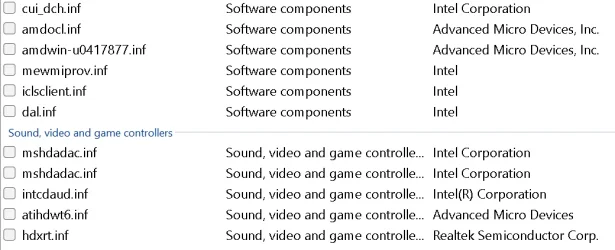
1.webp

Also, Autoruns shows these drives as still being active and loaded:
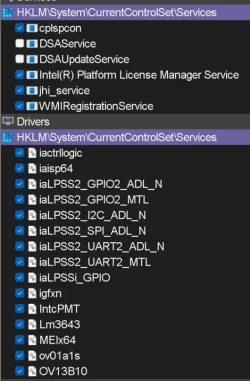
2.webp

Is there a way to tell if a particular Intel driver is still needed, or if it's just a leftover from my old Intel based system?
 

My Computer

System One

  • OS
    Win11 Pro
    Computer type
    PC/Desktop
    Manufacturer/Model
    BeeLink SER Mini
    CPU
    AMD Ryzen 5 5500U
    Motherboard
    BeeLink SER
    Memory
    16 GB
    Graphics Card(s)
    Radeon 2100
    Sound Card
    none
    Monitor(s) Displays
    Primary: Phillips 4K; Secondary: LG 4K
    Screen Resolution
    Both 3860 x 2160
    Hard Drives
    C: NVme 500 GB Windows only
    D: 128 GB NVme User data + Windows Temp via Junction Link
    PSU
    External
    Case
    Mini
    Cooling
    Internal fan
    Keyboard
    Logitech Wireless Lighted
    Mouse
    Kensington ExpertMouse wireless trackball
    Internet Speed
    500/500
    Browser
    Brave
    Antivirus
    Windows Defender
I swapped out my Intel i9 based Win11 Pro system for an AMD Ryzen one by simply restoring a Macrium system backup (the whole C: drive) onto the new Ryzen machine. I was pleasantly surprised that the whole process worked quite well and required only minimal tweaks. The new machine has been running just fine for several weeks now.

Except (isn't there always an except?) that Windows Update continues to install updates for Intel drivers. I don't think I need any of those drivers, but I guess the registry (or something) is telling Update that I still have them. Here's a sample from RAPR that shows some of them:

View attachment 162337

Also, Autoruns shows these drives as still being active and loaded:

View attachment 162338

Is there a way to tell if a particular Intel driver is still needed, or if it's just a leftover from my old Intel based system?

Since you use DriverStoreExplorer (RAPR), you can do this...

Open RAPR and EXPORT all drivers to a folder. When done, go to the location where you saved the drivers. You will note that there is a folder called "Drivers without an existing device". In theory, you should be able to select those drivers and delete them.

IMPORTANT: I would suggest an image backup first, or at the very least, keep these exported drivers until you know that all is well so that you can restore any of them if necessary. Note that I have put in a feature request for RAPR asking for the ability to select these drivers independently. I don't know if that will eventually be implemented, but for now it is a manual process.

Of course, there is the far more distasteful method that will 100% guaranteed resolve this: Reinstall Windows from scratch installing only the proper drivers.

NOTE: Having these additional drivers won't hurt anything. In fact, I used to use an ISO image that had the drivers for about 10 different systems all pre-integrated, just for testing purposes. But that meant that every time I installed Windows it would load up ALL of those drivers to the drive (although they would not be active).

EDIT: For the trick above to work, in RAPR, make sure that Options / Use Native Driver Store is selected. If you have Use DISM selected instead, you will not see folder names that include the "Drivers without an existing device" folder.
 

My Computers

System One System Two

  • OS
    Win11 Pro 25H2 (RTM+)
    Computer type
    PC/Desktop
    Manufacturer/Model
    Acemagic
    CPU
    Intel i7-14650HX
    Memory
    32 GB
    Graphics Card(s)
    No GPU - Built-in Intel Graphics
    Sound Card
    Integrated
    Monitor(s) Displays
    Varies as machine will often be moved to locations with different monitors
    Screen Resolution
    Varies
    Hard Drives
    1 x 1TB Gen 4 NVMe SSD
    PSU
    120W Power Brick
    Keyboard
    Corsair K70 Max RGB Magnetic Keyboard
    Mouse
    Logitech MX Master 3
    Internet Speed
    1Gb Up / 1 Gb Down
    Browser
    Edge
    Antivirus
    Windows Defender
  • Operating System
    Win11 Pro 25H2 (RTM+)
    Computer type
    Laptop
    Manufacturer/Model
    Lenovo ThinkBook 13x Gen 2
    CPU
    Intel i7-1255U
    Memory
    16 GB
    Graphics card(s)
    Intel Iris Xe Graphics
    Sound Card
    Realtek® ALC3306-CG codec
    Monitor(s) Displays
    13.3-inch IPS Display
    Screen Resolution
    WQXGA (2560 x 1600)
    Hard Drives
    2 TB 4 x 4 NVMe SSD
    PSU
    USB-C / Thunderbolt 4 Power / Charging
    Keyboard
    Backlit, spill resistant keyboard
    Mouse
    Buttonless Glass Precision Touchpad
    Internet Speed
    1Gb Up / 1Gb Down
    Browser
    Edge
    Antivirus
    Windows Defender
    Other Info
    WiFi 6e / Bluetooth 5.1 / Facial Recognition / Fingerprint Sensor / ToF (Time of Flight) Human Presence Sensor
Various chip drivers for "stuff" on the mobo. My MSI AMD Ryzen mobo has many of those entries in my autoruns.
 

My Computers

System One System Two

  • OS
    Win 10 Pro / Win 11 Pro & Home, Linux Mint
    Computer type
    PC/Desktop
    Manufacturer/Model
    Custom builds
    CPU
    AMD Ryzen 7 5700X / A10-7860K
    Motherboard
    MSI PRO B550-VC / ASRock A88M-G/3.1
    Memory
    32GB / 16GB
    Graphics Card(s)
    AMD RX 6650 XT / RX 580
    Monitor(s) Displays
    Samsung 27" / LG 24"
    Screen Resolution
    1920x1080
    Hard Drives
    Toshiba 2 TB
    Toshiba 1 TB
    Toshiba 1 TB
    WD Black SN770 1TB

    PNY 1 TB
    PNY 500 GB
    WD Black SN770 200 GB
    Inland 500 GB
    Inland 256 GB
    Case
    NZXT / Lian LI
    Keyboard
    ROCCAT PYRO / Logitech 148
    Mouse
    Logitech
    Browser
    Firefox, Opera, Waterfox, Tor
  • Operating System
    Windows 11 Home
    Computer type
    Laptop
    Manufacturer/Model
    HP 17
    CPU
    Intel i5
    Memory
    16GB
    Screen Resolution
    1920 x 1080
    Hard Drives
    512 GB
    Browser
    Firefox
Intel also makes some hardware other than CPU and Chip sets, like WiFi and Bluetooth devices.
 

My Computers

System One System Two

  • OS
    Windows 11 Pro - Windows 7 HP 64 - Lubuntu
    Computer type
    PC/Desktop
    Manufacturer/Model
    custom build
    CPU
    i5 6600K - 800MHz to 4400MHz
    Motherboard
    GA-Z170-HD3P
    Memory
    4+4G GSkill DDR4 3000
    Graphics Card(s)
    IG - Intel 530
    Monitor(s) Displays
    Samsung 226BW
    Screen Resolution
    1680x1050
    Hard Drives
    (1) -1 SM951 – 128GB M.2 AHCI PCIe SSD drive for Win 11
    (2) -1 WD SATA 3 - 1T for Data
    (3) -1 WD SATA 3 - 1T for backup
    (4) -1 BX500 SSD - 256G for Windows 7 and Lubuntu
    PSU
    Thermaltake 450W TR2 gold
    Keyboard
    Old and good Chicony mechanical keyboard
    Mouse
    Logitech mX performance - 9 buttons (had to disable some)
    Internet Speed
    500 Mb/s
    Browser
    Firefox 64
  • Operating System
    Windows 11 Pro
    Computer type
    Laptop
    Manufacturer/Model
    Asus Q550LF
    CPU
    i7-4500U 800- 3000MHz
    Motherboard
    Asus Q550LF
    Memory
    (4+4)G DDR3 1600
    Graphics card(s)
    IG intel 4400 + NVIDIA GeForce GT 745M
    Sound Card
    Realtek
    Monitor(s) Displays
    LG Display LP156WF4-SPH1
    Screen Resolution
    1920 x 1080
    Hard Drives
    BX500 120G SSD for Windows and programs
    & 1T HDD for data
    Internet Speed
    500 Mb/s
    Browser
    Firefox 64
@Birk

You can also disable drivers included with Windows Updates...


My Computers

System One System Two

  • OS
    Win 11 Home ♦♦♦26200.8457 ♦♦♦♦♦♦♦25H2
    Computer type
    PC/Desktop
    Manufacturer/Model
    Built by Ghot® [May 2020]
    CPU
    AMD Ryzen 7 3700X
    Motherboard
    Asus Pro WS X570-ACE (BIOS 5302)
    Memory
    G.Skill (F4-3200C14D-16GTZKW)
    Graphics Card(s)
    EVGA RTX 2070 (08G-P4-2171-KR)
    Sound Card
    Realtek ALC1220P / ALC S1220A
    Monitor(s) Displays
    Dell U3011 30"
    Screen Resolution
    2560 x 1600
    Hard Drives
    2x Samsung 860 EVO 500GB,
    WD 4TB Black FZBX - SATA III,
    WD 8TB Black FZBX - SATA III,
    DRW-24B1ST CD/DVD Burner
    PSU
    PC Power & Cooling 750W Quad EPS12V
    Case
    Cooler Master ATCS 840 Tower
    Cooling
    CM Hyper 212 EVO (push/pull)
    Keyboard
    Ducky DK9008 Shine II Blue LED
    Mouse
    Logitech Optical M-100
    Internet Speed
    300/300
    Browser
    Firefox (latest)
    Antivirus
    Bitdefender Total Security
    Other Info
    Speakers: Klipsch Pro Media 2.1
  • Operating System
    Windows XP Pro 32bit w/SP3
    Computer type
    PC/Desktop
    Manufacturer/Model
    Built by Ghot® (not in use)
    CPU
    AMD Athlon 64 X2 5000+ (OC'd @ 3.2Ghz)
    Motherboard
    ASUS M2N32-SLI Deluxe Wireless Edition
    Memory
    TWIN2X2048-6400C4DHX (2 x 1GB, DDR2 800)
    Graphics card(s)
    EVGA 256-P2-N758-TR GeForce 8600GT SSC
    Sound Card
    Onboard
    Monitor(s) Displays
    ViewSonic G90FB Black 19" Professional (CRT)
    Screen Resolution
    up to 2048 x 1536
    Hard Drives
    WD 36GB 10,000rpm Raptor SATA
    Seagate 80GB 7200rpm SATA
    Lite-On LTR-52246S CD/RW
    Lite-On LH-18A1P CD/DVD Burner
    PSU
    PC Power & Cooling Silencer 750 Quad EPS12V
    Case
    Generic Beige case, 80mm fans
    Cooling
    ZALMAN 9500A 92mm CPU Cooler
    Keyboard
    Logitech Classic Keybooard 200
    Mouse
    Logitech Optical M-BT96a
    Internet Speed
    300/300
    Browser
    Firefox 3.x ??
    Antivirus
    Symantec (Norton)
    Other Info
    Still assembled, still runs. Haven't turned it on for 15 years?
Open RAPR and EXPORT all drivers to a folder. When done, go to the location where you saved the drivers. You will note that there is a folder called "Drivers without an existing device". In theory, you should be able to select those drivers and delete them.

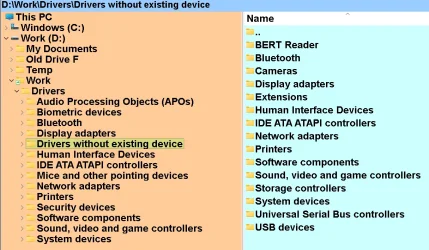
Wow - that really works well. I had no idea what that function did, but it sure does tell the story:

1.webp

Many of those directories have multiple drivers in them. The Display Adapter has drivers for both AMD Radeon graphics (which I now have) and Intel UHD graphics (which is non-existent.) So I've got some work to do before I have a good list of things to delete. ANd of course I'll make a full image backup of my C: drive before I do anything.

Thanks for the tip - it is a doozie.
 

My Computer

System One

  • OS
    Win11 Pro
    Computer type
    PC/Desktop
    Manufacturer/Model
    BeeLink SER Mini
    CPU
    AMD Ryzen 5 5500U
    Motherboard
    BeeLink SER
    Memory
    16 GB
    Graphics Card(s)
    Radeon 2100
    Sound Card
    none
    Monitor(s) Displays
    Primary: Phillips 4K; Secondary: LG 4K
    Screen Resolution
    Both 3860 x 2160
    Hard Drives
    C: NVme 500 GB Windows only
    D: 128 GB NVme User data + Windows Temp via Junction Link
    PSU
    External
    Case
    Mini
    Cooling
    Internal fan
    Keyboard
    Logitech Wireless Lighted
    Mouse
    Kensington ExpertMouse wireless trackball
    Internet Speed
    500/500
    Browser
    Brave
    Antivirus
    Windows Defender
Thanks for the tip - it is a doozie.

Thanks! BTW, do make sure to let us know how it goes. I have not had to remove drivers like that. The most I have done is removed an old display driver as well as WiFi and Bluetooth drivers whenever they get updated, so I'd be curious how it goes for you.

I typically do clean installs rather than migrating the existing installation simply because I have made so many automated processes for myself that it's almost as easy starting over rather than migrating so I'm curious to know how it all works out for you.
 

My Computers

System One System Two

  • OS
    Win11 Pro 25H2 (RTM+)
    Computer type
    PC/Desktop
    Manufacturer/Model
    Acemagic
    CPU
    Intel i7-14650HX
    Memory
    32 GB
    Graphics Card(s)
    No GPU - Built-in Intel Graphics
    Sound Card
    Integrated
    Monitor(s) Displays
    Varies as machine will often be moved to locations with different monitors
    Screen Resolution
    Varies
    Hard Drives
    1 x 1TB Gen 4 NVMe SSD
    PSU
    120W Power Brick
    Keyboard
    Corsair K70 Max RGB Magnetic Keyboard
    Mouse
    Logitech MX Master 3
    Internet Speed
    1Gb Up / 1 Gb Down
    Browser
    Edge
    Antivirus
    Windows Defender
  • Operating System
    Win11 Pro 25H2 (RTM+)
    Computer type
    Laptop
    Manufacturer/Model
    Lenovo ThinkBook 13x Gen 2
    CPU
    Intel i7-1255U
    Memory
    16 GB
    Graphics card(s)
    Intel Iris Xe Graphics
    Sound Card
    Realtek® ALC3306-CG codec
    Monitor(s) Displays
    13.3-inch IPS Display
    Screen Resolution
    WQXGA (2560 x 1600)
    Hard Drives
    2 TB 4 x 4 NVMe SSD
    PSU
    USB-C / Thunderbolt 4 Power / Charging
    Keyboard
    Backlit, spill resistant keyboard
    Mouse
    Buttonless Glass Precision Touchpad
    Internet Speed
    1Gb Up / 1Gb Down
    Browser
    Edge
    Antivirus
    Windows Defender
    Other Info
    WiFi 6e / Bluetooth 5.1 / Facial Recognition / Fingerprint Sensor / ToF (Time of Flight) Human Presence Sensor
I swapped out my Intel i9 based Win11 Pro system for an AMD Ryzen one by simply restoring a Macrium system backup (the whole C: drive) onto the new Ryzen machine. I was pleasantly surprised that the whole process worked quite well and required only minimal tweaks. The new machine has been running just fine for several weeks now.

Except (isn't there always an except?) that Windows Update continues to install updates for Intel drivers. I don't think I need any of those drivers, but I guess the registry (or something) is telling Update that I still have them. Here's a sample from RAPR that shows some of them:
So how did yopu pull this off? I did similar to what you did a LONG time ago with Win-XP but not since then. What I did was I went into control panel and deleted all the drivers and then shut it down, swapped the Motherboard and turned it on and let it discover all the new devices. I was wondering if that would still work with Windows 7 or 11. Maybe I booted into safe mode first, I can't remember.
 

My Computers

System One System Two

  • OS
    Windows 11 (up to date)
    Computer type
    PC/Desktop
    Manufacturer/Model
    Custom
    CPU
    Intel i5 12400
    Motherboard
    Gigabyte Z690 UA
    Memory
    Corsair Vengeance LPX 16GB
    Graphics Card(s)
    On Board the Z690
    Sound Card
    On Board
    Monitor(s) Displays
    43" Samsung tu7000
    Screen Resolution
    2560 x 1440
    Hard Drives
    SAMSUNG SSD 1TB NVMe M.2
    PSU
    Thermaltake smart 500w 80+
    Case
    LIAN LANCOOL_205M
    Cooling
    Bunch of fans . . . :o) (lights dont work)
    Keyboard
    Unicomp: Ultra Classic White Buckling Spring USB
    Mouse
    M510
    Internet Speed
    50mbps on Ethernet
    Browser
    Fire Fox
    Antivirus
    Windows
    Other Info
    Love this computer but I still prefer Win-7 like I love my old Lazy Boy Recliner . . . it just feels better.
  • Operating System
    WIN-7-64BIT and Win-11 pro for testing on unsupported hardware
    Computer type
    PC/Desktop
    Manufacturer/Model
    Home built
    CPU
    i5-3570K CPU @ 3.40GHz, 3801 Mhz, 4 Core(s), 4 Logical Processor(s)
    Motherboard
    GA-Z77-HD3
    Memory
    16 GB - Crucial Ballistick 4GB PC3-14900 DDR3-1333 MHz
    Graphics card(s)
    NVIDIA GeForce GTX 1050
    Sound Card
    On Board
    Monitor(s) Displays
    ASUS VP278
    Screen Resolution
    1920 x 1080
    Hard Drives
    4 - internal Samsung 2.5" SSD, 1 WD HDD 7200 and some external drives
    PSU
    EVGA 550w
    Case
    Old Gygabyte Tower
    Cooling
    Yes
    Keyboard
    Unicomp - UNIOP4A USB (like the old IBM Model H that I started with)
    Mouse
    M510
    Internet Speed
    50mbps
    Browser
    Firefox
    Antivirus
    Windows
    Other Info
    The only thing it lack is USB-3.2 on the front face but it has 3.0 on the back
So how did yopu pull this off?

I know that you were not asking me, but I'll just chime in and note how I did this when I was experimenting with it a month or two ago...

I simply went to the original machine (the source) and imaged the drive using DISM while booted from Windows installation media. I deployed that image to a new machine (same sort of deal - went from Intel based system to AMD). Windows worked perfectly. I did have some additional drivers to install, but that is all automated for me. Worked without a hitch.

NOTE: While I used DISM, this is not necessary. Programs like Macrium Reflect are specifically designed to restore to dissimilar hardware with no problems.

I still prefer to do clean installs, but I just wanted to test and make sure I knew how to do this if I really had to. That was prompted by a recent hardware failure where I had no choice but to migrate to new hardware
 

My Computers

System One System Two

  • OS
    Win11 Pro 25H2 (RTM+)
    Computer type
    PC/Desktop
    Manufacturer/Model
    Acemagic
    CPU
    Intel i7-14650HX
    Memory
    32 GB
    Graphics Card(s)
    No GPU - Built-in Intel Graphics
    Sound Card
    Integrated
    Monitor(s) Displays
    Varies as machine will often be moved to locations with different monitors
    Screen Resolution
    Varies
    Hard Drives
    1 x 1TB Gen 4 NVMe SSD
    PSU
    120W Power Brick
    Keyboard
    Corsair K70 Max RGB Magnetic Keyboard
    Mouse
    Logitech MX Master 3
    Internet Speed
    1Gb Up / 1 Gb Down
    Browser
    Edge
    Antivirus
    Windows Defender
  • Operating System
    Win11 Pro 25H2 (RTM+)
    Computer type
    Laptop
    Manufacturer/Model
    Lenovo ThinkBook 13x Gen 2
    CPU
    Intel i7-1255U
    Memory
    16 GB
    Graphics card(s)
    Intel Iris Xe Graphics
    Sound Card
    Realtek® ALC3306-CG codec
    Monitor(s) Displays
    13.3-inch IPS Display
    Screen Resolution
    WQXGA (2560 x 1600)
    Hard Drives
    2 TB 4 x 4 NVMe SSD
    PSU
    USB-C / Thunderbolt 4 Power / Charging
    Keyboard
    Backlit, spill resistant keyboard
    Mouse
    Buttonless Glass Precision Touchpad
    Internet Speed
    1Gb Up / 1Gb Down
    Browser
    Edge
    Antivirus
    Windows Defender
    Other Info
    WiFi 6e / Bluetooth 5.1 / Facial Recognition / Fingerprint Sensor / ToF (Time of Flight) Human Presence Sensor
I know that you were not asking me, but I'll just chime in and note how I did this when I was experimenting with it a month or two ago...

I simply went to the original machine (the source) and imaged the drive using DISM while booted from Windows installation media. I deployed that image to a new machine (same sort of deal - went from Intel based system to AMD). Windows worked perfectly. I did have some additional drivers to install, but that is all automated for me. Worked without a hitch.

NOTE: While I used DISM, this is not necessary. Programs like Macrium Reflect are specifically designed to restore to dissimilar hardware with no problems.

I still prefer to do clean installs, but I just wanted to test and make sure I knew how to do this if I really had to. That was prompted by a recent hardware failure where I had no choice but to migrate to new hardware
No problem, Thanks for chiming in, I didn't know Macrium had that option, I just started using it recently (y)
 

My Computers

System One System Two

  • OS
    Windows 11 (up to date)
    Computer type
    PC/Desktop
    Manufacturer/Model
    Custom
    CPU
    Intel i5 12400
    Motherboard
    Gigabyte Z690 UA
    Memory
    Corsair Vengeance LPX 16GB
    Graphics Card(s)
    On Board the Z690
    Sound Card
    On Board
    Monitor(s) Displays
    43" Samsung tu7000
    Screen Resolution
    2560 x 1440
    Hard Drives
    SAMSUNG SSD 1TB NVMe M.2
    PSU
    Thermaltake smart 500w 80+
    Case
    LIAN LANCOOL_205M
    Cooling
    Bunch of fans . . . :o) (lights dont work)
    Keyboard
    Unicomp: Ultra Classic White Buckling Spring USB
    Mouse
    M510
    Internet Speed
    50mbps on Ethernet
    Browser
    Fire Fox
    Antivirus
    Windows
    Other Info
    Love this computer but I still prefer Win-7 like I love my old Lazy Boy Recliner . . . it just feels better.
  • Operating System
    WIN-7-64BIT and Win-11 pro for testing on unsupported hardware
    Computer type
    PC/Desktop
    Manufacturer/Model
    Home built
    CPU
    i5-3570K CPU @ 3.40GHz, 3801 Mhz, 4 Core(s), 4 Logical Processor(s)
    Motherboard
    GA-Z77-HD3
    Memory
    16 GB - Crucial Ballistick 4GB PC3-14900 DDR3-1333 MHz
    Graphics card(s)
    NVIDIA GeForce GTX 1050
    Sound Card
    On Board
    Monitor(s) Displays
    ASUS VP278
    Screen Resolution
    1920 x 1080
    Hard Drives
    4 - internal Samsung 2.5" SSD, 1 WD HDD 7200 and some external drives
    PSU
    EVGA 550w
    Case
    Old Gygabyte Tower
    Cooling
    Yes
    Keyboard
    Unicomp - UNIOP4A USB (like the old IBM Model H that I started with)
    Mouse
    M510
    Internet Speed
    50mbps
    Browser
    Firefox
    Antivirus
    Windows
    Other Info
    The only thing it lack is USB-3.2 on the front face but it has 3.0 on the back
Yes, I will certainly post my results here, hopefully in just a few days from now. It's going to take a while to go through the complete list of drivers, and my guess is I'll delete one or two that will have to be restored etc.

As far as how I made the original transition goes - I just did a standard backup/restore. I did notice that during the restore there was an extra restart that said something about "Loading drivers". I assumed that was Macrium pulling in the required AMD drivers, which is something I had not seen it do before. However, all my previous restores were from backups of the same system.
 

My Computer

System One

  • OS
    Win11 Pro
    Computer type
    PC/Desktop
    Manufacturer/Model
    BeeLink SER Mini
    CPU
    AMD Ryzen 5 5500U
    Motherboard
    BeeLink SER
    Memory
    16 GB
    Graphics Card(s)
    Radeon 2100
    Sound Card
    none
    Monitor(s) Displays
    Primary: Phillips 4K; Secondary: LG 4K
    Screen Resolution
    Both 3860 x 2160
    Hard Drives
    C: NVme 500 GB Windows only
    D: 128 GB NVme User data + Windows Temp via Junction Link
    PSU
    External
    Case
    Mini
    Cooling
    Internal fan
    Keyboard
    Logitech Wireless Lighted
    Mouse
    Kensington ExpertMouse wireless trackball
    Internet Speed
    500/500
    Browser
    Brave
    Antivirus
    Windows Defender
Good news: it seems to have worked.

I ran down the RAPR list of "Drivers without existing device" and deleted all the ones that showed as Intel ones. Apparently a single driver name can include other drivers that have a related name because quite a few of the listed drivers were not in RAPR's list of current drivers. (That sounds confusing - because it is. That's not my fault.)

A fair number of drivers in the "Drivers without existing device" belonged to either Kensington or Logitech. Since I have a Kensington trackball and a Logitech keyboard I left those alone. Also, I left all the AMD ones as well.

Fortunately my system rebooted just fine after the driver deletion, and both my keyboard and trackball work. So I'm going to mark this thread as solved. Thanks again to everyone who contributed.
 

My Computer

System One

  • OS
    Win11 Pro
    Computer type
    PC/Desktop
    Manufacturer/Model
    BeeLink SER Mini
    CPU
    AMD Ryzen 5 5500U
    Motherboard
    BeeLink SER
    Memory
    16 GB
    Graphics Card(s)
    Radeon 2100
    Sound Card
    none
    Monitor(s) Displays
    Primary: Phillips 4K; Secondary: LG 4K
    Screen Resolution
    Both 3860 x 2160
    Hard Drives
    C: NVme 500 GB Windows only
    D: 128 GB NVme User data + Windows Temp via Junction Link
    PSU
    External
    Case
    Mini
    Cooling
    Internal fan
    Keyboard
    Logitech Wireless Lighted
    Mouse
    Kensington ExpertMouse wireless trackball
    Internet Speed
    500/500
    Browser
    Brave
    Antivirus
    Windows Defender

My Computers

System One System Two

  • OS
    Win11 Pro 25H2 (RTM+)
    Computer type
    PC/Desktop
    Manufacturer/Model
    Acemagic
    CPU
    Intel i7-14650HX
    Memory
    32 GB
    Graphics Card(s)
    No GPU - Built-in Intel Graphics
    Sound Card
    Integrated
    Monitor(s) Displays
    Varies as machine will often be moved to locations with different monitors
    Screen Resolution
    Varies
    Hard Drives
    1 x 1TB Gen 4 NVMe SSD
    PSU
    120W Power Brick
    Keyboard
    Corsair K70 Max RGB Magnetic Keyboard
    Mouse
    Logitech MX Master 3
    Internet Speed
    1Gb Up / 1 Gb Down
    Browser
    Edge
    Antivirus
    Windows Defender
  • Operating System
    Win11 Pro 25H2 (RTM+)
    Computer type
    Laptop
    Manufacturer/Model
    Lenovo ThinkBook 13x Gen 2
    CPU
    Intel i7-1255U
    Memory
    16 GB
    Graphics card(s)
    Intel Iris Xe Graphics
    Sound Card
    Realtek® ALC3306-CG codec
    Monitor(s) Displays
    13.3-inch IPS Display
    Screen Resolution
    WQXGA (2560 x 1600)
    Hard Drives
    2 TB 4 x 4 NVMe SSD
    PSU
    USB-C / Thunderbolt 4 Power / Charging
    Keyboard
    Backlit, spill resistant keyboard
    Mouse
    Buttonless Glass Precision Touchpad
    Internet Speed
    1Gb Up / 1Gb Down
    Browser
    Edge
    Antivirus
    Windows Defender
    Other Info
    WiFi 6e / Bluetooth 5.1 / Facial Recognition / Fingerprint Sensor / ToF (Time of Flight) Human Presence Sensor
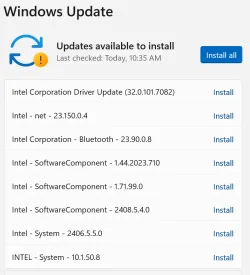
I recently changed my Win11 Pro PC from Intel based to AMD based. Using RAPR I removed all the Intel drivers from my system. Doing this did not cause any problems.

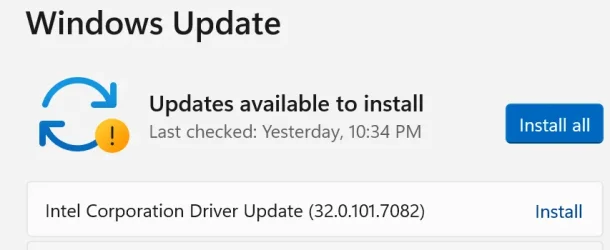
That was yesterday. Today I get this:

1.webp

The first one says it will replace my current AMD video driver with an Intel one. This strikes me as risky at best and potentially illegal at worst. Furthermore, since my system is running fine with no Intel drives installed, why should I bother installing a bunch of them? My sense is that duplicate drivers jus cause problems I don't have and don't want.

Is there a way to stop Windows Update from telling me to install all this Intel stuff? I've read that there's a way to stop Update from installing all drivers, but this seems like overkill to me.
 

Attachments

  • 1.webp
    1.webp
    16.4 KB · Views: 1

My Computer

System One

  • OS
    Win11 Pro
    Computer type
    PC/Desktop
    Manufacturer/Model
    BeeLink SER Mini
    CPU
    AMD Ryzen 5 5500U
    Motherboard
    BeeLink SER
    Memory
    16 GB
    Graphics Card(s)
    Radeon 2100
    Sound Card
    none
    Monitor(s) Displays
    Primary: Phillips 4K; Secondary: LG 4K
    Screen Resolution
    Both 3860 x 2160
    Hard Drives
    C: NVme 500 GB Windows only
    D: 128 GB NVme User data + Windows Temp via Junction Link
    PSU
    External
    Case
    Mini
    Cooling
    Internal fan
    Keyboard
    Logitech Wireless Lighted
    Mouse
    Kensington ExpertMouse wireless trackball
    Internet Speed
    500/500
    Browser
    Brave
    Antivirus
    Windows Defender

Latest Support Threads

Back
Top Bottom