Switching "Quick access" Explorer icon to "Home" (+title)


TizianoMad

Well-known member
Member
VIP
Local time
1:20 AM
Posts
187
Location
France
OS
Windows 10 & 11 LTSC 3xBoot 1809 21H2 24H2

    Quick access.png    Arrow right.png    Home.png

   Quick access               Home
       Accès rapide                        Accueil


Hello there,


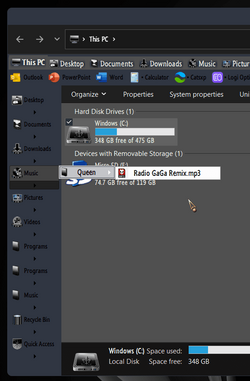
I'm about to change the "Quick access" previous icon with the new "Home" one.
I guess patching it by replacing the #51380 shell32.dll.mun one shouldn't be a problem*.

Is there a way of also changing its title ?
I'm using different Windows editions including 10, and also different languages.


* : as from W10 v1903 (manually or using an icon patcher).

To apply the previous one on W10 until 1809, instead of the old blue default one, niivu provided a reg file (attachments) to apply the "Favorite" icon (which is slightly different /brighter than Quick access, but very similar).
Concerning these lower versions in which you can't modify shell32.dll, maybe this trick could be needed, with replacing the "Favorite" icon (#1024 imageres.dll), or else a similar one could be created with the new icon placed elsewhere.


Home icon attached
 
Windows Build/Version
Windows 10 LTSC 21H2 (19044) + 1809

Attachments

Last edited:

My Computers My Computers

  • At a glance

    Windows 10 & 11 LTSC 3xBoot 1809 21H2 24H2Intel Core i5-2550K8 GBNVIDIA GeForce GTS 450
    OS
    Windows 10 & 11 LTSC 3xBoot 1809 21H2 24H2
    Computer type
    PC/Desktop
    Manufacturer/Model
    Self-made 2013
    CPU
    Intel Core i5-2550K
    Motherboard
    Intel DH67CL
    Memory
    8 GB
    Graphics Card(s)
    NVIDIA GeForce GTS 450
    Sound Card
    EmuPMX
    Monitor(s) Displays
    16/9 Samsung + 4/3 iiyama
    Screen Resolution
    1360 x 768 + 1024 x 768
    Hard Drives
    Main SSD: Samsung 250 Gb
    Secondary HDDs: Western Digital
    (Purple 4 Tb + Blue 2 Tb) x2
    + Green 0.5 Tb
    Case
    Antec
    Keyboard
    Dell
    Mouse
    Advance
    Browser
    Brave
    Antivirus
    Windows Security
    Other Info
    + Portable Cleanup Utilities :

    AdwCleaner
    ZHP Cleaner (+Diag)
    Kaspersky Virus Removal Tool
    CCleaner
  • At a glance

    Windows 11 Home
    Operating System
    Windows 11 Home
    Computer type
    Laptop
    Manufacturer/Model
    HP
    Other Info
    Using W11 OS on customers' computers more and more often, and sometimes on my mum's new laptop.
Last edited:

My Computers My Computers

  • At a glance

    Windows 10 & 11 LTSC 3xBoot 1809 21H2 24H2Intel Core i5-2550K8 GBNVIDIA GeForce GTS 450
    OS
    Windows 10 & 11 LTSC 3xBoot 1809 21H2 24H2
    Computer type
    PC/Desktop
    Manufacturer/Model
    Self-made 2013
    CPU
    Intel Core i5-2550K
    Motherboard
    Intel DH67CL
    Memory
    8 GB
    Graphics Card(s)
    NVIDIA GeForce GTS 450
    Sound Card
    EmuPMX
    Monitor(s) Displays
    16/9 Samsung + 4/3 iiyama
    Screen Resolution
    1360 x 768 + 1024 x 768
    Hard Drives
    Main SSD: Samsung 250 Gb
    Secondary HDDs: Western Digital
    (Purple 4 Tb + Blue 2 Tb) x2
    + Green 0.5 Tb
    Case
    Antec
    Keyboard
    Dell
    Mouse
    Advance
    Browser
    Brave
    Antivirus
    Windows Security
    Other Info
    + Portable Cleanup Utilities :

    AdwCleaner
    ZHP Cleaner (+Diag)
    Kaspersky Virus Removal Tool
    CCleaner
  • At a glance

    Windows 11 Home
    Operating System
    Windows 11 Home
    Computer type
    Laptop
    Manufacturer/Model
    HP
    Other Info
    Using W11 OS on customers' computers more and more often, and sometimes on my mum's new laptop.
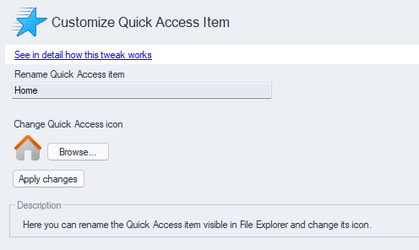
FYI you can do this easily with winaerotweaker;
1655106596754.png

r2j40PB.png
 

My Computer My Computer

At a glance

Windows 11 [22H2] [22621.2428]Intel Core i9-14900K 3.2 GHz 24-Core ProcessorG.Skill Trident Z5 RGB 32 GB (2 x 16 GB) DDR5...AMD Radeon RX 6950 XT
OS
Windows 11 [22H2] [22621.2428]
Computer type
PC/Desktop
Manufacturer/Model
Culture-Virus v7.0
CPU
Intel Core i9-14900K 3.2 GHz 24-Core Processor
Motherboard
Asus ROG MAXIMUS Z790 APEX ENCORE ATX LGA1700 Motherboard
Memory
G.Skill Trident Z5 RGB 32 GB (2 x 16 GB) DDR5-7200 CL34 Memory
Graphics Card(s)
AMD Radeon RX 6950 XT
Monitor(s) Displays
AOC CQ27G2U/BK
Screen Resolution
2560x1440
Hard Drives
M.2 1: Samsung SSD 990 PRO 2TB
M.2 2: Samsung SSD 970 EVO Plus 2TB
PSU
Corsair RM1000X SHIFT
Case
Phanteks NV9
Cooling
Custom Water / Direct-Die Cooling
Keyboard
Corsair K95 RGB PLATINUM XT Wired Gaming Keyboard
Mouse
ROCCAT LEADR Optical
Internet Speed
500mb Direct Fiber
Browser
Chrome

My Computers My Computers

  • At a glance

    Windows 11 Pro
    OS
    Windows 11 Pro
    Computer type
    PC/Desktop
    Manufacturer/Model
    ASUS ROG Strix
  • At a glance

    Windows 11 Pro
    Operating System
    Windows 11 Pro
    Computer type
    Laptop
    Manufacturer/Model
    ASUS VivoBook
  • ASUS VivoBook 'Lite' ~ Windows 11 Home
I just installed the latest Windows 11 IP [25136.1.220606] yesterday and setup my system - working here.
 

My Computer My Computer

At a glance

Windows 11 [22H2] [22621.2428]Intel Core i9-14900K 3.2 GHz 24-Core ProcessorG.Skill Trident Z5 RGB 32 GB (2 x 16 GB) DDR5...AMD Radeon RX 6950 XT
OS
Windows 11 [22H2] [22621.2428]
Computer type
PC/Desktop
Manufacturer/Model
Culture-Virus v7.0
CPU
Intel Core i9-14900K 3.2 GHz 24-Core Processor
Motherboard
Asus ROG MAXIMUS Z790 APEX ENCORE ATX LGA1700 Motherboard
Memory
G.Skill Trident Z5 RGB 32 GB (2 x 16 GB) DDR5-7200 CL34 Memory
Graphics Card(s)
AMD Radeon RX 6950 XT
Monitor(s) Displays
AOC CQ27G2U/BK
Screen Resolution
2560x1440
Hard Drives
M.2 1: Samsung SSD 990 PRO 2TB
M.2 2: Samsung SSD 970 EVO Plus 2TB
PSU
Corsair RM1000X SHIFT
Case
Phanteks NV9
Cooling
Custom Water / Direct-Die Cooling
Keyboard
Corsair K95 RGB PLATINUM XT Wired Gaming Keyboard
Mouse
ROCCAT LEADR Optical
Internet Speed
500mb Direct Fiber
Browser
Chrome
Replacing the icon(s) manually in shell32.dll.mun is not a problem in W11 & <W10 1903
(I prefer to avoid Tweaker apps, as problems can happen when changing Build)

The alternative manual method to replace the Home works nicely on W10 (Winaero's tutorial).

Now, my main question was about the title. In W10, the 2nd tutorial from Winaero does the job, but sometimes an undeveloped "home" duplicate appears at the very bottom of the list.

I would prefer to get a confirmation about these 2 methods, if they work Ok also on W11 before making any registry modifications.

Thank you.
 

My Computers My Computers

  • At a glance

    Windows 10 & 11 LTSC 3xBoot 1809 21H2 24H2Intel Core i5-2550K8 GBNVIDIA GeForce GTS 450
    OS
    Windows 10 & 11 LTSC 3xBoot 1809 21H2 24H2
    Computer type
    PC/Desktop
    Manufacturer/Model
    Self-made 2013
    CPU
    Intel Core i5-2550K
    Motherboard
    Intel DH67CL
    Memory
    8 GB
    Graphics Card(s)
    NVIDIA GeForce GTS 450
    Sound Card
    EmuPMX
    Monitor(s) Displays
    16/9 Samsung + 4/3 iiyama
    Screen Resolution
    1360 x 768 + 1024 x 768
    Hard Drives
    Main SSD: Samsung 250 Gb
    Secondary HDDs: Western Digital
    (Purple 4 Tb + Blue 2 Tb) x2
    + Green 0.5 Tb
    Case
    Antec
    Keyboard
    Dell
    Mouse
    Advance
    Browser
    Brave
    Antivirus
    Windows Security
    Other Info
    + Portable Cleanup Utilities :

    AdwCleaner
    ZHP Cleaner (+Diag)
    Kaspersky Virus Removal Tool
    CCleaner
  • At a glance

    Windows 11 Home
    Operating System
    Windows 11 Home
    Computer type
    Laptop
    Manufacturer/Model
    HP
    Other Info
    Using W11 OS on customers' computers more and more often, and sometimes on my mum's new laptop.
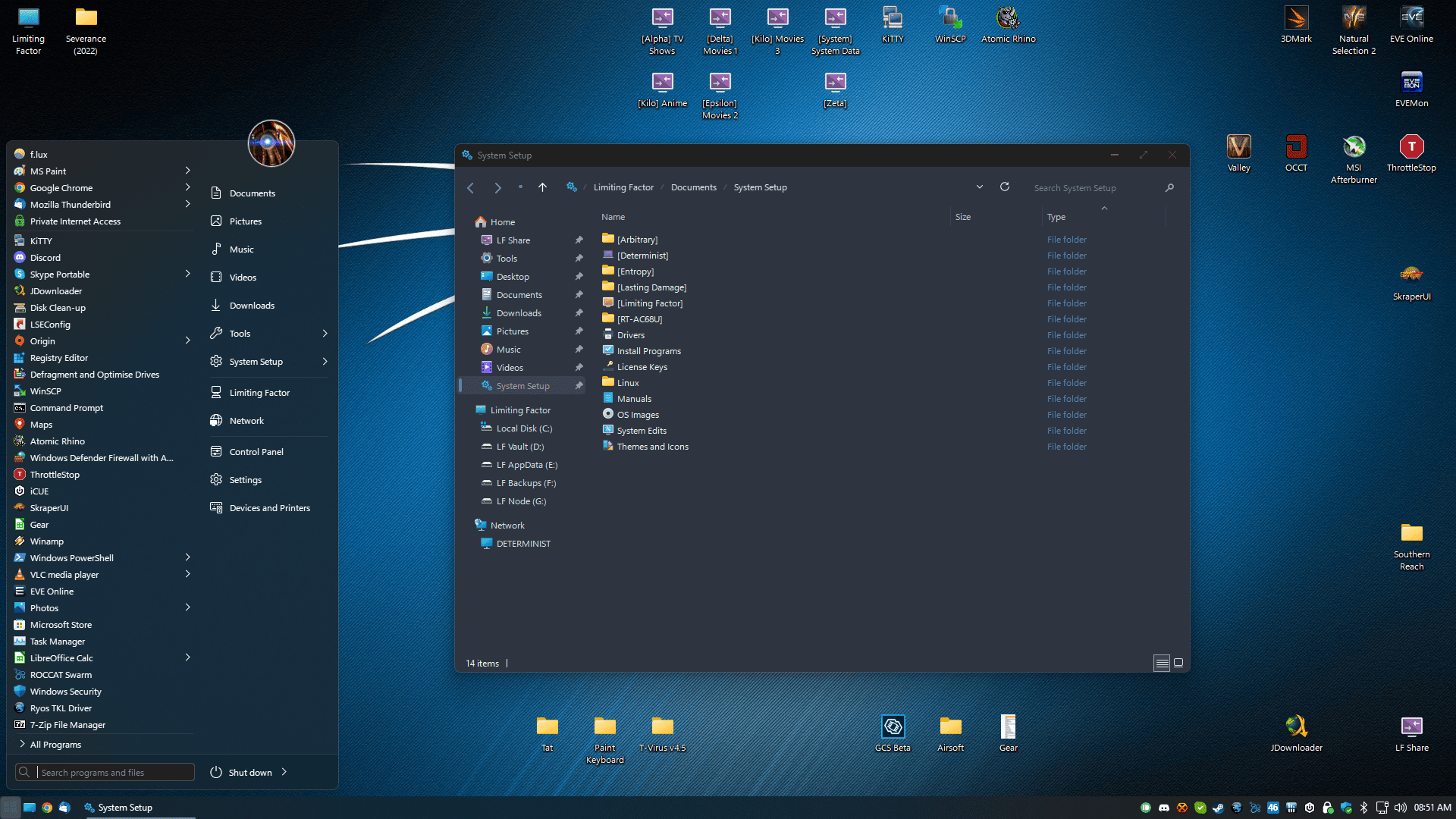
My Computer My Computer

At a glance

Windows 11 [22H2] [22621.2428]Intel Core i9-14900K 3.2 GHz 24-Core ProcessorG.Skill Trident Z5 RGB 32 GB (2 x 16 GB) DDR5...AMD Radeon RX 6950 XT
OS
Windows 11 [22H2] [22621.2428]
Computer type
PC/Desktop
Manufacturer/Model
Culture-Virus v7.0
CPU
Intel Core i9-14900K 3.2 GHz 24-Core Processor
Motherboard
Asus ROG MAXIMUS Z790 APEX ENCORE ATX LGA1700 Motherboard
Memory
G.Skill Trident Z5 RGB 32 GB (2 x 16 GB) DDR5-7200 CL34 Memory
Graphics Card(s)
AMD Radeon RX 6950 XT
Monitor(s) Displays
AOC CQ27G2U/BK
Screen Resolution
2560x1440
Hard Drives
M.2 1: Samsung SSD 990 PRO 2TB
M.2 2: Samsung SSD 970 EVO Plus 2TB
PSU
Corsair RM1000X SHIFT
Case
Phanteks NV9
Cooling
Custom Water / Direct-Die Cooling
Keyboard
Corsair K95 RGB PLATINUM XT Wired Gaming Keyboard
Mouse
ROCCAT LEADR Optical
Internet Speed
500mb Direct Fiber
Browser
Chrome

My Computers My Computers

  • At a glance

    Windows 11 Pro
    OS
    Windows 11 Pro
    Computer type
    PC/Desktop
    Manufacturer/Model
    ASUS ROG Strix
  • At a glance

    Windows 11 Pro
    Operating System
    Windows 11 Pro
    Computer type
    Laptop
    Manufacturer/Model
    ASUS VivoBook
  • ASUS VivoBook 'Lite' ~ Windows 11 Home
Hi,

Just to be able to make some headways on this simple thread, and to help it to be marked as solved,
here's the updated request :

Is there a way of changing the title(s) ?
> using different languages.

(Meanwhile, I finally came across this tutorial for Windows 10 (and in TenForums), but I don't know if works Ok on Windows 11.
> This is to change the icon's path, instead of patching the original icon).

Modifying title seems also possible. (but will be the same in any languages)
.../...

I would prefer to get a confirmation about these 2 methods, if they work Ok in W11 before making any registry modifications.

It seems that Stardocks' Icon Packager is the only reliable app which works nicely.
But as I mentioned, I prefer to know & make the registry modifications myself.

As W10 & W11 registries are not always identical, some occasional new keys can need changing.
For this case, they seem to be the same, as @paradoxum luckily managed with Winaero.
But as this app doesn't always succeed depending on builds, will just adding the REG key(s) still do ?

I guess that applying the title in several languages is another kettle of fish.
Perhaps impossible, but still interesting to know about.

Thank you.
 

My Computers My Computers

  • At a glance

    Windows 10 & 11 LTSC 3xBoot 1809 21H2 24H2Intel Core i5-2550K8 GBNVIDIA GeForce GTS 450
    OS
    Windows 10 & 11 LTSC 3xBoot 1809 21H2 24H2
    Computer type
    PC/Desktop
    Manufacturer/Model
    Self-made 2013
    CPU
    Intel Core i5-2550K
    Motherboard
    Intel DH67CL
    Memory
    8 GB
    Graphics Card(s)
    NVIDIA GeForce GTS 450
    Sound Card
    EmuPMX
    Monitor(s) Displays
    16/9 Samsung + 4/3 iiyama
    Screen Resolution
    1360 x 768 + 1024 x 768
    Hard Drives
    Main SSD: Samsung 250 Gb
    Secondary HDDs: Western Digital
    (Purple 4 Tb + Blue 2 Tb) x2
    + Green 0.5 Tb
    Case
    Antec
    Keyboard
    Dell
    Mouse
    Advance
    Browser
    Brave
    Antivirus
    Windows Security
    Other Info
    + Portable Cleanup Utilities :

    AdwCleaner
    ZHP Cleaner (+Diag)
    Kaspersky Virus Removal Tool
    CCleaner
  • At a glance

    Windows 11 Home
    Operating System
    Windows 11 Home
    Computer type
    Laptop
    Manufacturer/Model
    HP
    Other Info
    Using W11 OS on customers' computers more and more often, and sometimes on my mum's new laptop.
I've noticed some tweaks in winaero don't seem to work, such as the "always enable checkbox for all items in dialogue boxes" option. I reported it to him via email.
 

My Computer My Computer

At a glance

Windows 11 [22H2] [22621.2428]Intel Core i9-14900K 3.2 GHz 24-Core ProcessorG.Skill Trident Z5 RGB 32 GB (2 x 16 GB) DDR5...AMD Radeon RX 6950 XT
OS
Windows 11 [22H2] [22621.2428]
Computer type
PC/Desktop
Manufacturer/Model
Culture-Virus v7.0
CPU
Intel Core i9-14900K 3.2 GHz 24-Core Processor
Motherboard
Asus ROG MAXIMUS Z790 APEX ENCORE ATX LGA1700 Motherboard
Memory
G.Skill Trident Z5 RGB 32 GB (2 x 16 GB) DDR5-7200 CL34 Memory
Graphics Card(s)
AMD Radeon RX 6950 XT
Monitor(s) Displays
AOC CQ27G2U/BK
Screen Resolution
2560x1440
Hard Drives
M.2 1: Samsung SSD 990 PRO 2TB
M.2 2: Samsung SSD 970 EVO Plus 2TB
PSU
Corsair RM1000X SHIFT
Case
Phanteks NV9
Cooling
Custom Water / Direct-Die Cooling
Keyboard
Corsair K95 RGB PLATINUM XT Wired Gaming Keyboard
Mouse
ROCCAT LEADR Optical
Internet Speed
500mb Direct Fiber
Browser
Chrome
Although... On My Computer, I Made This Thing To Work On Winaero Tweaker. But Your's Are Not Going To Work, So How Did This Happen?
1655492647971.png
 

My Computer My Computer

At a glance

Windows 11Intel Core i5-8250U8.00 GBIntel(R) UHD Graphics 620
OS
Windows 11
Computer type
Laptop
Manufacturer/Model
Lenovo YOGA 730-15IKB
CPU
Intel Core i5-8250U
Motherboard
Lenovo LNVNB161216
Memory
8.00 GB
Graphics Card(s)
Intel(R) UHD Graphics 620
Sound Card
Realtek ALC236 @ Intel Sunrise Point-LP PCH - High Definition Audio Controller, Intel Kaby Lake HDMI @ Intel Sunrise Point-LP PCH - High Definition Audio Controller [C1] PCI[C1] PCI,
Monitor(s) Displays
CMN N156HCE-EN1
Screen Resolution
1920x1080
Hard Drives
G-TECH ArmorATD SCSI Disk Device
HFS256GD9TNG-62A0A
PSU
OEM Define 1
Case
Unknown Case
Cooling
Intel Sunrise Point-LP PCH - Thermal Management Controller [C1]
Keyboard
Standard PS/2 Keyboard
Mouse
HID-compliant mouse
Internet Speed
292500 kbps
Browser
Microsoft Edge, Google Chrome, Etc.
Antivirus
Trend Micro Internet Security
Other Info
Computer Type: ACPI x64-based PC
Computer Name: DESKTOP-JGTBO6N
Printer: Canon MG5300 series Printer (Copy 1)
Printer: Canon MG5300 series Printer WS
Printer: Canon MG5300 series Printer
DMI BIOS: Lenovo BIOS 7KCN33WW(V1.14)
Total Bluescreens: 4
Secure Boot
Trusted Platform Module 2.0
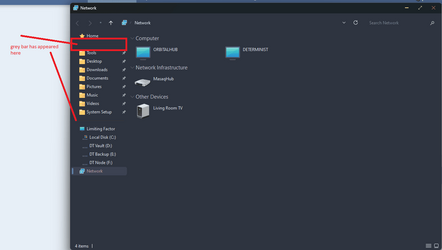
Encountered a strange problem today installing the latest IP again (did it a couple times yesterday and didn't see this issue).
Not sure how to reproduce... installed, install theme patcher, libraries etc, drivers, before applying a custom theme I always make sure everything else is up to date.

1655653352589.png


It's not between 'PC' and network. can't figure out what app or mod is causing it, since I did everything the same as I usually do..

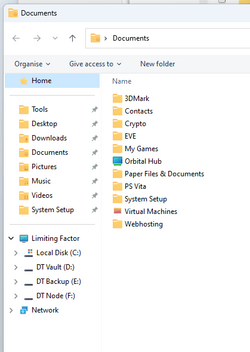
still there with windows light theme, so it's not the theme, I dunno how the heck i've done this:
1655653487050.png
 

My Computer My Computer

At a glance

Windows 11 [22H2] [22621.2428]Intel Core i9-14900K 3.2 GHz 24-Core ProcessorG.Skill Trident Z5 RGB 32 GB (2 x 16 GB) DDR5...AMD Radeon RX 6950 XT
OS
Windows 11 [22H2] [22621.2428]
Computer type
PC/Desktop
Manufacturer/Model
Culture-Virus v7.0
CPU
Intel Core i9-14900K 3.2 GHz 24-Core Processor
Motherboard
Asus ROG MAXIMUS Z790 APEX ENCORE ATX LGA1700 Motherboard
Memory
G.Skill Trident Z5 RGB 32 GB (2 x 16 GB) DDR5-7200 CL34 Memory
Graphics Card(s)
AMD Radeon RX 6950 XT
Monitor(s) Displays
AOC CQ27G2U/BK
Screen Resolution
2560x1440
Hard Drives
M.2 1: Samsung SSD 990 PRO 2TB
M.2 2: Samsung SSD 970 EVO Plus 2TB
PSU
Corsair RM1000X SHIFT
Case
Phanteks NV9
Cooling
Custom Water / Direct-Die Cooling
Keyboard
Corsair K95 RGB PLATINUM XT Wired Gaming Keyboard
Mouse
ROCCAT LEADR Optical
Internet Speed
500mb Direct Fiber
Browser
Chrome
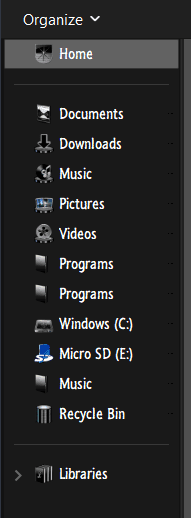
I have the same thing..., seems to be a corral for pinned items...

0001170.png

... that's why I had to get rid of the Home button! It seems to be the instigator!

0001171.png
 

My Computers My Computers

  • At a glance

    Windows 11 Pro
    OS
    Windows 11 Pro
    Computer type
    PC/Desktop
    Manufacturer/Model
    ASUS ROG Strix
  • At a glance

    Windows 11 Pro
    Operating System
    Windows 11 Pro
    Computer type
    Laptop
    Manufacturer/Model
    ASUS VivoBook
  • ASUS VivoBook 'Lite' ~ Windows 11 Home
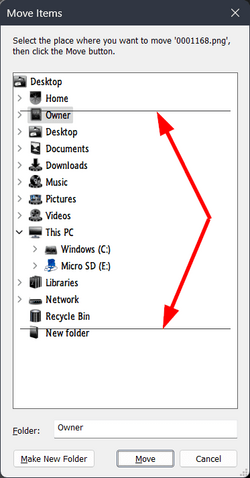
... the Move To dialog remains dickered though!

0001169.png
 

My Computers My Computers

  • At a glance

    Windows 11 Pro
    OS
    Windows 11 Pro
    Computer type
    PC/Desktop
    Manufacturer/Model
    ASUS ROG Strix
  • At a glance

    Windows 11 Pro
    Operating System
    Windows 11 Pro
    Computer type
    Laptop
    Manufacturer/Model
    ASUS VivoBook
  • ASUS VivoBook 'Lite' ~ Windows 11 Home
I use StartAllBack and QTTabBar..., makes it somewhat possible to circumvent a lot of the screwed up stuff!

0001172.png
 

My Computers My Computers

  • At a glance

    Windows 11 Pro
    OS
    Windows 11 Pro
    Computer type
    PC/Desktop
    Manufacturer/Model
    ASUS ROG Strix
  • At a glance

    Windows 11 Pro
    Operating System
    Windows 11 Pro
    Computer type
    Laptop
    Manufacturer/Model
    ASUS VivoBook
  • ASUS VivoBook 'Lite' ~ Windows 11 Home
Unfortunately, the latest answers posted are not very helpful to solve the topic.

@Edwin, as I mentioned, an undeveloped "Home" section duplicate appears ("Library" in your case) only when the Home "title" has been renamed.
Of course, posting a solution here about it would be very welcome.

Exchanging an icon with another in shell32, weather using a tweak app or proceeding manually is pretty common, so no request about that.
> BUT the alternative manual REG method used in W10 needs confirmation for W11.
(This one is interesting, because it avoids tweaking shell32, with creating a new REG location to display a separate personal icon).

> We could consider that the related WinAero method for W10 to rename the title (duplicate bug) obviously used in the app, kind of confirms it is the same used in W11.

Is there a way of changing the title(s) ?
> using different languages.

(Meanwhile, I finally came across this tutorial for Windows 10 (and in TenForums), but I don't know if works Ok on Windows 11.
> This is to change the icon's path, instead of patching the original icon).

Modifying title seems also possible. (but will be the same in any languages)
.../...

I would prefer to get a confirmation about these 2 methods, if they work Ok in W11 before making any registry modifications.

If ever it is reported that these manual methods do not work in W11 and that only apps can do the job, in this case I'll be happy to know about it.

But I don't find it very useful to post new app issues with all their big screenshots, as this thread mainly concerns confirmation about manual REG methods. Any visitors looking for answers from this request would feel as lost as me !
There are already threads about WinAero on the forum.

It is clearly announced in the present thread introduction that the request is also about applying the "Home" translations when switching language in Windows (Fr: Acceuil /Es: Inicio /De: Startseite...)

A clear answer about it will definitively help the thread to be marked as solved.

Thank you for considering.
 

My Computers My Computers

  • At a glance

    Windows 10 & 11 LTSC 3xBoot 1809 21H2 24H2Intel Core i5-2550K8 GBNVIDIA GeForce GTS 450
    OS
    Windows 10 & 11 LTSC 3xBoot 1809 21H2 24H2
    Computer type
    PC/Desktop
    Manufacturer/Model
    Self-made 2013
    CPU
    Intel Core i5-2550K
    Motherboard
    Intel DH67CL
    Memory
    8 GB
    Graphics Card(s)
    NVIDIA GeForce GTS 450
    Sound Card
    EmuPMX
    Monitor(s) Displays
    16/9 Samsung + 4/3 iiyama
    Screen Resolution
    1360 x 768 + 1024 x 768
    Hard Drives
    Main SSD: Samsung 250 Gb
    Secondary HDDs: Western Digital
    (Purple 4 Tb + Blue 2 Tb) x2
    + Green 0.5 Tb
    Case
    Antec
    Keyboard
    Dell
    Mouse
    Advance
    Browser
    Brave
    Antivirus
    Windows Security
    Other Info
    + Portable Cleanup Utilities :

    AdwCleaner
    ZHP Cleaner (+Diag)
    Kaspersky Virus Removal Tool
    CCleaner
  • At a glance

    Windows 11 Home
    Operating System
    Windows 11 Home
    Computer type
    Laptop
    Manufacturer/Model
    HP
    Other Info
    Using W11 OS on customers' computers more and more often, and sometimes on my mum's new laptop.
It's all really fecked up!
Here's what I know:
• I was able to get rid of the Home title/button/header..., whatever you wanna call it, which seems to be a standalone-virtual folder item.
• I still have a functioning Quick Access section but there's no header for it!
• Libraries was showing in my Nav Pane cuz I invoked it...
• I have not found a way to rename the Home title.

Other than that, I don't have a clue what's goin on in the new File Explorer! 🤷‍♂️
 

My Computers My Computers

  • At a glance

    Windows 11 Pro
    OS
    Windows 11 Pro
    Computer type
    PC/Desktop
    Manufacturer/Model
    ASUS ROG Strix
  • At a glance

    Windows 11 Pro
    Operating System
    Windows 11 Pro
    Computer type
    Laptop
    Manufacturer/Model
    ASUS VivoBook
  • ASUS VivoBook 'Lite' ~ Windows 11 Home
The heck with it! I don't even need a Navigation Pane! Windows' Navigation Pane is becoming a Navigation Pain!

0001173.png
 

My Computers My Computers

  • At a glance

    Windows 11 Pro
    OS
    Windows 11 Pro
    Computer type
    PC/Desktop
    Manufacturer/Model
    ASUS ROG Strix
  • At a glance

    Windows 11 Pro
    Operating System
    Windows 11 Pro
    Computer type
    Laptop
    Manufacturer/Model
    ASUS VivoBook
  • ASUS VivoBook 'Lite' ~ Windows 11 Home
The heck with it! I don't even need a Navigation Pane! Windows' Navigation Pane is becoming a Navigation Pain!

View attachment 31857
I'm starting to feel your pain with the navigation pane. It's very buggy with the latest W11 and mods made it worse.
 

My Computer My Computer

At a glance

Windows 11 [22H2] [22621.2428]Intel Core i9-14900K 3.2 GHz 24-Core ProcessorG.Skill Trident Z5 RGB 32 GB (2 x 16 GB) DDR5...AMD Radeon RX 6950 XT
OS
Windows 11 [22H2] [22621.2428]
Computer type
PC/Desktop
Manufacturer/Model
Culture-Virus v7.0
CPU
Intel Core i9-14900K 3.2 GHz 24-Core Processor
Motherboard
Asus ROG MAXIMUS Z790 APEX ENCORE ATX LGA1700 Motherboard
Memory
G.Skill Trident Z5 RGB 32 GB (2 x 16 GB) DDR5-7200 CL34 Memory
Graphics Card(s)
AMD Radeon RX 6950 XT
Monitor(s) Displays
AOC CQ27G2U/BK
Screen Resolution
2560x1440
Hard Drives
M.2 1: Samsung SSD 990 PRO 2TB
M.2 2: Samsung SSD 970 EVO Plus 2TB
PSU
Corsair RM1000X SHIFT
Case
Phanteks NV9
Cooling
Custom Water / Direct-Die Cooling
Keyboard
Corsair K95 RGB PLATINUM XT Wired Gaming Keyboard
Mouse
ROCCAT LEADR Optical
Internet Speed
500mb Direct Fiber
Browser
Chrome
Microsoft Is Such A Weird Menace Since You Knew That, But I Made A Windows 10-Styled Icon If You Used Windows 10 Or 11.
16.png20.png24.png32.png40.png48.png64.png256.png
 

Attachments

My Computer My Computer

At a glance

Windows 11Intel Core i5-8250U8.00 GBIntel(R) UHD Graphics 620
OS
Windows 11
Computer type
Laptop
Manufacturer/Model
Lenovo YOGA 730-15IKB
CPU
Intel Core i5-8250U
Motherboard
Lenovo LNVNB161216
Memory
8.00 GB
Graphics Card(s)
Intel(R) UHD Graphics 620
Sound Card
Realtek ALC236 @ Intel Sunrise Point-LP PCH - High Definition Audio Controller, Intel Kaby Lake HDMI @ Intel Sunrise Point-LP PCH - High Definition Audio Controller [C1] PCI[C1] PCI,
Monitor(s) Displays
CMN N156HCE-EN1
Screen Resolution
1920x1080
Hard Drives
G-TECH ArmorATD SCSI Disk Device
HFS256GD9TNG-62A0A
PSU
OEM Define 1
Case
Unknown Case
Cooling
Intel Sunrise Point-LP PCH - Thermal Management Controller [C1]
Keyboard
Standard PS/2 Keyboard
Mouse
HID-compliant mouse
Internet Speed
292500 kbps
Browser
Microsoft Edge, Google Chrome, Etc.
Antivirus
Trend Micro Internet Security
Other Info
Computer Type: ACPI x64-based PC
Computer Name: DESKTOP-JGTBO6N
Printer: Canon MG5300 series Printer (Copy 1)
Printer: Canon MG5300 series Printer WS
Printer: Canon MG5300 series Printer
DMI BIOS: Lenovo BIOS 7KCN33WW(V1.14)
Total Bluescreens: 4
Secure Boot
Trusted Platform Module 2.0
Back
Top Bottom