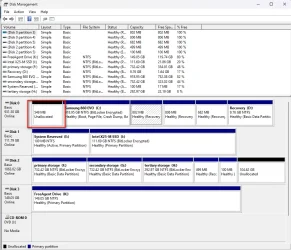
Now, that is a clean, sparkling even, set-up !!Good afternoon to all. I think I finally got my PC working properly. I ended up purchasing new drives. Took the old C: drive and wiped it after removing any necessary files, and am using it as my E: drive (storage). I have a new HDD drive that is designated as storage also, and designated it B: drive. I took the old storage drive and removed all pertinent files and folders, then wiped it clean and removed all partitions. My only major task is to go through my B: drive and remove all duplicate photos, documents, videos etc. I even included a screenshot of my Disk Management screen.
My Computers
-
At a glance
All Branches but StableAMD Ryzen 7 7735HS 3200-4500 Mhz 8 cores x 232 GB DDR5Radeon Graphic / NVIDIA GeForce RTX 4060 8 GB...- OS
- All Branches but Stable
- Computer type
- Laptop
- Manufacturer/Model
- Acer Nitro ANV15-51
- CPU
- AMD Ryzen 7 7735HS 3200-4500 Mhz 8 cores x 2
- Motherboard
- Sportage_RBH
- Memory
- 32 GB DDR5
- Graphics Card(s)
- Radeon Graphic / NVIDIA GeForce RTX 4060 8 GB GDDR6
- Sound Card
- AMD/Realtek(R) Audio
- Monitor(s) Displays
- Integrated Monitor (15.3"vis)
- Screen Resolution
- FHD 1920X1080 16:9 144Hz
- Hard Drives
- KINGSTON OM8SEP4512Q-AA 1TB
Western Digital 256GB
- PSU
- 19V DC 6.32 A 120 W
- Cooling
- Dual Fans
- Mouse
- MS Bluetooth
- Internet Speed
- Fiber 1GB Cox -us & 1GB Orange-fr
- Browser
- Edge Canary- Firefox Nightly-Chrome Dev-Chrome Dev
- Antivirus
- Windows Defender
-
At a glance
Windows 11 BetaAMD A9-94208 GB of DDR4AMD Radeon R5- Operating System
- Windows 11 Beta
- Computer type
- Laptop
- Manufacturer/Model
- Asus X751BP
- CPU
- AMD A9-9420
- Memory
- 8 GB of DDR4
- Graphics card(s)
- AMD Radeon R5
- Screen Resolution
- 1600x900
- Hard Drives
- Seagate 1 TB