
Solved System select screen corruption after installing NVidia drivers.


LordOfKent

Member
Member
Local time
6:28 PM
Posts
14
Location
Kent, England
OS
Windows 11 Pro 64-bit
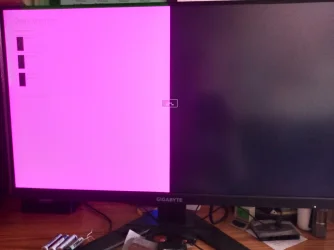
Hi all, I have done an in place upgrade from Win10 Home to Win11 Home on my system. I had been using NVidia drivers that were from about 6 months ago with no problem on 10. After the upgrade finished the screen that shows when booting that allows you to select win version or do repair or fault finding options did not display correctly. Although the options where there and worked there was a problem with the graphics.

I have used DDU to do a clean un-install of previous drivers as I have done before with no problem. On the reboot the screen mentioned was ok, no corruption. After installing the NV drivers using NMCleanstall the problem was back. I have tried with the following drivers, v581.15, v581.29 and v581.42, no difference.

What is puzzling is I have no idea what is causing this. I have even tried with a different GFX card but just the same. Any ideas guys please? IMG_20250923_171708248.webp
 
Windows Build/Version
Win11 version 24H2 (OS build 26100.1742)

My Computer

System One

  • OS
    Windows 11 Pro 64-bit
    Computer type
    PC/Desktop
    Manufacturer/Model
    Home build
    CPU
    Ryzen 7 5700X
    Motherboard
    MSI MPG B550 GAMING PLUS (MS-7C56) (AM4)
    Memory
    32 GB Crucial
    Graphics Card(s)
    GForce RTX 3600 Super 12GB VRam
    Monitor(s) Displays
    Gigabyte M28U
    Screen Resolution
    3840 x 2160 (UHD)
    Hard Drives
    2 x 1TB Crucial nvme CT1000P310SSD8
    WD WDS500G2B0A 500G
    Samsung SSD 870 EVO 1TB
    TOSHIBA DT01ACA200 2TB SSD
    TOSHIBA HDWD120 2TB
    SanDisk SDSSDA240G 240GB
    PSU
    700W
    Case
    Fractal Meshify B
    Cooling
    Sythe Fuma 2 Tower
    Keyboard
    Logitec G105
    Mouse
    Logitec G502 Hero
    Browser
    Firefox
    Antivirus
    Malwarebytes and MS
Have you run sfc /scannow?

Maybe a repair install of Windows (upgrade in place).

I'm sorry I can't be more targeted. I have never had to fix that issue.
 

My Computers

System One System Two

  • OS
    Windows 11 26200.8116
    Computer type
    PC/Desktop
    Manufacturer/Model
    homebuilt
    CPU
    Amd Threadripper 7970X
    Motherboard
    Gigabyte TRX50 Aero D Rev. 1.0
    Memory
    128GB (4 X 32) G.Skill DDR5 6400 (RDIMM)
    Graphics Card(s)
    Gigabyte RTX 4090 OC
    Sound Card
    none (USB to speakers), Realtek
    Monitor(s) Displays
    Innocn 32" OLED
    Screen Resolution
    3840 X 2160 @ 60Hz
    Hard Drives
    Crucial T700 2TB M.2 NVME SSD
    WD 4TB Blue SATA SSD
    Seagate 18TB IronWolf Pro
    PSU
    BeQuiet! Straight Power 12 1500W
    Case
    Lian Li 011 Dynamic Evo XL
    Cooling
    SilverStone Technology XE360-TR5, with 3 Phanteks T30 fans
    Keyboard
    Cherry KC 500 MX LP (mechanical)
    Mouse
    Logitech M500s (wired)
    Internet Speed
    2000/250 Mbps (down/up)
    Other Info
    xFinity gateway
  • Operating System
    windows 11 26200.8116
    Computer type
    PC/Desktop
    Manufacturer/Model
    homebuilt
    CPU
    Intel I9-13900K
    Motherboard
    Asus RoG Strix Z690-E
    Memory
    64GB G.Skill DDR5-6000
    Graphics card(s)
    Gigabyte RTX 3090 ti
    Sound Card
    built in Realtek
    Monitor(s) Displays
    Philips 27E1N8900 27" OLED
    Screen Resolution
    3840 X 2160 @60Hz
    Hard Drives
    WDC SN850 1TB
    8TB Seagate Ironwolf
    4TB Seagate Ironwolf
    PSU
    eVGA SuperNOVA 1300 GT
    Case
    Lian Li 011 Dynamic Evo
    Cooling
    Corsair iCUE H150i ELITE CAPELLIX Liquid CPU Cooler
    Keyboard
    Cherry Streaming (wired)
    Mouse
    Logitech M500s (wired)
Is 1742 your actual Windows build version? If so it's very old - latest non-Insider version is 6584 I think.
 

My Computers

System One System Two

  • OS
    Windows 11 Home 24H2 RP
    Computer type
    PC/Desktop
    Manufacturer/Model
    Self-build
    CPU
    Intel I3-10100
    Motherboard
    MSI H410M-PRO
    Memory
    16 GB
    Graphics Card(s)
    Nvidia GT 1030
    Sound Card
    Motherboard default
    Monitor(s) Displays
    Philips 27 inch
    Screen Resolution
    1920x1080
    Hard Drives
    Samsung EVO 970 NVMe SSD 256 Gb
    Samsung QVO 870 SATA SSD 2 Tb
    PSU
    ATX 450W
    Keyboard
    Logitech
    Mouse
    Logitech Wireless
    Internet Speed
    930 Mb down / 120 Mb up
    Browser
    Edge
    Antivirus
    Windows Defender
    Other Info
    Microsoft Office 2021 Plus
  • Operating System
    Windows 11 Home
    Computer type
    PC/Desktop
    Manufacturer/Model
    Self-build
    CPU
    Intel i3-8100
    Motherboard
    Gigabyte Z370 D3
    Memory
    16 Gb
    Graphics card(s)
    Nvidia GT 720
    Sound Card
    Motherboard default
    Monitor(s) Displays
    Philips 27-inch
    Screen Resolution
    1920x1080
    Hard Drives
    Samsung 960 NVMe SSD 256 Gb
    Seagate 2 Tb HDD
    PSU
    ATX 450W
    Keyboard
    Microsoft
    Mouse
    Logitech Wireless
    Internet Speed
    930 Mb down / 120 Mb up
    Browser
    Edge
    Antivirus
    Windows Defender
  • Like
Reactions: OAT
Is 1742 your actual Windows build version? If so it's very old - latest non-Insider version is 6584 I think.
6725.

It's a cumulative update preview build, which is not an insider build.

1742 is from September of 2024. I wonder how the OP has avoided updates?
 

My Computers

System One System Two

  • OS
    Windows 11 26200.8116
    Computer type
    PC/Desktop
    Manufacturer/Model
    homebuilt
    CPU
    Amd Threadripper 7970X
    Motherboard
    Gigabyte TRX50 Aero D Rev. 1.0
    Memory
    128GB (4 X 32) G.Skill DDR5 6400 (RDIMM)
    Graphics Card(s)
    Gigabyte RTX 4090 OC
    Sound Card
    none (USB to speakers), Realtek
    Monitor(s) Displays
    Innocn 32" OLED
    Screen Resolution
    3840 X 2160 @ 60Hz
    Hard Drives
    Crucial T700 2TB M.2 NVME SSD
    WD 4TB Blue SATA SSD
    Seagate 18TB IronWolf Pro
    PSU
    BeQuiet! Straight Power 12 1500W
    Case
    Lian Li 011 Dynamic Evo XL
    Cooling
    SilverStone Technology XE360-TR5, with 3 Phanteks T30 fans
    Keyboard
    Cherry KC 500 MX LP (mechanical)
    Mouse
    Logitech M500s (wired)
    Internet Speed
    2000/250 Mbps (down/up)
    Other Info
    xFinity gateway
  • Operating System
    windows 11 26200.8116
    Computer type
    PC/Desktop
    Manufacturer/Model
    homebuilt
    CPU
    Intel I9-13900K
    Motherboard
    Asus RoG Strix Z690-E
    Memory
    64GB G.Skill DDR5-6000
    Graphics card(s)
    Gigabyte RTX 3090 ti
    Sound Card
    built in Realtek
    Monitor(s) Displays
    Philips 27E1N8900 27" OLED
    Screen Resolution
    3840 X 2160 @60Hz
    Hard Drives
    WDC SN850 1TB
    8TB Seagate Ironwolf
    4TB Seagate Ironwolf
    PSU
    eVGA SuperNOVA 1300 GT
    Case
    Lian Li 011 Dynamic Evo
    Cooling
    Corsair iCUE H150i ELITE CAPELLIX Liquid CPU Cooler
    Keyboard
    Cherry Streaming (wired)
    Mouse
    Logitech M500s (wired)
Hi, I did use a setting to block updates for a number of weeks in the updates settings when on Win10, as a lot of folks did. As I mentioned this only happened since my upgrade to win11 Home, win10 was ok.

Edition Windows 11 Home
Version 24H2
Installed on ‎22/‎09/‎2025
OS build 26100.1742
Experience Windows Feature Experience Pack 1000.26100.18.0

sfc /scannow run

Beginning verification phase of system scan.
Verification 100% complete.

Windows Resource Protection found corrupt files and successfully repaired them.
For online repairs, details are included in the CBS log file located at
windir\Logs\CBS\CBS.log. For example C:\Windows\Logs\CBS\CBS.log. For offline
repairs, details are included in the log file provided by the /OFFLOGFILE flag.

Do you want me to attach the log file?
 

My Computer

System One

  • OS
    Windows 11 Pro 64-bit
    Computer type
    PC/Desktop
    Manufacturer/Model
    Home build
    CPU
    Ryzen 7 5700X
    Motherboard
    MSI MPG B550 GAMING PLUS (MS-7C56) (AM4)
    Memory
    32 GB Crucial
    Graphics Card(s)
    GForce RTX 3600 Super 12GB VRam
    Monitor(s) Displays
    Gigabyte M28U
    Screen Resolution
    3840 x 2160 (UHD)
    Hard Drives
    2 x 1TB Crucial nvme CT1000P310SSD8
    WD WDS500G2B0A 500G
    Samsung SSD 870 EVO 1TB
    TOSHIBA DT01ACA200 2TB SSD
    TOSHIBA HDWD120 2TB
    SanDisk SDSSDA240G 240GB
    PSU
    700W
    Case
    Fractal Meshify B
    Cooling
    Sythe Fuma 2 Tower
    Keyboard
    Logitec G105
    Mouse
    Logitec G502 Hero
    Browser
    Firefox
    Antivirus
    Malwarebytes and MS
@LordOfKent
Welcome to ElevenForum. I gave you ten points, just for filling out your computer specs. :-)

If it were me, I would let Windows update itself, and then use the Enablement Package to go to 25H2.
Microsoft has fixed a lot of problems in the past year.
You can get the Enablement Package here...


You should also do this (Option Two), before trying to fix the driver problem you're having.

After do disabling drivers in Windows Updates, you should do DDU again and install the Nvidia driver again.


Here's some other things that you may find useful...


My Computers

System One System Two

  • OS
    Win 11 Home ♦♦♦26200.8457 ♦♦♦♦♦♦♦25H2
    Computer type
    PC/Desktop
    Manufacturer/Model
    Built by Ghot® [May 2020]
    CPU
    AMD Ryzen 7 3700X
    Motherboard
    Asus Pro WS X570-ACE (BIOS 5302)
    Memory
    G.Skill (F4-3200C14D-16GTZKW)
    Graphics Card(s)
    EVGA RTX 2070 (08G-P4-2171-KR)
    Sound Card
    Realtek ALC1220P / ALC S1220A
    Monitor(s) Displays
    Dell U3011 30"
    Screen Resolution
    2560 x 1600
    Hard Drives
    2x Samsung 860 EVO 500GB,
    WD 4TB Black FZBX - SATA III,
    WD 8TB Black FZBX - SATA III,
    DRW-24B1ST CD/DVD Burner
    PSU
    PC Power & Cooling 750W Quad EPS12V
    Case
    Cooler Master ATCS 840 Tower
    Cooling
    CM Hyper 212 EVO (push/pull)
    Keyboard
    Ducky DK9008 Shine II Blue LED
    Mouse
    Logitech Optical M-100
    Internet Speed
    300/300
    Browser
    Firefox (latest)
    Antivirus
    Bitdefender Total Security
    Other Info
    Speakers: Klipsch Pro Media 2.1
  • Operating System
    Windows XP Pro 32bit w/SP3
    Computer type
    PC/Desktop
    Manufacturer/Model
    Built by Ghot® (not in use)
    CPU
    AMD Athlon 64 X2 5000+ (OC'd @ 3.2Ghz)
    Motherboard
    ASUS M2N32-SLI Deluxe Wireless Edition
    Memory
    TWIN2X2048-6400C4DHX (2 x 1GB, DDR2 800)
    Graphics card(s)
    EVGA 256-P2-N758-TR GeForce 8600GT SSC
    Sound Card
    Onboard
    Monitor(s) Displays
    ViewSonic G90FB Black 19" Professional (CRT)
    Screen Resolution
    up to 2048 x 1536
    Hard Drives
    WD 36GB 10,000rpm Raptor SATA
    Seagate 80GB 7200rpm SATA
    Lite-On LTR-52246S CD/RW
    Lite-On LH-18A1P CD/DVD Burner
    PSU
    PC Power & Cooling Silencer 750 Quad EPS12V
    Case
    Generic Beige case, 80mm fans
    Cooling
    ZALMAN 9500A 92mm CPU Cooler
    Keyboard
    Logitech Classic Keybooard 200
    Mouse
    Logitech Optical M-BT96a
    Internet Speed
    300/300
    Browser
    Firefox 3.x ??
    Antivirus
    Symantec (Norton)
    Other Info
    Still assembled, still runs. Haven't turned it on for 15 years?
Gradually working through some things I noticed that after using DDU to un-install the drivers, then let NMCleanstall install just the display driver. After a reboot the screen corruption is gone. But then back again when all NV drivers installed. I have run sfc /scannow and no errors. I will try the repair option soon before perhaps installing the 25H2 update.

Thanks Ghot for the points (y)
 

My Computer

System One

  • OS
    Windows 11 Pro 64-bit
    Computer type
    PC/Desktop
    Manufacturer/Model
    Home build
    CPU
    Ryzen 7 5700X
    Motherboard
    MSI MPG B550 GAMING PLUS (MS-7C56) (AM4)
    Memory
    32 GB Crucial
    Graphics Card(s)
    GForce RTX 3600 Super 12GB VRam
    Monitor(s) Displays
    Gigabyte M28U
    Screen Resolution
    3840 x 2160 (UHD)
    Hard Drives
    2 x 1TB Crucial nvme CT1000P310SSD8
    WD WDS500G2B0A 500G
    Samsung SSD 870 EVO 1TB
    TOSHIBA DT01ACA200 2TB SSD
    TOSHIBA HDWD120 2TB
    SanDisk SDSSDA240G 240GB
    PSU
    700W
    Case
    Fractal Meshify B
    Cooling
    Sythe Fuma 2 Tower
    Keyboard
    Logitec G105
    Mouse
    Logitec G502 Hero
    Browser
    Firefox
    Antivirus
    Malwarebytes and MS
I was just going to shut down for the night when I had a notice that updates were waiting to install. So I let it do what it wanted and sat back to monitor what it was doing.

After about 15 mins and multiple restarts it finished. My specs are now

Edition Windows 11 Home
Version 24H2
Installed on ‎07/‎10/‎2025
OS build 26100.6584
Experience Windows Feature Experience Pack 1000.26100.234.0

The screen corruption has gone as far as I can tell, so looks like those updates fixed it. Thanks for the help and suggestions, I still have some settings to get sorted, but that will be for a new post.
 

My Computer

System One

  • OS
    Windows 11 Pro 64-bit
    Computer type
    PC/Desktop
    Manufacturer/Model
    Home build
    CPU
    Ryzen 7 5700X
    Motherboard
    MSI MPG B550 GAMING PLUS (MS-7C56) (AM4)
    Memory
    32 GB Crucial
    Graphics Card(s)
    GForce RTX 3600 Super 12GB VRam
    Monitor(s) Displays
    Gigabyte M28U
    Screen Resolution
    3840 x 2160 (UHD)
    Hard Drives
    2 x 1TB Crucial nvme CT1000P310SSD8
    WD WDS500G2B0A 500G
    Samsung SSD 870 EVO 1TB
    TOSHIBA DT01ACA200 2TB SSD
    TOSHIBA HDWD120 2TB
    SanDisk SDSSDA240G 240GB
    PSU
    700W
    Case
    Fractal Meshify B
    Cooling
    Sythe Fuma 2 Tower
    Keyboard
    Logitec G105
    Mouse
    Logitec G502 Hero
    Browser
    Firefox
    Antivirus
    Malwarebytes and MS

Latest Support Threads

Back
Top Bottom








