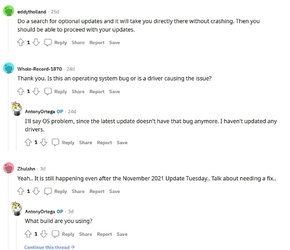
I go into Settings Windows Update, Advanced Option, and I see in Optional Updates that 2 are available. I click on this and Settings collapses.
In Event Viewer I see 2 errors seconds apart:
First one:
Log Name: Application
Source: Application Error
Date: 11/12/2021 8:33:01 PM
Event ID: 1000
Task Category: (100)
Level: Error
Keywords: Classic
User: N/A
Computer: IrvXPS8940
Description:
Faulting application name: SystemSettings.exe, version: 10.0.22000.120, time stamp: 0x27a6d211
Faulting module name: SystemSettings.dll, version: 10.0.22000.120, time stamp: 0x9799599e
Exception code: 0xc0000005
Fault offset: 0x0000000000497c4a
Faulting process id: 0x5028
Faulting application start time: 0x01d7d82e5e76989b
Faulting application path: C:\Windows\ImmersiveControlPanel\SystemSettings.exe
Faulting module path: C:\Windows\ImmersiveControlPanel\SystemSettings.dll
Report Id: 14ca71bf-3094-49c3-808f-990c0c177df0
Faulting package full name: windows.immersivecontrolpanel_10.0.6.1000_neutral_neutral_cw5n1h2txyewy
Faulting package-relative application ID: microsoft.windows.immersivecontrolpanel
Event Xml:
<Event xmlns="http://schemas.microsoft.com/win/2004/08/events/event">
<System>
<Provider Name="Application Error" />
<EventID Qualifiers="0">1000</EventID>
<Version>0</Version>
<Level>2</Level>
<Task>100</Task>
<Opcode>0</Opcode>
<Keywords>0x80000000000000</Keywords>
<TimeCreated SystemTime="2021-11-13T01:33:01.6231557Z" />
<EventRecordID>6298</EventRecordID>
<Correlation />
<Execution ProcessID="24100" ThreadID="0" />
<Channel>Application</Channel>
<Computer>IrvXPS8940</Computer>
<Security />
</System>
<EventData>
<Data>SystemSettings.exe</Data>
<Data>10.0.22000.120</Data>
<Data>27a6d211</Data>
<Data>SystemSettings.dll</Data>
<Data>10.0.22000.120</Data>
<Data>9799599e</Data>
<Data>c0000005</Data>
<Data>0000000000497c4a</Data>
<Data>5028</Data>
<Data>01d7d82e5e76989b</Data>
<Data>C:\Windows\ImmersiveControlPanel\SystemSettings.exe</Data>
<Data>C:\Windows\ImmersiveControlPanel\SystemSettings.dll</Data>
<Data>14ca71bf-3094-49c3-808f-990c0c177df0</Data>
<Data>windows.immersivecontrolpanel_10.0.6.1000_neutral_neutral_cw5n1h2txyewy</Data>
<Data>microsoft.windows.immersivecontrolpanel</Data>
</EventData>
</Event>
2nd one:
Log Name: Application
Source: Application Error
Date: 11/12/2021 8:33:03 PM
Event ID: 1000
Task Category: (100)
Level: Error
Keywords: Classic
User: N/A
Computer: IrvXPS8940
Description:
Faulting application name: SystemSettings.exe, version: 10.0.22000.120, time stamp: 0x27a6d211
Faulting module name: SystemSettings.dll, version: 10.0.22000.120, time stamp: 0x9799599e
Exception code: 0xc000041d
Fault offset: 0x0000000000497c4a
Faulting process id: 0x5028
Faulting application start time: 0x01d7d82e5e76989b
Faulting application path: C:\Windows\ImmersiveControlPanel\SystemSettings.exe
Faulting module path: C:\Windows\ImmersiveControlPanel\SystemSettings.dll
Report Id: ac1e44f4-5500-4ad2-8504-20790a7d1f9f
Faulting package full name: windows.immersivecontrolpanel_10.0.6.1000_neutral_neutral_cw5n1h2txyewy
Faulting package-relative application ID: microsoft.windows.immersivecontrolpanel
Event Xml:
<Event xmlns="http://schemas.microsoft.com/win/2004/08/events/event">
<System>
<Provider Name="Application Error" />
<EventID Qualifiers="0">1000</EventID>
<Version>0</Version>
<Level>2</Level>
<Task>100</Task>
<Opcode>0</Opcode>
<Keywords>0x80000000000000</Keywords>
<TimeCreated SystemTime="2021-11-13T01:33:03.9524755Z" />
<EventRecordID>6300</EventRecordID>
<Correlation />
<Execution ProcessID="5728" ThreadID="0" />
<Channel>Application</Channel>
<Computer>IrvXPS8940</Computer>
<Security />
</System>
<EventData>
<Data>SystemSettings.exe</Data>
<Data>10.0.22000.120</Data>
<Data>27a6d211</Data>
<Data>SystemSettings.dll</Data>
<Data>10.0.22000.120</Data>
<Data>9799599e</Data>
<Data>c000041d</Data>
<Data>0000000000497c4a</Data>
<Data>5028</Data>
<Data>01d7d82e5e76989b</Data>
<Data>C:\Windows\ImmersiveControlPanel\SystemSettings.exe</Data>
<Data>C:\Windows\ImmersiveControlPanel\SystemSettings.dll</Data>
<Data>ac1e44f4-5500-4ad2-8504-20790a7d1f9f</Data>
<Data>windows.immersivecontrolpanel_10.0.6.1000_neutral_neutral_cw5n1h2txyewy</Data>
<Data>microsoft.windows.immersivecontrolpanel</Data>
</EventData>
</Event>
All other parts of Setting seems to work OK?
I have rebooted, run SFC and DISM with no errors. Still happens.
I am on V 21H2, OS Build 22000.318.
I think it was working fine a few days ago?
In Event Viewer I see 2 errors seconds apart:
First one:
Log Name: Application
Source: Application Error
Date: 11/12/2021 8:33:01 PM
Event ID: 1000
Task Category: (100)
Level: Error
Keywords: Classic
User: N/A
Computer: IrvXPS8940
Description:
Faulting application name: SystemSettings.exe, version: 10.0.22000.120, time stamp: 0x27a6d211
Faulting module name: SystemSettings.dll, version: 10.0.22000.120, time stamp: 0x9799599e
Exception code: 0xc0000005
Fault offset: 0x0000000000497c4a
Faulting process id: 0x5028
Faulting application start time: 0x01d7d82e5e76989b
Faulting application path: C:\Windows\ImmersiveControlPanel\SystemSettings.exe
Faulting module path: C:\Windows\ImmersiveControlPanel\SystemSettings.dll
Report Id: 14ca71bf-3094-49c3-808f-990c0c177df0
Faulting package full name: windows.immersivecontrolpanel_10.0.6.1000_neutral_neutral_cw5n1h2txyewy
Faulting package-relative application ID: microsoft.windows.immersivecontrolpanel
Event Xml:
<Event xmlns="http://schemas.microsoft.com/win/2004/08/events/event">
<System>
<Provider Name="Application Error" />
<EventID Qualifiers="0">1000</EventID>
<Version>0</Version>
<Level>2</Level>
<Task>100</Task>
<Opcode>0</Opcode>
<Keywords>0x80000000000000</Keywords>
<TimeCreated SystemTime="2021-11-13T01:33:01.6231557Z" />
<EventRecordID>6298</EventRecordID>
<Correlation />
<Execution ProcessID="24100" ThreadID="0" />
<Channel>Application</Channel>
<Computer>IrvXPS8940</Computer>
<Security />
</System>
<EventData>
<Data>SystemSettings.exe</Data>
<Data>10.0.22000.120</Data>
<Data>27a6d211</Data>
<Data>SystemSettings.dll</Data>
<Data>10.0.22000.120</Data>
<Data>9799599e</Data>
<Data>c0000005</Data>
<Data>0000000000497c4a</Data>
<Data>5028</Data>
<Data>01d7d82e5e76989b</Data>
<Data>C:\Windows\ImmersiveControlPanel\SystemSettings.exe</Data>
<Data>C:\Windows\ImmersiveControlPanel\SystemSettings.dll</Data>
<Data>14ca71bf-3094-49c3-808f-990c0c177df0</Data>
<Data>windows.immersivecontrolpanel_10.0.6.1000_neutral_neutral_cw5n1h2txyewy</Data>
<Data>microsoft.windows.immersivecontrolpanel</Data>
</EventData>
</Event>
2nd one:
Log Name: Application
Source: Application Error
Date: 11/12/2021 8:33:03 PM
Event ID: 1000
Task Category: (100)
Level: Error
Keywords: Classic
User: N/A
Computer: IrvXPS8940
Description:
Faulting application name: SystemSettings.exe, version: 10.0.22000.120, time stamp: 0x27a6d211
Faulting module name: SystemSettings.dll, version: 10.0.22000.120, time stamp: 0x9799599e
Exception code: 0xc000041d
Fault offset: 0x0000000000497c4a
Faulting process id: 0x5028
Faulting application start time: 0x01d7d82e5e76989b
Faulting application path: C:\Windows\ImmersiveControlPanel\SystemSettings.exe
Faulting module path: C:\Windows\ImmersiveControlPanel\SystemSettings.dll
Report Id: ac1e44f4-5500-4ad2-8504-20790a7d1f9f
Faulting package full name: windows.immersivecontrolpanel_10.0.6.1000_neutral_neutral_cw5n1h2txyewy
Faulting package-relative application ID: microsoft.windows.immersivecontrolpanel
Event Xml:
<Event xmlns="http://schemas.microsoft.com/win/2004/08/events/event">
<System>
<Provider Name="Application Error" />
<EventID Qualifiers="0">1000</EventID>
<Version>0</Version>
<Level>2</Level>
<Task>100</Task>
<Opcode>0</Opcode>
<Keywords>0x80000000000000</Keywords>
<TimeCreated SystemTime="2021-11-13T01:33:03.9524755Z" />
<EventRecordID>6300</EventRecordID>
<Correlation />
<Execution ProcessID="5728" ThreadID="0" />
<Channel>Application</Channel>
<Computer>IrvXPS8940</Computer>
<Security />
</System>
<EventData>
<Data>SystemSettings.exe</Data>
<Data>10.0.22000.120</Data>
<Data>27a6d211</Data>
<Data>SystemSettings.dll</Data>
<Data>10.0.22000.120</Data>
<Data>9799599e</Data>
<Data>c000041d</Data>
<Data>0000000000497c4a</Data>
<Data>5028</Data>
<Data>01d7d82e5e76989b</Data>
<Data>C:\Windows\ImmersiveControlPanel\SystemSettings.exe</Data>
<Data>C:\Windows\ImmersiveControlPanel\SystemSettings.dll</Data>
<Data>ac1e44f4-5500-4ad2-8504-20790a7d1f9f</Data>
<Data>windows.immersivecontrolpanel_10.0.6.1000_neutral_neutral_cw5n1h2txyewy</Data>
<Data>microsoft.windows.immersivecontrolpanel</Data>
</EventData>
</Event>
All other parts of Setting seems to work OK?
I have rebooted, run SFC and DISM with no errors. Still happens.
I am on V 21H2, OS Build 22000.318.
I think it was working fine a few days ago?
My Computer
At a glance
Windows 11i7 1170032GBRTX2060 6GB
- OS
- Windows 11
- Computer type
- PC/Desktop
- Manufacturer/Model
- Dell
- CPU
- i7 11700
- Motherboard
- Dell
- Memory
- 32GB
- Graphics Card(s)
- RTX2060 6GB
- Sound Card
- Realtek/Nvidia
- Monitor(s) Displays
- Dell S3221QS
- Screen Resolution
- 3840x2160
- Hard Drives
- 512GB SSD, 1TB HDD
- PSU
- 500W
- Case
- Dell
- Cooling
- Passive
- Keyboard
- Logitech MK540
- Mouse
- MK540
- Internet Speed
- 1Gbps/40Mbps
- Browser
- Firefox
- Antivirus
- McAfee LiveSafe