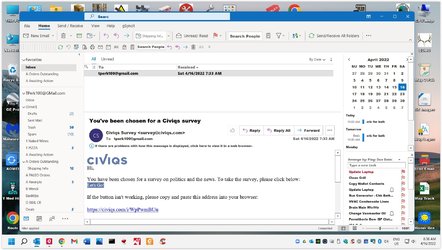
Task Bar will not Auto Hide until clicking in the 2021 Outlook Reminder Window.


TPerk100

Well-known member
Local time
7:52 PM
Posts
36
OS
Win 11 Pro
Win 11 Pro 21H2, Office 2021

Task bar will not autohide and some windows don't work correctly until I click on the Outlook Reminders window, and then all is OK. This is the exact same behavoir I had on my previous computer, Win10 and Outlook 2010 system. This happens at least once or twice per day. It's aggravating and I'd like to know how to fix it.

Thanks for any help.
 

My Computer My Computer

At a glance

Win 11 ProAMD Ryzen 9 5900X32 Gig DDR4NVIDIA T600 by Lenovo
OS
Win 11 Pro
Computer type
PC/Desktop
Manufacturer/Model
Self Built
CPU
AMD Ryzen 9 5900X
Motherboard
ASRock X570S PG Riptide
Memory
32 Gig DDR4
Graphics Card(s)
NVIDIA T600 by Lenovo
Sound Card
MB
Monitor(s) Displays
3 27" Samsung 2700s
Screen Resolution
1080x1920
Sounds like Outlook Reminder is stealing focus since it is always running, at least I saw that on my Outlook 2010 and 2013 so don't use it.
 

My Computers My Computers

  • At a glance

    Win11 Pro RTM Version 24H2 Build 26100.4202Intel Core i5 11th Gen. 2.40GHz12GB
    OS
    Win11 Pro RTM Version 24H2 Build 26100.4202
    Computer type
    Laptop
    Manufacturer/Model
    Dell Vostro 3400
    CPU
    Intel Core i5 11th Gen. 2.40GHz
    Memory
    12GB
    Hard Drives
    256GB SSD NVMe M.2
  • At a glance

    Win11 Pro RTM Version 24H2 Build 26100.4202Intel Core i5 10th Gen. 2.90GHz16GBOnboard, no VGA, using a DisplayPort-to-VGA a...
    Operating System
    Win11 Pro RTM Version 24H2 Build 26100.4202
    Computer type
    PC/Desktop
    Manufacturer/Model
    Dell Vostro 5890
    CPU
    Intel Core i5 10th Gen. 2.90GHz
    Memory
    16GB
    Graphics card(s)
    Onboard, no VGA, using a DisplayPort-to-VGA adapter
    Monitor(s) Displays
    24" Dell
    Hard Drives
    512GB SSD NVMe, 4TB Seagate HDD
    Browser
    Firefox, Edge
    Antivirus
    Windows Defender/Microsoft Security
My Microsoft 365 subscription doesn't have that behavior.
 

My Computers My Computers

  • At a glance

    Windows 11 ProIntel Series 3 Core Ultra X9 388H64GB LPDDR5x 9600 MT/sIntel Arc graphics B390 Panther Lake
    OS
    Windows 11 Pro
    Computer type
    Laptop
    Manufacturer/Model
    Dell XPS 16 DA16260
    CPU
    Intel Series 3 Core Ultra X9 388H
    Memory
    64GB LPDDR5x 9600 MT/s
    Graphics Card(s)
    Intel Arc graphics B390 Panther Lake
    Monitor(s) Displays
    16" 3.2K Tandem OLED Infinity Edge
    Screen Resolution
    3200 x 2000 16:10 236 PPI
    Hard Drives
    1 Terabyte M.2 PCIe NVMe SSD
    Case
    Black Anodized Aluminum
    Cooling
    Vapor Chamber Cooling
    Mouse
    None
    Internet Speed
    942 Mbps Netgear Mesh + 2 Satellites
    Browser
    Microsoft Edge (Chromium)
    Antivirus
    Windows Security (Defender)
    Other Info
    NPU delivering 67 TOPS
    Microsoft 365 subscription
    Microsoft Office 365
    Microsoft OneDrive 1TB Cloud
    Microsoft Visual Studio
    Microsoft Visual Studio Code
    Microsoft Sysinternals Suite
    Microsoft BitLocker
    Microsoft Copilot
    Dell Support Assist
    Dell Command | Update
    Macrium Reflect X subscription
    1Password Password Manager
    Amazon Kindle for PC
    Lightroom/Photoshop subscription
    Interactive Brokers Trader Workstation
  • At a glance

    Windows 11 ProSnapdragon® X Elite (12 Core) with Hexagon NP...32GB LPDDR5x 8448 MT/sIntegrated Adreno GPU
    Operating System
    Windows 11 Pro
    Computer type
    Laptop
    Manufacturer/Model
    Microsoft Surface Laptop 7
    CPU
    Snapdragon® X Elite (12 Core) with Hexagon NPU delivering 45 TOPS
    Memory
    32GB LPDDR5x 8448 MT/s
    Graphics card(s)
    Integrated Adreno GPU
    Sound Card
    Omnisonic speakers with Dolby Atmos spatial sound
    Monitor(s) Displays
    13.8″ PixelSense Flow touchscreen 120 Hz 600 NIT
    Screen Resolution
    2304 × 1536 (201 PPI), 3:2 aspect ratio
    Hard Drives
    1 TB PCIe NVMe Gen 4 SSD
    Case
    Black Anodized Aluminum
    Cooling
    Vapor Chamber Cooling
    Mouse
    None
    Internet Speed
    942 Mbps Netgear Mesh + 2 Satellites
    Browser
    Microsoft Edge (Chromium)
    Antivirus
    Windows Security (Defender)
    Other Info
    Microsoft 365 subscription (Office)
    Microsoft Office 365
    Microsoft OneDrive 1TB Cloud
    Microsoft Visual Studio 2026
    Microsoft Visual Studio Code
    Interactive Brokers Trader Workstation
    Lightroom/Photoshop subscription
    1Password Password Manager
    Microsoft Sysinternals
    Amazon Kindle for PC
    Microsoft BitLocker
    Microsoft Copilot
This is usually caused by one of the apps that appears in the notification area. It includes the hidden ones as well. Do any of them have any un-attended alert symbols on them (ie flag, red dot, exclamation mark, etc) Try the suggestions in this article. https://allthings.how/how-to-fix-taskbar-not-hiding-on-windows-11/

You might turn off notifications for Outlook to see if it stops it.
 

My Computers My Computers

  • At a glance

    Windows 11 Pro 25H2 26200.9168i9-10900 10 core 20 threads32 gbnone-Intel UHD Graphics 630
    OS
    Windows 11 Pro 25H2 26200.9168
    Computer type
    PC/Desktop
    Manufacturer/Model
    Dell Optiplex 7080
    CPU
    i9-10900 10 core 20 threads
    Motherboard
    DELL 0J37VM
    Memory
    32 gb
    Graphics Card(s)
    none-Intel UHD Graphics 630
    Sound Card
    Integrated Realtek
    Monitor(s) Displays
    Benq 27
    Screen Resolution
    2560x1440
    Hard Drives
    2x1tb Solidigm m.2 nvme /External drives 512gb Samsung m.2 sata+2tb Kingston m2.nvme
    PSU
    500w
    Case
    MT
    Cooling
    Dell Premium
    Keyboard
    Logitech wired
    Mouse
    Logitech wireless
    Internet Speed
    so slow I'm too embarrassed to tell
    Browser
    #1 Edge #2 Firefox
    Antivirus
    Defender+MWB Premium
  • At a glance

    Windows 11 Pro 24H2 26200.9168AMD Ryzen 7 6800U32 gbintegrated
    Operating System
    Windows 11 Pro 24H2 26200.9168
    Computer type
    PC/Desktop
    Manufacturer/Model
    Beelink Mini PC SER5
    CPU
    AMD Ryzen 7 6800U
    Memory
    32 gb
    Graphics card(s)
    integrated
    Sound Card
    integrated
    Monitor(s) Displays
    Benq 27
    Screen Resolution
    2560x1440
    Hard Drives
    1TB Crucial nvme
    Keyboard
    Logitech wired
    Mouse
    Logitech wireless
    Internet Speed
    still too embarrassed to tell
    Browser
    Firefox
    Antivirus
    Defender
  • System 3 is non compliant Dell 9020 i7-4770/24gb ram Win11 PRO 26200.9168
I depend on Reminder window to remind me of the numerous appointment, events, tasks, etc. I have scheduled. I really like it for this purpose, so don't really want to turn it off............ unless there is an alternative solution????

I am not interestsed in 365 subscription.

Glass- not sure what you mean. Chk the screen shot. Are you referring to the small bottom right icons in task bar. There are no alerts shown there.
 

Attachments

  • Task Bar.jpg
    Task Bar.jpg
    201.2 KB · Views: 5

My Computer My Computer

At a glance

Win 11 ProAMD Ryzen 9 5900X32 Gig DDR4NVIDIA T600 by Lenovo
OS
Win 11 Pro
Computer type
PC/Desktop
Manufacturer/Model
Self Built
CPU
AMD Ryzen 9 5900X
Motherboard
ASRock X570S PG Riptide
Memory
32 Gig DDR4
Graphics Card(s)
NVIDIA T600 by Lenovo
Sound Card
MB
Monitor(s) Displays
3 27" Samsung 2700s
Screen Resolution
1080x1920
small bottom right icons
Yes that's the ones. It probably won't make a difference but in taskbar settings, try turning off taskbar badges, restart, and then turn them back on again.

You might also open a command prompt as administrator and type sfc /scannow to make sure there is no corruption in the system files.

Since you saw the same behavior in Windows 10 I feel that something carried over from 10 to 11 so I'm not sure an in-place upgrade would help. It might take a clean install to fix it.
 

My Computers My Computers

  • At a glance

    Windows 11 Pro 25H2 26200.9168i9-10900 10 core 20 threads32 gbnone-Intel UHD Graphics 630
    OS
    Windows 11 Pro 25H2 26200.9168
    Computer type
    PC/Desktop
    Manufacturer/Model
    Dell Optiplex 7080
    CPU
    i9-10900 10 core 20 threads
    Motherboard
    DELL 0J37VM
    Memory
    32 gb
    Graphics Card(s)
    none-Intel UHD Graphics 630
    Sound Card
    Integrated Realtek
    Monitor(s) Displays
    Benq 27
    Screen Resolution
    2560x1440
    Hard Drives
    2x1tb Solidigm m.2 nvme /External drives 512gb Samsung m.2 sata+2tb Kingston m2.nvme
    PSU
    500w
    Case
    MT
    Cooling
    Dell Premium
    Keyboard
    Logitech wired
    Mouse
    Logitech wireless
    Internet Speed
    so slow I'm too embarrassed to tell
    Browser
    #1 Edge #2 Firefox
    Antivirus
    Defender+MWB Premium
  • At a glance

    Windows 11 Pro 24H2 26200.9168AMD Ryzen 7 6800U32 gbintegrated
    Operating System
    Windows 11 Pro 24H2 26200.9168
    Computer type
    PC/Desktop
    Manufacturer/Model
    Beelink Mini PC SER5
    CPU
    AMD Ryzen 7 6800U
    Memory
    32 gb
    Graphics card(s)
    integrated
    Sound Card
    integrated
    Monitor(s) Displays
    Benq 27
    Screen Resolution
    2560x1440
    Hard Drives
    1TB Crucial nvme
    Keyboard
    Logitech wired
    Mouse
    Logitech wireless
    Internet Speed
    still too embarrassed to tell
    Browser
    Firefox
    Antivirus
    Defender
  • System 3 is non compliant Dell 9020 i7-4770/24gb ram Win11 PRO 26200.9168
I thought I had responded to this, but don't see my response here, so here it is again.
Have toggled badges and restarted. Will see what happens now.
I regularly run Scannow
Not an upgrade....... new hardware, Win11 and Office 21
 

My Computer My Computer

At a glance

Win 11 ProAMD Ryzen 9 5900X32 Gig DDR4NVIDIA T600 by Lenovo
OS
Win 11 Pro
Computer type
PC/Desktop
Manufacturer/Model
Self Built
CPU
AMD Ryzen 9 5900X
Motherboard
ASRock X570S PG Riptide
Memory
32 Gig DDR4
Graphics Card(s)
NVIDIA T600 by Lenovo
Sound Card
MB
Monitor(s) Displays
3 27" Samsung 2700s
Screen Resolution
1080x1920
OK.......same problem today. More suggestions?
 

My Computer My Computer

At a glance

Win 11 ProAMD Ryzen 9 5900X32 Gig DDR4NVIDIA T600 by Lenovo
OS
Win 11 Pro
Computer type
PC/Desktop
Manufacturer/Model
Self Built
CPU
AMD Ryzen 9 5900X
Motherboard
ASRock X570S PG Riptide
Memory
32 Gig DDR4
Graphics Card(s)
NVIDIA T600 by Lenovo
Sound Card
MB
Monitor(s) Displays
3 27" Samsung 2700s
Screen Resolution
1080x1920
I just found this that was posted during Windows 10. Seems as though this behavior is by design,
 

My Computers My Computers

  • At a glance

    Windows 11 Pro 25H2 26200.9168i9-10900 10 core 20 threads32 gbnone-Intel UHD Graphics 630
    OS
    Windows 11 Pro 25H2 26200.9168
    Computer type
    PC/Desktop
    Manufacturer/Model
    Dell Optiplex 7080
    CPU
    i9-10900 10 core 20 threads
    Motherboard
    DELL 0J37VM
    Memory
    32 gb
    Graphics Card(s)
    none-Intel UHD Graphics 630
    Sound Card
    Integrated Realtek
    Monitor(s) Displays
    Benq 27
    Screen Resolution
    2560x1440
    Hard Drives
    2x1tb Solidigm m.2 nvme /External drives 512gb Samsung m.2 sata+2tb Kingston m2.nvme
    PSU
    500w
    Case
    MT
    Cooling
    Dell Premium
    Keyboard
    Logitech wired
    Mouse
    Logitech wireless
    Internet Speed
    so slow I'm too embarrassed to tell
    Browser
    #1 Edge #2 Firefox
    Antivirus
    Defender+MWB Premium
  • At a glance

    Windows 11 Pro 24H2 26200.9168AMD Ryzen 7 6800U32 gbintegrated
    Operating System
    Windows 11 Pro 24H2 26200.9168
    Computer type
    PC/Desktop
    Manufacturer/Model
    Beelink Mini PC SER5
    CPU
    AMD Ryzen 7 6800U
    Memory
    32 gb
    Graphics card(s)
    integrated
    Sound Card
    integrated
    Monitor(s) Displays
    Benq 27
    Screen Resolution
    2560x1440
    Hard Drives
    1TB Crucial nvme
    Keyboard
    Logitech wired
    Mouse
    Logitech wireless
    Internet Speed
    still too embarrassed to tell
    Browser
    Firefox
    Antivirus
    Defender
  • System 3 is non compliant Dell 9020 i7-4770/24gb ram Win11 PRO 26200.9168
It is by design. Why use notifications if they're going to be hidden. If it's such an annoyance disable notifications - when the notification appears, click the button that says stop notifications for said app.

You can also go to Start, System, in the left pane click System, and in the right pane click Notifications; you'll get a dropdown menu of all apps pushing notifications. Simply turn off the ones you don't want ;-)


My Computers My Computers

  • At a glance

    Windows 11 Pro 24H2 (Build 26100.4770)Intel Core 9 Ultra 285K64G (4x16) DDR5 Corsair RGB Dominator Platinu...Radeon (XFX Mercury) RX 9070XT OC (with Magne...
    OS
    Windows 11 Pro 24H2 (Build 26100.4770)
    Computer type
    PC/Desktop
    Manufacturer/Model
    Custom built
    CPU
    Intel Core 9 Ultra 285K
    Motherboard
    Gigabyte Aorus Z890 Xtreme AI Top
    Memory
    64G (4x16) DDR5 Corsair RGB Dominator Platinum (6400Mhz)
    Graphics Card(s)
    Radeon (XFX Mercury) RX 9070XT OC (with Magnetic Fans)
    Sound Card
    Onboard (DTS:X® Ultra Audio: ESS ES9280A DAC)
    Monitor(s) Displays
    27-inch Eizo Color Edge - CG2700X
    Screen Resolution
    3840 x 2160
    Hard Drives
    4 Samsung NVM 990 Pro drives: 1TB (OS), 2TB, 2 X 4TB.
    PSU
    Seasonic TX-1300 (1300 Watts)
    Case
    Cooler Master H500M
    Cooling
    Corsair Link Titan 280 RX RGB
    Keyboard
    Logitech Craft
    Mouse
    Logitech MX Master 3S
    Internet Speed
    1TB Download. 512mb Upload
    Browser
    Microsoft Edge Chromium
    Antivirus
    Windows Security
    Other Info
    System used for gaming, photography, music, school.
  • At a glance

    Windows 11 Pro 24H2 (Build 26100.4061)Intel Core i9-9900K32gig (4 x 8) Corsair Dominator Platinum DDR4...Radeon XFX Merc 7900XT (20gig)
    Operating System
    Windows 11 Pro 24H2 (Build 26100.4061)
    Computer type
    PC/Desktop
    Manufacturer/Model
    Custom built
    CPU
    Intel Core i9-9900K
    Motherboard
    Gigabyte Z390 Aorus Xtreme
    Memory
    32gig (4 x 8) Corsair Dominator Platinum DDR4 3600Mhz (B-Die)
    Graphics card(s)
    Radeon XFX Merc 7900XT (20gig)
    Sound Card
    Onboard
    Monitor(s) Displays
    24-Inch NEC PA242W
    Screen Resolution
    2880 x 1800
    Hard Drives
    2 X NVME, 1 X SATA SSD
    PSU
    EVGA Super Nova 1000 P2 (1000 Watt)
    Case
    Phantek Enthoo Luxe
    Cooling
    Corsair H115i Elite AIO Cooler
    Keyboard
    Logitech Keys
    Mouse
    Logitech MX Master 3
    Internet Speed
    1TB Download. 512mb Upload
    Browser
    Microsoft Edge Chromium
    Antivirus
    Windows Security
    Other Info
    Backup System

My Computer My Computer

At a glance

Win 11 ProAMD Ryzen 9 5900X32 Gig DDR4NVIDIA T600 by Lenovo
OS
Win 11 Pro
Computer type
PC/Desktop
Manufacturer/Model
Self Built
CPU
AMD Ryzen 9 5900X
Motherboard
ASRock X570S PG Riptide
Memory
32 Gig DDR4
Graphics Card(s)
NVIDIA T600 by Lenovo
Sound Card
MB
Monitor(s) Displays
3 27" Samsung 2700s
Screen Resolution
1080x1920

Latest Support Threads

Back
Top Bottom