Task Scheduler fails; command line succeeds


geoB

Member
Member
Local time
8:36 PM
Posts
43
OS
Windows 11 Pro
As I try to teach myself python, I built a script to do a daily update of an Excel spreadsheet. I've not yet stumbled on a workable Task Scheduler configuration.

Scheduler:
Run whether or not logged in: Checked​
Highest privileges: Checked​
Action: C:\Users\truck\AppData\Local\Programs\Python\Python314\python.exe​
Arguments: G:\workspace\apples\temp-forecast.py​
Start in: G:\workspace\apples​
Python: Script downloads a single sheet Excel file showing 14 days of hourly temperatures plus the time of sunset for the same 14 days. (Codling moths larvae are on the move on apple trees when temperature at sunset is 62° or greater.)

Running the Scheduler at 3 AM or clicking on Run in the Scheduler does not update Excel. Running "C:\Users\truck\AppData\Local\Programs\Python\Python314\python.exe G:\workspace\apples\temp-forecast.py" (sans quotes) at the powershell command line will update Excel. I ran a short version of this in Google that suggested an addendum to the arguments that would create a log.txt but that never worked eithter.

Any idea on how to automate this? Or even how to get an error log?
 
Windows Build/Version
Windows 11 Pro; Build 26200.8246

My Computer

System One

  • OS
    Windows 11 Pro
    Computer type
    PC/Desktop
    Manufacturer/Model
    Dell Slim ECS1250
    CPU
    Intel(R) Core(TM) Ultra 7 265 2.40 GHz
    Memory
    16.0 GB
    Graphics Card(s)
    Intel Graphics
    Monitor(s) Displays
    HP Pavilion 20xi
Check out AI's possible answer. This answer makes you save a certain script into a ps1 file, and suggests what steps to set up in Task Scheduler to run that ps1 file on a daily basis.

Link:

Or if you want, go to the Bing search engine, copy/paste the following, and press Search:
write "C:\Users\truck\AppData\Local\Programs\Python\Python314\python.exe G:\workspace\apples\temp-forecast.py" in a powershell script and set it to run every day in task scheduler
 

My Computer

System One

  • OS
    Windows 11
    Computer type
    PC/Desktop
    Manufacturer/Model
    Custom Built
It sounds like there's user environment problems running it from a scheduled task. You don't mention if you're actually opening Excel to update the spreadsheet, or just loading an Excel-formatted file and tweaking it. That's a big difference between the two.

A common debugging trick is wrapping your command line in CMD, so it can pipe the output to a log file.

Command: cmd.exe
Arguments: /c :\Users\truck\AppData\Local\Programs\Python\Python314\python.exe G:\workspace\apples\temp-forecast.py > G:\workspace\apps\log.txt
 

My Computer

System One

  • OS
    Windows 7
@pepanee , @garlin : Thanks for the suggestions. Much appreciated.

I tried the ps1 option - no change. And Google's gemini gave me the cmd.exe solution. Same result. I'd just found a stackoverflow q&a that suggests that the culprit is python's xlwings. I'll poke at that tomorrow and report back.
 

My Computer

System One

  • OS
    Windows 11 Pro
    Computer type
    PC/Desktop
    Manufacturer/Model
    Dell Slim ECS1250
    CPU
    Intel(R) Core(TM) Ultra 7 265 2.40 GHz
    Memory
    16.0 GB
    Graphics Card(s)
    Intel Graphics
    Monitor(s) Displays
    HP Pavilion 20xi
From that post, it sounds like you need to allow the script to run inside a CMD window that pops up (which you can minimize) and leave it alone until it finishes.

- Run only when user is logged on (interactive session)
- Don't need Highest Privileges (will run under a different user profile than you, which probably has Python environment settings)

Command: cmd.exe
Arguments: /c start "" /min G:\Users\truck\AppData\Local\Programs\Python\Python314\python.exe G:\workspace\apples\temp-forecast.py
 

My Computer

System One

  • OS
    Windows 7
Run whether or not logged in: Checked
Clear that & retry.
That entry is, in general, incompatible with any procedure that calls up a user interface.

Denis
 

My Computer

System One

  • OS
    Windows 11 Home x64 Version 25H2 Build 26200.8037
You didnt say whether your computer is awake at 3 AM.
If not, then you also need to check the option "Wake your computer to run this task"
 

My Computer

System One

  • OS
    Windows 11
    Computer type
    PC/Desktop
    Manufacturer/Model
    Custom
    CPU
    Ryzen 9 7900X
    Motherboard
    ASUS ROG STRIX B-650 E-F
    Memory
    64 GB
    Graphics Card(s)
    Nvidia GeForce GTX 1650
    Hard Drives
    C: SSD, 500 GB
    D: HDD, 1 TB
    J: HDD, 1 TB
    Antivirus
    Norton
@Try3 : Clearing "Run whether or not logged in" results in a prompt to identify an executable. Let's just say that's not compatible with scheduling the task for 3 AM. And yes, I've checked "Wake your computer to run this task" as the system is in sleep mode at the time.
 

My Computer

System One

  • OS
    Windows 11 Pro
    Computer type
    PC/Desktop
    Manufacturer/Model
    Dell Slim ECS1250
    CPU
    Intel(R) Core(TM) Ultra 7 265 2.40 GHz
    Memory
    16.0 GB
    Graphics Card(s)
    Intel Graphics
    Monitor(s) Displays
    HP Pavilion 20xi
a prompt to identify an executable
Please post a screenshot.
Does the task run manually [right-click on it & select Run]? Has it ever done so?
Can you run any Python scripts from Task scheduler?
Do any Python forums provide guidance on using Task scheduler?


Denis
 

My Computer

System One

  • OS
    Windows 11 Home x64 Version 25H2 Build 26200.8037
@Try3 I think the key piece here is whether a script can run from Task Scheduler. I tried running a script with different imports (because xlwings is suspect). The script's expected output was a list of data. The python script yielded data, the Task Scheduler yielded nothing. So I'm going to abandon the attempt to get Python to provide the data Excel needs. Instead, I'm off to see what PowerShell can do for managing codling moths.

Thanks for providing the critical tests.
 

My Computer

System One

  • OS
    Windows 11 Pro
    Computer type
    PC/Desktop
    Manufacturer/Model
    Dell Slim ECS1250
    CPU
    Intel(R) Core(TM) Ultra 7 265 2.40 GHz
    Memory
    16.0 GB
    Graphics Card(s)
    Intel Graphics
    Monitor(s) Displays
    HP Pavilion 20xi
Some of my closest equivalents might be of interest to you such as, for example, writing a csv-formatted list of current Windows updates or initiating a RoboCopy backup script from my main disks to a backup disk or to other network computers.
- I use Task scheduler to run a VBScript and that script starts the script that I really wanted. I've been using such VBS 'intermediaries' for over a decade to initiate batch files & powershell ps1 files.
- A variation, that I've tested but not yet replaced my vbs with, substitutes the intermediary VBScript with an intermediary conhost command that starts the script that I really wanted. There are discussions at -
- I leave all such TS tasks as Run only when user is logged on even if I set the Run with highest privileges property.
- I have experimented with Run whether user is logged on or not tasks but do not currently need any such facilities.
- In all my vbs scripts [& conhost replacements], I actually trigger shortcuts to the scripts that I really wanted so that they run minimised & with icons of my choosing.

I have also experimented with using ps1 scripts to write to Excel files but I only got as far as accessing the Excel data not writing it.
How to manipulate Excel files with PowerShell - TechSpi
Target page no longer available - old pdf printout attached instead.
I also kept this link [but annotated it as not yet tested]
export to excel - Stack Overflow


Best of luck,
Denis
 

Attachments

My Computer

System One

  • OS
    Windows 11 Home x64 Version 25H2 Build 26200.8037
When in Rome Microsoft, do as the Romans PowerShells do. The entire ps1 script is only 5 lines vs 29 of python. See below:

Code:
$data_url = "https://api.open-meteo.com/v1/forecast?latitude=39.49&longitude=-119.9&daily=sunset&hourly=temperature_2m&timezone=America%2FLos_Angeles&past_days=7&forecast_days=7&temperature_unit=fahrenheit&format=xlsx"
Invoke-WebRequest -Uri $data_url -OutFile "G:\workspace\apples\data.xlsx"
$date_sheet = "G:\workspace\apples\data.xlsx"
$destination = "G:\workspace\apples\sunset-temps.xlsx"
Import-Excel -Path $date_sheet | Export-Excel -Path $destination -WorksheetName "Data"
 

My Computer

System One

  • OS
    Windows 11 Pro
    Computer type
    PC/Desktop
    Manufacturer/Model
    Dell Slim ECS1250
    CPU
    Intel(R) Core(TM) Ultra 7 265 2.40 GHz
    Memory
    16.0 GB
    Graphics Card(s)
    Intel Graphics
    Monitor(s) Displays
    HP Pavilion 20xi
The entire ps1 script is only 5 lines
That's interesting, thanks.
I "intend", in the fullness of time, when the time is right, to improve one of my VBScripts to write directly to an Excel spreadsheet,
- It currently writes its output to a csv file which I then open in Excel manually and save as xlsx so your example looks helpful.


All the best,
Denis
 

My Computer

System One

  • OS
    Windows 11 Home x64 Version 25H2 Build 26200.8037
I was truly overzealous. The 5 line solution was posted without a test. Test failed. Lesson = Be excruciatingly precise when asking AI how to do something. When so applied I got a 29 line solution that actually worked. Do I need to try to shrink it? No. I'm just noodling. Here's what AI said and the chart that was made:
Code:
# 1. Configuration
$sourceUrl = "https://api.open-meteo.com/v1/forecast?latitude=39.49&longitude=-119.9&daily=sunset&hourly=temperature_2m&timezone=America%2FLos_Angeles&past_days=7&forecast_days=7&temperature_unit=fahrenheit&format=xlsx"
$fileA = "G:\workspace\apples\data.xlsx" # Temporary location for downloaded file
$fileB = "G:\workspace\apples\sunset-temps.xlsx" # Target local file
$targetSheetName = "Data"

# 2. Download Excel file "A"
Invoke-WebRequest -Uri $sourceUrl -OutFile $fileA

# 3. Open Excel and both workbooks
$excel = New-Object -ComObject Excel.Application
$excel.Visible = $false
$excel.DisplayAlerts = $false # Suppress overwrite prompts

$wbA = $excel.Workbooks.Open($fileA)
$wbB = $excel.Workbooks.Open($fileB)

# 4. Access and clear the named sheet in File "B"
$wsB = $wbB.Sheets.Item($targetSheetName)
$wsB.UsedRange.ClearContents() # Clears data but keeps formatting

# 5. Copy content from File "A" (First Sheet) to File "B"
$wsA = $wbA.Sheets.Item(1)
$wsA.UsedRange.Copy()
$wsB.Paste($wsB.Range("A1"))

# 6. Save and Clean up
$wbB.Save()
$wbA.Close($false)
$wbB.Close($true)
$excel.Quit()

# Release COM objects from memory
[System.Runtime.Interopservices.Marshal]::ReleaseComObject($excel) | Out-Null
Remove-Variable excel

Screenshot 2026-04-26 104858.webp
 

My Computer

System One

  • OS
    Windows 11 Pro
    Computer type
    PC/Desktop
    Manufacturer/Model
    Dell Slim ECS1250
    CPU
    Intel(R) Core(TM) Ultra 7 265 2.40 GHz
    Memory
    16.0 GB
    Graphics Card(s)
    Intel Graphics
    Monitor(s) Displays
    HP Pavilion 20xi
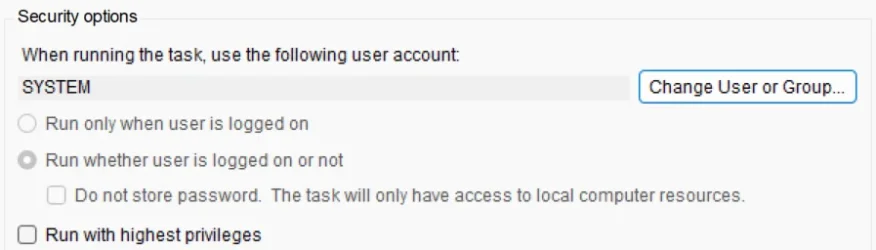
I'm only a novice here and maybe barking up the wrong tree, but, but recently I had an issue with Task Scheduler running a script. It was working fine until a Windows Update changed something a few months ago. It just wouldn't run even pressing the run option. But by switching the user from my own user account to SYSTEM it works perfectly again. It also runs silently in the background now without anything showing on the screen. Might be worth a try.

Screenshot 2026-04-26 184749.webp
 

My Computer

System One

  • OS
    Windows 11 Pro 25H2 26200.7922
    Computer type
    PC/Desktop
    Manufacturer/Model
    Local shop built (KC Computers Ltd)
    CPU
    Intel Core i9 13900F
    Motherboard
    Gigabyte Z690 Gaming X (rev. 1.0/1.1) - (BIOS: F32 09 18 2025)
    Memory
    2 x Kingston Fury 32gb DDR5 5600 Beast
    Graphics Card(s)
    Gigabyte Eagle (Nvidia) RTX 3060
    Sound Card
    Chord Async USB 44.1kHz - 384kHz 2Qute DAC
    Monitor(s) Displays
    Gigabyte AORUS FO32U2 32” OLED Flat Gaming Monitor, 0.03ms, KVM, 250 cd/m2, FreeSync Premium Pro, HDR True Black 400
    Screen Resolution
    3840 x 2160 (UHD), 240Hz
    Hard Drives
    1 x KINGSTON NVMe M.2 SSDSKC3000D2048G 2TB
    1 x Samsung SSD 870 EVO 250GB
    2 x Crucial CT4000MX500SSD1 4TB
    2 x Crucial CT2000MX500SSD1 2TB
    1 x Crucial CT250MX500SSD1 250.0 GB
    PSU
    Gigabyte 750w
    Case
    Fractal Torrent
    Cooling
    Stock Intel CPU, 2 x Fractal 180mm PWM (front), 3 x Fractal 140mm PWM (bottom)
    Keyboard
    Logitech MX Mechanical Wireless Illuminated Performance Keyboard
    Mouse
    Logitech MX Master 3S Wireless Performance Mouse
    Internet Speed
    900 Mbps/900 Mbps Trooli FTTP
    Browser
    Firefox
    Antivirus
    Eset Nod32
In this case, SYSTEM would not be the right identity. Python normally installs environment settings to your user profile. SYSTEM wouldn't have those settings.

The reason you need SYSTEM is you have "logged on or not" checked, which means only SYSTEM has the privileges to run a process (not owned by you) in your desktop session. If you chose "only when user logged on", then "Run with highest privileges" works well enough.
 

My Computer

System One

  • OS
    Windows 7
After a whole bunch of poking around, I was able to turn the solution into 7 lines! The "magic" is in dfinke's Import-Excel.
Import-Module G:\Documents\WindowsPowerShell\Modules\ImportExcel
$sourceUrl = "https://api.open-meteo.com/v1/forecast?latitude=39.49&longitude=-119.9&daily=sunset&hourly=temperature_2m&timezone=America/Los_Angeles&past_days=7&forecast_days=7&temperature_unit=fahrenheit&format=xlsx"
$data_table = "G:\workspace\apples\data.xlsx" # Temporary location for downloaded file
Export-Excel -Path $data_table -WorksheetName "Sheet1" -ClearSheet
Invoke-WebRequest -Uri $sourceUrl -OutFile $data_table
$sunset = "G:\workspace\apples\sunset-temps.xlsx"
Import-Excel $data_table | Export-Excel -Path $sunset -WorksheetName "Data"
The Task Scheduler components:
Program/script: C:\Windows\System32\WindowsPowerShell\v1.0\powershell.exe
Arguments: -command & G:\workspace\apples\temp-forecast.ps1
Start in: G:\workspace\apples
 

My Computer

System One

  • OS
    Windows 11 Pro
    Computer type
    PC/Desktop
    Manufacturer/Model
    Dell Slim ECS1250
    CPU
    Intel(R) Core(TM) Ultra 7 265 2.40 GHz
    Memory
    16.0 GB
    Graphics Card(s)
    Intel Graphics
    Monitor(s) Displays
    HP Pavilion 20xi
The more proper method for calling a PS script is:
Command: powershell.exe
Arguments: -ExecutionPolicy Bypass -File G:\workspace\apples\temp-forecast.ps1
Start in: G:\workspace\apples

powershell.exe should be in your execution path, so you don't need the full pathname.
"-ExecutionPolicy Bypass" will allow this script to run this one instance, even if your current PS execution policy doesn't allow scripts.
 

My Computer

System One

  • OS
    Windows 7
@garlin Thanks for your comment. I had indeed wandered off the reservation with too many iterations. I've updated and tested my script with the more proper method. All is well.
 

My Computer

System One

  • OS
    Windows 11 Pro
    Computer type
    PC/Desktop
    Manufacturer/Model
    Dell Slim ECS1250
    CPU
    Intel(R) Core(TM) Ultra 7 265 2.40 GHz
    Memory
    16.0 GB
    Graphics Card(s)
    Intel Graphics
    Monitor(s) Displays
    HP Pavilion 20xi
Back
Top Bottom