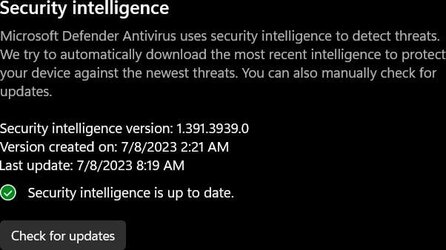
Yes! nothing happens... Started the day after I installed KB 5007651 ? So I've been going to Start\All apps\Windows Security (left click) down to Virus & Threat Protection,
Protection Updates\ and, checking for updates -
Attachments
updates.jpg
25.4 KB
· Views: 3
My Computer
At a glance
Windows 11 25H2 (OS Build 26200.8655)Processor: 11th Gen Intel(R) Core(TM) i5-1135...12GBIntel R Iris R XE Graphics family
OS
Windows 11 25H2 (OS Build 26200.8655)
Computer type
Laptop
Manufacturer/Model
Dell
CPU
Processor: 11th Gen Intel(R) Core(TM) i5-1135G7 @ 2.40G
Motherboard
64-bit operating system Dell 0XMF7W
Memory
12GB
Graphics Card(s)
Intel R Iris R XE Graphics family
Sound Card
Cirrus Speakers High Definition Audio
Monitor(s) Displays
Generic PnP monitor
Screen Resolution
1920 x 1080
Hard Drives
NVMe 670p SSDPEKNU512GZ NVMe I NTEL 512GB
Case
cheap
Mouse
Logitech wireless mouse
Internet Speed
16 Mps download
Browser
Google Chrome
Antivirus
Security: Microsoft Defender & Malwarebytes Premium (with browser guard)
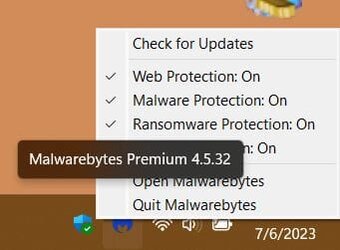
Before the download of KB 5007651.. I could rt. mouse click on the taskbar defender & it would give me choices: Run quick scan, 2. Check for updates on the defender, thats all I recall.....
My Computer
At a glance
Windows 11 25H2 (OS Build 26200.8655)Processor: 11th Gen Intel(R) Core(TM) i5-1135...12GBIntel R Iris R XE Graphics family
OS
Windows 11 25H2 (OS Build 26200.8655)
Computer type
Laptop
Manufacturer/Model
Dell
CPU
Processor: 11th Gen Intel(R) Core(TM) i5-1135G7 @ 2.40G
Motherboard
64-bit operating system Dell 0XMF7W
Memory
12GB
Graphics Card(s)
Intel R Iris R XE Graphics family
Sound Card
Cirrus Speakers High Definition Audio
Monitor(s) Displays
Generic PnP monitor
Screen Resolution
1920 x 1080
Hard Drives
NVMe 670p SSDPEKNU512GZ NVMe I NTEL 512GB
Case
cheap
Mouse
Logitech wireless mouse
Internet Speed
16 Mps download
Browser
Google Chrome
Antivirus
Security: Microsoft Defender & Malwarebytes Premium (with browser guard)
Before the download of KB 5007651.. I could rt. mouse click on the taskbar defender & it would give me choices: Run quick scan, 2. Check for updates on the defender, thats all I recall.....
This issue has a long tail. The irritating thing is that I don't use Defender but Norton 360 which, when installed takes over and shuts off Defender. However, Windows Update persists in downloading definitions including this rogue update. You might also find that when you try to open Windows Security Centre the app crashes and an error shows in Event Viewer/Reliabilty Monitor. The Windows Health Centre service probably stopped and restarted after 1 minute. BTW, there is another thread on this issue
Windows Security Health Crash after Windows 11 22H2 Upgrade
Thanks for the reply ! I've had no crashes or errors - none in the event viewer. I see on the forum, alot of other users with the same issue as mine.
I sent my issue to an MS forum. Only to find the problem was worse on the MS forum. Will be back. I have grandkids here today. Cheers
My Computer
At a glance
Windows 11 25H2 (OS Build 26200.8655)Processor: 11th Gen Intel(R) Core(TM) i5-1135...12GBIntel R Iris R XE Graphics family
OS
Windows 11 25H2 (OS Build 26200.8655)
Computer type
Laptop
Manufacturer/Model
Dell
CPU
Processor: 11th Gen Intel(R) Core(TM) i5-1135G7 @ 2.40G
Motherboard
64-bit operating system Dell 0XMF7W
Memory
12GB
Graphics Card(s)
Intel R Iris R XE Graphics family
Sound Card
Cirrus Speakers High Definition Audio
Monitor(s) Displays
Generic PnP monitor
Screen Resolution
1920 x 1080
Hard Drives
NVMe 670p SSDPEKNU512GZ NVMe I NTEL 512GB
Case
cheap
Mouse
Logitech wireless mouse
Internet Speed
16 Mps download
Browser
Google Chrome
Antivirus
Security: Microsoft Defender & Malwarebytes Premium (with browser guard)