TB3 external nvme ssd enclosure freezes computer


psideburns

New member
Local time
8:02 AM
Posts
9
OS
win 11
Hello, first post here. I'm new to Win11, just updated last week from 10 pro. My problem is whenever I plug in TB3 cable attached to my highpoint nvme ssd enclosure, the computer locks up and becomes unresponsive. When I unplug cable, it comes back to life. On the previous Win 10pro build, everything worked fine. I updated with all extrenal devices unplugged as per upgrade info. So I have a caldigit TB3 dock inbetween the computer and nvme enclosure. When enclosure is unplugged from dock, all is well and everything shows up in TB utility. The problem is when I plug in the nvme enclosure, it freezes. When I unplug it, back to normal. This is unacceptable as I have many games on nvme enclosure and need them. Before I roll back to Win 10pro is there any advice on things to try to fix this in Win 11. I like the interface and I would rather make this work. Thanks in advance!- Paul
 

My Computer My Computer

At a glance

win 11
OS
win 11
Welcome to Eleven Forums, psideburns.

It is a shame to hear this is happening on your Win 11, especially as you report it was working well on windows 10.

To help us assist you, can you confirm if the issue occurs :

1) when the NVMe device is plugged in at cold boot, or
2) when it is plugged in when the OS is running?
 

My Computers My Computers

  • At a glance

    Windows 11AMD Ryzen 5 560016 GBSapphire Radeon RX 6500XT (8 GB version)
    OS
    Windows 11
    Computer type
    PC/Desktop
    CPU
    AMD Ryzen 5 5600
    Motherboard
    MSI B550-A Pro
    Memory
    16 GB
    Graphics Card(s)
    Sapphire Radeon RX 6500XT (8 GB version)
    Monitor(s) Displays
    BenQ Mobuiz EX2710Q QHD, Iiyama ProLite X23377HDS
    Hard Drives
    MSI Spatium M461 4TB
  • At a glance

    Windows 11Intel Celeron N4020
    Operating System
    Windows 11
    Computer type
    Laptop
    Manufacturer/Model
    Acer A114
    CPU
    Intel Celeron N4020
I suppose that Caldigit support puts you off with something like "Windows 11 is unsupported until it is released".

Right?
 

My Computers My Computers

  • At a glance

    Windows 11 26200.8973Amd Threadripper 7970X128GB (4 X 32) G.Skill DDR5 6400 (RDIMM)Gigabyte RTX 4090 OC
    OS
    Windows 11 26200.8973
    Computer type
    PC/Desktop
    Manufacturer/Model
    homebuilt
    CPU
    Amd Threadripper 7970X
    Motherboard
    Gigabyte TRX50 Aero D Rev. 1.0
    Memory
    128GB (4 X 32) G.Skill DDR5 6400 (RDIMM)
    Graphics Card(s)
    Gigabyte RTX 4090 OC
    Sound Card
    none (USB to speakers), Realtek
    Monitor(s) Displays
    Innocn 32" OLED
    Screen Resolution
    3840 X 2160 @ 60Hz
    Hard Drives
    Crucial T700 2TB M.2 NVME SSD
    WD 4TB Blue SATA SSD
    Seagate 18TB IronWolf Pro
    PSU
    BeQuiet! Straight Power 12 1500W
    Case
    Lian Li 011 Dynamic Evo XL
    Cooling
    SilverStone Technology XE360-TR5, with 3 Phanteks T30 fans
    Keyboard
    Cherry KC 500 MX LP (mechanical)
    Mouse
    Logitech M500s (wired)
    Internet Speed
    2000/250 Mbps (down/up)
    Other Info
    xFinity gateway
  • At a glance

    windows 11 26200.8973Intel I9-13900K64GB G.Skill DDR5-6000Gigabyte RTX 3090 ti
    Operating System
    windows 11 26200.8973
    Computer type
    PC/Desktop
    Manufacturer/Model
    homebuilt
    CPU
    Intel I9-13900K
    Motherboard
    Asus RoG Strix Z690-E
    Memory
    64GB G.Skill DDR5-6000
    Graphics card(s)
    Gigabyte RTX 3090 ti
    Sound Card
    built in Realtek
    Monitor(s) Displays
    Philips 27E1N8900 27" OLED
    Screen Resolution
    3840 X 2160 @60Hz
    Hard Drives
    WDC SN850 1TB
    8TB Seagate Ironwolf
    4TB Seagate Ironwolf
    PSU
    eVGA SuperNOVA 1300 GT
    Case
    Lian Li 011 Dynamic Evo
    Cooling
    Corsair iCUE H150i ELITE CAPELLIX Liquid CPU Cooler
    Keyboard
    Cherry Streaming (wired)
    Mouse
    Logitech M500s (wired)
Welcome to Eleven Forums, psideburns.

It is a shame to hear this is happening on your Win 11, especially as you report it was working well on windows 10.

To help us assist you, can you confirm if the issue occurs :

1) when the NVMe device is plugged in at cold boot, or
2) when it is plugged in when the OS is running?
Yes of course. It happens only when OS is running that I can observe system lockup and with unplugging, immeadiate restore of control to system. Almost like a screenshot mode that unfreezes when you unplug it. On system startup it fails and freezes during the circular dots indicator of windowsstart screen, never progresses during boot process. It fails at that point and needs a force power to restart if nvme is unplugged of course. You know, its funny but I tried to upgrtade the first time with every device plugged in had same startup effect. Then I read the reccomendations to unplug devices and it went thru at that point. I didnt make the connection until just now...
 

My Computer My Computer

At a glance

win 11
OS
win 11
I suppose that Caldigit support puts you off with something like "Windows 11 is unsupported until it is released".

Right?
Well yes, but there is no operational problem with just the caldigit dock connected thru TB3 cable with win11. System functions normally, only when I plug in the external nvme enclosure from Highpoint- RocketStor 6661A- basically an external PCIE x3 nvme drive which connects with TB3 cable. Thats when the system locks up. Definately a problem with Win11 as this very setup worked flawlessly with Win10 pro. Hope I dont have to downgrade as I have over 7TB of games I dont want to have to reinstall. Particularily with Epic Game launcher as there is no workaround to get library noticed if you install new OS. Its a flaw with them as Ive researched a fix to no avail online...
 

My Computer My Computer

At a glance

win 11
OS
win 11
Well yes, but there is no operational problem with just the caldigit dock connected thru TB3 cable with win11. System functions normally, only when I plug in the external nvme enclosure from Highpoint- RocketStor 6661A- basically an external PCIE x3 nvme drive which connects with TB3 cable. Thats when the system locks up. Definately a problem with Win11 as this very setup worked flawlessly with Win10 pro. Hope I dont have to downgrade as I have over 7TB of games I dont want to have to reinstall. Particularily with Epic Game launcher as there is no workaround to get library noticed if you install new OS. Its a flaw with them as Ive researched a fix to no avail online...
I spent alot of time and money to get fast large nvme external storage just for gaming and digital photography.
 

My Computer My Computer

At a glance

win 11
OS
win 11
Well yes, but there is no operational problem with just the caldigit dock connected thru TB3 cable with win11. System functions normally, only when I plug in the external nvme enclosure from Highpoint- RocketStor 6661A- basically an external PCIE x3 nvme drive which connects with TB3 cable. Thats when the system locks up. Definately a problem with Win11 as this very setup worked flawlessly with Win10 pro. Hope I dont have to downgrade as I have over 7TB of games I dont want to have to reinstall. Particularily with Epic Game launcher as there is no workaround to get library noticed if you install new OS. Its a flaw with them as Ive researched a fix to no avail online...
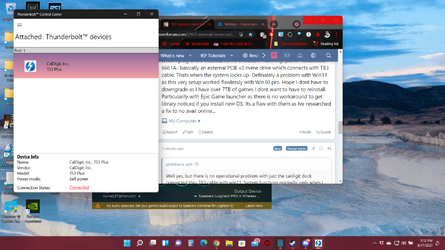
Here is a screenshot of the windows thunderbolt utility running and reading the dock normally in Win11 as proof it functions.
 

Attachments

  • 2021-08-17.png
    2021-08-17.png
    366.1 KB · Views: 15

My Computer My Computer

At a glance

win 11
OS
win 11
Can you directly connect the drive to the PC?

(I'm rather hazy on the compatibility between USB-C and Thunderbolt devices.)
 

My Computers My Computers

  • At a glance

    Windows 11 26200.8973Amd Threadripper 7970X128GB (4 X 32) G.Skill DDR5 6400 (RDIMM)Gigabyte RTX 4090 OC
    OS
    Windows 11 26200.8973
    Computer type
    PC/Desktop
    Manufacturer/Model
    homebuilt
    CPU
    Amd Threadripper 7970X
    Motherboard
    Gigabyte TRX50 Aero D Rev. 1.0
    Memory
    128GB (4 X 32) G.Skill DDR5 6400 (RDIMM)
    Graphics Card(s)
    Gigabyte RTX 4090 OC
    Sound Card
    none (USB to speakers), Realtek
    Monitor(s) Displays
    Innocn 32" OLED
    Screen Resolution
    3840 X 2160 @ 60Hz
    Hard Drives
    Crucial T700 2TB M.2 NVME SSD
    WD 4TB Blue SATA SSD
    Seagate 18TB IronWolf Pro
    PSU
    BeQuiet! Straight Power 12 1500W
    Case
    Lian Li 011 Dynamic Evo XL
    Cooling
    SilverStone Technology XE360-TR5, with 3 Phanteks T30 fans
    Keyboard
    Cherry KC 500 MX LP (mechanical)
    Mouse
    Logitech M500s (wired)
    Internet Speed
    2000/250 Mbps (down/up)
    Other Info
    xFinity gateway
  • At a glance

    windows 11 26200.8973Intel I9-13900K64GB G.Skill DDR5-6000Gigabyte RTX 3090 ti
    Operating System
    windows 11 26200.8973
    Computer type
    PC/Desktop
    Manufacturer/Model
    homebuilt
    CPU
    Intel I9-13900K
    Motherboard
    Asus RoG Strix Z690-E
    Memory
    64GB G.Skill DDR5-6000
    Graphics card(s)
    Gigabyte RTX 3090 ti
    Sound Card
    built in Realtek
    Monitor(s) Displays
    Philips 27E1N8900 27" OLED
    Screen Resolution
    3840 X 2160 @60Hz
    Hard Drives
    WDC SN850 1TB
    8TB Seagate Ironwolf
    4TB Seagate Ironwolf
    PSU
    eVGA SuperNOVA 1300 GT
    Case
    Lian Li 011 Dynamic Evo
    Cooling
    Corsair iCUE H150i ELITE CAPELLIX Liquid CPU Cooler
    Keyboard
    Cherry Streaming (wired)
    Mouse
    Logitech M500s (wired)
Can you directly connect the drive to the PC?

(I'm rather hazy on the compatibility between USB-C and Thunderbolt devices.)
I will try that when I get home tonight. Any other thoughts?
Has anyone heard of any incompatablity between TB3 external enclosure or ssd hard drives by way of TB3 and Win11?
 

My Computer My Computer

At a glance

win 11
OS
win 11
Only thing I can think of is that Windows might have replaced a dedicated USB 3 driver for your system with a generic one from Windows Update. Might be something to take a look at.
 

My Computers My Computers

  • At a glance

    Windows 11 23H2 Current buildAMD Ryzen 9 3950X4 * 32 GB - Corsair Vengeance 3600 MHzEVGA GeForce RTX 3080 Ti XC3 ULTRA GAMING (12...
    OS
    Windows 11 23H2 Current build
    Computer type
    PC/Desktop
    Manufacturer/Model
    HomeBrew
    CPU
    AMD Ryzen 9 3950X
    Motherboard
    MSI MEG X570 GODLIKE
    Memory
    4 * 32 GB - Corsair Vengeance 3600 MHz
    Graphics Card(s)
    EVGA GeForce RTX 3080 Ti XC3 ULTRA GAMING (12G-P5-3955-KR)
    Sound Card
    Realtek® ALC1220 Codec
    Monitor(s) Displays
    2x Eve Spectrum ES07D03 4K Gaming Monitor (Matte) | Eve Spectrum ES07DC9 4K Gaming Monitor (Glossy)
    Screen Resolution
    3x 3840 x 2160
    Hard Drives
    3x Samsung 980 Pro NVMe PCIe 4 M.2 2 TB SSD (MZ-V8P2T0B/AM) } 3x Sabrent Rocket NVMe 4.0 1 TB SSD (USB)
    PSU
    PC Power & Cooling’s Silencer Series 1050 Watt, 80 Plus Platinum
    Case
    Fractal Design Define 7 XL Dark ATX Full Tower Case
    Cooling
    Arctic Liquid Freezer III 420 RGB + Air 3x 140mm case fans (pull front) + 1x 120 mm (push back) and 1 x 120 mm (pull bottom)
    Keyboard
    SteelSeries Apex Pro Wired Gaming Keyboard
    Mouse
    Logitech MX Master 3S | MX Master 3 for Business
    Internet Speed
    AT&T LightSpeed Gigabit Duplex Ftth
    Browser
    Nightly (default) + Firefox (stable), Chrome, Edge , Arc
    Antivirus
    Defender + MB 5 Beta
  • At a glance

    ChromeOS Flex Dev Channel (current)Intel(R) Core(TM) i5-6300U CPU @ 2.40GHz, 250...16 GBIntel(R) HD Graphics 520
    Operating System
    ChromeOS Flex Dev Channel (current)
    Computer type
    Laptop
    Manufacturer/Model
    Dell Latitude E5470
    CPU
    Intel(R) Core(TM) i5-6300U CPU @ 2.40GHz, 2501 Mhz, 2 Core(s), 4 Logical Processor(s)
    Motherboard
    Dell
    Memory
    16 GB
    Graphics card(s)
    Intel(R) HD Graphics 520
    Sound Card
    Intel(R) HD Graphics 520 + RealTek Audio
    Monitor(s) Displays
    Dell laptop display 15"
    Screen Resolution
    1920 * 1080
    Hard Drives
    Toshiba 128GB M.2 22300 drive
    INTEL Cherryville 520 Series SSDSC2CW180A 180 GB SATA III SSD
    PSU
    Dell
    Case
    Dell
    Cooling
    Dell
    Keyboard
    Dell
    Mouse
    Logitech MX Master 3S (shared w. Sys 1) | Dell TouchPad
    Internet Speed
    AT&T LightSpeed Gigabit Duplex Ftth
Yes of course. It happens only when OS is running that I can observe system lockup and with unplugging, immeadiate restore of control to system. Almost like a screenshot mode that unfreezes when you unplug it. On system startup it fails and freezes during the circular dots indicator of windowsstart screen, never progresses during boot process. It fails at that point and needs a force power to restart if nvme is unplugged of course. You know, its funny but I tried to upgrtade the first time with every device plugged in had same startup effect. Then I read the reccomendations to unplug devices and it went thru at that point. I didnt make the connection until just now...

Well yes, but there is no operational problem with just the caldigit dock connected thru TB3 cable with win11. System functions normally, only when I plug in the external nvme enclosure from Highpoint- RocketStor 6661A- basically an external PCIE x3 nvme drive which connects with TB3 cable. Thats when the system locks up. Definately a problem with Win11 as this very setup worked flawlessly with Win10 pro. Hope I dont have to downgrade as I have over 7TB of games I dont want to have to reinstall. Particularily with Epic Game launcher as there is no workaround to get library noticed if you install new OS. Its a flaw with them as Ive researched a fix to no avail online...
Had you checked the CalDigit website for a firmware update for your device?

Other thing is the NVMe drive formatted to contain any system files?

And finally, do you have Fast Startup enabled on Windows 11?
 

My Computers My Computers

  • At a glance

    Windows 11AMD Ryzen 5 560016 GBSapphire Radeon RX 6500XT (8 GB version)
    OS
    Windows 11
    Computer type
    PC/Desktop
    CPU
    AMD Ryzen 5 5600
    Motherboard
    MSI B550-A Pro
    Memory
    16 GB
    Graphics Card(s)
    Sapphire Radeon RX 6500XT (8 GB version)
    Monitor(s) Displays
    BenQ Mobuiz EX2710Q QHD, Iiyama ProLite X23377HDS
    Hard Drives
    MSI Spatium M461 4TB
  • At a glance

    Windows 11Intel Celeron N4020
    Operating System
    Windows 11
    Computer type
    Laptop
    Manufacturer/Model
    Acer A114
    CPU
    Intel Celeron N4020
Had you checked the CalDigit website for a firmware update for your device?

Other thing is the NVMe drive formatted to contain any system files?

And finally, do you have Fast Startup enabled on Windows 11?
Yes just updated firmware on caldigit to v44, nvme drives were formatted to contain any file type, they work flawlessly with 10pro and finally, fast startup was checked. I just unchecked it...
Also I ran the thunderbolt driver also again and updated thunderbolt control center from MS store. It registers caldigit...
 

My Computer My Computer

At a glance

win 11
OS
win 11
See if there is any improvement in stability with fast startup switched off.
 

My Computers My Computers

  • At a glance

    Windows 11AMD Ryzen 5 560016 GBSapphire Radeon RX 6500XT (8 GB version)
    OS
    Windows 11
    Computer type
    PC/Desktop
    CPU
    AMD Ryzen 5 5600
    Motherboard
    MSI B550-A Pro
    Memory
    16 GB
    Graphics Card(s)
    Sapphire Radeon RX 6500XT (8 GB version)
    Monitor(s) Displays
    BenQ Mobuiz EX2710Q QHD, Iiyama ProLite X23377HDS
    Hard Drives
    MSI Spatium M461 4TB
  • At a glance

    Windows 11Intel Celeron N4020
    Operating System
    Windows 11
    Computer type
    Laptop
    Manufacturer/Model
    Acer A114
    CPU
    Intel Celeron N4020
See if there is any improvement in stability with fast startup switched off.
I will do that tonight, life gave me some reasons to not mess with this problem for a few days but I am back on it. Thnk you for all advice sos far. More to come tonight!
 

My Computer My Computer

At a glance

win 11
OS
win 11
try plug direct to the MB I had one the other day using enclosure after direct it worked fine
 

My Computer My Computer

At a glance

win11i9 1085016GBnVIDEA Geoforce 3070
OS
win11
Computer type
PC/Desktop
Manufacturer/Model
Me
CPU
i9 10850
Motherboard
MS-7C75
Memory
16GB
Graphics Card(s)
nVIDEA Geoforce 3070
Sound Card
Onboard
Monitor(s) Displays
Samsung 55inch TV
Screen Resolution
3040 X 2160
Hard Drives
6TB over 4 drives
Case
generic
Cooling
water cooled
Keyboard
generic
Mouse
generic
Internet Speed
500mb
Browser
various
Antivirus
ATM Bitdefender
I have this problem on an Asrock Deskmini 310 running pre-release build 22458. I also have a similar problem with a built in card reader on a Samsung Book 12. A Gigabyte Brix N4000 is the only Windows 11 one that can mount these devices correctly.
 

My Computer My Computer

At a glance

windows 11
OS
windows 11
Where did you fund the TB Control Center app on the MS Store? I can't locate it? Also, what driver version are you using for TB? Thanks.
 

My Computer My Computer

At a glance

Windows 11I7-1170032GBGTX 060
OS
Windows 11
Computer type
PC/Desktop
Manufacturer/Model
Custom
CPU
I7-11700
Motherboard
Asus Z590-P
Memory
32GB
Graphics Card(s)
GTX 060
Sound Card
MB only
Monitor(s) Displays
Viewsonic VP2770-LED
Screen Resolution
2560x1440
Hard Drives
1x500GB M2, 2x2TB
PSU
CoolerMaster 650
Case
CoolerMaster
Cooling
CoolerMaster
Keyboard
Logitech wired
Mouse
Logitec wired
Internet Speed
400Mbps
Browser
Edge
Antivirus
BitDefender
Other Info
Asus Thunderbolt EX 4 card
This thread has drifted slightly off topic but the problem reported by the original poster has been fixed in a later release of Windows 11
 

My Computer My Computer

At a glance

windows 11
OS
windows 11
OK, but other problems with the TB driver under Windows 11 remain:

I am using Intel driver version 1.41.1193.0 and while I can get the drive to install, Device Manager shows "Device not started (nhi)" in the events log. I also have the issue of my monitor (connected via TB cable) blinks off and on continuously after the PC wakes from sleep. Only a reboot stops this.
 

My Computer My Computer

At a glance

Windows 11I7-1170032GBGTX 060
OS
Windows 11
Computer type
PC/Desktop
Manufacturer/Model
Custom
CPU
I7-11700
Motherboard
Asus Z590-P
Memory
32GB
Graphics Card(s)
GTX 060
Sound Card
MB only
Monitor(s) Displays
Viewsonic VP2770-LED
Screen Resolution
2560x1440
Hard Drives
1x500GB M2, 2x2TB
PSU
CoolerMaster 650
Case
CoolerMaster
Cooling
CoolerMaster
Keyboard
Logitech wired
Mouse
Logitec wired
Internet Speed
400Mbps
Browser
Edge
Antivirus
BitDefender
Other Info
Asus Thunderbolt EX 4 card
This thread has drifted slightly off topic but the problem reported by the original poster has been fixed in a later release of Windows 11
And where is this solution- as to this day it still locks up my machine when I plug in the enclosure. I currently have latest version of win11 installed and still same problem.
 

My Computer My Computer

At a glance

win 11
OS
win 11

Latest Support Threads

Back
Top Bottom