JavaScript is disabled. For a better experience, please enable JavaScript in your browser before proceeding.
You are using an out of date browser. It may not display this or other websites correctly.
You should upgrade or use an
alternative browser .
Solved Temporary & Repeating Loss of System Audio
PowerSpec G355 Gaming Desktop PC
Howdy Folks
I'm about a month into Windows 11 upgrade from W10 and am still tweaking here and there.
I've developed an annoying loss of audio warnings on overwriting files. Actually, I'm guessing all my system audio takes a nap as my browser audio works fine.
The standard 'Restart' resolves the issue until next time.
Device Manager: Driver is current.
I ran the 3 DISM image cleanups followed by SFC /Scannow ... all is good there.
I'm guessing this is a simple fix and am looking for suggestions.
TIA to all who read/respond to this post.
Cheers!
/jdU
Windows Build/Version
Windows 11 Pro, Ver. 24H2 (OS Build 26100.3476)
Windows 11 Pro Intel Core i7-9700KF Processor 3.6GHz 16GB DDR4-3000 RAM NVIDIA GeForce RTX 2060 6GB GDDR6 Windows 11 Pro PC/Desktop PowerSpec G355 Gaming Desktop PC Intel Core i7-9700KF Processor 3.6GHz ASUS Z390-P Prime Intel LGA 1151 ATX Motherboard 16GB DDR4-3000 RAM NVIDIA GeForce RTX 2060 6GB GDDR6 Realtek High Definition Audio Dell SE2717HR RVJXC 27" Full HD 1920 X 1080 Monitor Full HD 1920 X 1080, 96 dpi Primary: 500GB M.2 SSD 600 Watt 80 Plus Power Supply (?) Open Front, Top, Bottom & Back 3 Case Fans, 2 Graphics Card Fans, 1 CPU Fan HP Wireless Logitech M510 Wireless Average 150 to 200+ Mbps via Xfinity xFi Pod to Ethernet cable Firefox (Chrome Alternate rarely used) Bitdefender Comcast Wi-Fi Router (~15 Ft. & 1 Floor below) runs 600+ Mbps
I would go to start-settings-system and sound for starters.
Windows 11 pro AMD Ryzen 7 5700X G.SKILL Ripjaws V Series (Intel XMP) DDR4 RAM... ASUS Dual GeForce RTX™ 4060 White Edition Windows 11 pro PC/Desktop custom build AMD Ryzen 7 5700X AMD ROG STRIX B550-F G.SKILL Ripjaws V Series (Intel XMP) DDR4 RAM 32GB (2x16GB) ASUS Dual GeForce RTX™ 4060 White Edition on-board SAMSUNG 32-Inch Odyssey G50D Series 2560 x 1440 Samsung 990 EVO Plus 1TB, ssd INTEL SSD 730 series 240 GB, and Samsung 840 Evo ssd 500 GB. CORSAIR - RMe Series 1000W 80 PLUS Gold Fully Modular ATX Power Supply Antec 900 Nine Hundred ATX Mid Tower Computer Gaming Case ID-COOLING SE-214-XT Black CPU Cooler All-Black Layout Logitech 520 Logitech 310 Google Chrome Windows Defender
Well-known member
Member
Thread Starter
I would go to start-settings-system and sound for starters.
Yep, been there. All's good including test button producing audio scale sound; though running the Audio Troubleshooter no sound. Thanks for the suggestion.
Windows 11 Pro Intel Core i7-9700KF Processor 3.6GHz 16GB DDR4-3000 RAM NVIDIA GeForce RTX 2060 6GB GDDR6 Windows 11 Pro PC/Desktop PowerSpec G355 Gaming Desktop PC Intel Core i7-9700KF Processor 3.6GHz ASUS Z390-P Prime Intel LGA 1151 ATX Motherboard 16GB DDR4-3000 RAM NVIDIA GeForce RTX 2060 6GB GDDR6 Realtek High Definition Audio Dell SE2717HR RVJXC 27" Full HD 1920 X 1080 Monitor Full HD 1920 X 1080, 96 dpi Primary: 500GB M.2 SSD 600 Watt 80 Plus Power Supply (?) Open Front, Top, Bottom & Back 3 Case Fans, 2 Graphics Card Fans, 1 CPU Fan HP Wireless Logitech M510 Wireless Average 150 to 200+ Mbps via Xfinity xFi Pod to Ethernet cable Firefox (Chrome Alternate rarely used) Bitdefender Comcast Wi-Fi Router (~15 Ft. & 1 Floor below) runs 600+ Mbps
Well-known member
Member
Thread Starter
Hi Folks
Looking for any more ideas; here's some new details:
1. I've noticed a restart
may or
may not temporarily resolve the missing system sound issue.
2. Unrelated to above: Loading Macrium Reflect yesterday produced the normal (system) UAC warning sound, however completion of the backup did not produce the expected "Finished" sound. I'm thinking it's only system sounds at issue, where apps continue to produce sounds normally.
That's all I've got for now.
Thanks again to all who join in.
Windows 11 Pro Intel Core i7-9700KF Processor 3.6GHz 16GB DDR4-3000 RAM NVIDIA GeForce RTX 2060 6GB GDDR6 Windows 11 Pro PC/Desktop PowerSpec G355 Gaming Desktop PC Intel Core i7-9700KF Processor 3.6GHz ASUS Z390-P Prime Intel LGA 1151 ATX Motherboard 16GB DDR4-3000 RAM NVIDIA GeForce RTX 2060 6GB GDDR6 Realtek High Definition Audio Dell SE2717HR RVJXC 27" Full HD 1920 X 1080 Monitor Full HD 1920 X 1080, 96 dpi Primary: 500GB M.2 SSD 600 Watt 80 Plus Power Supply (?) Open Front, Top, Bottom & Back 3 Case Fans, 2 Graphics Card Fans, 1 CPU Fan HP Wireless Logitech M510 Wireless Average 150 to 200+ Mbps via Xfinity xFi Pod to Ethernet cable Firefox (Chrome Alternate rarely used) Bitdefender Comcast Wi-Fi Router (~15 Ft. & 1 Floor below) runs 600+ Mbps
Just a Computer User
Pro User
VIP
i will assume that you have checked control panel > sound
Windows 11 Home Ryzen 7 5825u 64GB DDR4 3200 Ryzen 7 5825u Windows 11 Home PC/Desktop HP 24" AiO Ryzen 7 5825u HP 64GB DDR4 3200 Ryzen 7 5825u RealTek 24" HP AiO 1920 x 1080 @60 Hz 1TB WD Blue SN580 M2 SSD Partitioned. 90W external power brick 24" All in One Default Air Cooling HP WiFi UK extended HP WiFi 3 Button 1GB full fibre Edge & Firefox AVG Internet Security/Windows Defender Mainly Open Source Software
Ubuntu 22.04.5 LTS i5 7200u 16GB DDR4 Intel Ubuntu 22.04.5 LTS Laptop Dell 13" Latitude 2017 i5 7200u Dell 16GB DDR4 Intel Intel 13" Dell Laptop 250GB Crucial 2.5" SSD Generic WiFi 3 button WiFi only Firefox ClamAV TK Mainly Open Source Software
Well-known member
Member
Thread Starter
@XxXxX (Steve)
Yes, Control Panel system sounds work (no attachment)
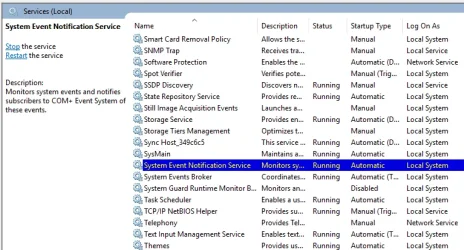
Re: 1. & 2. Attachments show System Event Notification Service is running and set to Automatic, and I see no instance of Sonitude SECOMN Service.
I've run
DISM /Online /Cleanup-Image /ScanHealth
DISM /Online /Cleanup-Image /CheckHealth
DISM /Online /Cleanup-Image /RestoreHealth
SFC /Scannow
Two or 3 times showing no issues.
I have system sounds now, but this has been intermittent, so we'll see what tomorrow brings.
Appreciate you joining in.
Windows 11 Pro Intel Core i7-9700KF Processor 3.6GHz 16GB DDR4-3000 RAM NVIDIA GeForce RTX 2060 6GB GDDR6 Windows 11 Pro PC/Desktop PowerSpec G355 Gaming Desktop PC Intel Core i7-9700KF Processor 3.6GHz ASUS Z390-P Prime Intel LGA 1151 ATX Motherboard 16GB DDR4-3000 RAM NVIDIA GeForce RTX 2060 6GB GDDR6 Realtek High Definition Audio Dell SE2717HR RVJXC 27" Full HD 1920 X 1080 Monitor Full HD 1920 X 1080, 96 dpi Primary: 500GB M.2 SSD 600 Watt 80 Plus Power Supply (?) Open Front, Top, Bottom & Back 3 Case Fans, 2 Graphics Card Fans, 1 CPU Fan HP Wireless Logitech M510 Wireless Average 150 to 200+ Mbps via Xfinity xFi Pod to Ethernet cable Firefox (Chrome Alternate rarely used) Bitdefender Comcast Wi-Fi Router (~15 Ft. & 1 Floor below) runs 600+ Mbps
Just a Computer User
Pro User
VIP
also it would be worth checking the reliability monitor for any events.
Windows 11 Home Ryzen 7 5825u 64GB DDR4 3200 Ryzen 7 5825u Windows 11 Home PC/Desktop HP 24" AiO Ryzen 7 5825u HP 64GB DDR4 3200 Ryzen 7 5825u RealTek 24" HP AiO 1920 x 1080 @60 Hz 1TB WD Blue SN580 M2 SSD Partitioned. 90W external power brick 24" All in One Default Air Cooling HP WiFi UK extended HP WiFi 3 Button 1GB full fibre Edge & Firefox AVG Internet Security/Windows Defender Mainly Open Source Software
Ubuntu 22.04.5 LTS i5 7200u 16GB DDR4 Intel Ubuntu 22.04.5 LTS Laptop Dell 13" Latitude 2017 i5 7200u Dell 16GB DDR4 Intel Intel 13" Dell Laptop 250GB Crucial 2.5" SSD Generic WiFi 3 button WiFi only Firefox ClamAV TK Mainly Open Source Software
Well-known member
Member
Thread Starter
Update: 5/13/25-7:00am
Booted, System Sounds working
8:45am: Full Shutdown (fast start has been disabled)
1:15pm: Booted normally, No System Sounds
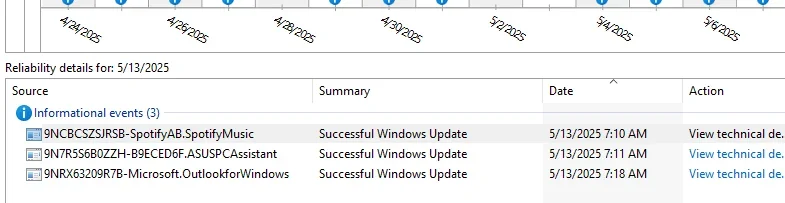
Reliability Monitor has 3 new entries: Attached
Note: In case it's relevant: Recently, initiating sleep mode works with an almost immediate wake. (Is the reason for shut down today).
Staying tuned and thanks to all with thoughts/comments.
Cheers!
jdU(250513-1) Reliability Monitor.webp
24.6 KB
· Views: 1
Windows 11 Pro Intel Core i7-9700KF Processor 3.6GHz 16GB DDR4-3000 RAM NVIDIA GeForce RTX 2060 6GB GDDR6 Windows 11 Pro PC/Desktop PowerSpec G355 Gaming Desktop PC Intel Core i7-9700KF Processor 3.6GHz ASUS Z390-P Prime Intel LGA 1151 ATX Motherboard 16GB DDR4-3000 RAM NVIDIA GeForce RTX 2060 6GB GDDR6 Realtek High Definition Audio Dell SE2717HR RVJXC 27" Full HD 1920 X 1080 Monitor Full HD 1920 X 1080, 96 dpi Primary: 500GB M.2 SSD 600 Watt 80 Plus Power Supply (?) Open Front, Top, Bottom & Back 3 Case Fans, 2 Graphics Card Fans, 1 CPU Fan HP Wireless Logitech M510 Wireless Average 150 to 200+ Mbps via Xfinity xFi Pod to Ethernet cable Firefox (Chrome Alternate rarely used) Bitdefender Comcast Wi-Fi Router (~15 Ft. & 1 Floor below) runs 600+ Mbps
Just a Computer User
Pro User
VIP
they are updates but no error messages which is a good sign.
Windows 11 Home Ryzen 7 5825u 64GB DDR4 3200 Ryzen 7 5825u Windows 11 Home PC/Desktop HP 24" AiO Ryzen 7 5825u HP 64GB DDR4 3200 Ryzen 7 5825u RealTek 24" HP AiO 1920 x 1080 @60 Hz 1TB WD Blue SN580 M2 SSD Partitioned. 90W external power brick 24" All in One Default Air Cooling HP WiFi UK extended HP WiFi 3 Button 1GB full fibre Edge & Firefox AVG Internet Security/Windows Defender Mainly Open Source Software
Ubuntu 22.04.5 LTS i5 7200u 16GB DDR4 Intel Ubuntu 22.04.5 LTS Laptop Dell 13" Latitude 2017 i5 7200u Dell 16GB DDR4 Intel Intel 13" Dell Laptop 250GB Crucial 2.5" SSD Generic WiFi 3 button WiFi only Firefox ClamAV TK Mainly Open Source Software
Well-known member
Member
Thread Starter
New Audio Drivers installed properly announcing themselves at full volume.
System sounds worked normally for half a day then went silent.
History says tomorrow morning all will be fine.
FWIW: Sleep mode is acting about the same; e.g. works sometimes and sometimes wakes immediately on its own requiring closing all open programs and performing a shutdown.
Both issues are relatively minor, but something is wrong. Perhaps the next monthly updates will help. TBD
Thanks to all!
Windows 11 Pro Intel Core i7-9700KF Processor 3.6GHz 16GB DDR4-3000 RAM NVIDIA GeForce RTX 2060 6GB GDDR6 Windows 11 Pro PC/Desktop PowerSpec G355 Gaming Desktop PC Intel Core i7-9700KF Processor 3.6GHz ASUS Z390-P Prime Intel LGA 1151 ATX Motherboard 16GB DDR4-3000 RAM NVIDIA GeForce RTX 2060 6GB GDDR6 Realtek High Definition Audio Dell SE2717HR RVJXC 27" Full HD 1920 X 1080 Monitor Full HD 1920 X 1080, 96 dpi Primary: 500GB M.2 SSD 600 Watt 80 Plus Power Supply (?) Open Front, Top, Bottom & Back 3 Case Fans, 2 Graphics Card Fans, 1 CPU Fan HP Wireless Logitech M510 Wireless Average 150 to 200+ Mbps via Xfinity xFi Pod to Ethernet cable Firefox (Chrome Alternate rarely used) Bitdefender Comcast Wi-Fi Router (~15 Ft. & 1 Floor below) runs 600+ Mbps
Just a Computer User
Pro User
VIP
Q. are the speakers USB attached or are they within the monitor.
Windows 11 Home Ryzen 7 5825u 64GB DDR4 3200 Ryzen 7 5825u Windows 11 Home PC/Desktop HP 24" AiO Ryzen 7 5825u HP 64GB DDR4 3200 Ryzen 7 5825u RealTek 24" HP AiO 1920 x 1080 @60 Hz 1TB WD Blue SN580 M2 SSD Partitioned. 90W external power brick 24" All in One Default Air Cooling HP WiFi UK extended HP WiFi 3 Button 1GB full fibre Edge & Firefox AVG Internet Security/Windows Defender Mainly Open Source Software
Ubuntu 22.04.5 LTS i5 7200u 16GB DDR4 Intel Ubuntu 22.04.5 LTS Laptop Dell 13" Latitude 2017 i5 7200u Dell 16GB DDR4 Intel Intel 13" Dell Laptop 250GB Crucial 2.5" SSD Generic WiFi 3 button WiFi only Firefox ClamAV TK Mainly Open Source Software
Well-known member
Member
Thread Starter
Re: Speakers*, (3.5mm connectors) they always work; if not system sounds they still work from YouTube, etc. Computer generated UAC notification sounds work. But trying to overwrite a file with another, the appropriate "Are you sure?" window opens but clicking "Yes" completes the save with no sound.
*
https://amz.cx/3S3A
Bose Companion 2 Series III Multimedia Speakers - for PC (with 3.5mm AUX & PC Input) Black
I'll stay tuned, hoping the next update provides something more.
Thanks again,
Windows 11 Pro Intel Core i7-9700KF Processor 3.6GHz 16GB DDR4-3000 RAM NVIDIA GeForce RTX 2060 6GB GDDR6 Windows 11 Pro PC/Desktop PowerSpec G355 Gaming Desktop PC Intel Core i7-9700KF Processor 3.6GHz ASUS Z390-P Prime Intel LGA 1151 ATX Motherboard 16GB DDR4-3000 RAM NVIDIA GeForce RTX 2060 6GB GDDR6 Realtek High Definition Audio Dell SE2717HR RVJXC 27" Full HD 1920 X 1080 Monitor Full HD 1920 X 1080, 96 dpi Primary: 500GB M.2 SSD 600 Watt 80 Plus Power Supply (?) Open Front, Top, Bottom & Back 3 Case Fans, 2 Graphics Card Fans, 1 CPU Fan HP Wireless Logitech M510 Wireless Average 150 to 200+ Mbps via Xfinity xFi Pod to Ethernet cable Firefox (Chrome Alternate rarely used) Bitdefender Comcast Wi-Fi Router (~15 Ft. & 1 Floor below) runs 600+ Mbps
Well-known member
Member
Thread Starter
Howdy All
I've started to notice this audio issue (may) coincide with a secondary problem of this desktop sometimes waking immediately after put into sleep-mode. Rather thank compounding both issues/solutions (here) I am marking this thread 'Solved'
Thanks again to everyone who participated!
Cheers!
Windows 11 Pro Intel Core i7-9700KF Processor 3.6GHz 16GB DDR4-3000 RAM NVIDIA GeForce RTX 2060 6GB GDDR6 Windows 11 Pro PC/Desktop PowerSpec G355 Gaming Desktop PC Intel Core i7-9700KF Processor 3.6GHz ASUS Z390-P Prime Intel LGA 1151 ATX Motherboard 16GB DDR4-3000 RAM NVIDIA GeForce RTX 2060 6GB GDDR6 Realtek High Definition Audio Dell SE2717HR RVJXC 27" Full HD 1920 X 1080 Monitor Full HD 1920 X 1080, 96 dpi Primary: 500GB M.2 SSD 600 Watt 80 Plus Power Supply (?) Open Front, Top, Bottom & Back 3 Case Fans, 2 Graphics Card Fans, 1 CPU Fan HP Wireless Logitech M510 Wireless Average 150 to 200+ Mbps via Xfinity xFi Pod to Ethernet cable Firefox (Chrome Alternate rarely used) Bitdefender Comcast Wi-Fi Router (~15 Ft. & 1 Floor below) runs 600+ Mbps




 History says tomorrow morning all will be fine.






