Solved Thanks Macrium V8 --Brilliant piece of software


Sounds like you like an app that's constantly "updated", like Windows update? I know I don't.
I like an app where the support is proactive and responds to a bug report from users within hours, and can issue a patch for all users within a day. I have personal experience of just how efficient Paramount Software's support is, having found an obsure bug and reported it.
 

My Computers My Computers

  • At a glance

    Windows 11 HomeAMD Athlon Silver 3050U8GBRadeon Graphics
    OS
    Windows 11 Home
    Computer type
    Laptop
    Manufacturer/Model
    Acer Aspire 3 A315-23-R9VY
    CPU
    AMD Athlon Silver 3050U
    Memory
    8GB
    Graphics Card(s)
    Radeon Graphics
    Monitor(s) Displays
    laptop screen
    Screen Resolution
    1366x768 native resolution, up to 2560x1440 with Radeon Virtual Super Resolution
    Hard Drives
    1TB Samsung EVO 870 SSD (from April 2026: 250GB EVO 850)
    Internet Speed
    150 Mbps
    Browser
    Edge, Firefox
    Antivirus
    Defender
    Other Info
    fully 'Windows 11 ready' laptop. Windows 10 C: partition migrated from my old unsupported 'main machine' then upgraded to 11. A test migration ran Insider builds for 2 months. When 11 was released on 5th October 2021 it was re-imaged back to 10 and was offered the upgrade in Windows Update on 20th October. Windows Update offered the 22H2 Feature Update on 20th September 2022. It got the 23H2 Feature Update on 4th November 2023 through Windows Update, 24H2 on 3rd October 2024 through Windows Update by setting the Target Release Version for 24H2, and 25H2 on 30th September 2025 through Windows Update by setting the Target Release Version for 25H2.

    UPDATE - 11 April 2026: due to mechanical deterioration this PC has been retired from active duty. The OS with all software and files has been migrated to my System Seven in 'Other systems' to carry on as my general purpose 'main machine'.
  • At a glance

    Windows 11 ProIntel® Core™ i5-520M8GB(integrated graphics) Intel HD Graphics
    Operating System
    Windows 11 Pro
    Computer type
    Laptop
    Manufacturer/Model
    Dell Latitude E4310
    CPU
    Intel® Core™ i5-520M
    Motherboard
    0T6M8G
    Memory
    8GB
    Graphics card(s)
    (integrated graphics) Intel HD Graphics
    Screen Resolution
    1366x768
    Hard Drives
    500GB Crucial MX500 SSD
    Browser
    Firefox, Edge
    Antivirus
    Defender
    Other Info
    unsupported machine: Legacy bios, MBR, TPM 1.2, upgraded from W10 to W11 using W10/W11 hybrid install media workaround.

    In-place upgrade to 22H2 using ISO and a workaround.
    Feature Update to 23H2 by manually installing the Enablement Package.
    In-place upgrade to 24H2 using hybrid 23H2/24H2 install media.
    Upgraded to 25H2 by Enablement Package.

    Also running Insider Dev, and Canary builds and Windows 10 as native boot .vhdx.
  • My SYSTEM THREE is a Dell Latitude 5410, i7-10610U, 32GB RAM, 512GB NVMe ssd, supported device running Windows 11 Pro.

    My SYSTEM FOUR is a 2-in-1 convertible Lenovo Yoga 11e 20DA, Celeron N2930, 8GB RAM, 256GB ssd. Unsupported device: currently running Win10 Pro, plus Win11 Pro RTM and Insider Dev, Beta, and RP 24H2 as native boot vhdx.

    My SYSTEM FIVE is a Dell Latitude 3190 2-in-1, Pentium Silver N5030, 8GB RAM, 1TB NVMe ssd, supported device running Windows 11 Pro, plus Insider Beta, Dev, and Canary builds (and a few others) as a native boot .vhdx.

    My SYSTEM SIX is a Dell Latitude 5550, Core Ultra 7 165H, 64GB RAM, 1TB NVMe SSD, supported device, Windows 11 Pro 24H2, Hyper-V host machine. Updated to 25H2 on 30th September 2025.

    My SYSTEM SEVEN is a Lenovo Thinkpad T580, Intel Core i7-8650U, 16GB RAM, 512GB NVMe SSD + 2nd 512GB NVMe SSD, a supported device for Windows 11. This is my current general purpose 'main machine'. The installed Windows 11 Home from my System One has been migrated to this machine.
I don't like people say: xxx is the best xxx software. At least, you should add: in my opinion, or in my experience. Otherwise, you should provide solid data, comparison before you make such claims.

For example, my experience with Macrium Reflect is not good at all. One time it even rendered my HDD not recognizable in WinPE after a backup/restore operation. IMO, Terabyte Image for Windows is the best between speed/compression ratio with superb reliability. For me it's the best but I don't shout around on this forum. This is not what this forums is supposed to be used. This is not a market where you advertise your favorite app with a dedicated thread with just your user experience without solid data support. It's OK it casually mention it in discussion how you feel about it, but posts such as this one should be discouraged, to say the least.
I've used Image for Windows a few years ago, and I agree it was great and worked 100% of the time. I then tried Macruim free which worked just as well, but with a friendlier interface and Macrium has never failed me in over 5 years or so (I always make a boot USB and use that for restore).

You are correct in saying that peoples experience differs, but why not share that experience ? if it had not been for people sharing i would never have learnt about Libreoffice, Macrium, Filezilla, etc, For one i will always be grateful that people share their experiences especially people who are trusted members of any forum.
 

My Computer My Computer

At a glance

Windows 11Intel(R) Core(TM) i7-14700F (2.10 to 5.7 GHz)...32 GB Corsair Vengeance DDR5Nvidia 5060Ti 16GB
OS
Windows 11
Computer type
PC/Desktop
Manufacturer/Model
Scan
CPU
Intel(R) Core(TM) i7-14700F (2.10 to 5.7 GHz) 20 cores
Motherboard
ASUS Prime H610M-A WiFi D5
Memory
32 GB Corsair Vengeance DDR5
Graphics Card(s)
Nvidia 5060Ti 16GB
Sound Card
Onboard / Realtek
Monitor(s) Displays
BENQ GL2450
Screen Resolution
1920x1080
Hard Drives
1TB Cricial P310 (Heatsink) M.2
1 x Crucial SSD 480gb
1 x Crucial SSD 1TB
PSU
Corsair 650 w
Case
Coolmaster
Cooling
Scan Pro Glacier Liquid Cooling
Keyboard
HP keyboard and mouse combo
Mouse
HP keyboard and mouse combo
Internet Speed
900mbs
Browser
Chrome
Antivirus
Microsoft
@jimbo45

I am using Macrium Reflect V8 free. Could you tell me how it differ from the pay version?

BTW for what its is worth, thanks to the assistance of this forums members I got the hang on using macrium reflect. Some consider Reflect to be for advanced user, and that maybe but if I am learning quicker than I thought to use it, it speaks volumes for the product.
 

Attachments

  • V8 free.png
    V8 free.png
    11.4 KB · Views: 1

My Computer My Computer

At a glance

Windows 11
OS
Windows 11
Computer type
PC/Desktop
Motherboard
Gigabyte
@Pulcinella

From what I can see from my own research as I am looking into upgrading is everything in Free, plus:
  • Rapid Delta Clone and Restore
  • Intra-daily backup scheduling
  • Oracle VirtualBox
  • Ransomware protection and encryption
  • Incremental imaging
  • Bare metal restore to dissimilar hardware with ReDeploy
  • 1 year technical support
  • Lifetime license - no subscription or renewals
  • Free minor version upgrades
Hopefully someone will update and correct me if I am wrong, before I upgrade.
 

My Computers My Computers

  • At a glance

    Windows 11 Pro 25H2Intel S1200 Core i3 1010532.0 GBMSI GT710 2GB PCIe Video Card
    OS
    Windows 11 Pro 25H2
    Computer type
    PC/Desktop
    Manufacturer/Model
    Home built
    CPU
    Intel S1200 Core i3 10105
    Motherboard
    Gigabyte S1200 MicroATX B560M DS3H DDR4
    Memory
    32.0 GB
    Graphics Card(s)
    MSI GT710 2GB PCIe Video Card
    Sound Card
    Realtek® Audio CODEC
    Monitor(s) Displays
    Dual Acer 24in
    Screen Resolution
    1920 x 1080
    Hard Drives
    500GB Crucial P1 M.2 PCIe SSD
    PSU
    500W
    Case
    Thermaltake ATX Versa H21 Case
    Cooling
    Internal fans by (3)
    Keyboard
    Microsoft Wireless Keyboard 850
    Mouse
    Microsoft Wireless mouse
    Internet Speed
    50Mbps / 20Mbps
    Browser
    Chrome
    Antivirus
    Defender, Malwarebyte
  • At a glance

    Windows 11 Pro 25H2Intel(R) Core(TM) i5-4460 CPU @ 3.20GHz12.0 GBIntegrated Video Card
    Operating System
    Windows 11 Pro 25H2
    Computer type
    PC/Desktop
    Manufacturer/Model
    Home built Test-PC
    CPU
    Intel(R) Core(TM) i5-4460 CPU @ 3.20GHz
    Motherboard
    ASUS S1150 MicroATX B85M-E
    Memory
    12.0 GB
    Graphics card(s)
    Integrated Video Card
    Sound Card
    Integrated Sound Card
    Monitor(s) Displays
    Chimei 22"
    Screen Resolution
    1680 x 1050
    Hard Drives
    120GB WD 2.5" Green SATA 6Gb/s SSD
    1TB WD 3.5" 7200rpm SATA 6Gb/s Caviar Blue
    PSU
    400W
    Case
    Cougar MicroATX MG100 Case Black
    Cooling
    Deepcool 120mm Case Fan
    Keyboard
    Logitech Wireless keyboard
    Mouse
    Logitech Wireless mouse
    Internet Speed
    50Mbps / 20Mbps
    Browser
    Chrome
    Antivirus
    Defender
    Other Info
    Only running Win 11 on this PC for test purposes
@Pulcinella

From what I can see from my own research as I am looking into upgrading is everything in Free, plus:
  • Rapid Delta Clone and Restore
  • Intra-daily backup scheduling
  • Oracle VirtualBox
  • Ransomware protection and encryption
  • Incremental imaging
  • Bare metal restore to dissimilar hardware with ReDeploy
  • 1 year technical support
  • Lifetime license - no subscription or renewals
  • Free minor version upgrades
Hopefully someone will update and correct me if I am wrong, before I upgrade.
The Oracle Virtualbox vm option for Viboot applies to Free version as well.
 

My Computer My Computer

At a glance

Windows 11 Pro + Win11 Canary VM.I9 13th gen i9-13900H 2.60 GHZ16 GB solderedIntegrated Intel Iris XE
OS
Windows 11 Pro + Win11 Canary VM.
Computer type
Laptop
Manufacturer/Model
ASUS Zenbook 14
CPU
I9 13th gen i9-13900H 2.60 GHZ
Motherboard
Yep, Laptop has one.
Memory
16 GB soldered
Graphics Card(s)
Integrated Intel Iris XE
Sound Card
Realtek built in
Monitor(s) Displays
laptop OLED screen
Screen Resolution
2880x1800 touchscreen
Hard Drives
1 TB NVME SSD (only weakness is only one slot)
PSU
Internal + 65W thunderbolt USB4 charger
Case
Yep, got one
Cooling
Stella Artois (UK pint cans - 568 ml) - extra cost.
Keyboard
Built in UK keybd
Mouse
Bluetooth , wireless dongled, wired
Internet Speed
900 mbs (ethernet), wifi 6 typical 350-450 mb/s both up and down
Browser
Edge
Antivirus
Defender
Other Info
TPM 2.0, 2xUSB4 thunderbolt, 1xUsb3 (usb a), 1xUsb-c, hdmi out, 3.5 mm audio out/in combo, ASUS backlit trackpad (inc. switchable number pad)

Macrium Reflect Home V8
Office 365 Family (6 users each 1TB onedrive space)
Hyper-V (a vm runs almost as fast as my older laptop)
@jimbo45

I am using Macrium Reflect V8 free. Could you tell me how it differ from the pay version?

BTW for what its is worth, thanks to the assistance of this forums members I got the hang on using macrium reflect. Some consider Reflect to be for advanced user, and that maybe but if I am learning quicker than I thought to use it, it speaks volumes for the product.
Hi there
The "Deploy Image to different hardware" is great -- it can of course often be done manually but a 1 click solution is good.

Features :


Also where did you get Macrium Free V8. AFAIK there's "No such Animal" unless you used the trial verson of V8 and let it expire.

BTW compared with V7 it really does do backups and restores a lot faster and V7 wasn't a slouch either.

Cheers
jimbo
 

My Computer My Computer

At a glance

Windows XP,11 Linux Fedora Rawhide pre-releas...2 X Intel i7
OS
Windows XP,11 Linux Fedora Rawhide pre-release 45
Computer type
PC/Desktop
CPU
2 X Intel i7
Screen Resolution
4KUHD X 2
Hi there
The "Deploy Image to different hardware" is great -- it can of course often be done manually but a 1 click solution is good.

Features :


Also where did you get Macrium Free V8. AFAIK there's "No such Animal" unless you used the trial verson of V8 and let it expire.

BTW compared with V7 it really does do backups and restores a lot faster and V7 wasn't a slouch either.

Cheers
jimbo
I don't remember how I got a registration code. Quite long time back I guess from some website. I have one also for Paragon but I really do not like that.
Anyway maybe it was W 10 or the way my system was setup prior to a clean install of W 11. I could not get any backup product to work, Windows own included.
Lately with the help of some of you guys here, lot of help, I got Macrium to do what I wanted it to do. I am very thankful indeed.
When I downloaded V7 I was prompted to register and after at startup there came an update prompt to V8. It may expire if it is a trial, but it does not seems to be.
You should be able to see from my screenshot on previuos post that it is a free V8 version.
 

My Computer My Computer

At a glance

Windows 11
OS
Windows 11
Computer type
PC/Desktop
Motherboard
Gigabyte
@jimbo45

I am using Macrium Reflect V8 free. Could you tell me how it differ from the pay version?

BTW for what its is worth, thanks to the assistance of this forums members I got the hang on using macrium reflect. Some consider Reflect to be for advanced user, and that maybe but if I am learning quicker than I thought to use it, it speaks volumes for the product.
Hi there
The "Deploy Image to different hardware" is great -- it can of course often be done manually but a 1 click solution is good.

Features :


Also where did you get Macrium Free V8. AFAIK there's "No such Animal" unless you used the trial verson of V8 and let it expire.

Cheers
jimbo
@jimbo45 Here it say it is free.
Hi there
Thanks -- will try it on another machine which doesn't have a V8 license.

You deserve a rep -- not sure how to do it on this Forum !! but definitely a +1 for you

Cheers
jimbo
 

My Computer My Computer

At a glance

Windows XP,11 Linux Fedora Rawhide pre-releas...2 X Intel i7
OS
Windows XP,11 Linux Fedora Rawhide pre-release 45
Computer type
PC/Desktop
CPU
2 X Intel i7
Screen Resolution
4KUHD X 2
@jimbo45
from what I recollect after downloading V8 from the link posted, at installation you should be prompted to register. Enter email and they should send a code. Or maybe they sent it to me because I used earlier subscription email. The code they sent me was my old one.
No harm trying I guess.
 

My Computer My Computer

At a glance

Windows 11
OS
Windows 11
Computer type
PC/Desktop
Motherboard
Gigabyte
Hi there
The "Deploy Image to different hardware" is great -- it can of course often be done manually but a 1 click solution is good.

Features :


Also where did you get Macrium Free V8. AFAIK there's "No such Animal" unless you used the trial verson of V8 and let it expire.

BTW compared with V7 it really does do backups and restores a lot faster and V7 wasn't a slouch either.

Cheers
jimbo
The deploy to new image is fine IF you have all the key drivers for new PC and have added to Rescue USB. It was great back in day of W7 (or 8 to some degree) but TBH with W10/11 you rarely need it anymore.

I have had cases where redeploy has failed as it did not hace drivers available.

It is easy enough to get drivers for new pc if it comes preinstalled but sometimes you need to get them from ouen website.

If one cannot afford Reflect Home, you can use this approach fir free.

1) make a custom iso of existing installation on old pc

2) download drivers for new pc (or extract from version on new pc if available)

3) inject drivers into install.wim from custom iso.

4) Install custim iso in new pc.

@ Kari (as usual) has written excellent tutorials on all of steps above.

I just could not get redeploy to sort all drivers out on new laptop using Reflect / redeploy of old laptop but then again, the
two device were very different.

Using the driver injection method, it worked first time. I attribute this to the far superior driver handling ovee old versions. W10 does not seem to care if you have a mixture of drivers from old and new pc - it just sorts out which it needs.

I cannot remember the last time I had to use sysprep to remove hardware drivers as you always had to do with tired old W7.

So yeah ReDeploy is good but I find you rarely need it these days.
 

My Computer My Computer

At a glance

Windows 11 Pro + Win11 Canary VM.I9 13th gen i9-13900H 2.60 GHZ16 GB solderedIntegrated Intel Iris XE
OS
Windows 11 Pro + Win11 Canary VM.
Computer type
Laptop
Manufacturer/Model
ASUS Zenbook 14
CPU
I9 13th gen i9-13900H 2.60 GHZ
Motherboard
Yep, Laptop has one.
Memory
16 GB soldered
Graphics Card(s)
Integrated Intel Iris XE
Sound Card
Realtek built in
Monitor(s) Displays
laptop OLED screen
Screen Resolution
2880x1800 touchscreen
Hard Drives
1 TB NVME SSD (only weakness is only one slot)
PSU
Internal + 65W thunderbolt USB4 charger
Case
Yep, got one
Cooling
Stella Artois (UK pint cans - 568 ml) - extra cost.
Keyboard
Built in UK keybd
Mouse
Bluetooth , wireless dongled, wired
Internet Speed
900 mbs (ethernet), wifi 6 typical 350-450 mb/s both up and down
Browser
Edge
Antivirus
Defender
Other Info
TPM 2.0, 2xUSB4 thunderbolt, 1xUsb3 (usb a), 1xUsb-c, hdmi out, 3.5 mm audio out/in combo, ASUS backlit trackpad (inc. switchable number pad)

Macrium Reflect Home V8
Office 365 Family (6 users each 1TB onedrive space)
Hyper-V (a vm runs almost as fast as my older laptop)

My Computers My Computers

  • At a glance

    Windows 11 Pro 25H2Intel Core i7-10700K16GB (8GB PC4-19200 DDR4 SDRAM x2)NVIDIA GeForce GTX 1050 TI
    OS
    Windows 11 Pro 25H2
    Computer type
    PC/Desktop
    Manufacturer/Model
    PowerSpec B746
    CPU
    Intel Core i7-10700K
    Motherboard
    ASRock Z490 Phantom Gaming 4/ax
    Memory
    16GB (8GB PC4-19200 DDR4 SDRAM x2)
    Graphics Card(s)
    NVIDIA GeForce GTX 1050 TI
    Sound Card
    Realtek Audio
    Monitor(s) Displays
    #1. LG ULTRAWIDE 34" #2. AOC Q32G2WG3 32"
    Screen Resolution
    #1. 3440 X 1440 #2. 1920 x 1080
    Hard Drives
    NVMe WDC WDS100T2B0C-00PXH0 1TB
    Samsung SSD 860 EVO 1TB
    PSU
    750 Watts (62.5A)
    Case
    PowerSpec/Lian Li ATX 205
    Keyboard
    Logitech K270
    Mouse
    Logitech M185
    Browser
    Microsoft Edge and Firefox
    Antivirus
    Webroot SecureAnywhere CE 26.1
  • At a glance

    Windows 11 Canary ChannelIntel Core i5-8400 CPU @ 2.80GHz16 MB DDR 4-2666
    Operating System
    Windows 11 Canary Channel
    Computer type
    PC/Desktop
    Manufacturer/Model
    PowerSpec G156
    CPU
    Intel Core i5-8400 CPU @ 2.80GHz
    Motherboard
    AsusTeK Prime B360M-A
    Memory
    16 MB DDR 4-2666
    Monitor(s) Displays
    23" Speptre HDMI 75Hz
    Screen Resolution
    1920x1080
    Hard Drives
    Samsung 970 EVO 500GB NVMe
    Keyboard
    Logitek K270
    Mouse
    Logitek M185
    Browser
    Firefox, Edge and Edge Canary
    Antivirus
    Windows Defender
I wonder why a free version of 8 is available on Techspot while on the Macrium website they only list the trial version.
Hi,
If they made the free version easy to find nobody would feel obligated to buy it.
Frankly I don't think people realize all they need is the winpe recovery media lol
 

My Computer My Computer

At a glance

Win-7-10-11Pro's10900k & 9940x & 5930kTrident-Z Royal 4000c16 2x16gb & Trident-Z 36...Titan Xp & 1080ti FTW3 & evga 980ti gaming
OS
Win-7-10-11Pro's
Computer type
PC/Desktop
Manufacturer/Model
Acer 17" Nitro 7840sn/ 2x16gb 5600c40/ 4060/ stock 1tb-os/ 4tb sn850x
CPU
10900k & 9940x & 5930k
Motherboard
z490-Apex & x299-Apex & x99-Sabertooth
Memory
Trident-Z Royal 4000c16 2x16gb & Trident-Z 3600c16 4x8gb & 3200c14 4x8gb
Graphics Card(s)
Titan Xp & 1080ti FTW3 & evga 980ti gaming
Sound Card
Onboard Realtek x3
Monitor(s) Displays
1-AOC G2460PG 24"G-Sync 144Hz/ 2nd 1-ASUS VG248QE 24"/ 3rd LG 43" series
Screen Resolution
1920-1080 not sure what the t.v is besides 43" class scales from 1920-1080 perfectly
Hard Drives
2-WD-sn850x 4tb/ 970evo+500gb/ 980 pro 2tb.
PSU
1000p2 & 1200p2 & 850p2
Case
D450 x2 & 1 Test bench in cherry Entertainment center
Cooling
Custom water loops x3 with 2x mora 360mm rads only 980ti gaming air cooled
Keyboard
G710+x3
Mouse
Redragon x3
Internet Speed
xfinity gigabyte
Browser
Firefox
Antivirus
mbam pro
IMO If a program is good recommend it, if you say it's the best then it is obvious to everyone that it is your opinion, , if you don't like what people post ignore it. try the software and form your own opinion. I THINK Macrium is the best and it has a great reputation
 

My Computers My Computers

  • At a glance

    Windows 11 Pro13th Gen Core i9 13900HX32GB DDR5 @4800MHz 2x16GBGeforce RTX 4090HX 16GB
    OS
    Windows 11 Pro
    Computer type
    Laptop
    Manufacturer/Model
    Alienware M18 R1
    CPU
    13th Gen Core i9 13900HX
    Memory
    32GB DDR5 @4800MHz 2x16GB
    Graphics Card(s)
    Geforce RTX 4090HX 16GB
    Sound Card
    Nvidia HD / Realtek ALC3254
    Monitor(s) Displays
    18" QHD+
    Screen Resolution
    25660 X 1600
    Hard Drives
    C: KIOXIA (Toshiba) 2TB KXG80ZNV2T04 NVMe PCIe M.2 SSD
    D: KIOXIA (Toshiba) 2TB KXG80ZNV2T04 NVMe PCIe M.2 SSD
    Case
    Dark Metallic Moon
    Keyboard
    Alienware M Series per-key AlienFX RGB
    Mouse
    Alienware AW610M
    Browser
    Chrome and Firefox
    Antivirus
    Norton
    Other Info
    Killer E3000 Ethernet Controller
    Killer Killer AX1690 Wi-Fi Network Adaptor Wi-Fi 6E
    Bluetooth 5.2
    Alienware Z01G Graphic Amplifier
  • At a glance

    Windows 11 Pro10th Gen i-9 10900 K32Gb Dual Channel DDR4 @ 8843MHzNvidia RTX 2080 Super
    Operating System
    Windows 11 Pro
    Computer type
    Laptop
    Manufacturer/Model
    Alienware Area 51m R2
    CPU
    10th Gen i-9 10900 K
    Memory
    32Gb Dual Channel DDR4 @ 8843MHz
    Graphics card(s)
    Nvidia RTX 2080 Super
    Sound Card
    Nvidia
    Screen Resolution
    1920 x 1080
    Hard Drives
    Hard Drive C: Samsung 2TB SSD PM981a NVMe
    Hard Drive D:Samsung 2TB SSD 970 EVO Plus
    Mouse
    Alienware 610M
    Browser
    Chrome
    Antivirus
    Norton
IMO If a program is good recommend it, if you say it's the best then it is obvious to everyone that it is your opinion, , if you don't like what people post ignore it. try the software and form your own opinion. I THINK Macrium is the best and it has a great reputation
I think the problem was taken care of.
 

My Computers My Computers

  • At a glance

    Windows 11 Pro 25H2Intel Core i7-10700K16GB (8GB PC4-19200 DDR4 SDRAM x2)NVIDIA GeForce GTX 1050 TI
    OS
    Windows 11 Pro 25H2
    Computer type
    PC/Desktop
    Manufacturer/Model
    PowerSpec B746
    CPU
    Intel Core i7-10700K
    Motherboard
    ASRock Z490 Phantom Gaming 4/ax
    Memory
    16GB (8GB PC4-19200 DDR4 SDRAM x2)
    Graphics Card(s)
    NVIDIA GeForce GTX 1050 TI
    Sound Card
    Realtek Audio
    Monitor(s) Displays
    #1. LG ULTRAWIDE 34" #2. AOC Q32G2WG3 32"
    Screen Resolution
    #1. 3440 X 1440 #2. 1920 x 1080
    Hard Drives
    NVMe WDC WDS100T2B0C-00PXH0 1TB
    Samsung SSD 860 EVO 1TB
    PSU
    750 Watts (62.5A)
    Case
    PowerSpec/Lian Li ATX 205
    Keyboard
    Logitech K270
    Mouse
    Logitech M185
    Browser
    Microsoft Edge and Firefox
    Antivirus
    Webroot SecureAnywhere CE 26.1
  • At a glance

    Windows 11 Canary ChannelIntel Core i5-8400 CPU @ 2.80GHz16 MB DDR 4-2666
    Operating System
    Windows 11 Canary Channel
    Computer type
    PC/Desktop
    Manufacturer/Model
    PowerSpec G156
    CPU
    Intel Core i5-8400 CPU @ 2.80GHz
    Motherboard
    AsusTeK Prime B360M-A
    Memory
    16 MB DDR 4-2666
    Monitor(s) Displays
    23" Speptre HDMI 75Hz
    Screen Resolution
    1920x1080
    Hard Drives
    Samsung 970 EVO 500GB NVMe
    Keyboard
    Logitek K270
    Mouse
    Logitek M185
    Browser
    Firefox, Edge and Edge Canary
    Antivirus
    Windows Defender
I am using Macrium Reflect V8 free. Could you tell me how it differ from the pay version?
@Pulcinella

From what I can see from my own research as I am looking into upgrading is everything in Free, plus:
  • Rapid Delta Clone and Restore
  • Intra-daily backup scheduling
  • Oracle VirtualBox
  • Ransomware protection and encryption
  • Incremental imaging
  • Bare metal restore to dissimilar hardware with ReDeploy
  • 1 year technical support
  • Lifetime license - no subscription or renewals
  • Free minor version upgrades
Hopefully someone will update and correct me if I am wrong, before I upgrade.
As cereberus said, viBoot is included in Free, and in v8 it supports VirtualBox as well as Hyper-V that v7 supported.

In addition, the v8 Free edition get's all the same updates as the paid edition, so will upgrade automatically to any v8.n.nnnn version that may be released. The Free licence does not expire either, and allows for commercial use as well as home use.

I wonder why a free version of 8 is available on Techspot while on the Macrium website they only list the trial version.

Macrium have not officially released a v8 Free installer. Any 3rd-party download is therefore technically 'unofficial'. While it may be safe to install I would not trust it for that reason.

The Trial version of v8 can be downloaded from Macrium and will revert to Free at the end of the trial. If you already have a v8 Trial that has expired, or you have v8 Home and remove the installed key, then you can note down the v8 Free key. With this you can install the v8 Trial, then use its 'purchase' option to change the installed key to the v8 Free key. This will turn it into the Free edition immediately.

I have more PCs than I have licences for v8 Home, so I use v8 Free on most of the rest, or still use v7 Free on a couple.
 

My Computers My Computers

  • At a glance

    Windows 11 HomeAMD Athlon Silver 3050U8GBRadeon Graphics
    OS
    Windows 11 Home
    Computer type
    Laptop
    Manufacturer/Model
    Acer Aspire 3 A315-23-R9VY
    CPU
    AMD Athlon Silver 3050U
    Memory
    8GB
    Graphics Card(s)
    Radeon Graphics
    Monitor(s) Displays
    laptop screen
    Screen Resolution
    1366x768 native resolution, up to 2560x1440 with Radeon Virtual Super Resolution
    Hard Drives
    1TB Samsung EVO 870 SSD (from April 2026: 250GB EVO 850)
    Internet Speed
    150 Mbps
    Browser
    Edge, Firefox
    Antivirus
    Defender
    Other Info
    fully 'Windows 11 ready' laptop. Windows 10 C: partition migrated from my old unsupported 'main machine' then upgraded to 11. A test migration ran Insider builds for 2 months. When 11 was released on 5th October 2021 it was re-imaged back to 10 and was offered the upgrade in Windows Update on 20th October. Windows Update offered the 22H2 Feature Update on 20th September 2022. It got the 23H2 Feature Update on 4th November 2023 through Windows Update, 24H2 on 3rd October 2024 through Windows Update by setting the Target Release Version for 24H2, and 25H2 on 30th September 2025 through Windows Update by setting the Target Release Version for 25H2.

    UPDATE - 11 April 2026: due to mechanical deterioration this PC has been retired from active duty. The OS with all software and files has been migrated to my System Seven in 'Other systems' to carry on as my general purpose 'main machine'.
  • At a glance

    Windows 11 ProIntel® Core™ i5-520M8GB(integrated graphics) Intel HD Graphics
    Operating System
    Windows 11 Pro
    Computer type
    Laptop
    Manufacturer/Model
    Dell Latitude E4310
    CPU
    Intel® Core™ i5-520M
    Motherboard
    0T6M8G
    Memory
    8GB
    Graphics card(s)
    (integrated graphics) Intel HD Graphics
    Screen Resolution
    1366x768
    Hard Drives
    500GB Crucial MX500 SSD
    Browser
    Firefox, Edge
    Antivirus
    Defender
    Other Info
    unsupported machine: Legacy bios, MBR, TPM 1.2, upgraded from W10 to W11 using W10/W11 hybrid install media workaround.

    In-place upgrade to 22H2 using ISO and a workaround.
    Feature Update to 23H2 by manually installing the Enablement Package.
    In-place upgrade to 24H2 using hybrid 23H2/24H2 install media.
    Upgraded to 25H2 by Enablement Package.

    Also running Insider Dev, and Canary builds and Windows 10 as native boot .vhdx.
  • My SYSTEM THREE is a Dell Latitude 5410, i7-10610U, 32GB RAM, 512GB NVMe ssd, supported device running Windows 11 Pro.

    My SYSTEM FOUR is a 2-in-1 convertible Lenovo Yoga 11e 20DA, Celeron N2930, 8GB RAM, 256GB ssd. Unsupported device: currently running Win10 Pro, plus Win11 Pro RTM and Insider Dev, Beta, and RP 24H2 as native boot vhdx.

    My SYSTEM FIVE is a Dell Latitude 3190 2-in-1, Pentium Silver N5030, 8GB RAM, 1TB NVMe ssd, supported device running Windows 11 Pro, plus Insider Beta, Dev, and Canary builds (and a few others) as a native boot .vhdx.

    My SYSTEM SIX is a Dell Latitude 5550, Core Ultra 7 165H, 64GB RAM, 1TB NVMe SSD, supported device, Windows 11 Pro 24H2, Hyper-V host machine. Updated to 25H2 on 30th September 2025.

    My SYSTEM SEVEN is a Lenovo Thinkpad T580, Intel Core i7-8650U, 16GB RAM, 512GB NVMe SSD + 2nd 512GB NVMe SSD, a supported device for Windows 11. This is my current general purpose 'main machine'. The installed Windows 11 Home from my System One has been migrated to this machine.
I have more PCs than I have licences for v8 Home, so I use v8 Free on most of the rest, or still use v7 Free on a couple.
You just reminded me that I had two keys left from the four license pack. I just updated my old desktop to Version 8
 

My Computers My Computers

  • At a glance

    Windows 11 Pro 25H2Intel Core i7-10700K16GB (8GB PC4-19200 DDR4 SDRAM x2)NVIDIA GeForce GTX 1050 TI
    OS
    Windows 11 Pro 25H2
    Computer type
    PC/Desktop
    Manufacturer/Model
    PowerSpec B746
    CPU
    Intel Core i7-10700K
    Motherboard
    ASRock Z490 Phantom Gaming 4/ax
    Memory
    16GB (8GB PC4-19200 DDR4 SDRAM x2)
    Graphics Card(s)
    NVIDIA GeForce GTX 1050 TI
    Sound Card
    Realtek Audio
    Monitor(s) Displays
    #1. LG ULTRAWIDE 34" #2. AOC Q32G2WG3 32"
    Screen Resolution
    #1. 3440 X 1440 #2. 1920 x 1080
    Hard Drives
    NVMe WDC WDS100T2B0C-00PXH0 1TB
    Samsung SSD 860 EVO 1TB
    PSU
    750 Watts (62.5A)
    Case
    PowerSpec/Lian Li ATX 205
    Keyboard
    Logitech K270
    Mouse
    Logitech M185
    Browser
    Microsoft Edge and Firefox
    Antivirus
    Webroot SecureAnywhere CE 26.1
  • At a glance

    Windows 11 Canary ChannelIntel Core i5-8400 CPU @ 2.80GHz16 MB DDR 4-2666
    Operating System
    Windows 11 Canary Channel
    Computer type
    PC/Desktop
    Manufacturer/Model
    PowerSpec G156
    CPU
    Intel Core i5-8400 CPU @ 2.80GHz
    Motherboard
    AsusTeK Prime B360M-A
    Memory
    16 MB DDR 4-2666
    Monitor(s) Displays
    23" Speptre HDMI 75Hz
    Screen Resolution
    1920x1080
    Hard Drives
    Samsung 970 EVO 500GB NVMe
    Keyboard
    Logitek K270
    Mouse
    Logitek M185
    Browser
    Firefox, Edge and Edge Canary
    Antivirus
    Windows Defender
I wonder why a free version of 8 is available on Techspot while on the Macrium website they only list the trial version.
The free version you see is not official. There free version always follows a few months later. It is possible Reflect policy has changed i.e. trial version which converts to free. Malwarebytes changed to this model.
 

My Computer My Computer

At a glance

Windows 11 Pro + Win11 Canary VM.I9 13th gen i9-13900H 2.60 GHZ16 GB solderedIntegrated Intel Iris XE
OS
Windows 11 Pro + Win11 Canary VM.
Computer type
Laptop
Manufacturer/Model
ASUS Zenbook 14
CPU
I9 13th gen i9-13900H 2.60 GHZ
Motherboard
Yep, Laptop has one.
Memory
16 GB soldered
Graphics Card(s)
Integrated Intel Iris XE
Sound Card
Realtek built in
Monitor(s) Displays
laptop OLED screen
Screen Resolution
2880x1800 touchscreen
Hard Drives
1 TB NVME SSD (only weakness is only one slot)
PSU
Internal + 65W thunderbolt USB4 charger
Case
Yep, got one
Cooling
Stella Artois (UK pint cans - 568 ml) - extra cost.
Keyboard
Built in UK keybd
Mouse
Bluetooth , wireless dongled, wired
Internet Speed
900 mbs (ethernet), wifi 6 typical 350-450 mb/s both up and down
Browser
Edge
Antivirus
Defender
Other Info
TPM 2.0, 2xUSB4 thunderbolt, 1xUsb3 (usb a), 1xUsb-c, hdmi out, 3.5 mm audio out/in combo, ASUS backlit trackpad (inc. switchable number pad)

Macrium Reflect Home V8
Office 365 Family (6 users each 1TB onedrive space)
Hyper-V (a vm runs almost as fast as my older laptop)
I wonder why a free version of 8 is available on Techspot while on the Macrium website they only list the trial version.
The free version you see is not official. There free version always follows a few months later. It is possible Reflect policy has changed i.e. trial version which converts to free.

If past behaviour is anything to go by, then v8 Free won't be released until 6-7 months after the launch of v8. That's what Macrium did with the release of v7, anyway.

According to the release notes v7 was released at the end of February 2017....

Macrium Reflect v7.0.1994 - 27th February 2017 - Initial Release
Macrium Reflect Patch Details

...and according to the Wayback Machine's archived pages for Macrium Reflect Free, v6 was still being offered in September 2017....

Reflect Free v6
Current Version: 6.3.1835 (26th June 2017)
Macrium Software | Your Image is Everything (20 Sep 2017)

...the first recorded appearance of v7 Free was on the 2nd October 2017.

Reflect Free v7
Current Version: 7.1.2614 (29th September 2017)
Macrium Software | Your Image is Everything (02 Oct 2017)
 

My Computers My Computers

  • At a glance

    Windows 11 HomeAMD Athlon Silver 3050U8GBRadeon Graphics
    OS
    Windows 11 Home
    Computer type
    Laptop
    Manufacturer/Model
    Acer Aspire 3 A315-23-R9VY
    CPU
    AMD Athlon Silver 3050U
    Memory
    8GB
    Graphics Card(s)
    Radeon Graphics
    Monitor(s) Displays
    laptop screen
    Screen Resolution
    1366x768 native resolution, up to 2560x1440 with Radeon Virtual Super Resolution
    Hard Drives
    1TB Samsung EVO 870 SSD (from April 2026: 250GB EVO 850)
    Internet Speed
    150 Mbps
    Browser
    Edge, Firefox
    Antivirus
    Defender
    Other Info
    fully 'Windows 11 ready' laptop. Windows 10 C: partition migrated from my old unsupported 'main machine' then upgraded to 11. A test migration ran Insider builds for 2 months. When 11 was released on 5th October 2021 it was re-imaged back to 10 and was offered the upgrade in Windows Update on 20th October. Windows Update offered the 22H2 Feature Update on 20th September 2022. It got the 23H2 Feature Update on 4th November 2023 through Windows Update, 24H2 on 3rd October 2024 through Windows Update by setting the Target Release Version for 24H2, and 25H2 on 30th September 2025 through Windows Update by setting the Target Release Version for 25H2.

    UPDATE - 11 April 2026: due to mechanical deterioration this PC has been retired from active duty. The OS with all software and files has been migrated to my System Seven in 'Other systems' to carry on as my general purpose 'main machine'.
  • At a glance

    Windows 11 ProIntel® Core™ i5-520M8GB(integrated graphics) Intel HD Graphics
    Operating System
    Windows 11 Pro
    Computer type
    Laptop
    Manufacturer/Model
    Dell Latitude E4310
    CPU
    Intel® Core™ i5-520M
    Motherboard
    0T6M8G
    Memory
    8GB
    Graphics card(s)
    (integrated graphics) Intel HD Graphics
    Screen Resolution
    1366x768
    Hard Drives
    500GB Crucial MX500 SSD
    Browser
    Firefox, Edge
    Antivirus
    Defender
    Other Info
    unsupported machine: Legacy bios, MBR, TPM 1.2, upgraded from W10 to W11 using W10/W11 hybrid install media workaround.

    In-place upgrade to 22H2 using ISO and a workaround.
    Feature Update to 23H2 by manually installing the Enablement Package.
    In-place upgrade to 24H2 using hybrid 23H2/24H2 install media.
    Upgraded to 25H2 by Enablement Package.

    Also running Insider Dev, and Canary builds and Windows 10 as native boot .vhdx.
  • My SYSTEM THREE is a Dell Latitude 5410, i7-10610U, 32GB RAM, 512GB NVMe ssd, supported device running Windows 11 Pro.

    My SYSTEM FOUR is a 2-in-1 convertible Lenovo Yoga 11e 20DA, Celeron N2930, 8GB RAM, 256GB ssd. Unsupported device: currently running Win10 Pro, plus Win11 Pro RTM and Insider Dev, Beta, and RP 24H2 as native boot vhdx.

    My SYSTEM FIVE is a Dell Latitude 3190 2-in-1, Pentium Silver N5030, 8GB RAM, 1TB NVMe ssd, supported device running Windows 11 Pro, plus Insider Beta, Dev, and Canary builds (and a few others) as a native boot .vhdx.

    My SYSTEM SIX is a Dell Latitude 5550, Core Ultra 7 165H, 64GB RAM, 1TB NVMe SSD, supported device, Windows 11 Pro 24H2, Hyper-V host machine. Updated to 25H2 on 30th September 2025.

    My SYSTEM SEVEN is a Lenovo Thinkpad T580, Intel Core i7-8650U, 16GB RAM, 512GB NVMe SSD + 2nd 512GB NVMe SSD, a supported device for Windows 11. This is my current general purpose 'main machine'. The installed Windows 11 Home from my System One has been migrated to this machine.
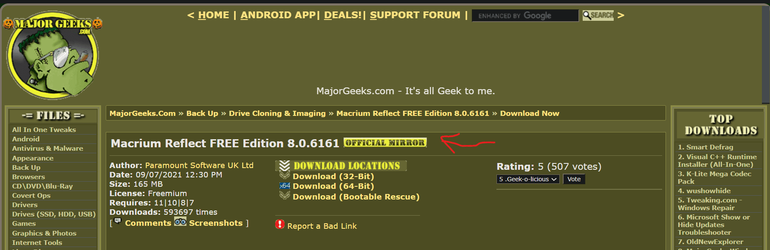
V 8 free is available also from official mirror on Majorgeeks.
BTW I am unable to trace back where I read it from but it was from a Macrium Reflect representative, maybe on Reddit couple of weeks ago.
He said that soon V 8 free shall be available. Could it be that some well known apps site got the head start?
 

Attachments

  • Majorgeeks.png
    Majorgeeks.png
    65.8 KB · Views: 1

My Computer My Computer

At a glance

Windows 11
OS
Windows 11
Computer type
PC/Desktop
Motherboard
Gigabyte

Latest Support Threads

Back
Top Bottom