The Difficulty to Remove Windows Defender and the Potentional Risks


Thank you Marcus Vinicus, I have that on my 24H2. Good to know.

It used to have a link to run Defender with your AV which I clicked on once and then couldn't find how to turn it off again.
Screenshot 2025-08-05 123314.webp
 

My Computer

System One

  • OS
    Windows 11 Pro 25H2 26200.7922
    Computer type
    PC/Desktop
    Manufacturer/Model
    Local shop built (KC Computers Ltd)
    CPU
    Intel Core i9 13900F
    Motherboard
    Gigabyte Z690 Gaming X (rev. 1.0/1.1) - (BIOS: F32 09 18 2025)
    Memory
    2 x Kingston Fury 32gb DDR5 5600 Beast
    Graphics Card(s)
    Gigabyte Eagle (Nvidia) RTX 3060
    Sound Card
    Chord Async USB 44.1kHz - 384kHz 2Qute DAC
    Monitor(s) Displays
    Gigabyte AORUS FO32U2 32” OLED Flat Gaming Monitor, 0.03ms, KVM, 250 cd/m2, FreeSync Premium Pro, HDR True Black 400
    Screen Resolution
    3840 x 2160 (UHD), 240Hz
    Hard Drives
    1 x KINGSTON NVMe M.2 SSDSKC3000D2048G 2TB
    1 x Samsung SSD 870 EVO 250GB
    2 x Crucial CT4000MX500SSD1 4TB
    2 x Crucial CT2000MX500SSD1 2TB
    1 x Crucial CT250MX500SSD1 250.0 GB
    PSU
    Gigabyte 750w
    Case
    Fractal Torrent
    Cooling
    Stock Intel CPU, 2 x Fractal 180mm PWM (front), 3 x Fractal 140mm PWM (bottom)
    Keyboard
    Logitech MX Mechanical Wireless Illuminated Performance Keyboard
    Mouse
    Logitech MX Master 3S Wireless Performance Mouse
    Internet Speed
    900 Mbps/900 Mbps Trooli FTTP
    Browser
    Firefox
    Antivirus
    Eset Nod32
This PowerShell script tells whether or not antivirus software on the target computer is enabled or disabled. This is useful if the computer has a 3rd party AV software installed and importantly what is the state of Windows Defender. It converts the productstate number to hex and deciphers if the AV software is enabled or disabled (the 3rd digit in HexProductState).

Code:
Get-CimInstance -Namespace root/SecurityCenter2 -ClassName AntiVirusProduct | ForEach-Object {
  $state = '{0:X6}' -f $_.productState
  [PSCustomObject]@{
    Name = $_.displayName
    HexProductState = $state
    Enabled = switch ($state[2]) {
      '0' { 'Disabled' }
      '1' { 'Enabled' }
      default { 'Unknown' }
    }
  }
}

Here is the result of running this script on my desktop PC which runs Bitdefender Total Security and shows Defender is disabled. Note the Bitdefender setup disabled Defender without any action from myself.

View attachment 141385
PS C:\WINDOWS\system32> Get-CimInstance -Namespace root/SecurityCenter2 -ClassName AntiVirusProduct | ForEach-Object {
>> $state = '{0:X6}' -f $_.productState
>> [PSCustomObject]@{
>> Name = $_.displayName
>> HexProductState = $state
>> Enabled = switch ($state[2]) {
>> '0' { 'Disabled' }
>> '1' { 'Enabled' }
>> default { 'Unknown' }
>> }
>> }
>> }

Name HexProductState Enabled
---- --------------- -------
Kaspersky 041000 Enabled
Windows Defender 060100 Disabled
 

My Computers

System One System Two

  • OS
    Windows 11 Pro 25H2 26200.7627
    Computer type
    PC/Desktop
    Manufacturer/Model
    Gigababyte X870E Aorus Pro Rev 1.1
    CPU
    Ryzen 7 9800X3D
    Motherboard
    Gigababyte X870E Aorus Pro Rev 1.1
    Memory
    G.Skill Trident Z5 RGB DDR5-6000 32GB (2×16GB) CL30 2 x 16gb
    Graphics Card(s)
    RTX 5080 Palit Gaming Pro
    Sound Card
    Steel Series Arctis 1 Gaming Head phones
    Monitor(s) Displays
    Asus ROG Strix 27″ QHD OLED XG27AQDMG & Phillips 272V8
    Screen Resolution
    2560 X1440 27 Inch 240 HZ Asus
    PSU
    Corsair RM1000X
    Case
    Corsair CC750D (CC-9011078) Obsidian 750D Airflow Edition Black Full Tower ATX Case
    Cooling
    Corsair iCUE LINK TITAN 360 RX RGB
    Keyboard
    Razer BlackWidow V4 X Razer™ Yellow Mechanical Switches
    Mouse
    Logitech G502X Plus
    Internet Speed
    HFC 2000/100
    Browser
    Opera GX
    Antivirus
    Kaspersky Plus
  • Operating System
    Windows 11 23H2 22631.2715
    Computer type
    Laptop
    Manufacturer/Model
    Dell XPS EVO 13.3" RNX9305C01AUSB
    CPU
    Intel i5-1135G7
    Motherboard
    Dell
    Memory
    8 GB
    Graphics card(s)
    Intel Iris Xe Graphics
    Monitor(s) Displays
    LED
    Screen Resolution
    1920 x 1080
    Hard Drives
    256GB SSD
    Other Info
    https://www.thegoodguys.com.au/dell-xps-evo-133-inches-win-11-laptop-rnx9305c01ausb
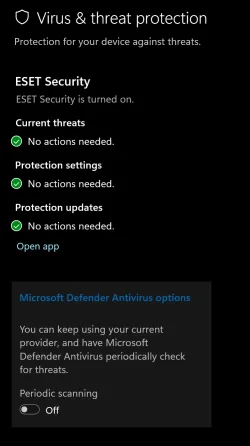
There is a setting to disable periodic scanning by Defender if a 3rd party AV scanner is installed. This screenshot is from 24H2 Beta.

Yes I have that setting and it is toggled off.
 

My Computers

System One System Two

  • OS
    Windows 11 Pro 25H2 26200.7627
    Computer type
    PC/Desktop
    Manufacturer/Model
    Gigababyte X870E Aorus Pro Rev 1.1
    CPU
    Ryzen 7 9800X3D
    Motherboard
    Gigababyte X870E Aorus Pro Rev 1.1
    Memory
    G.Skill Trident Z5 RGB DDR5-6000 32GB (2×16GB) CL30 2 x 16gb
    Graphics Card(s)
    RTX 5080 Palit Gaming Pro
    Sound Card
    Steel Series Arctis 1 Gaming Head phones
    Monitor(s) Displays
    Asus ROG Strix 27″ QHD OLED XG27AQDMG & Phillips 272V8
    Screen Resolution
    2560 X1440 27 Inch 240 HZ Asus
    PSU
    Corsair RM1000X
    Case
    Corsair CC750D (CC-9011078) Obsidian 750D Airflow Edition Black Full Tower ATX Case
    Cooling
    Corsair iCUE LINK TITAN 360 RX RGB
    Keyboard
    Razer BlackWidow V4 X Razer™ Yellow Mechanical Switches
    Mouse
    Logitech G502X Plus
    Internet Speed
    HFC 2000/100
    Browser
    Opera GX
    Antivirus
    Kaspersky Plus
  • Operating System
    Windows 11 23H2 22631.2715
    Computer type
    Laptop
    Manufacturer/Model
    Dell XPS EVO 13.3" RNX9305C01AUSB
    CPU
    Intel i5-1135G7
    Motherboard
    Dell
    Memory
    8 GB
    Graphics card(s)
    Intel Iris Xe Graphics
    Monitor(s) Displays
    LED
    Screen Resolution
    1920 x 1080
    Hard Drives
    256GB SSD
    Other Info
    https://www.thegoodguys.com.au/dell-xps-evo-133-inches-win-11-laptop-rnx9305c01ausb
Why not disconnect from the internet and try it out? (assuming the game will run disconnected).
 

My Computers

System One System Two

  • OS
    W10
    Computer type
    PC/Desktop
    Manufacturer/Model
    Home brew
    CPU
    Ryzen3-2200G
    Motherboard
    GA-A320M-S2H
    Memory
    16 GB Kingston HyperX DDR4
    Graphics Card(s)
    Integrated
    Sound Card
    Integrated
    Monitor(s) Displays
    LG W2246
    Screen Resolution
    1920x1080
    Hard Drives
    Intel 760p 256GB NVMe M.2
    Seagate Barracuda 7200 1TB
    Gash Seagate ST31608
    PSU
    2006-vintage no-name
    Case
    Acer Aspire 2006
    Cooling
    Air (fan-assist)
    Keyboard
    HP SK-2885
    Mouse
    wireless
    Internet Speed
    32 mbps
    Browser
    FF latest
    Antivirus
    MS Defender
  • Operating System
    W10
    Computer type
    Laptop
    Manufacturer/Model
    HP 255 G8
    CPU
    Ryzen 5 3500U
    Memory
    8 GB
    Graphics card(s)
    on-board
    Monitor(s) Displays
    16"
    Screen Resolution
    1920x1080
    Hard Drives
    Samsung SSD 512GB Nvme
    Browser
    FF + Edge
    Antivirus
    MS Defender
Windows Security suite, including Windows Defender is a part of Windows and it is free. Trying to remove any part Windows Security can make your system unstable.
If you install any other 3rd party Anti-Virus software, it will disable Windows Security/Defender as you can only have one active AV software on your computer. Defender takes very little space and resources on your computer. Unless you are planning on not running ANY Anti-Virus app, which is never suggested, there is no reason to remove Defender.
Windows Security/Defender works just as well if not better than most AV products free or otherwise.

Why would you want to remove Defender?
lol installing 3rd party AV does not disable Defender at all. this is not how it used to be. Even if it says defender is disabled, the processes are most likey running in the background. U gotta manually disable them.
 

My Computer

System One

  • OS
    WIN11
    Computer type
    PC/Desktop
    Manufacturer/Model
    Custom
    CPU
    7900X
    Motherboard
    ASUS Rog Crosshair HERO x670E
    Memory
    32GB G-Skills Flare X5 6000mhz
    Graphics Card(s)
    4090 RTX
    Sound Card
    onboard
    Monitor(s) Displays
    LG-27GN950
    Screen Resolution
    4K
    PSU
    1300W
    Case
    Corsair 7000x
    Cooling
    H170i
    Antivirus
    NO Win Defender
I have been attempting to completely remove Windows Defender from my system (it's OEM Windows 11) however it's not possible without a great deal of tinkering going into safe mode with registry editing. I have tried gpedit.msc , the only only thing I have managed is to disable Real time proctection but its still running. There is tamper protection enabled but the the toggle is not visible in my settings under Windows Security. this needs to be turned off before removing WIndows Defender and they seem to co-exist, you can't have one without the other. Is there any downside to having Windows Defender remain on my system with real time scanning off? If Tamper Protection is turned off, this leaves me more vulnerable to attacks? I have recently upgraded my PC to a Ryzen 7 9800X3D (see my full specs on this forum) and I going to be gaming with Battlefield 6 which is due for release Oct ober 10th. My AV is Kaspersky Plus

AntivirusEnabled True
RealTimeProtectionEnabled False
AMServiceEnabled True


PS C:\WINDOWS\system32> if ((Get-MpComputerStatus).AntivirusEnabled -and (Get-MpComputerStatus).RealTimeProtectionEnabled) {
>> "Microsoft Defender is ENABLED and actively protecting you."
>> } elseif ((Get-MpComputerStatus).AntivirusEnabled -and -not (Get-MpComputerStatus).RealTimeProtectionEnabled) {
>> "Microsoft Defender is RUNNING but Real-Time Protection is DISABLED."
>> } else {
>> "Microsoft Defender is DISABLED."
>> }
Microsoft Defender is RUNNING but Real-Time Protection is DISABLED.
PS C:\WINDOWS\system32>
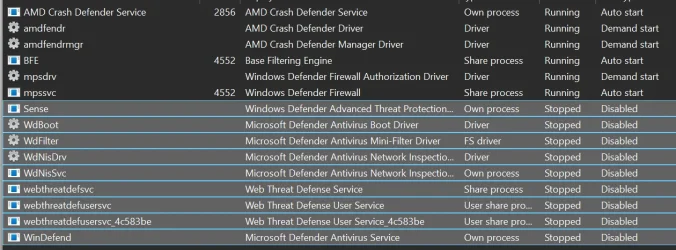
Completely removing WDefender causes some issues. There is a guy who makes a tool that removes it completely but it has some issues back then but the safest way is to disable all the defender processes. Simply installing 3rd party AV does not disable win defender at all even if it says it's disabled. Make sure those processes are disabled. Check out the pic. Those are the processes needed to be disabled.
And sometimes there is another process called "MDCoreSvc" which I dont have rn now in the picture . if u have it, disable that as well ( I believe if you install malwarebyte, it's created somehow maybe not)
Finally, Dont touch firewall related services(mpsdrv,mpssvc) cuz it will break winstore. And you must do it in safe mode.

This is the link to win remover


Attachments

  • 1.webp
    1.webp
    85.5 KB · Views: 3
Last edited:

My Computer

System One

  • OS
    WIN11
    Computer type
    PC/Desktop
    Manufacturer/Model
    Custom
    CPU
    7900X
    Motherboard
    ASUS Rog Crosshair HERO x670E
    Memory
    32GB G-Skills Flare X5 6000mhz
    Graphics Card(s)
    4090 RTX
    Sound Card
    onboard
    Monitor(s) Displays
    LG-27GN950
    Screen Resolution
    4K
    PSU
    1300W
    Case
    Corsair 7000x
    Cooling
    H170i
    Antivirus
    NO Win Defender
I just watched a video where someone installed Linux for gaming. No bloat or Windows Defender holding the system back. The gain/loss in FPS varied by game and was ultimately insignificant.

The "windows bloat" and "defender slowdown" arguments are overblown rubbish as far as I'm concerned.

Personally, I would leave well enough alone. Install your AV of choice and game on.
 

My Computers

System One System Two

  • OS
    Windows 11 LTSC 24H2 (26100.4484)
    Computer type
    Laptop
    Manufacturer/Model
    Lenovo Legion 5 (17ach6h)
    CPU
    Ryzen 7 5800H
    Memory
    32GB (RipJaws DDR4 3200)
    Graphics Card(s)
    GeForce RTX 3060
    Monitor(s) Displays
    Philips 34" Ultrawide (343e2e)
    Screen Resolution
    2560x1080
    Hard Drives
    1TB OEM Samsung NVMe M.2
    1TB Samsung 970 EVO NVMe M.2
    8TB WD Black HDD
    PSU
    300W brick
    Cooling
    Paste replaced with PTM7950
    Keyboard
    Cooler Master (SK-630)
    Mouse
    EVGA X20
    Internet Speed
    500 Mbps
    Browser
    Firefox
    Antivirus
    Windows Defender
  • Operating System
    Windows 11 LTSC 24H2 (26100.4484)
    Computer type
    Laptop
    Manufacturer/Model
    Asus ROG Strix (GL502VSK)
    CPU
    Core I7 7700HQ
    Memory
    16GB DDR4
    Graphics card(s)
    GeForce GTX 1070
    Monitor(s) Displays
    15.6" 60Hz IPS
    Screen Resolution
    1920x1080
    Hard Drives
    256GB OEM Samsung M.2 NVMe
    2TB Team Group EX2 SATA III
    Cooling
    Paste replaced with PTM7950
    Internet Speed
    500 Mbps
    Browser
    Firefox
    Antivirus
    Windows Defender
I just watched a video where someone installed Linux for gaming. No bloat or Windows Defender holding the system back. The gain/loss in FPS varied by game and was ultimately insignificant.

The "windows bloat" and "defender slowdown" arguments are overblown rubbish as far as I'm concerned.

Personally, I would leave well enough alone. Install your AV of choice and game on.
you cant play most of games on linux
 

My Computer

System One

  • OS
    WIN11
    Computer type
    PC/Desktop
    Manufacturer/Model
    Custom
    CPU
    7900X
    Motherboard
    ASUS Rog Crosshair HERO x670E
    Memory
    32GB G-Skills Flare X5 6000mhz
    Graphics Card(s)
    4090 RTX
    Sound Card
    onboard
    Monitor(s) Displays
    LG-27GN950
    Screen Resolution
    4K
    PSU
    1300W
    Case
    Corsair 7000x
    Cooling
    H170i
    Antivirus
    NO Win Defender
you cant play most of games on linux

You can play plenty of games on Linux. It's the games with anti-cheat that will throw a fit. But that wasn't the point. The point was to answer his question below.

I haven't removed it I was asking if their is a potential downside to removing it completely. Also I still nobody has answered that having WIndows Defender "running" but not real time scanning has any impact on my gaming

And that answer is no.
 

My Computers

System One System Two

  • OS
    Windows 11 LTSC 24H2 (26100.4484)
    Computer type
    Laptop
    Manufacturer/Model
    Lenovo Legion 5 (17ach6h)
    CPU
    Ryzen 7 5800H
    Memory
    32GB (RipJaws DDR4 3200)
    Graphics Card(s)
    GeForce RTX 3060
    Monitor(s) Displays
    Philips 34" Ultrawide (343e2e)
    Screen Resolution
    2560x1080
    Hard Drives
    1TB OEM Samsung NVMe M.2
    1TB Samsung 970 EVO NVMe M.2
    8TB WD Black HDD
    PSU
    300W brick
    Cooling
    Paste replaced with PTM7950
    Keyboard
    Cooler Master (SK-630)
    Mouse
    EVGA X20
    Internet Speed
    500 Mbps
    Browser
    Firefox
    Antivirus
    Windows Defender
  • Operating System
    Windows 11 LTSC 24H2 (26100.4484)
    Computer type
    Laptop
    Manufacturer/Model
    Asus ROG Strix (GL502VSK)
    CPU
    Core I7 7700HQ
    Memory
    16GB DDR4
    Graphics card(s)
    GeForce GTX 1070
    Monitor(s) Displays
    15.6" 60Hz IPS
    Screen Resolution
    1920x1080
    Hard Drives
    256GB OEM Samsung M.2 NVMe
    2TB Team Group EX2 SATA III
    Cooling
    Paste replaced with PTM7950
    Internet Speed
    500 Mbps
    Browser
    Firefox
    Antivirus
    Windows Defender
This thread isn't about games on Linux.......
 

My Computers

System One System Two

  • OS
    Windows 11 Pro 25H2
    Computer type
    PC/Desktop
    Manufacturer/Model
    Homebuilt
    CPU
    Intel Core i9 13900K
    Motherboard
    Asus ProArt Z790 Creator WiFi - Bios 3107
    Memory
    Corsair Dominator Platinum 64gb 5600MT/s DDR5 Dual Channel
    Graphics Card(s)
    Sapphire NITRO+ AMD Radeon RX 7900 XTX Vapor-X 24GB
    Sound Card
    External DAC: Cambridge Audio DACMagic200M - Headphone Amp: Topping L50
    Monitor(s) Displays
    Panasonic MX950 Mini LED 55" TV 120hz
    Screen Resolution
    3840 x 2160 120hz
    Hard Drives
    Samsung 980 Pro 2TB (OS)
    Samsung 980 Pro 1TB (Files)
    Lexar NZ790 4TB
    LaCie d2 Professional 6TB external - USB 3.1
    Seagate Expansion 16TB external - USB 3.2
    Seagate One Touch 18TB external HD - USB 3.0
    PSU
    Corsair RM1200x Shift
    Case
    Corsair RGB Smart Case 5000x (white)
    Cooling
    Corsair iCue H150i Elite Capellix XT
    Keyboard
    Incase Ergonomic USB (Microsoft clone)
    Mouse
    Logitech MX Master 3S
    Internet Speed
    Fibre 900/500 Mbps
    Browser
    Microsoft Edge Chromium
    Antivirus
    Bitdefender Total Security
    Other Info
    AMD Radeon Software & Drivers 26.1.1
    Hasleo Backup Suite
    Dashlane password manager
    Kensington Verimark fingerprint reader
    Logitech Brio 4K webcam
    Orico 10-port powered USB 3.0 hub
  • Operating System
    Windows 11 Pro 25H2
    Computer type
    Laptop
    Manufacturer/Model
    Asus Vivobook X1605VA
    CPU
    Intel® Core™ i9-13900H
    Motherboard
    Asus X1605VA bios 309
    Memory
    32GB DDR4-3200 Dual channel
    Graphics card(s)
    *Intel Iris Xᵉ Graphics G7
    Sound Card
    Realtek | Intel SST Bluetooth & USB
    Monitor(s) Displays
    16.0-inch, WUXGA 16:10 aspect ratio, IPS-level Panel
    Screen Resolution
    1920 x 1200 60hz
    Hard Drives
    512GB M.2 NVMe™ PCIe® 3.0 SSD
    Mouse
    Logitech MX Ergo Trackball
    Antivirus
    Bitdefender Total Security
    Other Info
    720p Webcam
    WiFi & USB to ethernet
I was advised to "disable defender" by FR33THY he is well-known Windows tweaker that has many gamers on his books

"Use the option to remove defender"
Maybe use the playbook straight after a w11 pro install
These people not only walk among us but make YT videos
 

My Computer

System One

  • OS
    Windows 11 Pro 25H2 (RP channel)
    Computer type
    PC/Desktop
    Manufacturer/Model
    MSI
    CPU
    AMD Ryzen 7 9800X3D 8-core
    Motherboard
    MEG X870E Godlike
    Memory
    64GB Corsair Titanium 6000/CL30
    Graphics Card(s)
    MSI Suprim 5080 SOC
    Sound Card
    Soundblaster AE-9
    Monitor(s) Displays
    ASUS TUF Gaming VG289Q
    Screen Resolution
    3840x2160
    Hard Drives
    Samsung 9100 Pro 4TB (gen 5 x4, system drive/games)
    Samsung 990 Pro 2TB
    Samsung 980 Pro 2TB
    Samsung 870 Evo 4TB
    Samsung 870 Evo 2TB
    Samsung T9 4TB
    PSU
    Seasonic PX-2200
    Case
    Bequiet! Dark Base Pro 901
    Cooling
    Noctua NH-D15S Chromax black
    Keyboard
    Logitech G915 X (wired)
    Mouse
    Logitech G903 with PowerPlay charger
    Internet Speed
    900Mb/sec
    Browser
    Microsoft Edge
    Antivirus
    Windows Defender
Completely removing WDefender causes some issues. There is a guy who makes a tool that removes it completely but it has some issues back then but the safest way is to disable all the defender processes. Simply installing 3rd party AV does not disable win defender at all even if it says it's disabled. Make sure those processes are disabled. Check out the pic. Those are the processes needed to be disabled.
And sometimes there is another process called "MDCoreSvc" which I dont have rn now in the picture . if u have it, disable that as well ( I believe if you install malwarebyte, it's created somehow maybe not)
Finally, Dont touch firewall related services(mpsdrv,mpssvc) cuz it will break winstore. And you must do it in safe mode.

This is the link to win remover

I am using DefenderRemover as first script after installing Win11 Pro to more than 15 PCs and have any problems yet with other AV. System response is rapidly quickly and memory usage has dropped dramatically :-)(y)
 

My Computer

System One

  • OS
    Windows 11
I am using DefenderRemover as first script after installing Win11 Pro to more than 15 PCs and have any problems yet with other AV. System response is rapidly quickly and memory usage has dropped dramatically :-)(y)

This script removes/disables following security components:

Tamper Protection (for Windows 11 21H2 or earlier)

not going to work for me as I am on 24H2 , you cannot remove Windows Defender without disabling tamper protection. I do not see this setting as it is hidden. But thanks for your advice in any case
 

My Computers

System One System Two

  • OS
    Windows 11 Pro 25H2 26200.7627
    Computer type
    PC/Desktop
    Manufacturer/Model
    Gigababyte X870E Aorus Pro Rev 1.1
    CPU
    Ryzen 7 9800X3D
    Motherboard
    Gigababyte X870E Aorus Pro Rev 1.1
    Memory
    G.Skill Trident Z5 RGB DDR5-6000 32GB (2×16GB) CL30 2 x 16gb
    Graphics Card(s)
    RTX 5080 Palit Gaming Pro
    Sound Card
    Steel Series Arctis 1 Gaming Head phones
    Monitor(s) Displays
    Asus ROG Strix 27″ QHD OLED XG27AQDMG & Phillips 272V8
    Screen Resolution
    2560 X1440 27 Inch 240 HZ Asus
    PSU
    Corsair RM1000X
    Case
    Corsair CC750D (CC-9011078) Obsidian 750D Airflow Edition Black Full Tower ATX Case
    Cooling
    Corsair iCUE LINK TITAN 360 RX RGB
    Keyboard
    Razer BlackWidow V4 X Razer™ Yellow Mechanical Switches
    Mouse
    Logitech G502X Plus
    Internet Speed
    HFC 2000/100
    Browser
    Opera GX
    Antivirus
    Kaspersky Plus
  • Operating System
    Windows 11 23H2 22631.2715
    Computer type
    Laptop
    Manufacturer/Model
    Dell XPS EVO 13.3" RNX9305C01AUSB
    CPU
    Intel i5-1135G7
    Motherboard
    Dell
    Memory
    8 GB
    Graphics card(s)
    Intel Iris Xe Graphics
    Monitor(s) Displays
    LED
    Screen Resolution
    1920 x 1080
    Hard Drives
    256GB SSD
    Other Info
    https://www.thegoodguys.com.au/dell-xps-evo-133-inches-win-11-laptop-rnx9305c01ausb
ProductStatus : 524288
QuickScanAge : 4294967295
QuickScanEndTime :
QuickScanOverdue : False
QuickScanSignatureVersion :
QuickScanStartTime :
RealTimeProtectionEnabled : False
RealTimeScanDirection : 0
RebootRequired : False
SmartAppControlExpiration : 4/09/2025 6:15:55 PM (2025-09-04T08:15:55Z)
SmartAppControlState : Eval
TamperProtectionSource : Signatures
TDTCapable : N/A
TDTMode : N/A
TDTSiloType : N/A
TDTStatus : N/A
TDTTelemetry : N/A
TroubleShootingDailyMaxQuota :
TroubleShootingDailyQuotaLeft :
TroubleShootingEndTime :
TroubleShootingExpirationLeft :
TroubleShootingMode :
TroubleShootingModeSource :
TroubleShootingQuotaResetTime :
TroubleShootingStartTime :
PSComputerName :


it appears my Windows Defender is basically non-functional according to the above. Correct me if I am wrong.
 

My Computers

System One System Two

  • OS
    Windows 11 Pro 25H2 26200.7627
    Computer type
    PC/Desktop
    Manufacturer/Model
    Gigababyte X870E Aorus Pro Rev 1.1
    CPU
    Ryzen 7 9800X3D
    Motherboard
    Gigababyte X870E Aorus Pro Rev 1.1
    Memory
    G.Skill Trident Z5 RGB DDR5-6000 32GB (2×16GB) CL30 2 x 16gb
    Graphics Card(s)
    RTX 5080 Palit Gaming Pro
    Sound Card
    Steel Series Arctis 1 Gaming Head phones
    Monitor(s) Displays
    Asus ROG Strix 27″ QHD OLED XG27AQDMG & Phillips 272V8
    Screen Resolution
    2560 X1440 27 Inch 240 HZ Asus
    PSU
    Corsair RM1000X
    Case
    Corsair CC750D (CC-9011078) Obsidian 750D Airflow Edition Black Full Tower ATX Case
    Cooling
    Corsair iCUE LINK TITAN 360 RX RGB
    Keyboard
    Razer BlackWidow V4 X Razer™ Yellow Mechanical Switches
    Mouse
    Logitech G502X Plus
    Internet Speed
    HFC 2000/100
    Browser
    Opera GX
    Antivirus
    Kaspersky Plus
  • Operating System
    Windows 11 23H2 22631.2715
    Computer type
    Laptop
    Manufacturer/Model
    Dell XPS EVO 13.3" RNX9305C01AUSB
    CPU
    Intel i5-1135G7
    Motherboard
    Dell
    Memory
    8 GB
    Graphics card(s)
    Intel Iris Xe Graphics
    Monitor(s) Displays
    LED
    Screen Resolution
    1920 x 1080
    Hard Drives
    256GB SSD
    Other Info
    https://www.thegoodguys.com.au/dell-xps-evo-133-inches-win-11-laptop-rnx9305c01ausb

My Computers

System One System Two

  • OS
    Windows 11 LTSC 24H2 (26100.4484)
    Computer type
    Laptop
    Manufacturer/Model
    Lenovo Legion 5 (17ach6h)
    CPU
    Ryzen 7 5800H
    Memory
    32GB (RipJaws DDR4 3200)
    Graphics Card(s)
    GeForce RTX 3060
    Monitor(s) Displays
    Philips 34" Ultrawide (343e2e)
    Screen Resolution
    2560x1080
    Hard Drives
    1TB OEM Samsung NVMe M.2
    1TB Samsung 970 EVO NVMe M.2
    8TB WD Black HDD
    PSU
    300W brick
    Cooling
    Paste replaced with PTM7950
    Keyboard
    Cooler Master (SK-630)
    Mouse
    EVGA X20
    Internet Speed
    500 Mbps
    Browser
    Firefox
    Antivirus
    Windows Defender
  • Operating System
    Windows 11 LTSC 24H2 (26100.4484)
    Computer type
    Laptop
    Manufacturer/Model
    Asus ROG Strix (GL502VSK)
    CPU
    Core I7 7700HQ
    Memory
    16GB DDR4
    Graphics card(s)
    GeForce GTX 1070
    Monitor(s) Displays
    15.6" 60Hz IPS
    Screen Resolution
    1920x1080
    Hard Drives
    256GB OEM Samsung M.2 NVMe
    2TB Team Group EX2 SATA III
    Cooling
    Paste replaced with PTM7950
    Internet Speed
    500 Mbps
    Browser
    Firefox
    Antivirus
    Windows Defender
lol installing 3rd party AV does not disable Defender at all. this is not how it used to be. Even if it says defender is disabled, the processes are most likey running in the background. U gotta manually disable them.

If the 3rd party AV registers correctly with security center then Defender disables.

You can check if it registered correctly here:
Code:
HKEY_LOCAL_MACHINE\SOFTWARE\Microsoft\Security Center\Provider\Av

My system has nothing related to defender running and I did not disable anything on my own as Windows did it for me when I installed Eset.
 

My Computer

System One

  • OS
    Windows 11 Pro
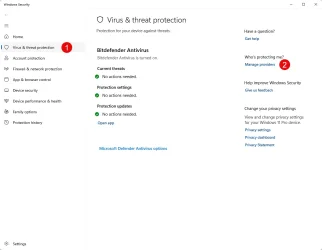
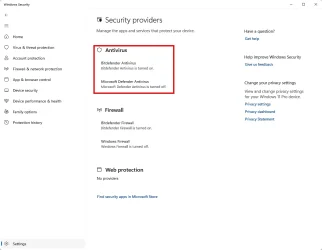
Had a deeper look around the Windows Security applet in my Windows 11 24H2 Beta and it is easy to check the status of AV software in the computer.

The Bitdefender Total Security setup at install disabled Windows Defender except for that periodic scanning setting I posted about earlier.
Note I said 'disabled' I'm not claiming that Bitdefender Total Security goes nuclear and deletes everything Defender related during setup.

AV check defender status1.webpAV check defender status2.webp

There is also a group policy in the Group Policy editor that disables Windows Defender, though I haven't tested it.
It is at: Computer Configuration >> Administrative Templates >> Windows Components >> Microsoft Defender Antivirus >> Turn off Microsoft Defender Antivirus.
 
Last edited:

My Computers

System One System Two

  • OS
    Windows 11 Pro 25H2
    Computer type
    PC/Desktop
    Manufacturer/Model
    Homebuilt
    CPU
    Intel Core i9 13900K
    Motherboard
    Asus ProArt Z790 Creator WiFi - Bios 3107
    Memory
    Corsair Dominator Platinum 64gb 5600MT/s DDR5 Dual Channel
    Graphics Card(s)
    Sapphire NITRO+ AMD Radeon RX 7900 XTX Vapor-X 24GB
    Sound Card
    External DAC: Cambridge Audio DACMagic200M - Headphone Amp: Topping L50
    Monitor(s) Displays
    Panasonic MX950 Mini LED 55" TV 120hz
    Screen Resolution
    3840 x 2160 120hz
    Hard Drives
    Samsung 980 Pro 2TB (OS)
    Samsung 980 Pro 1TB (Files)
    Lexar NZ790 4TB
    LaCie d2 Professional 6TB external - USB 3.1
    Seagate Expansion 16TB external - USB 3.2
    Seagate One Touch 18TB external HD - USB 3.0
    PSU
    Corsair RM1200x Shift
    Case
    Corsair RGB Smart Case 5000x (white)
    Cooling
    Corsair iCue H150i Elite Capellix XT
    Keyboard
    Incase Ergonomic USB (Microsoft clone)
    Mouse
    Logitech MX Master 3S
    Internet Speed
    Fibre 900/500 Mbps
    Browser
    Microsoft Edge Chromium
    Antivirus
    Bitdefender Total Security
    Other Info
    AMD Radeon Software & Drivers 26.1.1
    Hasleo Backup Suite
    Dashlane password manager
    Kensington Verimark fingerprint reader
    Logitech Brio 4K webcam
    Orico 10-port powered USB 3.0 hub
  • Operating System
    Windows 11 Pro 25H2
    Computer type
    Laptop
    Manufacturer/Model
    Asus Vivobook X1605VA
    CPU
    Intel® Core™ i9-13900H
    Motherboard
    Asus X1605VA bios 309
    Memory
    32GB DDR4-3200 Dual channel
    Graphics card(s)
    *Intel Iris Xᵉ Graphics G7
    Sound Card
    Realtek | Intel SST Bluetooth & USB
    Monitor(s) Displays
    16.0-inch, WUXGA 16:10 aspect ratio, IPS-level Panel
    Screen Resolution
    1920 x 1200 60hz
    Hard Drives
    512GB M.2 NVMe™ PCIe® 3.0 SSD
    Mouse
    Logitech MX Ergo Trackball
    Antivirus
    Bitdefender Total Security
    Other Info
    720p Webcam
    WiFi & USB to ethernet
This script removes/disables following security components:

Tamper Protection (for Windows 11 21H2 or earlier)

not going to work for me as I am on 24H2 , you cannot remove Windows Defender without disabling tamper protection. I do not see this setting as it is hidden. But thanks for your advice in any case
I am using Win 11 Pro 24H2 and DefenderRemover working fine (y) for me.

For disabling tamper protection you can see here: How to disable Microsoft Defender in Windows 11/10 in case

Completely Disabling Microsoft Defender via Registry and Safe Mode​

May be help for you ;-)
 

My Computer

System One

  • OS
    Windows 11
I was advised to "disable defender" by FR33THY he is well-known Windows tweaker that has many gamers on his books
That doesn't make him an expert, just a tweaker with an opinion. Zero need to "remove" Defender unless you want a less secure system.
 

My Computers

System One System Two

  • OS
    Windows 11 Pro 24H2 (Build 26100.4770)
    Computer type
    PC/Desktop
    Manufacturer/Model
    Custom built
    CPU
    Intel Core 9 Ultra 285K
    Motherboard
    Gigabyte Aorus Z890 Xtreme AI Top
    Memory
    64G (4x16) DDR5 Corsair RGB Dominator Platinum (6400Mhz)
    Graphics Card(s)
    Radeon (XFX Mercury) RX 9070XT OC (with Magnetic Fans)
    Sound Card
    Onboard (DTS:X® Ultra Audio: ESS ES9280A DAC)
    Monitor(s) Displays
    27-inch Eizo Color Edge - CG2700X
    Screen Resolution
    3840 x 2160
    Hard Drives
    4 Samsung NVM 990 Pro drives: 1TB (OS), 2TB, 2 X 4TB.
    PSU
    Seasonic TX-1300 (1300 Watts)
    Case
    Cooler Master H500M
    Cooling
    Corsair Link Titan 280 RX RGB
    Keyboard
    Logitech Craft
    Mouse
    Logitech MX Master 3S
    Internet Speed
    1TB Download. 512mb Upload
    Browser
    Microsoft Edge Chromium
    Antivirus
    Windows Security
    Other Info
    System used for gaming, photography, music, school.
  • Operating System
    Windows 11 Pro 24H2 (Build 26100.4061)
    Computer type
    PC/Desktop
    Manufacturer/Model
    Custom built
    CPU
    Intel Core i9-9900K
    Motherboard
    Gigabyte Z390 Aorus Xtreme
    Memory
    32gig (4 x 8) Corsair Dominator Platinum DDR4 3600Mhz (B-Die)
    Graphics card(s)
    Radeon XFX Merc 7900XT (20gig)
    Sound Card
    Onboard
    Monitor(s) Displays
    24-Inch NEC PA242W
    Screen Resolution
    2880 x 1800
    Hard Drives
    2 X NVME, 1 X SATA SSD
    PSU
    EVGA Super Nova 1000 P2 (1000 Watt)
    Case
    Phantek Enthoo Luxe
    Cooling
    Corsair H115i Elite AIO Cooler
    Keyboard
    Logitech Keys
    Mouse
    Logitech MX Master 3
    Internet Speed
    1TB Download. 512mb Upload
    Browser
    Microsoft Edge Chromium
    Antivirus
    Windows Security
    Other Info
    Backup System
Back
Top Bottom