

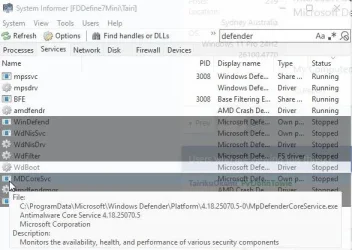
There is also relatively new Microsoft Defender Core Service
My Computer
At a glance
Home2FH2CanAMD Ryzen 5 8600G (07/24)2x32GB Kingston FURY DDR5 5600 MHz CL36 @5200...ASROCK Radeon RX 6600 Challenger D 8G @48FPS ...
- OS
- Home2FH2Can
- Computer type
- PC/Desktop
- CPU
- AMD Ryzen 5 8600G (07/24)
- Motherboard
- ASROCK B650M-HDV/M.2 (07/24) BIOS 4.43 AGESA ComboAM5 1.3.0.1b Patch A (07/26)
- Memory
- 2x32GB Kingston FURY DDR5 5600 MHz CL36 @5200 CL40 (07/24)
- Graphics Card(s)
- ASROCK Radeon RX 6600 Challenger D 8G @48FPS (08/24)
- Sound Card
- Creative Sound BlasterX AE-5 Plus (05/24)
- Monitor(s) Displays
- 24" Philips 24M1N3200ZS/00 (05/24)
- Screen Resolution
- 1920×1080@165Hz via DP1.4
- Hard Drives
- Kingston KC3000 NVMe 2TB (05/24)
ADATA XPG GAMMIX S11 Pro 512GB (07/19)
- PSU
- Seasonic Core GM 550 Gold (04/24)
- Case
- Fractal Design Define 7 Mini with 3x Noctua NF-P14s/12@555rpm (04/24)
- Cooling
- Noctua NH-U12S with Noctua NF-P12 (04/24)
- Keyboard
- HP Pavilion Wired Keyboard 300 (07/24) + Rabalux 76017 Parker (01/24)
- Mouse
- Logitech M330 Silent Plus (07/26)
- Internet Speed
- 500/100 Mbps via RouterOS (05/21) & TCP Optimizer
- Browser
- Edge, Brave for YouTube, LibreWolf for FB
- Antivirus
- NextDNS blocking 1/3 Traffic
- Other Info
- Phone: Motorola Moto G86 (02/26)
Backup: Hasleo Backup Suite (PreOS)
Headphones: Sennheiser RS170 (09/10)
Chair: Huzaro Force 4.4 Grey Mesh (05/24)
Notifier: Xiaomi Mi Band 9 Milanese (10/24)
FlexCore USB-C 3.2 Gen 1 (M) to LAN (F) (08/25)


 : very light resource consumption, and the worst protection possible.




