
Everything was fine yesterday. This morning when I go to the search box at the bottom left of my screen and type something in all the words are now white on the screen that comes up. I have not changed anything since last night and I can't figure out how to be able to see what the search shows since I can't read it. How can I fix this?
I am running Windows 11Pro Version 23H2 (OS Build 22631.7276). I have attached what I get now.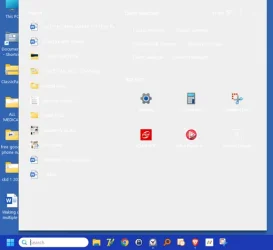
Thank You
I am running Windows 11Pro Version 23H2 (OS Build 22631.7276). I have attached what I get now.
Thank You
My Computers
-
At a glance
windows 11 Pro11th Gen Intel Core i7-11390H (4 Cores, 8 Thr...32GB dual channel (DDR4)Intel® Iris® Xe- OS
- windows 11 Pro
- Computer type
- PC/Desktop
- Manufacturer/Model
- geekom mini IT11
- CPU
- 11th Gen Intel Core i7-11390H (4 Cores, 8 Threads, 12M
- Memory
- 32GB dual channel (DDR4)
- Graphics Card(s)
- Intel® Iris® Xe
- Monitor(s) Displays
- HP S2031
- Hard Drives
- 1TB SSD
-
At a glance
Windows 11 ProIntel Core i7-13620HDDR4: SO-DIMM 32GB- Operating System
- Windows 11 Pro
- Computer type
- PC/Desktop
- Manufacturer/Model
- Geekom Mini PC XT13 Pro
- CPU
- Intel Core i7-13620H
- Memory
- DDR4: SO-DIMM 32GB
- Monitor(s) Displays
- HPS2031
- Hard Drives
- M.2 1TB






