
I periodically get this pop-up from Malwarebytes Windows Firewall Control warning me about this executable that wants to phone home:

I notice the Microsoft Store Logo and blue box below it flash and appears when I open apps like AdwCleaner and Malwarebytes itself. Then it quickly disappears as if it's trying to phone home to the Microsoft Store for some reason. I've never installed those apps through the Microsoft Store. Never.
Although I have a rule active in Firewall Control to block it, it sometimes keeps reappears again & again asking me to allow it. I'd like to delete these attempts to phone home to what appears to be the Microsoft Store (?) since I never use it. Malwarebytes detects nothing. How can I delete this from happening?
~
Revo also detects a number of these:
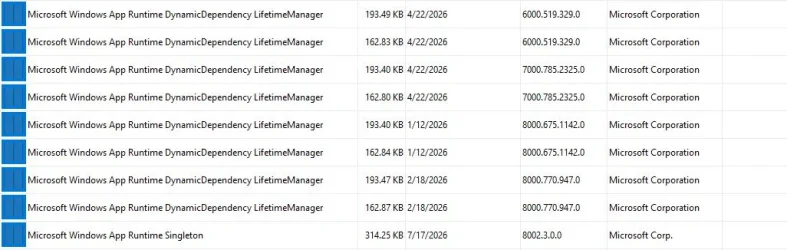
So I'm also wondering, are they related to what I asked up above? Do I need all these or can I delete them?
I notice the Microsoft Store Logo and blue box below it flash and appears when I open apps like AdwCleaner and Malwarebytes itself. Then it quickly disappears as if it's trying to phone home to the Microsoft Store for some reason. I've never installed those apps through the Microsoft Store. Never.
Although I have a rule active in Firewall Control to block it, it sometimes keeps reappears again & again asking me to allow it. I'd like to delete these attempts to phone home to what appears to be the Microsoft Store (?) since I never use it. Malwarebytes detects nothing. How can I delete this from happening?
~
Revo also detects a number of these:
So I'm also wondering, are they related to what I asked up above? Do I need all these or can I delete them?
My Computers
-
At a glance
Windows 11 Pro 25H2 build: (26200.7623)32GB- OS
- Windows 11 Pro 25H2 build: (26200.7623)
- Computer type
- Laptop
- Manufacturer/Model
- Microsoft Surface Pro
- Memory
- 32GB
-
At a glance
Microsoft 25H2 ProIntel Core Ultra 764GBIntel Integrated Graphics- Operating System
- Microsoft 25H2 Pro
- Computer type
- Laptop
- Manufacturer/Model
- Dell Pro 14 - PC14250
- CPU
- Intel Core Ultra 7
- Memory
- 64GB
- Graphics card(s)
- Intel Integrated Graphics
- Hard Drives
- Micron 1TB SSD






