How can I block and then delete storeexperiencehost.exe safely?


cheaterslick

Well-known member
Power User
Local time
9:30 AM
Posts
1,578
Location
Virginia, USA
OS
Windows 11 Pro 25H2 build: (26200.7623)
I periodically get this pop-up from Malwarebytes Windows Firewall Control warning me about this executable that wants to phone home:

Capture.webp

I notice the Microsoft Store Logo and blue box below it flash and appears when I open apps like AdwCleaner and Malwarebytes itself. Then it quickly disappears as if it's trying to phone home to the Microsoft Store for some reason. I've never installed those apps through the Microsoft Store. Never.

Although I have a rule active in Firewall Control to block it, it sometimes keeps reappears again & again asking me to allow it. I'd like to delete these attempts to phone home to what appears to be the Microsoft Store (?) since I never use it. Malwarebytes detects nothing. How can I delete this from happening?

~

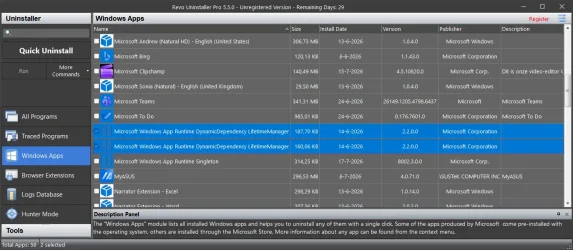
Revo also detects a number of these:
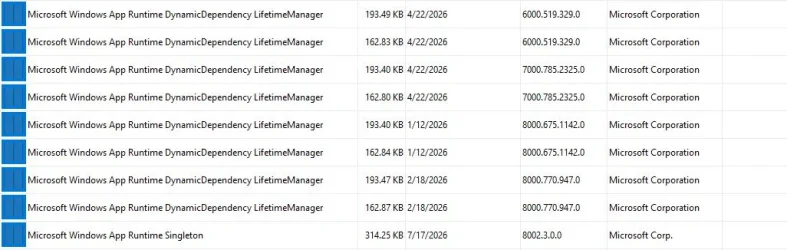
Capture.webp

So I'm also wondering, are they related to what I asked up above? Do I need all these or can I delete them?
 

My Computers My Computers

  • At a glance

    Windows 11 Pro 25H2 build: (26200.7623)32GB
    OS
    Windows 11 Pro 25H2 build: (26200.7623)
    Computer type
    Laptop
    Manufacturer/Model
    Microsoft Surface Pro
    Memory
    32GB
  • At a glance

    Microsoft 25H2 ProIntel Core Ultra 764GBIntel Integrated Graphics
    Operating System
    Microsoft 25H2 Pro
    Computer type
    Laptop
    Manufacturer/Model
    Dell Pro 14 - PC14250
    CPU
    Intel Core Ultra 7
    Memory
    64GB
    Graphics card(s)
    Intel Integrated Graphics
    Hard Drives
    Micron 1TB SSD
I have never used windows store as i find that one more troublesome then it's usefulness..
Have a look in services if there is any service connected to "store experience" or something similar.
Perhaps there is a setting in the store app (just guessing here as i never had store installed) that you can disable it..
Or...... just try the ugly 90's/early 00's solution..... find the file "storeexperiencehost.exe" then rename it "storeexperiencehost.exe.bak"
This way you can easy restore the file if something dont play nice... and if it solves the specific problem.. let it be there as its probibly not many KB's
 

My Computers My Computers

  • At a glance

    Linux: Debian, Kali-linux, Alma, Win:7,10IoT,...i3, i5 and i7 From 2gen to 9th gen... Server ...
    OS
    Linux: Debian, Kali-linux, Alma, Win:7,10IoT,2012R
    Manufacturer/Model
    HP Elitebook 840, AsusX53, Aspire E1-572. AsusUX32A, HP Pro3130mt+3010mt, HP Proliant ML150, 3xCustom-PC, i3, i5, i7
    CPU
    i3, i5 and i7 From 2gen to 9th gen... Server dual Xenon
    Hard Drives
    Sata, M.2, SAS
  • At a glance

    Retro: 2003server.XPpro, Win2000, Win98SE, Wi...Oldest intel 8088 up to P4 dual core
    Operating System
    Retro: 2003server.XPpro, Win2000, Win98SE, Win95, Win3.11, MS-DOS, IBM-DOS
    Manufacturer/Model
    Commodore, AST, Fujitsu, Compaq, etc etc. etc Around 15 desktops and 20 laptops in the collection
    CPU
    Oldest intel 8088 up to P4 dual core
    Hard Drives
    MFM, IDE, SCSI
Have a look in services if there is any service connected to "store experience" or something similar.

services.msc, I checked, Nothing in there.

(just guessing here as i never had store installed)

Nope, I don't have it installed.

Or...... just try the ugly 90's/early 00's solution..... find the file "storeexperiencehost.exe" then rename it "storeexperiencehost.exe.bak"

I may have to do that at some point. It's not located at C:\program files\windowsapps\ so I know that. What's there is that store package folder that it's pointing to and I'm not sure if I need to take control of it and delete it or not. Even if I did that, it still leaves that executable to find and a search turns up nothing.
 

My Computers My Computers

  • At a glance

    Windows 11 Pro 25H2 build: (26200.7623)32GB
    OS
    Windows 11 Pro 25H2 build: (26200.7623)
    Computer type
    Laptop
    Manufacturer/Model
    Microsoft Surface Pro
    Memory
    32GB
  • At a glance

    Microsoft 25H2 ProIntel Core Ultra 764GBIntel Integrated Graphics
    Operating System
    Microsoft 25H2 Pro
    Computer type
    Laptop
    Manufacturer/Model
    Dell Pro 14 - PC14250
    CPU
    Intel Core Ultra 7
    Memory
    64GB
    Graphics card(s)
    Intel Integrated Graphics
    Hard Drives
    Micron 1TB SSD
Okay, so the file do not exist in the path it's listing C:\program files\windowsapps\microsoft.storepurchaseapp_226005xxxxxxxxxxxxxxx
Then it can be its more of a warning that it can't find the file... But if you say its trying to phone home.. it should be on the system.. What happen if you search for the exe file?
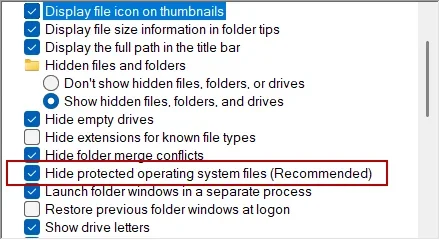
(if you have enabled to show all hidden and system files, otherwise you might never find it if its a system file and you have hide system files in explorer)
 

My Computers My Computers

  • At a glance

    Linux: Debian, Kali-linux, Alma, Win:7,10IoT,...i3, i5 and i7 From 2gen to 9th gen... Server ...
    OS
    Linux: Debian, Kali-linux, Alma, Win:7,10IoT,2012R
    Manufacturer/Model
    HP Elitebook 840, AsusX53, Aspire E1-572. AsusUX32A, HP Pro3130mt+3010mt, HP Proliant ML150, 3xCustom-PC, i3, i5, i7
    CPU
    i3, i5 and i7 From 2gen to 9th gen... Server dual Xenon
    Hard Drives
    Sata, M.2, SAS
  • At a glance

    Retro: 2003server.XPpro, Win2000, Win98SE, Wi...Oldest intel 8088 up to P4 dual core
    Operating System
    Retro: 2003server.XPpro, Win2000, Win98SE, Win95, Win3.11, MS-DOS, IBM-DOS
    Manufacturer/Model
    Commodore, AST, Fujitsu, Compaq, etc etc. etc Around 15 desktops and 20 laptops in the collection
    CPU
    Oldest intel 8088 up to P4 dual core
    Hard Drives
    MFM, IDE, SCSI
Back
Top Bottom