21312324213
New member
- Local time
- 10:00 PM
- Posts
- 1
- OS
- 123412
Hi everyone!
In the Windows 11 Start Menu, under the "All apps" section, folders created by installed programs are displayed. I want to replace their standard yellow icon with my own .ico file.
I have completely replaced the icon resources in the system file imageres.dll.mun. The new icons applied successfully everywhere across the system and in File Explorer, but in the Start Menu, program folders still continue to show up with the default yellow icons. Apparently, the Start Menu pulls folder images from a separate internal cache or system package.
Does anyone know a working method, registry tweak, or script to force the Windows 11 Start Menu to pull the new icons for folders?
Thanks in advance for any help!
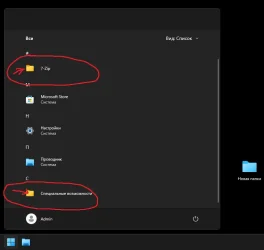
In the Windows 11 Start Menu, under the "All apps" section, folders created by installed programs are displayed. I want to replace their standard yellow icon with my own .ico file.
I have completely replaced the icon resources in the system file imageres.dll.mun. The new icons applied successfully everywhere across the system and in File Explorer, but in the Start Menu, program folders still continue to show up with the default yellow icons. Apparently, the Start Menu pulls folder images from a separate internal cache or system package.
Does anyone know a working method, registry tweak, or script to force the Windows 11 Start Menu to pull the new icons for folders?
Thanks in advance for any help!
- Windows Build/Version
- Windows 11 25H2 26200.8873
My Computer
At a glance
123412
- OS
- 123412
- Computer type
- PC/Desktop
- Manufacturer/Model
- 123123