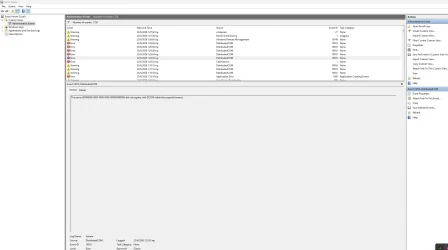
The server {00000000-0000-0000-0000-000000000000} did not register with DCOM within the required timeout.


larysid

Active member
Member
Local time
4:31 AM
Posts
141
OS
win 11 pro 25 h2
Hello! I own a custom desktop PC (win 11 25h2, AMD RYZEN 5800X, ASUS ROG STRIX X570F, NVIDIA 3080, corsair 32gb RAM) and since yesterday, after several updates (for example one drive, edge, armoury crate aura creator and ms store webexperiencepack, windows app runtime 1.8 and 2.2 as well) I have this DCOM error at every shutdown/restart.... I have already tried: Clean boot, full shutdown, cleared temp and system files via dism.exe, used sfc /scannow and dism restore health, cleared file explorer in folder options general tab and resetted folders as well, cleared internet history and flushed DNS, reinstalled my GPU nvidia app- game ready drivers, but nothing fixes this cosmetic bug... Even a system restore to previous state (10 days before, where there wasn't this error), did not fix this bug...
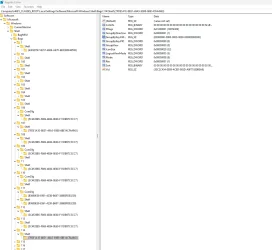
It has to do with shell bags...I have also checked to my laptop ac 16250 dell, but there is no such an error there in its event viewer..
So I suspect Armoury crate's rog live service update is at fault...
Of course I am fully updated to everything in my desktop PC..
Does anybody know how to fix it, please?
 
Windows Build/Version
windows 11 25h2 latest build

Attachments
  • 2026-06-23_01-38_1.webp
    2026-06-23_01-38_1.webp
    93.1 KB · Views: 1
  • 2026-06-23_01-38.webp
    2026-06-23_01-38.webp
    88.8 KB · Views: 1

My Computer My Computer

At a glance

win 11 pro 25 h2
OS
win 11 pro 25 h2
Computer type
PC/Desktop
Unless you are actually experiencing an issue it's best to just ignore DCOM errors. They're often non-issues or self-recovering
 

My Computer My Computer

At a glance

Linux Mint
OS
Linux Mint
Computer type
Laptop
Manufacturer/Model
System76 Lemur Pro
Unless you are actually experiencing an issue it's best to just ignore DCOM errors. They're often non-issues or self-recovering
yes you are right!! I have already seen, some similar posts.. I think I will ignore it, waiting for next updates to fix it... but if anybody here to this post, has another idea regarding this, please inform me.. Till then, I will just ignore it (I am facing no problems except from these DCOM errors)!
 

My Computer My Computer

At a glance

win 11 pro 25 h2
OS
win 11 pro 25 h2
Computer type
PC/Desktop
AI states:
> Windows logs dozens of cosmetic DCOM timeouts in the background that have zero impact on your day-to-day usage. Microsoft designed the Event Viewer to log everything, even self-recovering hiccups. Trying to force a "fix" for a harmless DCOM log often causes more stability issues than the error itself.

But if you want to look further...
1) Wait for an App/Driver Update
2) Check for Specific Software Conflicts
3) Run Standard System Repairs
which include
> a) DISM.exe /Online /Cleanup-image /Restorehealth
> b) sfc /scannow
which you state that you have already done.
 

My Computer My Computer

At a glance

Windows 11
OS
Windows 11
Computer type
PC/Desktop
Manufacturer/Model
Custom Built
@pepanee that is a fact. Microsoft is liberal with their use of 'error' for things that really should be a warning or info.
 

My Computer My Computer

At a glance

Linux Mint
OS
Linux Mint
Computer type
Laptop
Manufacturer/Model
System76 Lemur Pro
Back
Top Bottom