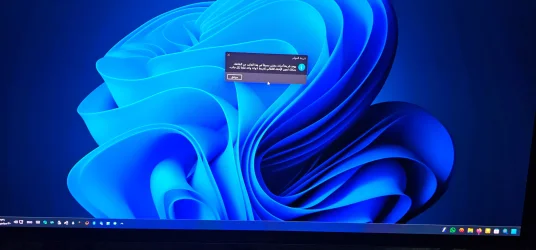
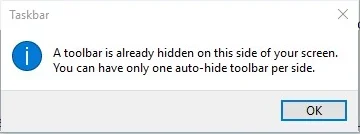
there is already a toolbar hidden on this side of the screen


abdulhkeem

Member
Local time
6:29 PM
Posts
17
OS
Windows 11
everytime my monitors go to sleep and when i wake them i get:
there is already a toolbar hidden on this side of the screen
Error, it is so frustrating and annoying.
So anyone has any solution to tthis annoyance?
PS. i wan't to keep auto hide taskbar active, so no disabling auto hide for me.
 
Windows Build/Version
26200.6725

My Computer

System One

  • OS
    Windows 11
    Computer type
    PC/Desktop
    Manufacturer/Model
    Asus
    CPU
    AMD 9800x3D
    Motherboard
    Asus Strix X870E-E
    Memory
    64gb Corsair Dominator Titanium 6000 CL30
    Graphics Card(s)
    Asus tuf 4070ti
    Sound Card
    Steelseries H Wireless
    Monitor(s) Displays
    MSI 273QP QD-Oled X24, LG 24MK430
    Screen Resolution
    2560x1440, 1920x1080
    Hard Drives
    WD SN850X 4tb, WD Black 2tb, WD Black 4tb
    PSU
    Corsair HX100i
    Case
    Corsair 7000D Airflow
    Cooling
    Noctua NH-U12A
    Keyboard
    Corsair K70 RGB Pro
    Mouse
    Corsair NightSabre
    Browser
    Firefox
    Antivirus
    Kaspersky Standard
Can you attach a screenshot, or take a pic with your smartphone and attach it in your next post?
 

My Computer

System One

  • OS
    Windows 11 Pro Insider 64 bit 25H2 26200.5742
    Computer type
    PC/Desktop
    Manufacturer/Model
    Gigabyte Z390 UD
    CPU
    Intel Core i7 9700K 3.60
    Motherboard
    Gigabyte Z390 UD
    Memory
    16 GB
    Graphics Card(s)
    nVidia GEForce RTX 2060 Super
    Sound Card
    onboard
    Monitor(s) Displays
    Two 27" Dell 4K monitors
    Screen Resolution
    3840 x 2160
    Hard Drives
    M.2 NVME SSD, 500 GB; Two 2TB Mechanical HDD's
    PSU
    850w PSU
    Case
    Cyberpower PC
    Cooling
    Water cooled
    Keyboard
    Backlit Cyberpower gaming keyboard
    Mouse
    Backlit Cyberpower gaming mouse
    Internet Speed
    1 GB mbps
    Browser
    Brave
    Antivirus
    Windows Security
my system is in arabic but i googled the english version and attached the image for you.
this all started when i bought my first oled monitor a few days ago used 2 hdmi monitors were fine then this happened when i replaced one with msi 273qp x24 on displayport (for FW updates)
 

Attachments

  • ٢٠٢٥٠٩٣٠_١٥٣٦٣٢.webp
    ٢٠٢٥٠٩٣٠_١٥٣٦٣٢.webp
    513.9 KB · Views: 4
  • a.webp
    a.webp
    5.6 KB · Views: 2

My Computer

System One

  • OS
    Windows 11
    Computer type
    PC/Desktop
    Manufacturer/Model
    Asus
    CPU
    AMD 9800x3D
    Motherboard
    Asus Strix X870E-E
    Memory
    64gb Corsair Dominator Titanium 6000 CL30
    Graphics Card(s)
    Asus tuf 4070ti
    Sound Card
    Steelseries H Wireless
    Monitor(s) Displays
    MSI 273QP QD-Oled X24, LG 24MK430
    Screen Resolution
    2560x1440, 1920x1080
    Hard Drives
    WD SN850X 4tb, WD Black 2tb, WD Black 4tb
    PSU
    Corsair HX100i
    Case
    Corsair 7000D Airflow
    Cooling
    Noctua NH-U12A
    Keyboard
    Corsair K70 RGB Pro
    Mouse
    Corsair NightSabre
    Browser
    Firefox
    Antivirus
    Kaspersky Standard
i wan't to keep auto hide taskbar active, so no disabling auto hide for me.
I suggest you disable auto-hide pemporarily as a possible aide to diagnosing the problem.
- Perhaps disabling auto-hide will allow whatever other hidden toolbar the system is complaining about to appear, possibly identifying the root cause of the problem???
- Perhaps your new monitor / graphics driver installed a hidden toolbar of its own and that is what the system is complaining about???


Best of luck,
Denis


Welcome to ElevenForum.

It's really worth making time to browse through the ElevenForum Tutorial index - there's a shortcut to it at the top of every ElevenForum page [within the Tutorials dropdown list].
- At the foot of the ElevenForum Tutorial index is a shortcut to download it as a spreadsheet.
- I download a new copy each month.
- By downloading it as a spreadsheet I can benefit from Excel's excellent filtering capabilities when I search for topics of interest.
- ElevenForum tutorials are also listed at Tutorials and there's a shortcut to that at the top of every page.

You can search ElevenForum using the search box in the top-right corner of all ElevenForum webpages or using Advanced Search - ElevenForum
- You can also search ElevenForum threads in many general search engines, such as Google, by adding site:elevenforum.com after your search term. For example,
Taskbar setup site:elevenforum.com
- [This is what the search box in the top-right corner of ElevenForum webpages does automatically]
 

My Computer

System One

  • OS
    Windows 11 Home x64 Version 25H2 Build 26200.8037
auto hide gets disabled when the stupid error appears. what is windows even fussing about? i dont have any other toolbars hidden microsoft ruined their OS with the stupid redesign it was fine in 10 why re-invent the wheel over and over?!
the only thing working is setting only 1 taskbar on the main monitor "uncheck show taskbar on all my displays" sigh.
 

My Computer

System One

  • OS
    Windows 11
    Computer type
    PC/Desktop
    Manufacturer/Model
    Asus
    CPU
    AMD 9800x3D
    Motherboard
    Asus Strix X870E-E
    Memory
    64gb Corsair Dominator Titanium 6000 CL30
    Graphics Card(s)
    Asus tuf 4070ti
    Sound Card
    Steelseries H Wireless
    Monitor(s) Displays
    MSI 273QP QD-Oled X24, LG 24MK430
    Screen Resolution
    2560x1440, 1920x1080
    Hard Drives
    WD SN850X 4tb, WD Black 2tb, WD Black 4tb
    PSU
    Corsair HX100i
    Case
    Corsair 7000D Airflow
    Cooling
    Noctua NH-U12A
    Keyboard
    Corsair K70 RGB Pro
    Mouse
    Corsair NightSabre
    Browser
    Firefox
    Antivirus
    Kaspersky Standard
I've had the same issue on multiple devices for years now. In the end, I gave up and when this happens I run a batch file (contents below) that restarts explorer.exe, which addresses the symptoms. Hope this helps.

taskkill /f /IM explorer.exe
start explorer.exe
exit
exit
 

My Computers

System One System Two

  • OS
    Windows 11 23H2, 24H2
    Computer type
    PC/Desktop
    Manufacturer/Model
    Dell XPS8950, Vostro5620
    CPU
    i7-12700K
    Motherboard
    Z690 : 9D2HH Foxconn, R6PCT Foxconn 2nd (XPS)
    Memory
    16GB (2 x 8)
    Graphics Card(s)
    Intel(R) UHD Graphics 770 with shared graphics memory
    Sound Card
    Integrated
    Monitor(s) Displays
    Acer CBL282K Smiiprx
    Screen Resolution
    4K UHD (3840 x 2160) @ 60 Hz
    Hard Drives
    Western Digital PC SN810 512 GB M.2 NVMe SSD, PCIe
    PSU
    750W
    Cooling
    2G44F Asetek 125W CPU liquid cooler
    Keyboard
    Arteck Wireless
    Mouse
    Victsing-mm057 wireless
    Internet Speed
    Wi-Fi 6
    Browser
    Vivaldi
    Antivirus
    Windows Defender (native)
  • Operating System
    Win 23H2
    Computer type
    Laptop
    Manufacturer/Model
    Dell Vostro 5620
    CPU
    12th Gen Intel Core i7-1260P
    Memory
    2 x 8 GB
    Graphics card(s)
    Intel Iris Xe Graphics
    Screen Resolution
    1920 x 1200 @ 60 Hz
    Hard Drives
    NVMe 512 GB
    Case
    Aluminum
    Mouse
    Touchpad
    Browser
    Vivaldi
    Antivirus
    Windows Defender (native)
yeah i gave up on the stupid windows version and got myselft displayfusion which gave me a second taskbar without the annoyance of windows in the way LoL 😂
 

My Computer

System One

  • OS
    Windows 11
    Computer type
    PC/Desktop
    Manufacturer/Model
    Asus
    CPU
    AMD 9800x3D
    Motherboard
    Asus Strix X870E-E
    Memory
    64gb Corsair Dominator Titanium 6000 CL30
    Graphics Card(s)
    Asus tuf 4070ti
    Sound Card
    Steelseries H Wireless
    Monitor(s) Displays
    MSI 273QP QD-Oled X24, LG 24MK430
    Screen Resolution
    2560x1440, 1920x1080
    Hard Drives
    WD SN850X 4tb, WD Black 2tb, WD Black 4tb
    PSU
    Corsair HX100i
    Case
    Corsair 7000D Airflow
    Cooling
    Noctua NH-U12A
    Keyboard
    Corsair K70 RGB Pro
    Mouse
    Corsair NightSabre
    Browser
    Firefox
    Antivirus
    Kaspersky Standard
yeah i gave up on the stupid windows version and got myselft displayfusion which gave me a second taskbar without the annoyance of windows in the way LoL 😂
Hi,
This behavior is to warn you about your language choice and can be turned off .


cccleaner.webp
 

My Computers

System One System Two

  • OS
    All Branches but Release
    Computer type
    Laptop
    Manufacturer/Model
    Acer Nitro ANV15-51
    CPU
    AMD Ryzen 7 7735HS 3200-4500 Mhz 8 cores x 2
    Motherboard
    Sportage_RBH
    Memory
    32 GB DDR5
    Graphics Card(s)
    Radeon Graphic / NVIDIA GeForce RTX 4060 8 GB GDDR6
    Sound Card
    AMD/Realtek(R) Audio
    Monitor(s) Displays
    Integrated Monitor (15.3"vis)
    Screen Resolution
    FHD 1920X1080 16:9 144Hz
    Hard Drives
    KINGSTON OM8SEP4512Q-AA 1TB
    Western Digital 256GB
    PSU
    19V DC 6.32 A 120 W
    Cooling
    Dual Fans
    Mouse
    MS Bluetooth
    Internet Speed
    Fiber 1GB Cox -us & 1GB Orange-fr
    Browser
    Edge Canary- Firefox Nightly-Chrome Dev-Chrome Dev
    Antivirus
    Windows Defender
  • Operating System
    Windows 11 Beta
    Computer type
    Laptop
    Manufacturer/Model
    Asus X751BP
    CPU
    AMD A9-9420
    Memory
    8 GB of DDR4
    Graphics card(s)
    AMD Radeon R5
    Screen Resolution
    1600x900
    Hard Drives
    Seagate 1 TB
it is off, i never even turned it on. it's the Microsoft way to ruin everything just to anger their loyal customers sigh.
 

My Computer

System One

  • OS
    Windows 11
    Computer type
    PC/Desktop
    Manufacturer/Model
    Asus
    CPU
    AMD 9800x3D
    Motherboard
    Asus Strix X870E-E
    Memory
    64gb Corsair Dominator Titanium 6000 CL30
    Graphics Card(s)
    Asus tuf 4070ti
    Sound Card
    Steelseries H Wireless
    Monitor(s) Displays
    MSI 273QP QD-Oled X24, LG 24MK430
    Screen Resolution
    2560x1440, 1920x1080
    Hard Drives
    WD SN850X 4tb, WD Black 2tb, WD Black 4tb
    PSU
    Corsair HX100i
    Case
    Corsair 7000D Airflow
    Cooling
    Noctua NH-U12A
    Keyboard
    Corsair K70 RGB Pro
    Mouse
    Corsair NightSabre
    Browser
    Firefox
    Antivirus
    Kaspersky Standard
Back
Top Bottom