

- Local time
- 11:17 AM
- Posts
- 743
- OS
- Windows 11 Pro build 26200.8524
Today after reading some on-line newspapers, I wanted to open a drive in Windows Explorer. I opened Windows Explorer but clicking on a drive icon "PLACE (F:)" several times in Windows Explorer did nothing and the drive did not open. Several mouse clickings inside Windows Explorer window did not make Windows Explorer be the active window, I guess.
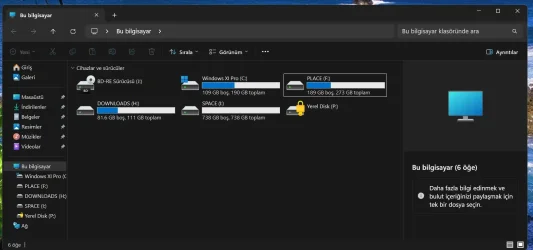
In such cases, I refresh the desktop by pressing "Fn + F5" key (my keyboard requires two keys be pressed together for function keys). After this, clicking on the same drive opened it.
Windows 11 Pro 26H2 Build: 26300.9550 (Windows 11 is installed on incompatible hardware). This build was installed when it was out and I did not have this issue. I will be on the lookout if the same thing happens again.
Has any forum member experienced the same bug before ?
In such cases, I refresh the desktop by pressing "Fn + F5" key (my keyboard requires two keys be pressed together for function keys). After this, clicking on the same drive opened it.
Windows 11 Pro 26H2 Build: 26300.9550 (Windows 11 is installed on incompatible hardware). This build was installed when it was out and I did not have this issue. I will be on the lookout if the same thing happens again.
Has any forum member experienced the same bug before ?
My Computers
-
At a glance
Windows 11 Pro build 26200.8524Intel i7-4790Teams DDR3-1600 4x4 GBMSI Nvidia GeForce GTX 1050Ti- OS
- Windows 11 Pro build 26200.8524
- Computer type
- PC/Desktop
- Manufacturer/Model
- Home Built
- CPU
- Intel i7-4790
- Motherboard
- Asus H97 Pro Gamer with add-on TPM1.2 module
- Memory
- Teams DDR3-1600 4x4 GB
- Graphics Card(s)
- MSI Nvidia GeForce GTX 1050Ti
- Sound Card
- Realtek ALC1150
- Monitor(s) Displays
- Dell P2425D
- Screen Resolution
- 2560 by 1440 pixels
- Hard Drives
- Corsair NVMe M.2 Core XT 1000 GB (Windows 11 v.25H2); Samsung SATA Evo 870 500 GB (Windows 11 v.25H2);
- PSU
- Corsair HX850
- Case
- Gigabyte Solo 210
- Cooling
- Zalman CNPS7X Tower
- Keyboard
- Microsoft AIO Wireless (includes touchpad)
- Mouse
- HP S1000 Plus Wireless
- Internet Speed
- 500 Mb fiber optic
- Browser
- Chrome; MS Edge
- Antivirus
- Windows Defender
-
At a glance
MacOS 12 MontereyIntel Core i58 GBIntel integrated- Operating System
- MacOS 12 Monterey
- Computer type
- Laptop
- Manufacturer/Model
- Apple Macbook Air
- CPU
- Intel Core i5
- Memory
- 8 GB
- Graphics card(s)
- Intel integrated
- Screen Resolution
- 1440 by 900 pixels
- Hard Drives
- 128 GB
- Keyboard
- Built-in
- Mouse
- Microsoft Wireless
- Internet Speed
- 802.11 ac
- Browser
- Chrome; Safari
- Antivirus
- N/A






