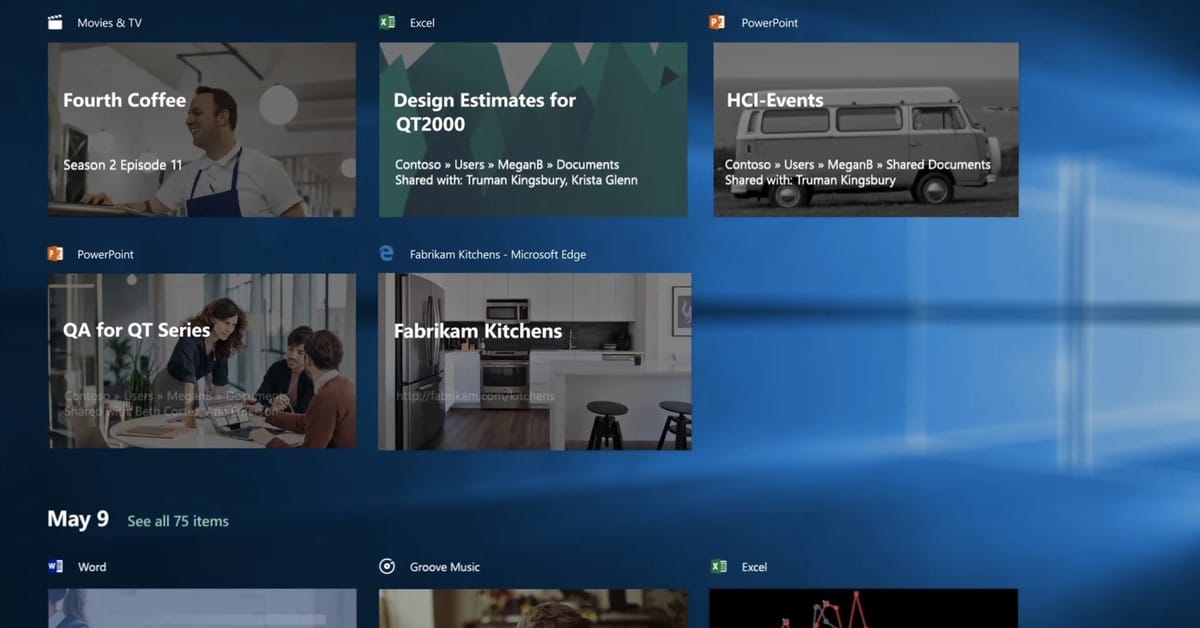
Timeline, replacement for File History


Haydon

Well-known member
Power User
VIP
Local time
2:06 PM
Posts
1,990
OS
Windows 10 Pro
Timeline was announced 5 years ago, what became of it?


My Computer My Computer

At a glance

Windows 10 Pro
OS
Windows 10 Pro

My Computer My Computer

At a glance

Windows 11AMD 3990XCORSAIR Vengeance RGB PRO (4x16GB) DDR4 3600 ...Asus ROG Strix RTX 3090
OS
Windows 11
Computer type
PC/Desktop
CPU
AMD 3990X
Motherboard
ASUS ROG Zenith II Extreme
Memory
CORSAIR Vengeance RGB PRO (4x16GB) DDR4 3600 (PC4-28800) C18
Graphics Card(s)
Asus ROG Strix RTX 3090
Monitor(s) Displays
Samsung Odyssey G9 @ 240 Hz
Screen Resolution
5120 x 1440
Hard Drives
SEKC SM2502T 2TB NVMe M.2 (2TB X 3)
PSU
Corsair AXi Series, AX1600i, 1600 Watt, 80+ Titanium Certified, Fully Modular
Case
BGW10 Dark Base PRO 900 ATX
Cooling
Corsair Hydro Series iCUE H115i PRO XT RGB (280mm)
Keyboard
SteelSeries Apex Pro
Mouse
Logitech MX Master 3
Ouch, especially since I have my suspicions that File History itself is slowly slipping into a 'cannot live cannot die' state, similar to Backup and Restore (Windows 7)
 

My Computer My Computer

At a glance

Windows 10 Pro
OS
Windows 10 Pro
I never use timeline as some of my family use the pc's in the house as well and it mucks up what I am doing and visa versa
 

My Computers My Computers

  • At a glance

    Windows 11 Pro13th Gen Core i9 13900HX32GB DDR5 @4800MHz 2x16GBGeforce RTX 4090HX 16GB
    OS
    Windows 11 Pro
    Computer type
    Laptop
    Manufacturer/Model
    Alienware M18 R1
    CPU
    13th Gen Core i9 13900HX
    Memory
    32GB DDR5 @4800MHz 2x16GB
    Graphics Card(s)
    Geforce RTX 4090HX 16GB
    Sound Card
    Nvidia HD / Realtek ALC3254
    Monitor(s) Displays
    18" QHD+
    Screen Resolution
    25660 X 1600
    Hard Drives
    C: KIOXIA (Toshiba) 2TB KXG80ZNV2T04 NVMe PCIe M.2 SSD
    D: KIOXIA (Toshiba) 2TB KXG80ZNV2T04 NVMe PCIe M.2 SSD
    Case
    Dark Metallic Moon
    Keyboard
    Alienware M Series per-key AlienFX RGB
    Mouse
    Alienware AW610M
    Browser
    Chrome and Firefox
    Antivirus
    Norton
    Other Info
    Killer E3000 Ethernet Controller
    Killer Killer AX1690 Wi-Fi Network Adaptor Wi-Fi 6E
    Bluetooth 5.2
    Alienware Z01G Graphic Amplifier
  • At a glance

    Windows 11 Pro10th Gen i-9 10900 K32Gb Dual Channel DDR4 @ 8843MHzNvidia RTX 2080 Super
    Operating System
    Windows 11 Pro
    Computer type
    Laptop
    Manufacturer/Model
    Alienware Area 51m R2
    CPU
    10th Gen i-9 10900 K
    Memory
    32Gb Dual Channel DDR4 @ 8843MHz
    Graphics card(s)
    Nvidia RTX 2080 Super
    Sound Card
    Nvidia
    Screen Resolution
    1920 x 1080
    Hard Drives
    Hard Drive C: Samsung 2TB SSD PM981a NVMe
    Hard Drive D:Samsung 2TB SSD 970 EVO Plus
    Mouse
    Alienware 610M
    Browser
    Chrome
    Antivirus
    Norton
Ouch, especially since I have my suspicions that File History itself is slowly slipping into a 'cannot live cannot die' state, similar to Backup and Restore (Windows 7)
One can hope that File History develops into a TwoDrive so that users can sync their files to OneDrive (in the cloud) and/or TwoDrive (on earth) (y)(y)
 

My Computer My Computer

At a glance

Windows 10 Pro
OS
Windows 10 Pro
Windows 10 Timeline is indispensable for me! CAN YOU PLEASE TELL ME OF A 3RD PARTY UTILITY OR PROGRAM THAT GIVES this SAME functionality on Windows 11? I have to stay on OLD Windows 10 until I can find duplicate functionality some other way. It's bad to stay on an old version of windows, but what else can I do? PLEASE help me find how to get Timeline on Windows 11 so I can upgrade for free. HAVE TO HAVE THIS functionality.

Why? Timeline saves me so much time re-opening previously used files! I can't imagine anyone working without it, unless all you do is browse the internet, which I understand. But even then! Timeline shows a visual display of all your previous webpages, making it simple to go back to another page. Sure your browser can do that in a differrent way, but it's one click to Windows 10 Timeline! and you don't have to leave the browser page your on! Thanks in advance for any help, tips or suggestions.
 

Attachments

  • WINDOWS_10_TIMELINE_NOT_IN_WINDOWS_11_UNACCEPTABLE.jpg
    WINDOWS_10_TIMELINE_NOT_IN_WINDOWS_11_UNACCEPTABLE.jpg
    284.5 KB · Views: 1

My Computer My Computer

At a glance

Windows 10Intel® Core™ i7-10510U (1.8 GHz base frequenc...16 GB DDR4-2666 SDRAM (2 x 8 GB)Graphics (discrete) NVIDIA® GeForce® MX250 (2...
OS
Windows 10
Computer type
Laptop
Manufacturer/Model
HP Spectre x360 Convertible 15"
CPU
Intel® Core™ i7-10510U (1.8 GHz base frequency, up to 4
Motherboard
Motherboard ID : 863F
Memory
16 GB DDR4-2666 SDRAM (2 x 8 GB)
Graphics Card(s)
Graphics (discrete) NVIDIA® GeForce® MX250 (2 GB GDDR5 dedicated)
Sound Card
Intel® Smart Sound Technology (Intel® SST) & NVIDIA Virtual Audio Device (Wave Extensible) (WDM) & Realtek HD Audio & KRISP & Audio by Bang & Olufsen, quad speakers
Monitor(s) Displays
15.6" diagonal 4K UWVA BrightView micro-edge AMOLED multitouch-enabled edge-to-edge glass with Corning® Gorilla® Glass NBT™ (3840 x 2160)
Screen Resolution
(3840 x 2160)
Hard Drives
1 TB Intel® SSD
32 GB Intel® Optane™ Memory for storage acceleration

Latest Support Threads

Back
Top Bottom