Tiny11 Install


Digidoc

New member
Member
Local time
6:47 PM
Posts
9
OS
Win 11 Pro Version 24H2 (build 26100.4351)
Greets from the SE USA. Many people are arguing about Windows 11, some love it, others hate it. Others argue instead about Tiny11. NTDEV created Tiny11 and now wants people to build their own ISO images with the options they want to include or exclude. Others argue still about building their own Tiny-ISO and instead prefer to use one which has been prebuilt for them. Other people complain about the build process failing and so get frustrated. I have had (and have used) many different versions of Tiny11. I once thought some were corrupted or bad, but guess what? I had a memory chip failure causing the errors and -all- the Tiny11 ISO images were in fact good! Here is a link to download a pre-built ISO image:
[Download Tiny11 ISO for PC [Lightweight Windows 11] Free]

Here is another link to 26H1 release dated 03-2026:
[Tiny 11 Releases}
 
Windows Build/Version
25h2 (Tiny11)

My Computer My Computer

At a glance

Win 11 Pro Version 24H2 (build 26100.4351)3.70 gigahertz Intel Xeon W-2135
OS
Win 11 Pro Version 24H2 (build 26100.4351)
Computer type
PC/Desktop
Manufacturer/Model
Lenovo 30BFS44D00 ThinkStation P520
CPU
3.70 gigahertz Intel Xeon W-2135
Motherboard
Lenovo 1036 NO DPK
It is important to note, if you are trying to install Tiny11 on a Core2Duo CPU chip, that chip is missing 2 needed instructions; [popcnt & SSE4.2]; hence the newest version of Tiny11 which runs on this CPU is 23H2! It fails to install on 24h2 and 25h2. Microsoft update runs and updates needed drivers and security.
 
Last edited:

My Computer My Computer

At a glance

Win 11 Pro Version 24H2 (build 26100.4351)3.70 gigahertz Intel Xeon W-2135
OS
Win 11 Pro Version 24H2 (build 26100.4351)
Computer type
PC/Desktop
Manufacturer/Model
Lenovo 30BFS44D00 ThinkStation P520
CPU
3.70 gigahertz Intel Xeon W-2135
Motherboard
Lenovo 1036 NO DPK
Greets from the SE USA. Many people are arguing about Windows 11, some love it, others hate it. Others argue instead about Tiny11. NTDEV created Tiny11 and now wants people to build their own ISO images with the options they want to include or exclude. Others argue still about building their own Tiny-ISO and instead prefer to use one which has been prebuilt for them. Other people complain about the build process failing and so get frustrated. I have had (and have used) many different versions of Tiny11. I once thought some were corrupted or bad, but guess what? I had a memory chip failure causing the errors and -all- the Tiny11 ISO images were in fact good! Here is a link to download a pre-built ISO image:
[Download Tiny11 ISO for PC [Lightweight Windows 11] Free]

Here is another link to 26H1 release dated 03-2026:
[Tiny 11 Releases}

No idea what you're trying to communicate.
 

My Computers My Computers

  • At a glance

    Windows 11 Pro 25H2 Build 26200.8655Intel(R) Core(TM) i7-4770K CPU @ 3.50GHz32.0 GB of I forget and the box is in storage.Gigabyte nVidia GeForce GTX 1660 Super OC 6GB
    OS
    Windows 11 Pro 25H2 Build 26200.8655
    Computer type
    PC/Desktop
    Manufacturer/Model
    Sin-built 2013
    CPU
    Intel(R) Core(TM) i7-4770K CPU @ 3.50GHz
    Motherboard
    ASUS ROG Maximus VI Formula
    Memory
    32.0 GB of I forget and the box is in storage.
    Graphics Card(s)
    Gigabyte nVidia GeForce GTX 1660 Super OC 6GB
    Sound Card
    ROG SupremeFX Formula 8-Channel High Definition Audio
    Monitor(s) Displays
    5 x LG 25MS500-B - 1 x 24MK430H-B - 1 x Wacom Pro 22" Touch Screen Tablet
    Screen Resolution
    All over the place
    Hard Drives
    Too many to list. OS on Samsung 1TB 870 QVO SATA
    PSU
    Silverstone 1500
    Case
    NZXT Phantom 820 Full-Tower Case
    Cooling
    Noctua NH-D15 Elite Class Dual Tower CPU Cooler / 6 x EziDIY 120mm / 2 x Corsair 140mm somethings / 1 x 140mm Thermaltake something / 2 x 200mm Corsair.
    Keyboard
    Corsair K95 / Logitech diNovo Edge Wireless
    Mouse
    Logitech: G402 / G502 / Mx Masters / Mx Air Cordless
    Internet Speed
    2000/500Mbps
    Browser
    All sorts
    Antivirus
    Kaspersky Premium
    Other Info
    ㅤㅤㅤㅤㅤㅤㅤㅤㅤㅤㅤㅤㅤㅤㅤㅤㅤㅤㅤㅤㅤㅤㅤㅤㅤㅤㅤㅤㅤㅤㅤㅤㅤㅤㅤㅤㅤㅤㅤㅤ⠀⠀⠀⠀⠀⠀⠀⠀⠀⠀
    TP-Link BE9300 WiFi 7 Bluetooth 5.4 (Archer TBE550E)
    TP-Link TX201 V1 2.5GB Lan

    Grandstream HT812 - VoIP
    ASUS DSL-AX82U - Mesh
    ASUS RT-AC68U - Mesh
    ASUS RT-BE88U Router

    Brother MFC-L2880DW Printer

    I’m on a horse.
  • At a glance

    Windows 11 Pro 25H2 Build 26200.8655 (Wifes)13th Generation Intel® Core™ i5-1340P Process...16GB LPDDR5-52001x Intel® Iris® Xe Graphics
    Operating System
    Windows 11 Pro 25H2 Build 26200.8655 (Wifes)
    Computer type
    Laptop
    Manufacturer/Model
    LENOVO Yoga 7 14IRL8 - Type 82YL
    CPU
    13th Generation Intel® Core™ i5-1340P Processor(Core™ i5-1340P)
    Memory
    16GB LPDDR5-5200
    Graphics card(s)
    1x Intel® Iris® Xe Graphics
    Sound Card
    Optimized with Dolby Atmos®
    Screen Resolution
    QHD 2880 x 1800 OLED
    Hard Drives
    M.2 512 GB SSD PCIe
    Mouse
    Logiteck MX Master 3S
    Internet Speed
    2000/500
    Antivirus
    Defender / Malwarebytes
    Other Info
    …still on a horse.


    Wireless Network: Wi-Fi 6E 2x2 AX; Bluetooth® 5.1 or above
    Ports: 1x 1 Novo button; 2 in 1 Audio Combo jack; Micro SD Card Reader; HDMI 1.4b; 2 x USB Type-C (TBT4)
    USB 3.2 Gen 2 DP 1.4a
    PD 3.0); 1 x USB 3.2 Gen1 Type A
    Camera
    1x 1080P FHD IR/RGB Hybrid with Privacy Shutter and Dual Array Microphone
    Graphics
    1x Intel® Iris® Xe Graphics
    Monitor
    14" WUXGA
    Form Factor
    Convertible Notebook
  • Windows 11 Pro 25H2 Build 26200.8655 (Wifes)

    Yoga 7 2-in-1 14IML9 - Type 83DJ

    Processor: Intel® Core™ Ultra 7 155H Processor(Core™ Ultra 7 155H)

    Memory: 32GB LPD5X-7467

    Hard Drive: 1 TB SSD PCIe

    Wireless Network: 1x Wi-Fi 6E 2x2 AX; Bluetooth® 5.1 or above

    Ports: 1 x HDMI 2.1 TMDS; 1 x Novo Button; 1 x Combo Audio Jack
    2 x USB-C (USB 4.0)
    1 x USB-A 3.2 Gen 1

    Camera: 1080P FHD IR Hybrid with Dual Microphone

    Graphics: Intel® Arc™ Graphics

    Monitor: 14" 2.8K

    ...Where's my horse?
In this video, i will show you how to create a custom lightweight Windows 11 installation that’s lighter, faster, and more in line with your needs.
 

My Computer My Computer

At a glance

Windows 11AMD Ryzen 7 5700GMicron Technology DDR4-3200 16GBNVIDIA GeForce RTX 3060
OS
Windows 11
Computer type
PC/Desktop
Manufacturer/Model
HP Pavilion
CPU
AMD Ryzen 7 5700G
Motherboard
Erica6
Memory
Micron Technology DDR4-3200 16GB
Graphics Card(s)
NVIDIA GeForce RTX 3060
Sound Card
Realtek ALC671
Monitor(s) Displays
Samsung SyncMaster U28E590
Screen Resolution
3840 x 2160
Hard Drives
SAMSUNG MZVLQ1T0HALB-000H1
Tiny 11 strips everything down to the point, you have to literally rebuild Windows from scratch. Its better to debloat than add in what you need.
 

My Computers My Computers

  • At a glance

    Windows 11 Education For 25H2Intel® Core i7 5500u8 GBIntel HD Family Graphics 5500 AMD Firepro 4150M
    OS
    Windows 11 Education For 25H2
    Computer type
    Laptop
    Manufacturer/Model
    HP ZBook G2
    CPU
    Intel® Core i7 5500u
    Motherboard
    HP
    Memory
    8 GB
    Graphics Card(s)
    Intel HD Family Graphics 5500 AMD Firepro 4150M
    Sound Card
    Realtek High Audio
    Hard Drives
    1 TB SSD
    Mouse
    HP USB Mouse
    Antivirus
    Windows Defender
  • At a glance

    Windows 11 Pro For Workstations 25H2Xeon 1535m v632 GBAMD Quadro Pro 4100
    Operating System
    Windows 11 Pro For Workstations 25H2
    Computer type
    Laptop
    Manufacturer/Model
    HP Zbook G4
    CPU
    Xeon 1535m v6
    Motherboard
    HP
    Memory
    32 GB
    Graphics card(s)
    AMD Quadro Pro 4100
    Sound Card
    Bang and Olufson Audio
    Hard Drives
    1TB SSD
    Mouse
    HP USB Mouse
    Antivirus
    Windows Defender
Sorry, I disagree. I have used both debloat and Tiny. There are versions of Tiny called Core and called Nano. Both of those are not suitable for everyday use. Regular Tiny11 can be installed where regular Windows11 cannot install.

If you want to install Windows 11 and then debloat, you can remove around 110 unneeded programs. If you are trying to install 11 on old hardware not normally supported, then Tiny11 is the better choice. An example of this is the Core2Duo CPU chip used in the Dell Vostro 420. It does not have the commands POPCNT and SSE4.2; both are required to run Windows 11. However, if you install Tiny11-23h2, it bypasses both these commands and allows a complete install. This makes a throwaway computer useable again with a modern Tiny11.

This Dell now has 4gb memory, a 1tb hdd, an ATI video card, wifi, bluetooth, and a DVD burner. The installed OS is Tiny11-23h2 build 22631.6199. Windows Store works. Windows update works. My remaining problem is with the sound driver on my ATI video card. It is not great, it is not speedy, but it is useable.
 

My Computer My Computer

At a glance

Win 11 Pro Version 24H2 (build 26100.4351)3.70 gigahertz Intel Xeon W-2135
OS
Win 11 Pro Version 24H2 (build 26100.4351)
Computer type
PC/Desktop
Manufacturer/Model
Lenovo 30BFS44D00 ThinkStation P520
CPU
3.70 gigahertz Intel Xeon W-2135
Motherboard
Lenovo 1036 NO DPK
@Digidoc I'm running Windows 11 Pro 25H2 without any problems whatsoever. I 'debloated' by setting my PC up as if it were in a EU country, thus giving me the option to uninstall elements of MS programs which I neither want nor need without having to resort to using third party programs or registry hacks etc.

Basically setting up my PC as if it's in the EU, I'm able to uninstall MS programs that users outside the EU aren't given the choice over because EU Law gives you that option. The best bit about it is, you don't even need to be in the EU to setup your PC that way. And for those that think uninstalling Edge for example causes problems because they believe the hype that it is so baked into Windows that removing it causes nothing but problems, well spoiler alert, it doesn't doing it the way I did it because MS aren't allowed to break stuff for EU users. I still get Windows updates etc. Upshot is, I have a lightweight Windows 11 without really putting in much effort if I'm honest. Edge? what is that? :LOL:
 

My Computer My Computer

At a glance

Windows 11 Pro 25H2 26200.8737Intel i5 10400x2 8gb Corsair Vengeance LPX 3600Intel(R) UHD Graphics 630
OS
Windows 11 Pro 25H2 26200.8737
Computer type
PC/Desktop
Manufacturer/Model
MSI
CPU
Intel i5 10400
Motherboard
B560M PRO-VDH WiFi BIOS 1.A1
Memory
x2 8gb Corsair Vengeance LPX 3600
Graphics Card(s)
Intel(R) UHD Graphics 630
Sound Card
Realtek onboard AL897
Monitor(s) Displays
MSI MAG Artymis 242C
Screen Resolution
1920 x 1080
Hard Drives
Samsung 970 Evo Plus 500gb
PSU
EVGA SuperNova 650w G3
Case
Gaming case
Keyboard
MSI GK20
Mouse
MSI Versa 300
Internet Speed
500mbps
Browser
Brave
Antivirus
Bitdefender
Other Info
MSI Herald BE9400 WiFi PCIe
Printer - Brother MFC-L2750DW
An example of this is the Core2Duo CPU chip used in the Dell Vostro 420. It does not have the commands POPCNT and SSE4.2; both are required to run Windows 11. However, if you install Tiny11-23h2, it bypasses both these commands and allows a complete install.
Regular Windows 11 23H2 requires neither of these. Tiny11 is bypassing nothing in this case.
 

My Computer My Computer

At a glance

Windows 11 Pro 25H212th Gen Core i7-1260P64 GB Micron PC4-25600Intel Iris Xe Graphics
OS
Windows 11 Pro 25H2
Computer type
PC/Desktop
Manufacturer/Model
Intel NUC12WSHi7
CPU
12th Gen Core i7-1260P
Motherboard
NUC12WSBi7
Memory
64 GB Micron PC4-25600
Graphics Card(s)
Intel Iris Xe Graphics
Sound Card
on-board Realtek HD Audio
Monitor(s) Displays
Dell U3219Q
Screen Resolution
3840 x 2160
Hard Drives
Samsung SSD 990 PRO 1TB
Crucial MX500 2 TB
Antivirus
Microsoft Defender
  • Like
Reactions: OAT
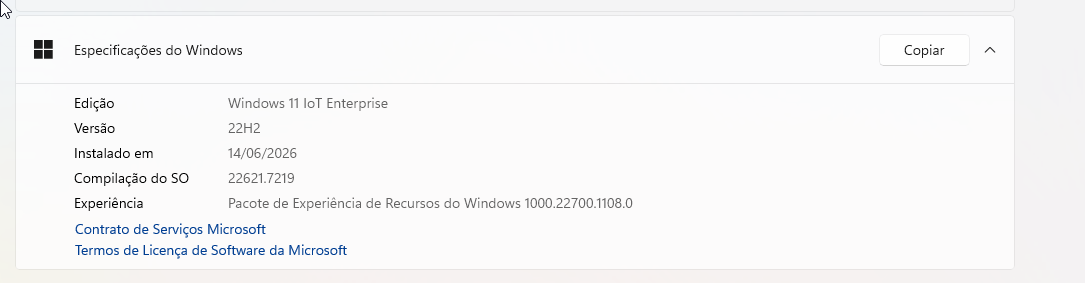
Here I created an ISO of Windows 11.22H2 IoT Enterprise Lite without apps, without Defender, without Edge, without CPU mitigations, and installed the latest update of Windows 11.23H2 on it, and it worked.
FU4TkA.png
 

My Computer My Computer

At a glance

Windows 11 Iot Enterprise 21h2 22000.3260xeon E5-2697v232gb 8x4gb ddr3 1333 mhzgtx 570 poit of view
OS
Windows 11 Iot Enterprise 21h2 22000.3260
Computer type
PC/Desktop
Manufacturer/Model
Asus
CPU
xeon E5-2697v2
Motherboard
rampage iv extreme
Memory
32gb 8x4gb ddr3 1333 mhz
Graphics Card(s)
gtx 570 poit of view
Sound Card
realtek HD (ALC898)
Monitor(s) Displays
samsung b2030
Screen Resolution
1600x900
Hard Drives
2tb hd 5400 rpm
3tb hd 5400 rpm
1tb nvme pcie 3.0
PSU
hx850w
Keyboard
mtek
Internet Speed
500/250 gpon
Browser
r3dfox 146.0
Antivirus
none
I'm running Windows 11 Pro 25H2 without any problems whatsoever. I 'debloated' by setting my PC up as if it were in a EU country, thus giving me the option to uninstall elements of MS programs which I neither want nor need without having to resort to using third party programs or registry hacks etc.
Agreed. My machine will not install Windows 11 25h2 as it requires 2 CPU commands mentioned in my earlier post.
 

My Computer My Computer

At a glance

Win 11 Pro Version 24H2 (build 26100.4351)3.70 gigahertz Intel Xeon W-2135
OS
Win 11 Pro Version 24H2 (build 26100.4351)
Computer type
PC/Desktop
Manufacturer/Model
Lenovo 30BFS44D00 ThinkStation P520
CPU
3.70 gigahertz Intel Xeon W-2135
Motherboard
Lenovo 1036 NO DPK
@Digidoc I'm running Windows 11 Pro 25H2 without any problems whatsoever. I 'debloated' by setting my PC up as if it were in a EU country, thus giving me the option to uninstall elements of MS programs which I neither want nor need without having to resort to using third party programs or registry hacks etc.

Basically setting up my PC as if it's in the EU, I'm able to uninstall MS programs that users outside the EU aren't given the choice over because EU Law gives you that option. The best bit about it is, you don't even need to be in the EU to setup your PC that way. And for those that think uninstalling Edge for example causes problems because they believe the hype that it is so baked into Windows that removing it causes nothing but problems, well spoiler alert, it doesn't doing it the way I did it because MS aren't allowed to break stuff for EU users. I still get Windows updates etc. Upshot is, I have a lightweight Windows 11 without really putting in much effort if I'm honest. Edge? what is that? :LOL:

What language and country did you select? Also, I'm guessing it would only work as a fresh new install, and wouldn't if you tried a repair install keeping all the stuff currently installed ?
 

My Computers My Computers

  • At a glance

    win 11 pro, 25H2i5-240032 GB DDR-3Intel HD Graphics 2000 (on-board)
    OS
    win 11 pro, 25H2
    Computer type
    PC/Desktop
    Manufacturer/Model
    Dell 790 (Mt)
    CPU
    i5-2400
    Motherboard
    Dell
    Memory
    32 GB DDR-3
    Graphics Card(s)
    Intel HD Graphics 2000 (on-board)
    Sound Card
    Intel Cougar Point PCH [B2] (On-Board)
    Monitor(s) Displays
    LG 27MN60T
  • At a glance

    Windows 11 home, 25H2Intel I7-3630QM16GB DDR3
    Operating System
    Windows 11 home, 25H2
    Computer type
    Laptop
    Manufacturer/Model
    Dell Inspiron 17R SE 7720
    CPU
    Intel I7-3630QM
    Memory
    16GB DDR3
    Hard Drives
    Samsung 500GB SSD
What language and country did you select? Also, I'm guessing it would only work as a fresh new install, and wouldn't if you tried a repair install keeping all the stuff currently installed ?
Read this thread:


As a native English speaker resident in the UK which is not part of the European Union, I naturally chose Ireland as they of course are in the EU.

Many I suspect wouldn’t bother going to the lengths I did because it would probably be too much trouble. This way, I at least have choices.
 

My Computer My Computer

At a glance

Windows 11 Pro 25H2 26200.8737Intel i5 10400x2 8gb Corsair Vengeance LPX 3600Intel(R) UHD Graphics 630
OS
Windows 11 Pro 25H2 26200.8737
Computer type
PC/Desktop
Manufacturer/Model
MSI
CPU
Intel i5 10400
Motherboard
B560M PRO-VDH WiFi BIOS 1.A1
Memory
x2 8gb Corsair Vengeance LPX 3600
Graphics Card(s)
Intel(R) UHD Graphics 630
Sound Card
Realtek onboard AL897
Monitor(s) Displays
MSI MAG Artymis 242C
Screen Resolution
1920 x 1080
Hard Drives
Samsung 970 Evo Plus 500gb
PSU
EVGA SuperNova 650w G3
Case
Gaming case
Keyboard
MSI GK20
Mouse
MSI Versa 300
Internet Speed
500mbps
Browser
Brave
Antivirus
Bitdefender
Other Info
MSI Herald BE9400 WiFi PCIe
Printer - Brother MFC-L2750DW
Custom versions of Windows 11 25H2 strip out the code requiring POPCNT and SSE4.2. They run like 23H2. This can be useful on hardware on which regular 25H2 cannot be installed.
 

My Computers My Computers

  • At a glance

    Windows 11 Education For 25H2Intel® Core i7 5500u8 GBIntel HD Family Graphics 5500 AMD Firepro 4150M
    OS
    Windows 11 Education For 25H2
    Computer type
    Laptop
    Manufacturer/Model
    HP ZBook G2
    CPU
    Intel® Core i7 5500u
    Motherboard
    HP
    Memory
    8 GB
    Graphics Card(s)
    Intel HD Family Graphics 5500 AMD Firepro 4150M
    Sound Card
    Realtek High Audio
    Hard Drives
    1 TB SSD
    Mouse
    HP USB Mouse
    Antivirus
    Windows Defender
  • At a glance

    Windows 11 Pro For Workstations 25H2Xeon 1535m v632 GBAMD Quadro Pro 4100
    Operating System
    Windows 11 Pro For Workstations 25H2
    Computer type
    Laptop
    Manufacturer/Model
    HP Zbook G4
    CPU
    Xeon 1535m v6
    Motherboard
    HP
    Memory
    32 GB
    Graphics card(s)
    AMD Quadro Pro 4100
    Sound Card
    Bang and Olufson Audio
    Hard Drives
    1TB SSD
    Mouse
    HP USB Mouse
    Antivirus
    Windows Defender
Custom versions of Windows 11 25H2 strip out the code requiring POPCNT and SSE4.2. They run like 23H2. This can be useful on hardware on which regular 25H2 cannot be installed.
How does that work when winload.efi & ntoskernel.exe both require POPCNT? I don't believe you can strip out the code, since it would invalidate the file's digital signature and trigger a security violation.


My Computer My Computer

At a glance

Windows 7
OS
Windows 7
How does that work when winload.efi & ntoskernel.exe both require POPCNT? I don't believe you can strip out the code, since it would invalidate the file's digital signature and trigger a security violation.


You might replace it with winload.efi and netsokernel.exe from 23H2. Last files that didn't come with POPCNT. I don't think there's any point to it after 25H2. There is a time when aging hardware has to be retired and workarounds to them are just that - workarounds. More cost-effective to upgrade your PC.
 

My Computers My Computers

  • At a glance

    Windows 11 Education For 25H2Intel® Core i7 5500u8 GBIntel HD Family Graphics 5500 AMD Firepro 4150M
    OS
    Windows 11 Education For 25H2
    Computer type
    Laptop
    Manufacturer/Model
    HP ZBook G2
    CPU
    Intel® Core i7 5500u
    Motherboard
    HP
    Memory
    8 GB
    Graphics Card(s)
    Intel HD Family Graphics 5500 AMD Firepro 4150M
    Sound Card
    Realtek High Audio
    Hard Drives
    1 TB SSD
    Mouse
    HP USB Mouse
    Antivirus
    Windows Defender
  • At a glance

    Windows 11 Pro For Workstations 25H2Xeon 1535m v632 GBAMD Quadro Pro 4100
    Operating System
    Windows 11 Pro For Workstations 25H2
    Computer type
    Laptop
    Manufacturer/Model
    HP Zbook G4
    CPU
    Xeon 1535m v6
    Motherboard
    HP
    Memory
    32 GB
    Graphics card(s)
    AMD Quadro Pro 4100
    Sound Card
    Bang and Olufson Audio
    Hard Drives
    1TB SSD
    Mouse
    HP USB Mouse
    Antivirus
    Windows Defender
You might replace it with winload.efi and netsokernel.exe from 23H2. Last files that didn't come with POPCNT. I don't think there's any point to it after 25H2. There is a time when aging hardware has to be retired and workarounds to them are just that - workarounds. More cost-effective to upgrade your PC.
Do you like boot errors starting with 0xC and a lot of zeroes, because that's how you get boot errors starting with 0xC and a lot of zeroes.
 

My Computer My Computer

At a glance

Windows 11 Pro 25H212th Gen Core i7-1260P64 GB Micron PC4-25600Intel Iris Xe Graphics
OS
Windows 11 Pro 25H2
Computer type
PC/Desktop
Manufacturer/Model
Intel NUC12WSHi7
CPU
12th Gen Core i7-1260P
Motherboard
NUC12WSBi7
Memory
64 GB Micron PC4-25600
Graphics Card(s)
Intel Iris Xe Graphics
Sound Card
on-board Realtek HD Audio
Monitor(s) Displays
Dell U3219Q
Screen Resolution
3840 x 2160
Hard Drives
Samsung SSD 990 PRO 1TB
Crucial MX500 2 TB
Antivirus
Microsoft Defender
  • Like
Reactions: OAT
Might? If you have SkuSiPolicy enabled, it would know if you're using outdated winload.efi files. Offhand there might be other Code Integrity policy files which are smart enough to know if you're mixing and matching kernel files.
 

My Computer My Computer

At a glance

Windows 7
OS
Windows 7

Latest Support Threads

Back
Top Bottom