
TPM / SBAT errors


mrmatt

Member
Local time
12:17 PM
Posts
83
Location
UK
OS
Windows 11 Home 25H2 26200.8246
I was looking in one of the logs in Event Viewer, and there seems to be a daily occurrence of the following:


Log Name: System
Source: Microsoft-Windows-TPM-WMI
Date: 19/04/2026 12:34:39
Event ID: 1796
Task Category: None
Level: Error
Keywords:
User: SYSTEM
Computer: DESKTOP-1BCOBNU
Description:
The Secure Boot update failed to update SBAT with error Unknown HResult Error code: 0x800700c1. For more information, please see Secure Boot DB and DBX variable update events - Microsoft Support
Event Xml:
<Event xmlns="http://schemas.microsoft.com/win/2004/08/events/event">
<System>
<Provider Name="Microsoft-Windows-TPM-WMI" Guid="{7d5387b0-cbe0-11da-a94d-0800200c9a66}" />
<EventID>1796</EventID>
<Version>3</Version>
<Level>2</Level>
<Task>0</Task>
<Opcode>0</Opcode>
<Keywords>0x8000000000000000</Keywords>
<TimeCreated SystemTime="2026-04-19T11:34:39.3787150Z" />
<EventRecordID>65234</EventRecordID>
<Correlation />
<Execution ProcessID="9384" ThreadID="18296" />
<Channel>System</Channel>
<Computer>DESKTOP-1BCOBNU</Computer>
<Security UserID="S-1-5-18" />
</System>
<EventData>
<Data Name="UpdateType">SBAT</Data>
<Data Name="HResult">-1878589247</Data>
</EventData>
</Event>


This is highly concerning. I know the KEK update was applied ? (That was installed on 21st Feb)

Under Settings, Device Security, there are no problems reported with Secure Boot. Also, in Security Processor, no problems reported with TPM.
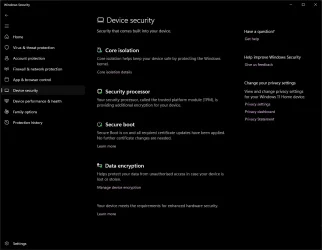

1776620299165.webp

Any ideas please ?

(I don't really know anything about TPM, other than it stands for Trusted Platform Module). I am concerned this may pose a problem in future with Secure Boot Certificates expiring in June ?
 

My Computer

System One

  • OS
    Windows 11 Home 25H2 26200.8246
    Computer type
    PC/Desktop
    Manufacturer/Model
    HP
Secure Boot's SBAT (or "SBAT Level") is only used by Linux systems. It's their equivalent of the SVN number, to prevent older and insecure boot managers from loading.

Windows itself doesn't care about the actual SBAT value, other than MS thinks it's helping Linux users by writing it to the UEFI. Some users have claimed their BIOS'es throw errors when the SBAT is written, because it's a secure UEFI variable.

You might want to try this setting, which opts out of writing the SBAT:
Code:
reg add HKEY_LOCAL_MACHINE\SYSTEM\CurrentControlSet\Control\SecureBoot\SBAT /v OptOut /d 1 /t REG_DWORD

The event warnings may be annoying, but this error will not impact Windows' ability to use Secure Boot.
 

My Computer

System One

  • OS
    Windows 7
I was having this event as well only on my laptop lol. Glad to see is not anything serious.
I've been ignoring this error since I'm all updated... should I add that reg command or just keep ignoring this thing?
 

My Computers

System One System Two

  • OS
    Windows 11 Pro 25H2
    Computer type
    PC/Desktop
    Manufacturer/Model
    Built PC
    CPU
    AMD Ryzen 5 5600G @ 3.9/4.4Ghz
    Motherboard
    MSI B550M-PRO-WiFi Ver. 1.4
    Memory
    2 x 16 GB DDR4 Kingston Fury Beast 3200 Mhz
    Graphics Card(s)
    AMD Radeon RX 6600 XT MSI Mech 2X OC Edition 8 GB
    Sound Card
    Realtek High Definition Audio (Integrated)
    Monitor(s) Displays
    Samsung C50Rx 27" LED / HP S2031 20" LCD
    Screen Resolution
    1920 x 1080 px / 1600 x 900 px
    Hard Drives
    WD Blue SN570 NVME M.2 SSD [1 TB] -- External Drives: - WD Scorpion Blue 250 GB 5400 RPM (Data Backup) - Hitachi 500 GB 5400 RPM (Software / ISOs Backup) - Toshiba MQ01ABD100 1 TB 5400 RPM (OS Images) - HGST TravelStar 7K1000 1 TB, 7200 RPM USB 3.0 - ADATA SU800 2TB SSD USB 3.0
    PSU
    Corsair RM750e 750W Fully Modular
    Case
    Naceb Hydra NA-1602
    Cooling
    Naceb Orpheus x 3 (Front) + Naceb Cepheus 1200 RPM Max (Rear) + ThemalRight Assasin X 90 SE (CPU)
    Keyboard
    Logitech MK470 Wireless
    Mouse
    Logitech MK470 Wireless
    Internet Speed
    120 MB Symetrical
    Browser
    Firefox / Brave / Edge
    Antivirus
    Windows Defender
    Other Info
    - VMs: WMware Player - Windows 8.1 Pro x64 / Windows 11 Pro
    - Wacom Intuos Pro Small Tablet PTH-460
  • Operating System
    Windows 11 Pro 25H2
    Computer type
    Laptop
    Manufacturer/Model
    HP Pavilion 15-eh3000la (80M53LA)
    CPU
    AMD Ryzen 7 7730U @ 2.0/4.5 Ghz
    Motherboard
    HP 8BC7
    Memory
    2 x 16 GB Kingston Fury Impact DDR4 3200 Mhz
    Graphics card(s)
    Radeon (tm) Graphics Vega 8 (512 MB)
    Sound Card
    Realtek High Definition Audio (Integrated)
    Monitor(s) Displays
    AU Optronics
    Screen Resolution
    1920 x 1080 px (125% size)
    Hard Drives
    WD Blue SN570 1TB NVME M.2 Drive
    PSU
    45 Watt Charger
    Cooling
    Laptop Cooling Pad
    Keyboard
    Free Wolf Foldable Portable Keyboard
    Mouse
    Free Wolf Wireless Mouse
    Internet Speed
    120 MB Symetrical
    Browser
    Firefox / Brave / Edge
    Antivirus
    Windows Defender
    Other Info
    - 41mWh battery.
    - Wacom Intuos Pro Small Tablet PTH-460
The Secure Boot task is programmed to constantly retry, so it's better to Opt Out. If you get used to ignoring event log messages, after a while you will miss something critical.
 
Last edited:

My Computer

System One

  • OS
    Windows 7
Secure Boot's SBAT (or "SBAT Level") is only used by Linux systems. It's their equivalent of the SVN number, to prevent older and insecure boot managers from loading.

Windows itself doesn't care about the actual SBAT value, other than MS thinks it's helping Linux users by writing it to the UEFI. Some users have claimed their BIOS'es throw errors when the SBAT is written, because it's a secure UEFI variable.

You might want to try this setting, which opts out of writing the SBAT:
Code:
reg add HKEY_LOCAL_MACHINE\SYSTEM\CurrentControlSet\Control\SecureBoot\SBAT /v OptOut /d 1 /t REG_DWORD

The event warnings may be annoying, but this error will not impact Windows' ability to use Secure Boot.

Thanks.

What about TPM ? How do I know if I have any TPM errors ?

Do I need to be concerned ? How do I check please ?
 

My Computer

System One

  • OS
    Windows 11 Home 25H2 26200.8246
    Computer type
    PC/Desktop
    Manufacturer/Model
    HP
The problem is not all TPM "errors" are really errors, or about TPM. Windows has decided to dump all Secure Boot migration messages, whether informational or not, as "critical" events in the TPM-WMI logs.

As the deadline nears for PCA 2011's expiration, the event log messages are getting louder on purpose. I wouldn't stress about it. If you get a green check mark in the Windows Security Center's tab for Device Security / Secure Boot, then your PC is fine.
 

My Computer

System One

  • OS
    Windows 7
Yes, I have got green ticks for all in Windows Security.


I know TPM stands for Trusted Platform Module, but I'm not sure what it relates to exactly, and what I need to be concerned about on this PC.


As far as I know, my BIOS is up to date.
 

My Computer

System One

  • OS
    Windows 11 Home 25H2 26200.8246
    Computer type
    PC/Desktop
    Manufacturer/Model
    HP
TPM is a separate security chip where Windows hides your BitLocker keys or Windows Hello PIN passwords.

The Secure Boot update process isn't directly related to TPM, but MS decided it was going to dump all those messages into this category instead of creating a Secure Boot-only category. Hence the confusion for users. Some of the logged messages are intended for IT admins, who are interested in collecting data on PC's.

Not everything in the event logs is designed to be read by the average home user.
 

My Computer

System One

  • OS
    Windows 7
Right.......a lot I don't understand there, but thanks for that.
 

My Computer

System One

  • OS
    Windows 11 Home 25H2 26200.8246
    Computer type
    PC/Desktop
    Manufacturer/Model
    HP
Back
Top Bottom




