Transparent start menu Open Shell


LGM11

Well-known member
Local time
6:36 AM
Posts
12
OS
Windows 11
Does anyone have any suggestions for settings to get a transparent start menu with Open Shell? I've played around with quite a few settings today and cannot get a transparent grey background. I know it was possible with Classic Shell, but I'm having trouble getting it now.

TIA.
 

My Computer My Computer

At a glance

Windows 11
OS
Windows 11
Computer type
Laptop
Manufacturer/Model
HP Envy 15" ... Lenovo Yoga Duet 7i ... Asus UN5401R
It sure feels like Microsoft is trying its best to put glass blur 6 feet under for good.
I gather you are on 22H2 and talking about that Aero-like transparent menu glass blur that does not work anymore.

I see Big Muscle of glass8.eu has thrown in the towel,
so no hope it can be revived that way.
The last hope is for coders on Open-Shell. They are aware of it:


You could turn off "Enable Menu glass" in "Menu Look" tab of Open-Shell settings.
It will only be a Menu Glass setting disabled.pngtransparent menu without blur and darker as well.
 

My Computer My Computer

At a glance

Win XP, 7, 8.1, 10. Windows11 only for test d...Socket FM1 with qty2 noctua NF-P14 FLX fans16GBAPU or Geforce GT 1030 Silent
OS
Win XP, 7, 8.1, 10. Windows11 only for test driving with non compatible hardware.
Computer type
PC/Desktop
Manufacturer/Model
Self built
CPU
Socket FM1 with qty2 noctua NF-P14 FLX fans
Motherboard
GIGABYTE A75M-UD2H
Memory
16GB
Graphics Card(s)
APU or Geforce GT 1030 Silent
Sound Card
On board
Monitor(s) Displays
LG, Asus, HP
Screen Resolution
1920x1080
Hard Drives
Many hard drives and SSDs.
The front of the computer has slide-in
drive bays qty 2 HD, qty 2 SSD
PSU
500 watt
Keyboard
Perixx Periboard-317 with a physical on/off switch soldered in for the backlight
Yes, I am on 22H2. I can get just the barest of transparency with Open Shell, but nothing like before. I have no issues with the taskbar. It is as transparent as I want to make it.
 

My Computer My Computer

At a glance

Windows 11
OS
Windows 11
Computer type
Laptop
Manufacturer/Model
HP Envy 15" ... Lenovo Yoga Duet 7i ... Asus UN5401R
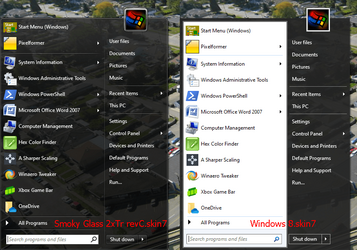
Ive had tranparent start menus and task bar by just using windows settings, as i said, HAD. I dont use any theming software etc
and for awhile i was able to get them both tranparent depending it seems on what color maybe I was using..IDK. Im on public release with my new update for today and i have Solid color on both. What happened do you think that I can no longer get those 2 to be transparent??
 

My Computer My Computer

At a glance

Windows 11 Pro Version 23H2(OS Build 22631.4890)12-Core AMD Ryzen 9 5900X, 4950 MHz (49.5 x 100)4 - G Skill Trident Z Neo F4-3600C16-16GTZNCPCI Express 4.0 x16: PowerColor RX 6800
OS
Windows 11 Pro Version 23H2(OS Build 22631.4890)
Computer type
PC/Desktop
Manufacturer/Model
AMD
CPU
12-Core AMD Ryzen 9 5900X, 4950 MHz (49.5 x 100)
Motherboard
Gigabyte X570 Aorus Master
Memory
4 - G Skill Trident Z Neo F4-3600C16-16GTZNC
Graphics Card(s)
PCI Express 4.0 x16: PowerColor RX 6800
Sound Card
Realtek ALC1220 @ AMD K19.2 - High Definition Audio Controller
Monitor(s) Displays
2 - 27 inch Westinghouse
Screen Resolution
1920 x 1080
Hard Drives
2 SSD - 2 TB each
1 SSD - 4TB
1 HDD - 2TB
Keyboard
logitech
Mouse
logitech
Internet Speed
1 GB
Browser
Firefox
Antivirus
Eset Endpoint Security
@imanlien2020 It's possible.
Without Open-Shell. I haven't been tracking what each and every Windows 11 update does,
for Windows 10 is my daily operating system.

With Open-Shell,
I don't know is this the end of glass blur? Only Microsoft knows what they are doing or do they?
Vista and 7 had glass blur, then Microsoft took it away on 8 and 8.1, then gave it back on 10,
and now they are taking it away again.

Is it really hurting Windows 11 system by keeping the glass code available?
 

My Computer My Computer

At a glance

Win XP, 7, 8.1, 10. Windows11 only for test d...Socket FM1 with qty2 noctua NF-P14 FLX fans16GBAPU or Geforce GT 1030 Silent
OS
Win XP, 7, 8.1, 10. Windows11 only for test driving with non compatible hardware.
Computer type
PC/Desktop
Manufacturer/Model
Self built
CPU
Socket FM1 with qty2 noctua NF-P14 FLX fans
Motherboard
GIGABYTE A75M-UD2H
Memory
16GB
Graphics Card(s)
APU or Geforce GT 1030 Silent
Sound Card
On board
Monitor(s) Displays
LG, Asus, HP
Screen Resolution
1920x1080
Hard Drives
Many hard drives and SSDs.
The front of the computer has slide-in
drive bays qty 2 HD, qty 2 SSD
PSU
500 watt
Keyboard
Perixx Periboard-317 with a physical on/off switch soldered in for the backlight

Latest Support Threads

Back
Top Bottom