Trouble Using MusicBee for Metadata


MalwareT

Active member
Member
Local time
1:44 AM
Posts
181
OS
Windows 11
Hi, forum. I'm trying to use MusicBee to add metadata to some CDs that I already ripped with Window Media Player since WMP has discontinued providing metadata. I've tried reading Google AI instructions about MB and have watched some of their YouTube videos, but I'm kind of stuck on an album where half the metadata song titles showed up and the other half didn't. Therefore, can someone help me tag my metadata with MusicBee?

P.S. And if I can successfully learn how to use MusicBee, I think that I might ditch Windows Media Player for pulling the rug out from its users.
 

My Computer

System One

  • OS
    Windows 11
    Computer type
    PC/Desktop
    Manufacturer/Model
    Dell OptiPlex 7060
    CPU
    Hexa-Core i5-8600T processor 3.2GHz
    Motherboard
    Dell Inc. 0DWPVW A00
    Memory
    32GB of DDR4 RAM
    Graphics Card(s)
    integrated Intel HD 630 coprocessor
    Monitor(s) Displays
    Intel(R) UHD Graphics 630 [Display adapter] DELL S2230MX [Monitor] (21.7"vis, s/n XX-05GX1Y-XXXXX-23J-08WM, March 2012)
    Antivirus
    Windows Defender Version 4.18.24090.11 Malwarebytes Anti-Malware Version 5.2.4.157

My Computers

System One System Two

  • OS
    Win 11 Home ♦♦♦26200.8655 ♦♦♦♦♦♦♦25H2
    Computer type
    PC/Desktop
    Manufacturer/Model
    Built by Ghot® [May 2020]
    CPU
    AMD Ryzen 7 3700X
    Motherboard
    Asus Pro WS X570-ACE (BIOS 5302)
    Memory
    G.Skill (F4-3200C14D-16GTZKW)
    Graphics Card(s)
    EVGA RTX 2070 (08G-P4-2171-KR)
    Sound Card
    Realtek ALC1220P / ALC S1220A
    Monitor(s) Displays
    Dell U3011 30"
    Screen Resolution
    2560 x 1600
    Hard Drives
    2x Samsung 860 EVO 500GB,
    WD 4TB Black FZBX - SATA III,
    WD 8TB Black FZBX - SATA III,
    DRW-24B1ST CD/DVD Burner
    PSU
    PC Power & Cooling 750W Quad EPS12V
    Case
    Cooler Master ATCS 840 Tower
    Cooling
    CM Hyper 212 EVO (push/pull)
    Keyboard
    Ducky DK9008 Shine II Blue LED
    Mouse
    Logitech Optical M-100
    Internet Speed
    300/300
    Browser
    Firefox (latest)
    Antivirus
    Bitdefender Total Security
    Other Info
    Speakers: Klipsch Pro Media 2.1
  • Operating System
    Windows XP Pro 32bit w/SP3
    Computer type
    PC/Desktop
    Manufacturer/Model
    Built by Ghot® (not in use)
    CPU
    AMD Athlon 64 X2 5000+ (OC'd @ 3.2Ghz)
    Motherboard
    ASUS M2N32-SLI Deluxe Wireless Edition
    Memory
    TWIN2X2048-6400C4DHX (2 x 1GB, DDR2 800)
    Graphics card(s)
    EVGA 256-P2-N758-TR GeForce 8600GT SSC
    Sound Card
    Onboard
    Monitor(s) Displays
    ViewSonic G90FB Black 19" Professional (CRT)
    Screen Resolution
    up to 2048 x 1536
    Hard Drives
    WD 36GB 10,000rpm Raptor SATA
    Seagate 80GB 7200rpm SATA
    Lite-On LTR-52246S CD/RW
    Lite-On LH-18A1P CD/DVD Burner
    PSU
    PC Power & Cooling Silencer 750 Quad EPS12V
    Case
    Generic Beige case, 80mm fans
    Cooling
    ZALMAN 9500A 92mm CPU Cooler
    Keyboard
    Logitech Classic Keybooard 200
    Mouse
    Logitech Optical M-BT96a
    Internet Speed
    300/300
    Browser
    Firefox 3.x ??
    Antivirus
    Symantec (Norton)
    Other Info
    Still assembled, still runs. Haven't turned it on for 15 years?
its best if you go to musicbee forum. I got plenty of help there from dedicated people there.

Easy way is to select tracks and press Ctrl+L and let the magic happen. There is numerous method to tag and sync lyrics in music bee but I suggest you start with backing up few songs and experiment with them.....you might also need to set Tags (2) in preference menu to prefer certain tag providers like deezer....I've enabled them all so if accessing to deezer fails then Musicbrainz or apple music comes to rescue in tagging songs.
 

My Computer

System One

  • OS
    Windows 11 21H2
    Computer type
    Laptop
    Manufacturer/Model
    Acer Nitro 5 AN515-58 (2022)
    CPU
    12500H (12c16t)
    Motherboard
    (BIOS v2.05) ADL Jimny_ADH
    Memory
    2x8 GB DDR4
    Graphics Card(s)
    NVidia RTX 3050 Mobile 4GB
    Sound Card
    Realtek configured by DTS:X
    Monitor(s) Displays
    72hz Dell SE2719H external, 144hz internal
    Screen Resolution
    1920x1080
    Hard Drives
    Internal: Raid Config 1TB (Samsung MZVL2_512 + Micron 3400_512) NVME SSD
    Portables: WD Elements 4tb, WD Elements SE 2TB, Seagate 3.5inch HDD 1TB, WD Blue 3.5inch 512gb, Hitachi 2.5 inch HDD 512gb
    Keyboard
    Redragon Kitava - Red Switches
    Mouse
    Meetion GM80 Transformers
    Internet Speed
    250mbps
    Browser
    Waterfox (Windows), Kiwi (Android)
    Antivirus
    MalwareBytes
    Other Info
    Speaker: Mingo 5.1 Home Theatre System (used everyday since Early 2000 without repair)
    Headphone: Ugreen HiTune Max 5C
    Earphone: Mi In-Ear Headphones Pro HD Dual Driver (Neutral sound profile)
@MalwareT


You might want to try Foobar2000...


Metadata editing...


Eleven Forum topic on Foobar2000 and others...
Thanks, Ghot. So, is Foobar2000 easier and more intuitive to use than MusicBee? Because I just Googled how to rip CDs in WMA lossless and it took me a while to find the Tool option, and when I clicked on Rip CD and found the Settings, I then clicked on Encoder Settings and found all these variables that I had no idea as to where to start. Or perhaps I shouldn't have clicked on Encoder Settings.
 

My Computer

System One

  • OS
    Windows 11
    Computer type
    PC/Desktop
    Manufacturer/Model
    Dell OptiPlex 7060
    CPU
    Hexa-Core i5-8600T processor 3.2GHz
    Motherboard
    Dell Inc. 0DWPVW A00
    Memory
    32GB of DDR4 RAM
    Graphics Card(s)
    integrated Intel HD 630 coprocessor
    Monitor(s) Displays
    Intel(R) UHD Graphics 630 [Display adapter] DELL S2230MX [Monitor] (21.7"vis, s/n XX-05GX1Y-XXXXX-23J-08WM, March 2012)
    Antivirus
    Windows Defender Version 4.18.24090.11 Malwarebytes Anti-Malware Version 5.2.4.157

its best if you go to musicbee forum. I got plenty of help there from dedicated people there.

Easy way is to select tracks and press Ctrl+L and let the magic happen. There is numerous method to tag and sync lyrics in music bee but I suggest you start with backing up few songs and experiment with them.....you might also need to set Tags (2) in preference menu to prefer certain tag providers like deezer....I've enabled them all so if accessing to deezer fails then Musicbrainz or apple music comes to rescue in tagging songs.
I must have said something wrong because all I got from their forum is radio silence.
 

My Computer

System One

  • OS
    Windows 11
    Computer type
    PC/Desktop
    Manufacturer/Model
    Dell OptiPlex 7060
    CPU
    Hexa-Core i5-8600T processor 3.2GHz
    Motherboard
    Dell Inc. 0DWPVW A00
    Memory
    32GB of DDR4 RAM
    Graphics Card(s)
    integrated Intel HD 630 coprocessor
    Monitor(s) Displays
    Intel(R) UHD Graphics 630 [Display adapter] DELL S2230MX [Monitor] (21.7"vis, s/n XX-05GX1Y-XXXXX-23J-08WM, March 2012)
    Antivirus
    Windows Defender Version 4.18.24090.11 Malwarebytes Anti-Malware Version 5.2.4.157
I must have said something wrong because all I got from their forum is radio silence.
There will be very few members active there and they might've missed it.
Yours is a very common problem and I believe you'll be able to find similar post on that forum.

I was a complete beginner when I first started using music bee and you dont have to worry about making mistakes in the app as every action is revert-able.

I also tried foobar back then but it wasn't as elegant and intuitive as music bee for me.

Have you tried changing the metadata provider in musicbee like i mentioned?
 

My Computer

System One

  • OS
    Windows 11 21H2
    Computer type
    Laptop
    Manufacturer/Model
    Acer Nitro 5 AN515-58 (2022)
    CPU
    12500H (12c16t)
    Motherboard
    (BIOS v2.05) ADL Jimny_ADH
    Memory
    2x8 GB DDR4
    Graphics Card(s)
    NVidia RTX 3050 Mobile 4GB
    Sound Card
    Realtek configured by DTS:X
    Monitor(s) Displays
    72hz Dell SE2719H external, 144hz internal
    Screen Resolution
    1920x1080
    Hard Drives
    Internal: Raid Config 1TB (Samsung MZVL2_512 + Micron 3400_512) NVME SSD
    Portables: WD Elements 4tb, WD Elements SE 2TB, Seagate 3.5inch HDD 1TB, WD Blue 3.5inch 512gb, Hitachi 2.5 inch HDD 512gb
    Keyboard
    Redragon Kitava - Red Switches
    Mouse
    Meetion GM80 Transformers
    Internet Speed
    250mbps
    Browser
    Waterfox (Windows), Kiwi (Android)
    Antivirus
    MalwareBytes
    Other Info
    Speaker: Mingo 5.1 Home Theatre System (used everyday since Early 2000 without repair)
    Headphone: Ugreen HiTune Max 5C
    Earphone: Mi In-Ear Headphones Pro HD Dual Driver (Neutral sound profile)

My Computers

System One System Two

  • OS
    Windows 11 Pro 25H2 26200.8655
    Computer type
    Laptop
    Manufacturer/Model
    Acemagic LX15PRO
    CPU
    AMD Ryzen 7 5825U with Radeon Graphics
    Memory
    16GB
    Screen Resolution
    1920 x 1080
    Hard Drives
    SSD 2TB
    Internet Speed
    30 Mbps
    Browser
    Brave
    Antivirus
    Webroot Secure Anywhere
    Other Info
    System 3

    Acer Swift SF114-34 laptop
    OS Windows 11 Pro 26200.8524
    CPU Pentium Silver N6000
    RAM 4GB
    SSD Samsung 970 EVO Plus SSD 2TB (an upgrade)
  • Operating System
    Windows 11 Pro 23H2 22631.2506
    Computer type
    Laptop
    Manufacturer/Model
    HP Mini 210-1090NR PC (bought in late 2009!)
    CPU
    Atom N450 1.66GHz
    Memory
    2GB
    Browser
    Brave
    Antivirus
    Webroot

My Computers

System One System Two

  • OS
    Win 11 Home ♦♦♦26200.8655 ♦♦♦♦♦♦♦25H2
    Computer type
    PC/Desktop
    Manufacturer/Model
    Built by Ghot® [May 2020]
    CPU
    AMD Ryzen 7 3700X
    Motherboard
    Asus Pro WS X570-ACE (BIOS 5302)
    Memory
    G.Skill (F4-3200C14D-16GTZKW)
    Graphics Card(s)
    EVGA RTX 2070 (08G-P4-2171-KR)
    Sound Card
    Realtek ALC1220P / ALC S1220A
    Monitor(s) Displays
    Dell U3011 30"
    Screen Resolution
    2560 x 1600
    Hard Drives
    2x Samsung 860 EVO 500GB,
    WD 4TB Black FZBX - SATA III,
    WD 8TB Black FZBX - SATA III,
    DRW-24B1ST CD/DVD Burner
    PSU
    PC Power & Cooling 750W Quad EPS12V
    Case
    Cooler Master ATCS 840 Tower
    Cooling
    CM Hyper 212 EVO (push/pull)
    Keyboard
    Ducky DK9008 Shine II Blue LED
    Mouse
    Logitech Optical M-100
    Internet Speed
    300/300
    Browser
    Firefox (latest)
    Antivirus
    Bitdefender Total Security
    Other Info
    Speakers: Klipsch Pro Media 2.1
  • Operating System
    Windows XP Pro 32bit w/SP3
    Computer type
    PC/Desktop
    Manufacturer/Model
    Built by Ghot® (not in use)
    CPU
    AMD Athlon 64 X2 5000+ (OC'd @ 3.2Ghz)
    Motherboard
    ASUS M2N32-SLI Deluxe Wireless Edition
    Memory
    TWIN2X2048-6400C4DHX (2 x 1GB, DDR2 800)
    Graphics card(s)
    EVGA 256-P2-N758-TR GeForce 8600GT SSC
    Sound Card
    Onboard
    Monitor(s) Displays
    ViewSonic G90FB Black 19" Professional (CRT)
    Screen Resolution
    up to 2048 x 1536
    Hard Drives
    WD 36GB 10,000rpm Raptor SATA
    Seagate 80GB 7200rpm SATA
    Lite-On LTR-52246S CD/RW
    Lite-On LH-18A1P CD/DVD Burner
    PSU
    PC Power & Cooling Silencer 750 Quad EPS12V
    Case
    Generic Beige case, 80mm fans
    Cooling
    ZALMAN 9500A 92mm CPU Cooler
    Keyboard
    Logitech Classic Keybooard 200
    Mouse
    Logitech Optical M-BT96a
    Internet Speed
    300/300
    Browser
    Firefox 3.x ??
    Antivirus
    Symantec (Norton)
    Other Info
    Still assembled, still runs. Haven't turned it on for 15 years?
I don't know. I've never used MusicBee.
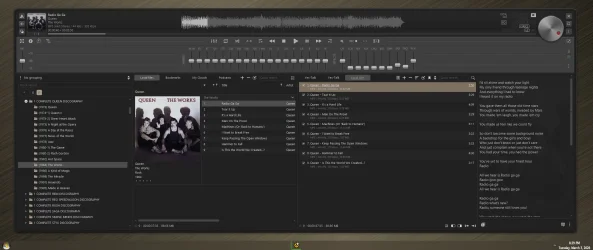
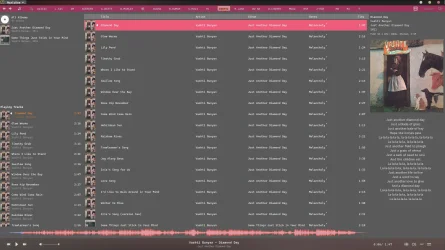
Hi @Ghot This is how musicbee looks on my machine....pretty easy to navigate to multiple CD's and albums. My music collection was a complete mess until I discovered musicbee....also got synced lyrics on my old mp3's. Hope you'll give it a try someday. This screenshot is in dark mode on musicbee.
 

Attachments

  • 1772543164753.webp
    1772543164753.webp
    174.8 KB · Views: 1

My Computer

System One

  • OS
    Windows 11 21H2
    Computer type
    Laptop
    Manufacturer/Model
    Acer Nitro 5 AN515-58 (2022)
    CPU
    12500H (12c16t)
    Motherboard
    (BIOS v2.05) ADL Jimny_ADH
    Memory
    2x8 GB DDR4
    Graphics Card(s)
    NVidia RTX 3050 Mobile 4GB
    Sound Card
    Realtek configured by DTS:X
    Monitor(s) Displays
    72hz Dell SE2719H external, 144hz internal
    Screen Resolution
    1920x1080
    Hard Drives
    Internal: Raid Config 1TB (Samsung MZVL2_512 + Micron 3400_512) NVME SSD
    Portables: WD Elements 4tb, WD Elements SE 2TB, Seagate 3.5inch HDD 1TB, WD Blue 3.5inch 512gb, Hitachi 2.5 inch HDD 512gb
    Keyboard
    Redragon Kitava - Red Switches
    Mouse
    Meetion GM80 Transformers
    Internet Speed
    250mbps
    Browser
    Waterfox (Windows), Kiwi (Android)
    Antivirus
    MalwareBytes
    Other Info
    Speaker: Mingo 5.1 Home Theatre System (used everyday since Early 2000 without repair)
    Headphone: Ugreen HiTune Max 5C
    Earphone: Mi In-Ear Headphones Pro HD Dual Driver (Neutral sound profile)
Hi @Ghot This is how musicbee looks on my machine....pretty easy to navigate to multiple CD's and albums. My music collection was a complete mess until I discovered musicbee....also got synced lyrics on my old mp3's. Hope you'll give it a try someday. This screenshot is in dark mode on musicbee.


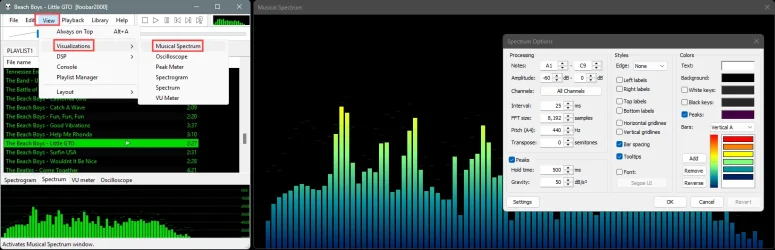
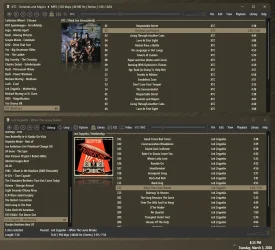
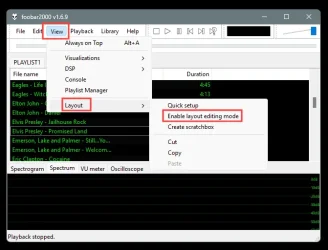
With Foobar2000 you can edit the entire interface to be however you want it.

Image1.webp


I did mine like this. I added a visualization too...

Foobar2000 Spectrum.webp


Maybe @Edwin will show you his layout for Foobar2000.
 

My Computers

System One System Two

  • OS
    Win 11 Home ♦♦♦26200.8655 ♦♦♦♦♦♦♦25H2
    Computer type
    PC/Desktop
    Manufacturer/Model
    Built by Ghot® [May 2020]
    CPU
    AMD Ryzen 7 3700X
    Motherboard
    Asus Pro WS X570-ACE (BIOS 5302)
    Memory
    G.Skill (F4-3200C14D-16GTZKW)
    Graphics Card(s)
    EVGA RTX 2070 (08G-P4-2171-KR)
    Sound Card
    Realtek ALC1220P / ALC S1220A
    Monitor(s) Displays
    Dell U3011 30"
    Screen Resolution
    2560 x 1600
    Hard Drives
    2x Samsung 860 EVO 500GB,
    WD 4TB Black FZBX - SATA III,
    WD 8TB Black FZBX - SATA III,
    DRW-24B1ST CD/DVD Burner
    PSU
    PC Power & Cooling 750W Quad EPS12V
    Case
    Cooler Master ATCS 840 Tower
    Cooling
    CM Hyper 212 EVO (push/pull)
    Keyboard
    Ducky DK9008 Shine II Blue LED
    Mouse
    Logitech Optical M-100
    Internet Speed
    300/300
    Browser
    Firefox (latest)
    Antivirus
    Bitdefender Total Security
    Other Info
    Speakers: Klipsch Pro Media 2.1
  • Operating System
    Windows XP Pro 32bit w/SP3
    Computer type
    PC/Desktop
    Manufacturer/Model
    Built by Ghot® (not in use)
    CPU
    AMD Athlon 64 X2 5000+ (OC'd @ 3.2Ghz)
    Motherboard
    ASUS M2N32-SLI Deluxe Wireless Edition
    Memory
    TWIN2X2048-6400C4DHX (2 x 1GB, DDR2 800)
    Graphics card(s)
    EVGA 256-P2-N758-TR GeForce 8600GT SSC
    Sound Card
    Onboard
    Monitor(s) Displays
    ViewSonic G90FB Black 19" Professional (CRT)
    Screen Resolution
    up to 2048 x 1536
    Hard Drives
    WD 36GB 10,000rpm Raptor SATA
    Seagate 80GB 7200rpm SATA
    Lite-On LTR-52246S CD/RW
    Lite-On LH-18A1P CD/DVD Burner
    PSU
    PC Power & Cooling Silencer 750 Quad EPS12V
    Case
    Generic Beige case, 80mm fans
    Cooling
    ZALMAN 9500A 92mm CPU Cooler
    Keyboard
    Logitech Classic Keybooard 200
    Mouse
    Logitech Optical M-BT96a
    Internet Speed
    300/300
    Browser
    Firefox 3.x ??
    Antivirus
    Symantec (Norton)
    Other Info
    Still assembled, still runs. Haven't turned it on for 15 years?

My Computer

System One

  • OS
    Windows 11
    Computer type
    PC/Desktop
    Manufacturer/Model
    Dell OptiPlex 7060
    CPU
    Hexa-Core i5-8600T processor 3.2GHz
    Motherboard
    Dell Inc. 0DWPVW A00
    Memory
    32GB of DDR4 RAM
    Graphics Card(s)
    integrated Intel HD 630 coprocessor
    Monitor(s) Displays
    Intel(R) UHD Graphics 630 [Display adapter] DELL S2230MX [Monitor] (21.7"vis, s/n XX-05GX1Y-XXXXX-23J-08WM, March 2012)
    Antivirus
    Windows Defender Version 4.18.24090.11 Malwarebytes Anti-Malware Version 5.2.4.157

My Computer

System One

  • OS
    Windows 11
    Computer type
    PC/Desktop
    Manufacturer/Model
    Dell OptiPlex 7060
    CPU
    Hexa-Core i5-8600T processor 3.2GHz
    Motherboard
    Dell Inc. 0DWPVW A00
    Memory
    32GB of DDR4 RAM
    Graphics Card(s)
    integrated Intel HD 630 coprocessor
    Monitor(s) Displays
    Intel(R) UHD Graphics 630 [Display adapter] DELL S2230MX [Monitor] (21.7"vis, s/n XX-05GX1Y-XXXXX-23J-08WM, March 2012)
    Antivirus
    Windows Defender Version 4.18.24090.11 Malwarebytes Anti-Malware Version 5.2.4.157
My Computers

System One System Two

  • OS
    Windows 11 Pro
    Computer type
    PC/Desktop
    Manufacturer/Model
    ASUS ROG Strix
  • Operating System
    Windows 11 Pro
    Computer type
    Laptop
    Manufacturer/Model
    ASUS VivoBook
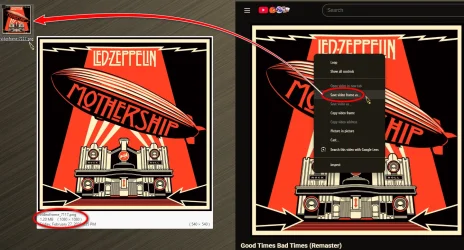
I rip CD's with foobar and get album art from YouTube.

12518.webp
 

My Computers

System One System Two

  • OS
    Windows 11 Pro
    Computer type
    PC/Desktop
    Manufacturer/Model
    ASUS ROG Strix
  • Operating System
    Windows 11 Pro
    Computer type
    Laptop
    Manufacturer/Model
    ASUS VivoBook
Both the foobar and AIMP look pretty elegant....the only issue seems to be the first few days when starting to properly tag music files.

My suggestion for @MalwareT would be to properly name music tags and to keep unwanted names in brackets Eg.---- Earthquake (Feat. Tinie Tempah) ----so they wouldn't mess up with web-search. The albums also have to be named correctly so it'd be best to leave album blank if there are too many songs and musicbee will auto-fill the album from web....including lyrics and album art.
 

My Computer

System One

  • OS
    Windows 11 21H2
    Computer type
    Laptop
    Manufacturer/Model
    Acer Nitro 5 AN515-58 (2022)
    CPU
    12500H (12c16t)
    Motherboard
    (BIOS v2.05) ADL Jimny_ADH
    Memory
    2x8 GB DDR4
    Graphics Card(s)
    NVidia RTX 3050 Mobile 4GB
    Sound Card
    Realtek configured by DTS:X
    Monitor(s) Displays
    72hz Dell SE2719H external, 144hz internal
    Screen Resolution
    1920x1080
    Hard Drives
    Internal: Raid Config 1TB (Samsung MZVL2_512 + Micron 3400_512) NVME SSD
    Portables: WD Elements 4tb, WD Elements SE 2TB, Seagate 3.5inch HDD 1TB, WD Blue 3.5inch 512gb, Hitachi 2.5 inch HDD 512gb
    Keyboard
    Redragon Kitava - Red Switches
    Mouse
    Meetion GM80 Transformers
    Internet Speed
    250mbps
    Browser
    Waterfox (Windows), Kiwi (Android)
    Antivirus
    MalwareBytes
    Other Info
    Speaker: Mingo 5.1 Home Theatre System (used everyday since Early 2000 without repair)
    Headphone: Ugreen HiTune Max 5C
    Earphone: Mi In-Ear Headphones Pro HD Dual Driver (Neutral sound profile)

My Computer

System One

  • OS
    Windows 11 21H2
    Computer type
    Laptop
    Manufacturer/Model
    Acer Nitro 5 AN515-58 (2022)
    CPU
    12500H (12c16t)
    Motherboard
    (BIOS v2.05) ADL Jimny_ADH
    Memory
    2x8 GB DDR4
    Graphics Card(s)
    NVidia RTX 3050 Mobile 4GB
    Sound Card
    Realtek configured by DTS:X
    Monitor(s) Displays
    72hz Dell SE2719H external, 144hz internal
    Screen Resolution
    1920x1080
    Hard Drives
    Internal: Raid Config 1TB (Samsung MZVL2_512 + Micron 3400_512) NVME SSD
    Portables: WD Elements 4tb, WD Elements SE 2TB, Seagate 3.5inch HDD 1TB, WD Blue 3.5inch 512gb, Hitachi 2.5 inch HDD 512gb
    Keyboard
    Redragon Kitava - Red Switches
    Mouse
    Meetion GM80 Transformers
    Internet Speed
    250mbps
    Browser
    Waterfox (Windows), Kiwi (Android)
    Antivirus
    MalwareBytes
    Other Info
    Speaker: Mingo 5.1 Home Theatre System (used everyday since Early 2000 without repair)
    Headphone: Ugreen HiTune Max 5C
    Earphone: Mi In-Ear Headphones Pro HD Dual Driver (Neutral sound profile)

My Computer

System One

  • OS
    Windows 11
    Computer type
    PC/Desktop
    Manufacturer/Model
    Dell OptiPlex 7060
    CPU
    Hexa-Core i5-8600T processor 3.2GHz
    Motherboard
    Dell Inc. 0DWPVW A00
    Memory
    32GB of DDR4 RAM
    Graphics Card(s)
    integrated Intel HD 630 coprocessor
    Monitor(s) Displays
    Intel(R) UHD Graphics 630 [Display adapter] DELL S2230MX [Monitor] (21.7"vis, s/n XX-05GX1Y-XXXXX-23J-08WM, March 2012)
    Antivirus
    Windows Defender Version 4.18.24090.11 Malwarebytes Anti-Malware Version 5.2.4.157
Latest Support Threads

Back
Top Bottom