For clarity, and to quell thoughts that you can simply extract it from the TPM chip. You can't. That's not how it works, so don't lose your key!!! Been there, done that. But yeah, I keep mine in my Microsoft Account as well as my OneDrive Personal Vault.
Why not just manually turn off bitlocker and then use a group policy template to prevent automated bitlocker from turning itself on? If such a thing is possible?
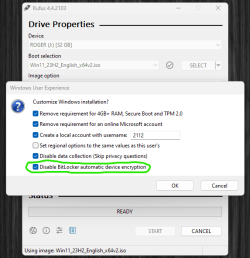
But the question i had was what will happen next time i reinstall the computer, not if BitLocker will re-activate next week on the current install. IOW, what trigger BitLocker to auto-activate, is there something in the BIOS, something in the computer hardware or what? I created install media using Rufus yesterday and noticed that there is an option to prevent BitLocker to auto-encrypt the device.
If the system drive only is encrypted it´s easy and fast to solve, but i added extra storage drives, approx 32 TB. So if all disks are encrypted though i have not asked for it it will take more time.
My Computer
At a glance
Windows 11 Pro for WorkstationsIntel Xeon w5-2465X (3.10 GHz)128 GBNvidia RTX PRO 4000 Blackwell
OS
Windows 11 Pro for Workstations
Computer type
PC/Desktop
Manufacturer/Model
HP
CPU
Intel Xeon w5-2465X (3.10 GHz)
Motherboard
HP Z4 G5
Memory
128 GB
Graphics Card(s)
Nvidia RTX PRO 4000 Blackwell
Sound Card
On board, Realtek
Monitor(s) Displays
ASUS Swift PG279Q (27")
Screen Resolution
2560x1440
Hard Drives
OS: SK hynix PC801 HFS001TEJ9X101N
Storage: 4 x Samsung 9100 Pro 8TB
Storage: 1 x Samsung 990 Pro 4TB
Extract from this article: "Your PC needs to meet the below hardware requirements if you want to use Device Encryption on your PC,
The device contains a TPM (Trusted Platform Module), either TPM 1.2 or TPM 2.0.
UEFI Secure Boot is enabled.
Platform Secure Boot is enabled
Direct memory access (DMA) protection is enabled"
Following @glasskuter instructions in #13: - My HP desktop machine runs Win 11 Pro and when I check I see 'Failed automatic device encryption....' so I assume the drives are not encrypted since I haven't encrypted it manually. I am signed in to MS account. Other than that the device is working fine but should I worry that the machine is not encrypted? It is a static desktop so does not get taken out and about.
I wrote a simple program for myself that scrambles my BitLocker recovery key in a very simple manner. I can easily take that scrambled key and unscramble it by hand without needing access to any computer. This allows me to place the scrambled key in plain site with no fear that it can be compromised. For example, I can put it in a card in my wallet or I can simply put it on a sticker on the underside of my laptop. The program also maintains a list of my keys.
As an example, below is an actual portion of my file showing several scrambled keys. I'm so confident in this that these are my actual real scrambled keys:
---------------------------------------------------------------------------
Key saved on 01-07-2024 at 12:50:25
Comment: ThinkBook
Drive Identifier: A0AB96F6-A00D-47F2-B966-7C425D068A35
Scrambled Key: 776454-432624-252666-424969-214475-144381-530998-100919
---------------------------------------------------------------------------
---------------------------------------------------------------------------
Key saved on 01-08-2024 at 12:16:46
Comment: ASUS Laptop
Drive Identifier: B6176A85-D149-40A7-90B7-E265F0B8D802
Scrambled Key: 508198-553251-220634-369539-312794-635783-706077-686503
---------------------------------------------------------------------------
---------------------------------------------------------------------------
Key saved on 01-14-2024 at 17:59:27
Comment: Silicon Power 4TB SSD
Drive Identifier: 04FEC6E2-8159-4EAC-8147-058BF351C15F
Scrambled Key: 114035-214286-625028-459255-158134-138792-384699-649072
---------------------------------------------------------------------------
Thing is, I use a local account so Bitlocker doesn't automatically turn itself on since I'm not signing into anything. I have no need for Bitlocker but I also don't want it to somehow turn itself on without my permission the next time an update comes.
But I also have a separate work laptop that I travel with where it is turned on and is set to accept a pin number on bootup, and that too also uses a local account. I deliberately turned it on because my job requires me to.
To encrypt or not is a personal choice depending on ones' own situation. I use a PC as well. My choice is no encryption.There's not a darn thing on this computer that is of any benefit to anyone but me. No passwords are saved in my browsers (I use a password manager protected by an 18 digit master password) and the few important personal files that have any sensitive information in them are stored in the cloud. (not onedrive different cloud with different account and pw) To my way of thinking, it makes no sense for me to encrypt, plus I'm old school and want to be 100% in control of my drives and data with no interference from the tpm.
As far as "accidental or automatic encryption by some booger in my machine" I do not worry about that either. In the very unlikely chance of it happening, the BL key should be in my MS account. If it wasn't, I could recover within 10 minutes by restoring one of the regular images I make.
I know a lot of folks would disagree with me, but I have never been paranoid about security. I believe in common sense and practicing safe computing habits but I do not take it so far as to worry about it to the point where my computing is no longer enjoyable. If we are concerned by "what ifs" we'll drive ourselves nuts. In the computing world, there are just too many of them.
It's funny how many different ways people use their computers. For me, my entire life is on my computer. I have important documents, my entire software collection with license keys including purchase details, etc.. All my private e-mail is on a local file on my PC, scans of important documents like my passport, etc. are also there. So, for me, it is entirely the opposite. I'm ultra paranoid about security
However, where we operate the same is that we are both good about having backups readily available so if we were to lose anything we could easily recover.
It is not if you buy a prebuilt machine from let´s say HP. All those computers comes with encryption on by default on the system disk without giving the end user any chance to say "no" during install, not even any info that the system drive will be encrypted. In all the info on HP´s site about the HP Workstations Z4 G5 there is no info such as "We have added an extra layer of security with BL because..." and that´s one of the biggest concern IMHO.
I was locked out from my own computer only because i added a new GPU, a PCIe card with M.2 sticks and one SATA SSD. I was forced to type in the recovery key for BitLocker. I did that and all was good, but if i for some reason couldn´t access it i had only one option - reinstall and delete everything on the system drive. At that time i have had the computer for two hours and had not written down the recovery key.
The main issue IMHO is the lack of choises and the lack of information for the end users. Many non-tech end users have one (1) disk and that´s the system disk. Then all it take is that BitLocker require the recovery key one day, the key that the non-tech end user never wrote down and they have forgot their MS account password. *Boom*, the only way out is to wipe the disk and reinstall Windows and all private data is lost. Unless they have a backup very much valuable data will be lost. And we all know that the non-techs don´t have backups.
So it´s not a personal choice. :)
My Computer
At a glance
Windows 11 Pro for WorkstationsIntel Xeon w5-2465X (3.10 GHz)128 GBNvidia RTX PRO 4000 Blackwell
OS
Windows 11 Pro for Workstations
Computer type
PC/Desktop
Manufacturer/Model
HP
CPU
Intel Xeon w5-2465X (3.10 GHz)
Motherboard
HP Z4 G5
Memory
128 GB
Graphics Card(s)
Nvidia RTX PRO 4000 Blackwell
Sound Card
On board, Realtek
Monitor(s) Displays
ASUS Swift PG279Q (27")
Screen Resolution
2560x1440
Hard Drives
OS: SK hynix PC801 HFS001TEJ9X101N
Storage: 4 x Samsung 9100 Pro 8TB
Storage: 1 x Samsung 990 Pro 4TB
Integral Realtek Hi-Def Audio and GPU NVIDIA High Def Audio
Monitor(s) Displays
DELL S2721QS 4K and DELL S2721DS QHD
Screen Resolution
3840 x 2160 and 2560 x 1440
Hard Drives
1 x 500GB Samsung SSD 750 EVO (Windows OS)
1 x 500GB Samsung SSD 870 EVO (Gaming Installs)
2 x 2TB Seagate Barracuda SATA 6Gb/s 64MB 5,900rpm (User Data, etc)
PSU
Thermaltake 750W
Case
SilverStone Temjin TJ06 (black)
Cooling
NOCTUA NH-D9L CPU Cooler (single fan)
Keyboard
Cooler Master CK550 RGB Mechanical Gaming
Mouse
Logitech M150 3-Button (wireless) and Razer Copperhead 7-Button Green Mouse (wired)
Browser
Brave
Other Info
QNAP TS-421 NAS (12TB RAID5)
QNAP HS-453DX NAS (4TB RAID1)
At a glance
macOS 14 SonomaApple M1 Pro32GBApple M1 Pro integral GPU
Operating System
macOS 14 Sonoma
Computer type
Laptop
Manufacturer/Model
Apple MacBook Pro 18.3 (14" 2021)
CPU
Apple M1 Pro
Motherboard
Apple
Memory
32GB
Graphics card(s)
Apple M1 Pro integral GPU
Sound Card
MacBook Pro Integral
Monitor(s) Displays
14" Liquid Retina XDR Display
Screen Resolution
3024 x 1964
Hard Drives
2TB
PSU
MacBook Integral
Case
MacBook Pro 2021 14"
Keyboard
MacBook Integral and Logitech K380 Multi-Device Compact Bluetooth Keyboard
Mouse
MacBook Touchpad and Sony VAIO N50 Aluminium 3-Button Compact Bluetooth Mouse
Browser
Brave
Other Info
QNAP TS-421 NAS (12TB RAID5)
QNAP HS-453DX NAS (4TB RAID1)
To answer my own question:
If i do a clean install using install media downloaded from MS without any modifications, the computer/disk/s did not got encrypted.
My Computer
At a glance
Windows 11 Pro for WorkstationsIntel Xeon w5-2465X (3.10 GHz)128 GBNvidia RTX PRO 4000 Blackwell
OS
Windows 11 Pro for Workstations
Computer type
PC/Desktop
Manufacturer/Model
HP
CPU
Intel Xeon w5-2465X (3.10 GHz)
Motherboard
HP Z4 G5
Memory
128 GB
Graphics Card(s)
Nvidia RTX PRO 4000 Blackwell
Sound Card
On board, Realtek
Monitor(s) Displays
ASUS Swift PG279Q (27")
Screen Resolution
2560x1440
Hard Drives
OS: SK hynix PC801 HFS001TEJ9X101N
Storage: 4 x Samsung 9100 Pro 8TB
Storage: 1 x Samsung 990 Pro 4TB