blownwiththeWin
Active member
- Local time
- 11:44 PM
- Posts
- 77
- OS
- Windows 11 24H2
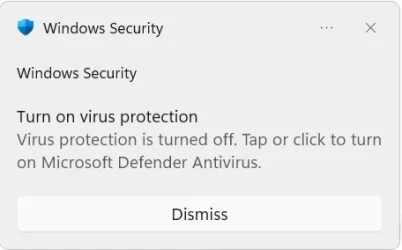
Hi, everyone! I lately discovered a weird bug. For now I think it can be reproduced by performing a system restart... A few minutes after restart and logging in I get a "Turn on Virus Protection" notification. It says that it's now turned off and I should click to turn it on. But when i click, it's already turned on..... I googled a bit, seems like some users experience the same lately, but nobody knows how to fix it. Any ideas?
Update: not sure, but seems like it's related to Chrome Browser unless it's a coincidence. Notification pop-ups when I launch chrome or something. I completely removed it from my computer and reinstalled. Fun fact that this notification popped again the first second when I downloaded Chrome installer from Edge... might be just a coincidence or whatever.. just my observations
Update: not sure, but seems like it's related to Chrome Browser unless it's a coincidence. Notification pop-ups when I launch chrome or something. I completely removed it from my computer and reinstalled. Fun fact that this notification popped again the first second when I downloaded Chrome installer from Edge... might be just a coincidence or whatever.. just my observations
- Windows Build/Version
- 26200.8973
Last edited:
My Computer
At a glance
Windows 11 24H2i7-1070032 GBNVIDIA RTX 3070
- OS
- Windows 11 24H2
- Computer type
- PC/Desktop
- Manufacturer/Model
- Zotac ZBOX-ECM73070C
- CPU
- i7-10700
- Memory
- 32 GB
- Graphics Card(s)
- NVIDIA RTX 3070
- PSU
- 500W