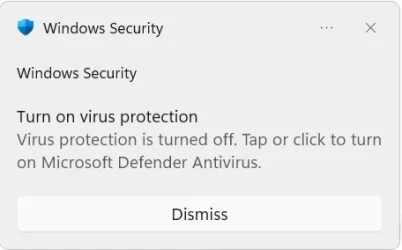
"Turn on Virus Protection" Notification pops up after reboot


blownwiththeWin

Active member
Local time
1:26 AM
Posts
77
OS
Windows 11 24H2
Hi, everyone! I lately discovered a weird bug. For now I think it can be reproduced by performing a system restart... A few minutes after restart and logging in I get a "Turn on Virus Protection" notification. It says that it's now turned off and I should click to turn it on. But when i click, it's already turned on..... I googled a bit, seems like some users experience the same lately, but nobody knows how to fix it. Any ideas?

Update: not sure, but seems like it's related to Chrome Browser unless it's a coincidence. Notification pop-ups when I launch chrome or something. I completely removed it from my computer and reinstalled. Fun fact that this notification popped again the first second when I downloaded Chrome installer from Edge... might be just a coincidence or whatever.. just my observations
 
Windows Build/Version
26200.8973
Last edited:

My Computer My Computer

At a glance

Windows 11 24H2i7-1070032 GBNVIDIA RTX 3070
OS
Windows 11 24H2
Computer type
PC/Desktop
Manufacturer/Model
Zotac ZBOX-ECM73070C
CPU
i7-10700
Memory
32 GB
Graphics Card(s)
NVIDIA RTX 3070
PSU
500W
Do you now or have you ever had any 3rd party AV app installed? Or do you use Windows Defender.
 

My Computers My Computers

  • At a glance

    Windows 11 Pro 25H2 26200.9168i9-10900 10 core 20 threads32 gbnone-Intel UHD Graphics 630
    OS
    Windows 11 Pro 25H2 26200.9168
    Computer type
    PC/Desktop
    Manufacturer/Model
    Dell Optiplex 7080
    CPU
    i9-10900 10 core 20 threads
    Motherboard
    DELL 0J37VM
    Memory
    32 gb
    Graphics Card(s)
    none-Intel UHD Graphics 630
    Sound Card
    Integrated Realtek
    Monitor(s) Displays
    Benq 27
    Screen Resolution
    2560x1440
    Hard Drives
    2x1tb Solidigm m.2 nvme /External drives 512gb Samsung m.2 sata+2tb Kingston m2.nvme
    PSU
    500w
    Case
    MT
    Cooling
    Dell Premium
    Keyboard
    Logitech wired
    Mouse
    Logitech wireless
    Internet Speed
    so slow I'm too embarrassed to tell
    Browser
    #1 Edge #2 Firefox
    Antivirus
    Defender+MWB Premium
  • At a glance

    Windows 11 Pro 24H2 26200.9168AMD Ryzen 7 6800U32 gbintegrated
    Operating System
    Windows 11 Pro 24H2 26200.9168
    Computer type
    PC/Desktop
    Manufacturer/Model
    Beelink Mini PC SER5
    CPU
    AMD Ryzen 7 6800U
    Memory
    32 gb
    Graphics card(s)
    integrated
    Sound Card
    integrated
    Monitor(s) Displays
    Benq 27
    Screen Resolution
    2560x1440
    Hard Drives
    1TB Crucial nvme
    Keyboard
    Logitech wired
    Mouse
    Logitech wireless
    Internet Speed
    still too embarrassed to tell
    Browser
    Firefox
    Antivirus
    Defender
  • System 3 is non compliant Dell 9020 i7-4770/24gb ram Win11 PRO 26200.9168
I have the same pop-up come up after I turn on my PC. I didn't click on the notification to turn back on and check the actual dashboard and I see it's already turned on... I'm thinking considering PCs/Laptops don't turn off all the way (fast startup) it might be something cached? Idk but it's a little annoying.

I don't have any other AV installed and I am running Windows 11 Enterprise 26H1 28000.2608
 

My Computers My Computers

  • At a glance

    Windows 11 Enterprise 26H1Intel Core Ultra 7 (Liquid Metal)32GB DDR5Intel Graphics (Integrated)
    OS
    Windows 11 Enterprise 26H1
    Computer type
    Laptop
    Manufacturer/Model
    Lenovo ThinkPad X1 Carbon Gen 12
    CPU
    Intel Core Ultra 7 (Liquid Metal)
    Motherboard
    OEM
    Memory
    32GB DDR5
    Graphics Card(s)
    Intel Graphics (Integrated)
    Sound Card
    Realtek
    Monitor(s) Displays
    Lenovo OLED
    Screen Resolution
    2880x1800
    Hard Drives
    2TB Samsung 990 Pro
    PSU
    OEM
    Case
    OEM
    Cooling
    OEM
    Keyboard
    ru-RU
    Mouse
    Lenovo Haptic Touchpad
    Internet Speed
    2Gbps (Xfinity ISP)
    Browser
    Chromium, Firefox
    Antivirus
    Windows Security
  • At a glance

    Windows 11 Enterprise 26H1Intel Core i9-13900 (Delidded, Liquid Metal)64GB DDR5EVGA GeForce RTX 3090 FTW3 Ultra
    Operating System
    Windows 11 Enterprise 26H1
    Computer type
    PC/Desktop
    Manufacturer/Model
    Lenovo P3 Ultra
    CPU
    Intel Core i9-13900 (Delidded, Liquid Metal)
    Motherboard
    OEM
    Memory
    64GB DDR5
    Graphics card(s)
    EVGA GeForce RTX 3090 FTW3 Ultra
    Sound Card
    Reaktek
    Monitor(s) Displays
    49" Odyssey OLED G9 (G95SC)
    Screen Resolution
    5120x1440
    Hard Drives
    512GB NVMe (OS), 4TB NVMe (Folders, Games)
    PSU
    Thermaltake Smart M 650W Bronze
    Case
    OEM
    Cooling
    OEM
    Keyboard
    Razer Huntsman V3 Pro 8KHz
    Mouse
    Razer Basilisk V3 Pro 35K
    Internet Speed
    2Gbps (Xfinity ISP)
    Browser
    Chromium, Firefox
    Antivirus
    Windows Security
I think it's not chrome related after all, since I uninstalled it but still got this notification. I also tried to perform System Restore, rolled back a few days ago. And the pop up stopped for some time. But then appeared again. It only started a few days ago, never had it before... Maybe it's some Windows Update related issue?
 

My Computer My Computer

At a glance

Windows 11 24H2i7-1070032 GBNVIDIA RTX 3070
OS
Windows 11 24H2
Computer type
PC/Desktop
Manufacturer/Model
Zotac ZBOX-ECM73070C
CPU
i7-10700
Memory
32 GB
Graphics Card(s)
NVIDIA RTX 3070
PSU
500W
You should scan for malware infection use MalwareBytes AV.
 

My Computer My Computer

At a glance

Windows 11AMD Ryzen 7 5700GMicron Technology DDR4-3200 16GBNVIDIA GeForce RTX 3060
OS
Windows 11
Computer type
PC/Desktop
Manufacturer/Model
HP Pavilion
CPU
AMD Ryzen 7 5700G
Motherboard
Erica6
Memory
Micron Technology DDR4-3200 16GB
Graphics Card(s)
NVIDIA GeForce RTX 3060
Sound Card
Realtek ALC671
Monitor(s) Displays
Samsung SyncMaster U28E590
Screen Resolution
3840 x 2160
Hard Drives
SAMSUNG MZVLQ1T0HALB-000H1
You never did answer the question I asked in Post #2. Do you now or have you ever had any 3rd party AV app installed? Or do you use Windows Defender.

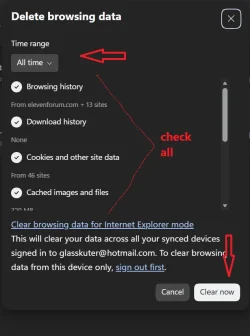
It would really help if you could post a screenshot of this popup. You should also delete all cookies and cache in your browsers.
In each browser hit CTRL+SHIFT+DEL. You get this page. Check the designated options then select "clear now"Restart your browser. You will have to login again to any of your sites.
Screenshot 2026-08-06 004916.webp
 

My Computers My Computers

  • At a glance

    Windows 11 Pro 25H2 26200.9168i9-10900 10 core 20 threads32 gbnone-Intel UHD Graphics 630
    OS
    Windows 11 Pro 25H2 26200.9168
    Computer type
    PC/Desktop
    Manufacturer/Model
    Dell Optiplex 7080
    CPU
    i9-10900 10 core 20 threads
    Motherboard
    DELL 0J37VM
    Memory
    32 gb
    Graphics Card(s)
    none-Intel UHD Graphics 630
    Sound Card
    Integrated Realtek
    Monitor(s) Displays
    Benq 27
    Screen Resolution
    2560x1440
    Hard Drives
    2x1tb Solidigm m.2 nvme /External drives 512gb Samsung m.2 sata+2tb Kingston m2.nvme
    PSU
    500w
    Case
    MT
    Cooling
    Dell Premium
    Keyboard
    Logitech wired
    Mouse
    Logitech wireless
    Internet Speed
    so slow I'm too embarrassed to tell
    Browser
    #1 Edge #2 Firefox
    Antivirus
    Defender+MWB Premium
  • At a glance

    Windows 11 Pro 24H2 26200.9168AMD Ryzen 7 6800U32 gbintegrated
    Operating System
    Windows 11 Pro 24H2 26200.9168
    Computer type
    PC/Desktop
    Manufacturer/Model
    Beelink Mini PC SER5
    CPU
    AMD Ryzen 7 6800U
    Memory
    32 gb
    Graphics card(s)
    integrated
    Sound Card
    integrated
    Monitor(s) Displays
    Benq 27
    Screen Resolution
    2560x1440
    Hard Drives
    1TB Crucial nvme
    Keyboard
    Logitech wired
    Mouse
    Logitech wireless
    Internet Speed
    still too embarrassed to tell
    Browser
    Firefox
    Antivirus
    Defender
  • System 3 is non compliant Dell 9020 i7-4770/24gb ram Win11 PRO 26200.9168
Do you Bitdefender installed?
I have Bitdefender Total Security installed and when that updates itself it is temporarily disabled and I get a 'Turn on virus protection' popup in the system tray area but it disappears when Bitdefender restarts itself after updating.
 

My Computers My Computers

  • At a glance

    Windows 11 ProAMD Ryzen 9 8945HS32GB DDR5 SO-DIMMIntegrated AMD Radeon 780M (4.00 GHz)
    OS
    Windows 11 Pro
    Computer type
    PC/Desktop
    Manufacturer/Model
    GMKtec K11
    CPU
    AMD Ryzen 9 8945HS
    Memory
    32GB DDR5 SO-DIMM
    Graphics Card(s)
    Integrated AMD Radeon 780M (4.00 GHz)
    Monitor(s) Displays
    Benq 2250HM
    Screen Resolution
    1920 x 1080
    Hard Drives
    1 TB PCIe 4.0 NVMe M.2 SSD
  • At a glance

    Windows 11 HomeIntel® Core™ Ultra 7 - 255H processor16 GB LPDDR5 SDRAMIntel Arc 140T onboard graphics
    Operating System
    Windows 11 Home
    Computer type
    Laptop
    Manufacturer/Model
    ASUS Zenbook 14 OLED 14" Laptop - UX3405CA-QL192W
    CPU
    Intel® Core™ Ultra 7 - 255H processor
    Memory
    16 GB LPDDR5 SDRAM
    Graphics card(s)
    Intel Arc 140T onboard graphics
    Screen Resolution
    1920 x 1200 (16:10 WUXGA resolution) OLED Touchscreen
    Hard Drives
    1TB SSD
No, I never had any 3rd party AV installed. Never. Also I deleted not only all the cache, but also the whole browser. But like i said, later I discovered that even without the browser it seemed to trigger that notification. Now i'm confused even more. If i try to reinstall Windows over my installed copy, will it help?
 

Attachments

  • virus-protection-is-turned-off-tap-or-click-to-turn-on-v0-0ztddqmt0rah1.webp
    virus-protection-is-turned-off-tap-or-click-to-turn-on-v0-0ztddqmt0rah1.webp
    9.1 KB · Views: 2

My Computer My Computer

At a glance

Windows 11 24H2i7-1070032 GBNVIDIA RTX 3070
OS
Windows 11 24H2
Computer type
PC/Desktop
Manufacturer/Model
Zotac ZBOX-ECM73070C
CPU
i7-10700
Memory
32 GB
Graphics Card(s)
NVIDIA RTX 3070
PSU
500W
Have you tried running the Windows Powershell (In Administrator mode) command sfc /scannow
 

My Computers My Computers

  • At a glance

    Windows 11 ProAMD Ryzen 9 8945HS32GB DDR5 SO-DIMMIntegrated AMD Radeon 780M (4.00 GHz)
    OS
    Windows 11 Pro
    Computer type
    PC/Desktop
    Manufacturer/Model
    GMKtec K11
    CPU
    AMD Ryzen 9 8945HS
    Memory
    32GB DDR5 SO-DIMM
    Graphics Card(s)
    Integrated AMD Radeon 780M (4.00 GHz)
    Monitor(s) Displays
    Benq 2250HM
    Screen Resolution
    1920 x 1080
    Hard Drives
    1 TB PCIe 4.0 NVMe M.2 SSD
  • At a glance

    Windows 11 HomeIntel® Core™ Ultra 7 - 255H processor16 GB LPDDR5 SDRAMIntel Arc 140T onboard graphics
    Operating System
    Windows 11 Home
    Computer type
    Laptop
    Manufacturer/Model
    ASUS Zenbook 14 OLED 14" Laptop - UX3405CA-QL192W
    CPU
    Intel® Core™ Ultra 7 - 255H processor
    Memory
    16 GB LPDDR5 SDRAM
    Graphics card(s)
    Intel Arc 140T onboard graphics
    Screen Resolution
    1920 x 1200 (16:10 WUXGA resolution) OLED Touchscreen
    Hard Drives
    1TB SSD
Have you tried running the Windows Powershell (In Administrator mode) command sfc /scannow

Yes, I also performend a dism restore health command. It's weird that it wasn't sending me this notification for a longer time when I restored my system to the latest restore point (which as usual messed up with my installed\removed apps lol which I hate). But even so, after some time I again got this pop-up. Today I booted my PC from sleep, and for almost an hour there's no notification. I will try to reboot now, and probably get it.

I also tried to check Event Viewer but found no suspicious recordings there, but maybe i didn't look in the right place.
 

My Computer My Computer

At a glance

Windows 11 24H2i7-1070032 GBNVIDIA RTX 3070
OS
Windows 11 24H2
Computer type
PC/Desktop
Manufacturer/Model
Zotac ZBOX-ECM73070C
CPU
i7-10700
Memory
32 GB
Graphics Card(s)
NVIDIA RTX 3070
PSU
500W
Try in-place upgrade to repair Windows 11.

You can also perform in-place upgrade of Windows 11. In-place upgrade is to use to replace the current operating system files on your computer. Unlike a clean installation of Windows, you can start a Windows in-place upgrade when your OS is still running. And an in-place upgrade can keep your files, settings, & apps during the upgrade process. You can perform a Windows 11 in-place upgrade is to use the Windows 11 Media Creation Tool. Make sure to select Upgrade this PC now and click Next. Follow the on-screen guide to perform a Windows 11 in-place upgrade.


My Computer My Computer

At a glance

Windows 11AMD Ryzen 7 5700GMicron Technology DDR4-3200 16GBNVIDIA GeForce RTX 3060
OS
Windows 11
Computer type
PC/Desktop
Manufacturer/Model
HP Pavilion
CPU
AMD Ryzen 7 5700G
Motherboard
Erica6
Memory
Micron Technology DDR4-3200 16GB
Graphics Card(s)
NVIDIA GeForce RTX 3060
Sound Card
Realtek ALC671
Monitor(s) Displays
Samsung SyncMaster U28E590
Screen Resolution
3840 x 2160
Hard Drives
SAMSUNG MZVLQ1T0HALB-000H1
Thank you! Look what i've discovered. I tried to translate some logs from Event Viewer I found:

"The Software Protection service has successfully scheduled the restart at 2126-07-13T08:23:47Z. Reason: RulesEngine." code 16384

"The Software Protection service has stopped." code 903

Source: Security SPP.
 

My Computer My Computer

At a glance

Windows 11 24H2i7-1070032 GBNVIDIA RTX 3070
OS
Windows 11 24H2
Computer type
PC/Desktop
Manufacturer/Model
Zotac ZBOX-ECM73070C
CPU
i7-10700
Memory
32 GB
Graphics Card(s)
NVIDIA RTX 3070
PSU
500W
I agree with @FreeBooter . Just be aware you will need to be patient. On my GMKtec device it took 1 3/4 hours via the Settings > System > Recovery > Fix Problems using Windows Update method.

Good luck.
 

My Computers My Computers

  • At a glance

    Windows 11 ProAMD Ryzen 9 8945HS32GB DDR5 SO-DIMMIntegrated AMD Radeon 780M (4.00 GHz)
    OS
    Windows 11 Pro
    Computer type
    PC/Desktop
    Manufacturer/Model
    GMKtec K11
    CPU
    AMD Ryzen 9 8945HS
    Memory
    32GB DDR5 SO-DIMM
    Graphics Card(s)
    Integrated AMD Radeon 780M (4.00 GHz)
    Monitor(s) Displays
    Benq 2250HM
    Screen Resolution
    1920 x 1080
    Hard Drives
    1 TB PCIe 4.0 NVMe M.2 SSD
  • At a glance

    Windows 11 HomeIntel® Core™ Ultra 7 - 255H processor16 GB LPDDR5 SDRAMIntel Arc 140T onboard graphics
    Operating System
    Windows 11 Home
    Computer type
    Laptop
    Manufacturer/Model
    ASUS Zenbook 14 OLED 14" Laptop - UX3405CA-QL192W
    CPU
    Intel® Core™ Ultra 7 - 255H processor
    Memory
    16 GB LPDDR5 SDRAM
    Graphics card(s)
    Intel Arc 140T onboard graphics
    Screen Resolution
    1920 x 1200 (16:10 WUXGA resolution) OLED Touchscreen
    Hard Drives
    1TB SSD
I agree with @FreeBooter . Just be aware you will need to be patient. On my GMKtec device it took 1 3/4 hours via the Settings > System > Recovery > Fix Problems using Windows Update method.

Good luck.

I agree, this is what i'm gonna do and report.
 

My Computer My Computer

At a glance

Windows 11 24H2i7-1070032 GBNVIDIA RTX 3070
OS
Windows 11 24H2
Computer type
PC/Desktop
Manufacturer/Model
Zotac ZBOX-ECM73070C
CPU
i7-10700
Memory
32 GB
Graphics Card(s)
NVIDIA RTX 3070
PSU
500W
I have the same issue going on and I'm running defender and have never used anything else. I'm runnning the Beta version of Insider.
 

My Computer My Computer

At a glance

windows 11 64i7-12700T32 GBNvidia GeForce 1650 / Intel 770
OS
windows 11 64
Computer type
PC/Desktop
Manufacturer/Model
HP
CPU
i7-12700T
Memory
32 GB
Graphics Card(s)
Nvidia GeForce 1650 / Intel 770
Screen Resolution
1920 / 1080
Hard Drives
Samsung 990 Pro 1TB
Case
All in One
Keyboard
USB
Mouse
USB
Internet Speed
600 MBS
Browser
Chrome
Antivirus
MS
I have the same issue going on and I'm running defender and have never used anything else. I'm runnning the Beta version of Insider.

Like i said, the issue was triggered by the latest update. However, it's not persistent on my second PC which received the same update. However, we know that Windows might behave different on different machines. I also never used any 3rd party AV and I don't remember changing any settings lately or adding\removing exclusions.
 

My Computer My Computer

At a glance

Windows 11 24H2i7-1070032 GBNVIDIA RTX 3070
OS
Windows 11 24H2
Computer type
PC/Desktop
Manufacturer/Model
Zotac ZBOX-ECM73070C
CPU
i7-10700
Memory
32 GB
Graphics Card(s)
NVIDIA RTX 3070
PSU
500W
Okay so I performed an in-place reinstall through Windows update service. No notifications so far after 2 system restarts after 15 mins each (usually it popped up at around 3-4 mins after the last boot). So I will just pray this was an update bug which isn't there when you perform the fresh install of the latest build, not updating over the previous one....

No notifications for now and i disabled the quiet mode which was automatically triggered after reinstall. If the issue persists I will probably then just wait for another update, cause I spoke to two users with the same issue appeared lately and they all reported the same behavior after the latest update: notification pops after 3-4 minutes, once, after system restart or after logging out and logging in back.
 

My Computer My Computer

At a glance

Windows 11 24H2i7-1070032 GBNVIDIA RTX 3070
OS
Windows 11 24H2
Computer type
PC/Desktop
Manufacturer/Model
Zotac ZBOX-ECM73070C
CPU
i7-10700
Memory
32 GB
Graphics Card(s)
NVIDIA RTX 3070
PSU
500W
Okay at this point i'm going to give up. Not sure if it's related but my PC got a few security updates and on the next reboot I again got code 903 and notification... before that it was working perfectly. Any ideas if it will be fixed?

Also wondering if it might be related to the latest error "V2 Protocol AIK certificate requests with P-256 ECC public keys are not supported. Public key algorithm: 1.2.840.10045.2.1, Key length: 256".. discovered it in event viewer and googled it. Many people have it too.
 
Last edited:

My Computer My Computer

At a glance

Windows 11 24H2i7-1070032 GBNVIDIA RTX 3070
OS
Windows 11 24H2
Computer type
PC/Desktop
Manufacturer/Model
Zotac ZBOX-ECM73070C
CPU
i7-10700
Memory
32 GB
Graphics Card(s)
NVIDIA RTX 3070
PSU
500W
Quick update on the situation. I managed to figure out that the notification is "scheduled" to pop at the same exact time - 4 minutes after startup. Found more similar threads on the internet. Microsoft Support checked my PC via remote control, they found no issues with my Defender or anything. So they suggested that if more people will report this directly via Feedback Hub, they will consider it a bug and try to fix it.

I've seen people mentioning the same issue and it all seem to start happening during the last week. So, anyone who is experiencing this, please submit your feedback with a screenshot to Microsoft. I also suggest checking if it appears the same time after each startup and make a screenshot with taskmanager CPU uptime.

I also keep getting that Protocol AIK certificate request error, so I believe it might be related. So if anyone has this, please also check your event viewer if you get the same error or not.

I believe this bug might be triggered by those windows certificates updates that they were talking about, but maybe it's just a coincidence.
 

My Computer My Computer

At a glance

Windows 11 24H2i7-1070032 GBNVIDIA RTX 3070
OS
Windows 11 24H2
Computer type
PC/Desktop
Manufacturer/Model
Zotac ZBOX-ECM73070C
CPU
i7-10700
Memory
32 GB
Graphics Card(s)
NVIDIA RTX 3070
PSU
500W
Do you Bitdefender installed?
I have Bitdefender Total Security installed and when that updates itself it is temporarily disabled and I get a 'Turn on virus protection' popup in the system tray area but it disappears when Bitdefender restarts itself after updating.
The Windows Security Centre has a delayed Automatic start setting when 3rd Party Security Software is installed.
I use Webroot Secure Anywhere and noticed this behaviour.
I contacted Webroot support and I ran a diagnostic application they sent me and the logs went back to Webroot.
Webroot contacted me that there was no issue with protection.|

I asked Google A.I. about the delay with Windows Security Centre and was told about the setting.
There is a Registry Entry to Edit but I could not get the Entry to Stick due to Permissions even though I was running Reg Edit in Admin Mode.
I downloaded PowerRun from Major Geeks which lets you run Windows Utilities like Regedit with the highest elevated privileges and got the change to stick.
Webroot is not listed on boot up in Windows Security Centre.
The Registry key is HKEY_LOCAL_MACHINE\SYSTEM\CurrentControlSet\Services\wscsvc
Locate the DWORD value named DelayedAutoStart and change its value data from 1 to 0 to remove the boot delay.
Ensure the Start DWORD value right beside it is set to 2
 

My Computer My Computer

At a glance

Windows 11AMD Ryzen 8700G64 GBOnboard
OS
Windows 11
Computer type
PC/Desktop
Manufacturer/Model
Generic
CPU
AMD Ryzen 8700G
Motherboard
Gigabyte B650 UD AC
Memory
64 GB
Graphics Card(s)
Onboard
Sound Card
Onboard
Monitor(s) Displays
Del U2723QE
Screen Resolution
3840 x 2160
Hard Drives
Corsiar MP600 1TB
PSU
Silverstone 750 GOLD
Case
Silverstone FARA 513

Latest Support Threads

Back
Top Bottom