My Computer
At a glance
Windows 11 Pro 64 BitAMD Ryzen 5825U32.0GB RAM (DDR4)AMD Radeon Graphics
- OS
- Windows 11 Pro 64 Bit
- Computer type
- PC/Desktop
- CPU
- AMD Ryzen 5825U
- Memory
- 32.0GB RAM (DDR4)
- Graphics Card(s)
- AMD Radeon Graphics
- Hard Drives
- 1TB SSD

Follow along with the video below to see how to install our site as a web app on your home screen.
Note: This feature may not be available in some browsers.

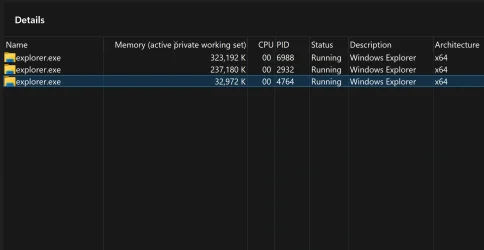
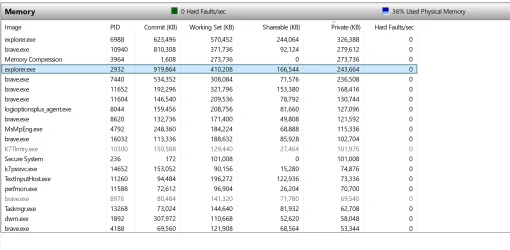
You can run several Explorer processes simultaneously. Totally normal & it insures more stability.So I ran Process Monitor out of curiosity and found two instances of Explorer.exe under Memory. I've attached a screen shot. This isn't normal, correct?
No, only me.Are there multiple users logged in?
No Folders open, I closed browser as well and there are actually three Explorer.exe running.You can run several Explorer processes simultaneously. Totally normal & it insures more stability.
As far as memory usage, it might go up a bit vs. a single process.
You can control it by unchecking or checking the option highlighted below.
Even turned off, you may still have more than one instance depending on use.
View attachment 144342
View attachment 144343
This is a non-issue & Browser is irrelevant.No Folders open, I closed browser as well and there are actually three Explorer.exe running.


Indeed!Is that San Diego Bay and Lindberg Field in that image! .


No Folders open, I closed browser as well and there are actually three Explorer.exe running.
@Ghot , Hi, I am not sure how to do that from Task Manager, there is only Restart.Use Task Manager to kill the Explorer instances, then reboot.
I am not sure how to do that from Task Manager
Yeah, I'm not sure it was like that before, and didn't see any mentions of that change either.Apparently you have to "Expand" it first. Then you'll have the "End Task" available.
Yet another MS "improvement" ??

At one time, MS used to aggregate multiple services under one service but nowadays that is pretty much a thing of the past (at least a decade).Yeah, I'm not sure it was like that before, and didn't see any mentions of that change either.