Two versions of Firefox on new laptop, how to remove one?


RandySea

Well-known member
Local time
5:24 PM
Posts
76
OS
Windows 11 Pro
After moving to a new Windows 11 laptop and copying programs from the old laptop with PCmover, I seem to have two versions of Firefox that look different. If I start Firefox from the Start, Programs, it looks like it did on my old laptop. It has the correct extensions and all my correct settings and bookmarks. It is Firefox Developers edition 1.45.0b9, which I’ve used for years. I want this.

But there seems to be a new, second version that looks different and does not show my extensions or bookmarks. It is Firefox Windows MSIX 1.0. This is the version that now acts as my default browser when I click on a link in an email. I don’t want this but I’m not sure how to fix this problem.

In setting up default apps in Windows, it only gives me one Firefox choice. I have no way to choose between the two shown above.

How can I fix this?
 
Windows Build/Version
Windows 11 Pro v 25h2 on Lenovo X1 Carbon Gen 14

My Computers My Computers

  • At a glance

    Windows 11 ProIntel
    OS
    Windows 11 Pro
    Computer type
    Laptop
    Manufacturer/Model
    Lenovo X1 Extreme 21CS
    CPU
    Intel
    Hard Drives
    2 TB SSD
    Internet Speed
    9 Kbps (rural Internet!)
    Browser
    Firefox
    Antivirus
    Windows Defender
  • At a glance

    Windows 11 ProIntel
    Operating System
    Windows 11 Pro
    Computer type
    Laptop
    Manufacturer/Model
    Lenovo X1 Extreme 21CB
    CPU
    Intel
    Motherboard
    OEM
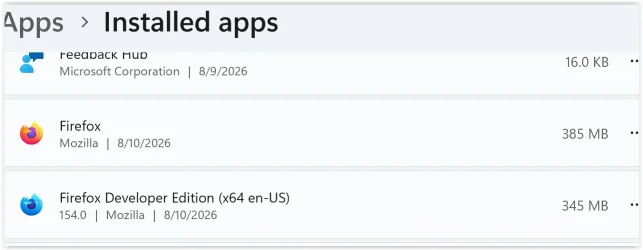
I have found a folder Mozilla Firefox and a folder for Firefox Developer Edition, both in Windows, Programs.
 

Attachments

  • Screen Shot 08-11-26 at 03.02 PM.webp
    Screen Shot 08-11-26 at 03.02 PM.webp
    22 KB · Views: 1

My Computers My Computers

  • At a glance

    Windows 11 ProIntel
    OS
    Windows 11 Pro
    Computer type
    Laptop
    Manufacturer/Model
    Lenovo X1 Extreme 21CS
    CPU
    Intel
    Hard Drives
    2 TB SSD
    Internet Speed
    9 Kbps (rural Internet!)
    Browser
    Firefox
    Antivirus
    Windows Defender
  • At a glance

    Windows 11 ProIntel
    Operating System
    Windows 11 Pro
    Computer type
    Laptop
    Manufacturer/Model
    Lenovo X1 Extreme 21CB
    CPU
    Intel
    Motherboard
    OEM
Not to worry, If you delete both go to the Mozilla download and get the latest.
 

My Computer My Computer

At a glance

Win11 Pro 25H2 26200.9168Processor: 12th Gen Intel(R) Core(TM) i7-1255U40 GBIntel
OS
Win11 Pro 25H2 26200.9168
Computer type
Laptop
Manufacturer/Model
Lenovo IdeaPad 3 15IAU7
CPU
Processor: 12th Gen Intel(R) Core(TM) i7-1255U
Memory
40 GB
Graphics Card(s)
Intel
Monitor(s) Displays
15.6 FHD and 31.5 HP
Screen Resolution
1920x1080
Hard Drives
Numerous
Mouse
Track Ball EM01 NL Bluetooth
Browser
FireFox
Antivirus
MS
No, he might lose all his data, it is too risky. Unless of course he has still the backup of the old Firefox. In that case, remove both and restore the old version from the backup.
 

My Computers My Computers

  • At a glance

    Windows 11 Pro 23H2 (5699), 25H2 (9168)Mobile DualCore Intel Core 2 Duo T7250, 2000 MHz4GBMobile Intel(R) GMA 4500M (Mobile 4 series)
    OS
    Windows 11 Pro 23H2 (5699), 25H2 (9168)
    Computer type
    Laptop
    Manufacturer/Model
    Acer Extensa 5630EZ
    CPU
    Mobile DualCore Intel Core 2 Duo T7250, 2000 MHz
    Motherboard
    Acer Extensa 5630
    Memory
    4GB
    Graphics Card(s)
    Mobile Intel(R) GMA 4500M (Mobile 4 series)
    Sound Card
    Realtek ALC268 @ Intel 82801IB ICH9 - High Definition Audio Controller
    Monitor(s) Displays
    1
    Screen Resolution
    1280x800
    Hard Drives
    Samsung SSD 850 EVO 250GB SATA Device (250 GB, SATA-III)
    Internet Speed
    802.11g wireless 54 Mbps
    Browser
    MICROSOFT EDGE
    Antivirus
    WINDOWS DEFENDER
    Other Info
    Legacy MBR installation, no TPM, no Secure Boot, no WDDM 2.0 graphics drivers, no SSE4.2, cannot get more unsupported ;) This is only my test laptop. I had installed Windows 11 here before upgrading my main PC. For my main PC I use everyday see my 2nd system specs.
  • At a glance

    Windows 11 Pro v25H2 (build 26200.9168)Intel Core-i7 3770 3.40GHz s1155 (3rd generat...2x Kingston Hyper-X Blu 8GB DDR3-1600GIGABYTE GeForce RTX 3050 WINDFORCE OC V2 6GB...
    Operating System
    Windows 11 Pro v25H2 (build 26200.9168)
    Computer type
    PC/Desktop
    Manufacturer/Model
    Custom-built PC
    CPU
    Intel Core-i7 3770 3.40GHz s1155 (3rd generation)
    Motherboard
    Asus P8H61 s1155 ATX
    Memory
    2x Kingston Hyper-X Blu 8GB DDR3-1600
    Graphics card(s)
    GIGABYTE GeForce RTX 3050 WINDFORCE OC V2 6GB (GV-N3050WF2OCV2-6GD)
    Sound Card
    Realtek HD audio (ALC887)
    Monitor(s) Displays
    Sony Bravia KDL-19L4000 19" LCD TV via VGA
    Screen Resolution
    1440x900 32-bit 60Hz
    Hard Drives
    WD Blue SA510 2.5 1000GB SSD as system disk, Western Digital Caviar Purple 4TB SATA III (WD40PURZ) as second
    PSU
    Thermaltake Litepower RGB 550W Full Wired
    Case
    SUPERCASE MIDI-TOWER
    Cooling
    Deepcool Gamma Archer CPU cooler, 1x 8cm fan at the back
    Keyboard
    Mitsumi 101-key PS/2
    Mouse
    Microsoft Compact Optical Mouse
    Internet Speed
    802.11ac 5GHz wireless 260Mpbs
    Browser
    Microsoft Edge, Mozilla Firefox
    Antivirus
    Microsoft Windows Defender
    Other Info
    Legacy BIOS (MBR) installation, no TPM, no Secure Boot, WDDM 3.0 graphics drivers, WEI score 7.4
But if I delete both, won't I lose all my bookmarks, etc?
 

My Computers My Computers

  • At a glance

    Windows 11 ProIntel
    OS
    Windows 11 Pro
    Computer type
    Laptop
    Manufacturer/Model
    Lenovo X1 Extreme 21CS
    CPU
    Intel
    Hard Drives
    2 TB SSD
    Internet Speed
    9 Kbps (rural Internet!)
    Browser
    Firefox
    Antivirus
    Windows Defender
  • At a glance

    Windows 11 ProIntel
    Operating System
    Windows 11 Pro
    Computer type
    Laptop
    Manufacturer/Model
    Lenovo X1 Extreme 21CB
    CPU
    Intel
    Motherboard
    OEM
But if I delete both, won't I lose all my bookmarks, etc?
It is Firefox Windows MSIX 1.0 you want gone then. It is the MS store version.
This one can be removed via Settings/Apps/Installed Apps/ but not via Control Panel.
 

My Computers My Computers

  • At a glance

    All Branches but StableAMD Ryzen 7 7735HS 3200-4500 Mhz 8 cores x 232 GB DDR5Radeon Graphic / NVIDIA GeForce RTX 4060 8 GB...
    OS
    All Branches but Stable
    Computer type
    Laptop
    Manufacturer/Model
    Acer Nitro ANV15-51
    CPU
    AMD Ryzen 7 7735HS 3200-4500 Mhz 8 cores x 2
    Motherboard
    Sportage_RBH
    Memory
    32 GB DDR5
    Graphics Card(s)
    Radeon Graphic / NVIDIA GeForce RTX 4060 8 GB GDDR6
    Sound Card
    AMD/Realtek(R) Audio
    Monitor(s) Displays
    Integrated Monitor (15.3"vis)
    Screen Resolution
    FHD 1920X1080 16:9 144Hz
    Hard Drives
    KINGSTON OM8SEP4512Q-AA 1TB
    Western Digital 256GB
    PSU
    19V DC 6.32 A 120 W
    Cooling
    Dual Fans
    Mouse
    MS Bluetooth
    Internet Speed
    Fiber 1GB Cox -us & 1GB Orange-fr
    Browser
    Edge Canary- Firefox Nightly-Chrome Dev-Chrome Dev
    Antivirus
    Windows Defender
  • At a glance

    Windows 11 BetaAMD A9-94208 GB of DDR4AMD Radeon R5
    Operating System
    Windows 11 Beta
    Computer type
    Laptop
    Manufacturer/Model
    Asus X751BP
    CPU
    AMD A9-9420
    Memory
    8 GB of DDR4
    Graphics card(s)
    AMD Radeon R5
    Screen Resolution
    1600x900
    Hard Drives
    Seagate 1 TB
But if I delete both, won't I lose all my bookmarks, etc?
Yes, but then you will restore the old Firefox from your backup with PCmover again. Of course make sure you can before you delete both.

Otherwise I would use a utility to backup Firefox, just in case, and then try to delete only the new version. An alternative is to copy all Mozilla folders related to the old version to another folder as backup, remove both and then copy the folders back to their original location before reinstalling Firefox. This will make the Installer think you already have Firefox and offer to upgrade. Click on Upgrade and proceed with the installation. When loading Firefox you should see all your settings, bookmarks and addons.
 

My Computers My Computers

  • At a glance

    Windows 11 Pro 23H2 (5699), 25H2 (9168)Mobile DualCore Intel Core 2 Duo T7250, 2000 MHz4GBMobile Intel(R) GMA 4500M (Mobile 4 series)
    OS
    Windows 11 Pro 23H2 (5699), 25H2 (9168)
    Computer type
    Laptop
    Manufacturer/Model
    Acer Extensa 5630EZ
    CPU
    Mobile DualCore Intel Core 2 Duo T7250, 2000 MHz
    Motherboard
    Acer Extensa 5630
    Memory
    4GB
    Graphics Card(s)
    Mobile Intel(R) GMA 4500M (Mobile 4 series)
    Sound Card
    Realtek ALC268 @ Intel 82801IB ICH9 - High Definition Audio Controller
    Monitor(s) Displays
    1
    Screen Resolution
    1280x800
    Hard Drives
    Samsung SSD 850 EVO 250GB SATA Device (250 GB, SATA-III)
    Internet Speed
    802.11g wireless 54 Mbps
    Browser
    MICROSOFT EDGE
    Antivirus
    WINDOWS DEFENDER
    Other Info
    Legacy MBR installation, no TPM, no Secure Boot, no WDDM 2.0 graphics drivers, no SSE4.2, cannot get more unsupported ;) This is only my test laptop. I had installed Windows 11 here before upgrading my main PC. For my main PC I use everyday see my 2nd system specs.
  • At a glance

    Windows 11 Pro v25H2 (build 26200.9168)Intel Core-i7 3770 3.40GHz s1155 (3rd generat...2x Kingston Hyper-X Blu 8GB DDR3-1600GIGABYTE GeForce RTX 3050 WINDFORCE OC V2 6GB...
    Operating System
    Windows 11 Pro v25H2 (build 26200.9168)
    Computer type
    PC/Desktop
    Manufacturer/Model
    Custom-built PC
    CPU
    Intel Core-i7 3770 3.40GHz s1155 (3rd generation)
    Motherboard
    Asus P8H61 s1155 ATX
    Memory
    2x Kingston Hyper-X Blu 8GB DDR3-1600
    Graphics card(s)
    GIGABYTE GeForce RTX 3050 WINDFORCE OC V2 6GB (GV-N3050WF2OCV2-6GD)
    Sound Card
    Realtek HD audio (ALC887)
    Monitor(s) Displays
    Sony Bravia KDL-19L4000 19" LCD TV via VGA
    Screen Resolution
    1440x900 32-bit 60Hz
    Hard Drives
    WD Blue SA510 2.5 1000GB SSD as system disk, Western Digital Caviar Purple 4TB SATA III (WD40PURZ) as second
    PSU
    Thermaltake Litepower RGB 550W Full Wired
    Case
    SUPERCASE MIDI-TOWER
    Cooling
    Deepcool Gamma Archer CPU cooler, 1x 8cm fan at the back
    Keyboard
    Mitsumi 101-key PS/2
    Mouse
    Microsoft Compact Optical Mouse
    Internet Speed
    802.11ac 5GHz wireless 260Mpbs
    Browser
    Microsoft Edge, Mozilla Firefox
    Antivirus
    Microsoft Windows Defender
    Other Info
    Legacy BIOS (MBR) installation, no TPM, no Secure Boot, WDDM 3.0 graphics drivers, WEI score 7.4

My Computers My Computers

  • At a glance

    Windows 11 Pro
    OS
    Windows 11 Pro
    Computer type
    PC/Desktop
    Manufacturer/Model
    ASUS ROG Strix
  • At a glance

    Windows 11 Pro
    Operating System
    Windows 11 Pro
    Computer type
    Laptop
    Manufacturer/Model
    ASUS VivoBook
  • ASUS VivoBook 'Lite' ~ Windows 11 Home
But if I delete both, won't I lose all my bookmarks, etc?


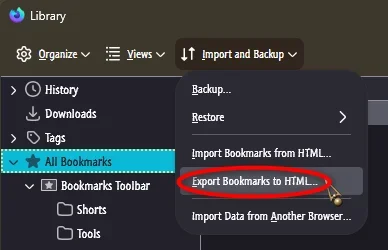
You can export your bookmarks to an HTML file.
Then when you do a clean install of Firefox, you can just import the bookmarks.


If I were you, I'd use REVO Uninstaller (free) to remove both copies of Firefox... and do the "Scan" for leftovers after removing each one.
Then do a clean install of Firefox and import your bookmarks.


And here's some FF tweaks that may help...


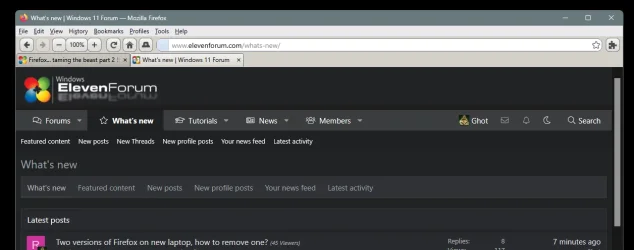
I'm on FF 153.0.4 at the moment, and this is what mine looks like...

Image1.webp
 

My Computers My Computers

  • At a glance

    Win 11 Home ♦♦♦26200.9168 ♦♦♦♦♦♦♦25H2AMD Ryzen 7 3700XG.Skill (F4-3200C14D-16GTZKW)EVGA RTX 2070 (08G-P4-2171-KR)
    OS
    Win 11 Home ♦♦♦26200.9168 ♦♦♦♦♦♦♦25H2
    Computer type
    PC/Desktop
    Manufacturer/Model
    Built by Ghot® [May 2020]
    CPU
    AMD Ryzen 7 3700X
    Motherboard
    Asus Pro WS X570-ACE (BIOS 5302)
    Memory
    G.Skill (F4-3200C14D-16GTZKW)
    Graphics Card(s)
    EVGA RTX 2070 (08G-P4-2171-KR)
    Sound Card
    Realtek ALC1220P / ALC S1220A
    Monitor(s) Displays
    Dell U3011 30"
    Screen Resolution
    2560 x 1600
    Hard Drives
    2x Samsung 860 EVO 500GB,
    WD 4TB Black FZBX - SATA III,
    WD 8TB Black FZBX - SATA III,
    DRW-24B1ST CD/DVD Burner
    PSU
    PC Power & Cooling 750W Quad EPS12V
    Case
    Cooler Master ATCS 840 Tower
    Cooling
    CM Hyper 212 EVO (push/pull)
    Keyboard
    Ducky DK9008 Shine II Blue LED
    Mouse
    Logitech Optical M-100
    Internet Speed
    300/300
    Browser
    Firefox (latest)
    Antivirus
    Bitdefender Total Security
    Other Info
    Speakers: Klipsch Pro Media 2.1
  • At a glance

    Windows XP Pro 32bit w/SP3AMD Athlon 64 X2 5000+ (OC'd @ 3.2Ghz)TWIN2X2048-6400C4DHX (2 x 1GB, DDR2 800)EVGA 256-P2-N758-TR GeForce 8600GT SSC
    Operating System
    Windows XP Pro 32bit w/SP3
    Computer type
    PC/Desktop
    Manufacturer/Model
    Built by Ghot® (not in use)
    CPU
    AMD Athlon 64 X2 5000+ (OC'd @ 3.2Ghz)
    Motherboard
    ASUS M2N32-SLI Deluxe Wireless Edition
    Memory
    TWIN2X2048-6400C4DHX (2 x 1GB, DDR2 800)
    Graphics card(s)
    EVGA 256-P2-N758-TR GeForce 8600GT SSC
    Sound Card
    Onboard
    Monitor(s) Displays
    ViewSonic G90FB Black 19" Professional (CRT)
    Screen Resolution
    up to 2048 x 1536
    Hard Drives
    WD 36GB 10,000rpm Raptor SATA
    Seagate 80GB 7200rpm SATA
    Lite-On LTR-52246S CD/RW
    Lite-On LH-18A1P CD/DVD Burner
    PSU
    PC Power & Cooling Silencer 750 Quad EPS12V
    Case
    Generic Beige case, 80mm fans
    Cooling
    ZALMAN 9500A 92mm CPU Cooler
    Keyboard
    Logitech Classic Keybooard 200
    Mouse
    Logitech Optical M-BT96a
    Internet Speed
    300/300
    Browser
    Firefox 3.x ??
    Antivirus
    Symantec (Norton)
    Other Info
    Still assembled, still runs. Haven't turned it on for 15 years?

My Computers My Computers

  • At a glance

    Windows 11 Pro 25H2 build: (26200.7623)32GB
    OS
    Windows 11 Pro 25H2 build: (26200.7623)
    Computer type
    Laptop
    Manufacturer/Model
    Microsoft Surface Pro
    Memory
    32GB
  • At a glance

    Microsoft 25H2 ProIntel Core Ultra 764GBIntel Integrated Graphics
    Operating System
    Microsoft 25H2 Pro
    Computer type
    Laptop
    Manufacturer/Model
    Dell Pro 14 - PC14250
    CPU
    Intel Core Ultra 7
    Memory
    64GB
    Graphics card(s)
    Intel Integrated Graphics
    Hard Drives
    Micron 1TB SSD
Now it just keeps getting weirder. Took two suggestions above. Exported (backed up) my bookmarks from Developer Edition just for safety. Then uninstalled the Firefox from the MS Store. That didn't harm the Firefox Developer edition, which is working fine after a reboot. Bookmarks are intact.
I then associated HTTP with Firefox and rebooted. This choice disappeared after rebooting.

After rebooting, when I clicked on a link it opened Edge. I checked the app associations. HTTPS and HTTP were reset to Edge. And Firefox was completely gone from the list of apps for associating, though it's running just fine in Start, Programs. When I start it up, it asks if I want it to be my default browser. I click on yes, but that does nothing. Default browser stays as Edge.
 

My Computers My Computers

  • At a glance

    Windows 11 ProIntel
    OS
    Windows 11 Pro
    Computer type
    Laptop
    Manufacturer/Model
    Lenovo X1 Extreme 21CS
    CPU
    Intel
    Hard Drives
    2 TB SSD
    Internet Speed
    9 Kbps (rural Internet!)
    Browser
    Firefox
    Antivirus
    Windows Defender
  • At a glance

    Windows 11 ProIntel
    Operating System
    Windows 11 Pro
    Computer type
    Laptop
    Manufacturer/Model
    Lenovo X1 Extreme 21CB
    CPU
    Intel
    Motherboard
    OEM
Well, I bit the bullet and just re-installed the base version of Firefox. I imported my bookmarks from the .json file I created above. Now I have the tedious job of bringing extensions back in, and redoing scripts in NoScript. But at least it is now working as my default app.

I would still like to make the old Firefox Developer work as my default app for HTTP etc, but can't figure out how to do that.
 

My Computers My Computers

  • At a glance

    Windows 11 ProIntel
    OS
    Windows 11 Pro
    Computer type
    Laptop
    Manufacturer/Model
    Lenovo X1 Extreme 21CS
    CPU
    Intel
    Hard Drives
    2 TB SSD
    Internet Speed
    9 Kbps (rural Internet!)
    Browser
    Firefox
    Antivirus
    Windows Defender
  • At a glance

    Windows 11 ProIntel
    Operating System
    Windows 11 Pro
    Computer type
    Laptop
    Manufacturer/Model
    Lenovo X1 Extreme 21CB
    CPU
    Intel
    Motherboard
    OEM
Well, I bit the bullet and just re-installed the base version of Firefox. I imported my bookmarks from the .json file I created above. Now I have the tedious job of bringing extensions back in, and redoing scripts in NoScript. But at least it is now working as my default app.

Again, saving your profile (like I mentioned earlier), you would avoid having to do all that since not only your bookmarks but your extensions, scripts and settings would come along with it.

I would still like to make the old Firefox Developer work as my default app for HTTP etc, but can't figure out how to do that.

Save your Firefox profile in a safe place. Then delete Firefox in it's entirety using Revo. That includes old folders and registry entries. Then install the following:


Then import your profile using the link instruction I posted up above. Close Firefox and re-open and it should be back to where it was.

I've had to this a few times in the past so I know it works.
 

My Computers My Computers

  • At a glance

    Windows 11 Pro 25H2 build: (26200.7623)32GB
    OS
    Windows 11 Pro 25H2 build: (26200.7623)
    Computer type
    Laptop
    Manufacturer/Model
    Microsoft Surface Pro
    Memory
    32GB
  • At a glance

    Microsoft 25H2 ProIntel Core Ultra 764GBIntel Integrated Graphics
    Operating System
    Microsoft 25H2 Pro
    Computer type
    Laptop
    Manufacturer/Model
    Dell Pro 14 - PC14250
    CPU
    Intel Core Ultra 7
    Memory
    64GB
    Graphics card(s)
    Intel Integrated Graphics
    Hard Drives
    Micron 1TB SSD
For bookmarks you can just copy these two files from your profile then paste them back overwriting the files in your profile.

The file that holds all your bookmarks is: places.sqlite
All the icons for those bookmarks are in: favicons.sqlite
 

My Computer My Computer

At a glance

Windows 11 Pro
OS
Windows 11 Pro
But he wanted to keep everything, not only the bookmarks. I haven't worked with profiles, I don't use Firefox as my default browser, that's why I suggested to manually copy all the relevant folders before uninstalling both Firefox versions. I have done that many times. Once you copy the folders to their respective location on a new computer and then install Firefox, you have everything back.

In OP's case, once he uninstalled the undesired version of Firefox and the option to select Firefox as the default browser was gone, all he had to do was install Firefox again at the same folder as the desired version. Installer would detect the files and offer to upgrade. Proceeding with the "upgrade" would make Firefox default again without losing anything. That's called in-place upgrade/repair and also works with Google Chrome and other non-browser apps.
 
Last edited:

My Computers My Computers

  • At a glance

    Windows 11 Pro 23H2 (5699), 25H2 (9168)Mobile DualCore Intel Core 2 Duo T7250, 2000 MHz4GBMobile Intel(R) GMA 4500M (Mobile 4 series)
    OS
    Windows 11 Pro 23H2 (5699), 25H2 (9168)
    Computer type
    Laptop
    Manufacturer/Model
    Acer Extensa 5630EZ
    CPU
    Mobile DualCore Intel Core 2 Duo T7250, 2000 MHz
    Motherboard
    Acer Extensa 5630
    Memory
    4GB
    Graphics Card(s)
    Mobile Intel(R) GMA 4500M (Mobile 4 series)
    Sound Card
    Realtek ALC268 @ Intel 82801IB ICH9 - High Definition Audio Controller
    Monitor(s) Displays
    1
    Screen Resolution
    1280x800
    Hard Drives
    Samsung SSD 850 EVO 250GB SATA Device (250 GB, SATA-III)
    Internet Speed
    802.11g wireless 54 Mbps
    Browser
    MICROSOFT EDGE
    Antivirus
    WINDOWS DEFENDER
    Other Info
    Legacy MBR installation, no TPM, no Secure Boot, no WDDM 2.0 graphics drivers, no SSE4.2, cannot get more unsupported ;) This is only my test laptop. I had installed Windows 11 here before upgrading my main PC. For my main PC I use everyday see my 2nd system specs.
  • At a glance

    Windows 11 Pro v25H2 (build 26200.9168)Intel Core-i7 3770 3.40GHz s1155 (3rd generat...2x Kingston Hyper-X Blu 8GB DDR3-1600GIGABYTE GeForce RTX 3050 WINDFORCE OC V2 6GB...
    Operating System
    Windows 11 Pro v25H2 (build 26200.9168)
    Computer type
    PC/Desktop
    Manufacturer/Model
    Custom-built PC
    CPU
    Intel Core-i7 3770 3.40GHz s1155 (3rd generation)
    Motherboard
    Asus P8H61 s1155 ATX
    Memory
    2x Kingston Hyper-X Blu 8GB DDR3-1600
    Graphics card(s)
    GIGABYTE GeForce RTX 3050 WINDFORCE OC V2 6GB (GV-N3050WF2OCV2-6GD)
    Sound Card
    Realtek HD audio (ALC887)
    Monitor(s) Displays
    Sony Bravia KDL-19L4000 19" LCD TV via VGA
    Screen Resolution
    1440x900 32-bit 60Hz
    Hard Drives
    WD Blue SA510 2.5 1000GB SSD as system disk, Western Digital Caviar Purple 4TB SATA III (WD40PURZ) as second
    PSU
    Thermaltake Litepower RGB 550W Full Wired
    Case
    SUPERCASE MIDI-TOWER
    Cooling
    Deepcool Gamma Archer CPU cooler, 1x 8cm fan at the back
    Keyboard
    Mitsumi 101-key PS/2
    Mouse
    Microsoft Compact Optical Mouse
    Internet Speed
    802.11ac 5GHz wireless 260Mpbs
    Browser
    Microsoft Edge, Mozilla Firefox
    Antivirus
    Microsoft Windows Defender
    Other Info
    Legacy BIOS (MBR) installation, no TPM, no Secure Boot, WDDM 3.0 graphics drivers, WEI score 7.4
But he wanted to keep everything, not only the bookmarks. I haven't worked with profiles, I don't use Firefox as my default browser, that's why I suggested to manually copy all the relevant folders before uninstalling both Firefox versions. I have done that many times. Once you copy the folders to their respective location on a new computer and then install Firefox, you have everything back.

In OP's case, once he uninstalled the undesired version of Firefox and the option to select Firefox as the default browser was gone, all he had to do was install Firefox again at the same folder as the desired version. Installer would detect the files and offer to upgrade. Proceeding with the "upgrade" would make Firefox default again without losing anything. That's called in-place upgrade/repair and also works with Google Chrome and other non-browser apps.
Not sure I follow which folders to move or copy where. I'll have to give this some more thought when my head clears of all the smoke. I mean that literally! I spent too much time outside this evening even with a mask on. I am in north central Washington, surrounded (at a distance) by serious fires.
 

My Computers My Computers

  • At a glance

    Windows 11 ProIntel
    OS
    Windows 11 Pro
    Computer type
    Laptop
    Manufacturer/Model
    Lenovo X1 Extreme 21CS
    CPU
    Intel
    Hard Drives
    2 TB SSD
    Internet Speed
    9 Kbps (rural Internet!)
    Browser
    Firefox
    Antivirus
    Windows Defender
  • At a glance

    Windows 11 ProIntel
    Operating System
    Windows 11 Pro
    Computer type
    Laptop
    Manufacturer/Model
    Lenovo X1 Extreme 21CB
    CPU
    Intel
    Motherboard
    OEM
Then uninstalled the Firefox from the MS Store
Nope, use the forum favourite RevoUninstaller to remove ANY software. And don't forgett he advanced option to remove any leftover files, folders, registry entries that the basic uninstall process doesn't remove (otherwise the re-install will just re-assume those settings).
 

My Computers My Computers

  • At a glance

    Windows 11 2xH2 (latest update ... forever anal)Intel i5-124008GBNVIDIA GeForce GT730
    OS
    Windows 11 2xH2 (latest update ... forever anal)
    Computer type
    PC/Desktop
    Manufacturer/Model
    HP Slim S01
    CPU
    Intel i5-12400
    Memory
    8GB
    Graphics Card(s)
    NVIDIA GeForce GT730
    Sound Card
    OOBE
    Monitor(s) Displays
    Acer 32"
    Screen Resolution
    1920x1080
    Hard Drives
    512GB KIOXIA NVMe
    1TB SATA SSD
    PSU
    OOBE
    Case
    OOBE
    Cooling
    OOBE
    Keyboard
    BT
    Mouse
    BT
    Browser
    Brave FFox Chrome Opera
    Antivirus
    KIS
  • At a glance

    Windows 11 Pro 2xH2 (latest update ... 4ever ...i7-1165G7 @ 2.80GHzIntel Iris Xe Graphics
    Operating System
    Windows 11 Pro 2xH2 (latest update ... 4ever anal)
    Computer type
    Laptop
    Manufacturer/Model
    HP Pavillion 15
    CPU
    i7-1165G7 @ 2.80GHz
    Graphics card(s)
    Intel Iris Xe Graphics
    Hard Drives
    Samsung NVMe 512GB
    + numerous/multiple SSD Type C USB enclosures
    Internet Speed
    NBN FTTN 50
    Browser
    Brave
    Antivirus
    KIS
Not sure I follow which folders to move or copy where.
No need to touch any individual folders
Then uninstalled the Firefox from the MS Store.

Making a proper unnecessarily complicated mess of this, which should be a simple straight forward process, using (after the settings and favourites backup, of course) ...

Use the forum favourite RevoUninstaller to remove ANY software. And don't forgett he advanced option to remove any leftover files, folders, registry entries that the basic uninstall process doesn't remove (otherwise the re-install will just re-assume those settings)

Install and run RevoUninstaller
Options tab (along the top) > Uninstaller (LH column)
Untick Make a Restore Point before uninstall
Tick Checkmark all leftovers by default
Uninstaller tab > Double click the desired program
Run the uninstallation process
IMPORTANT
DO NOT reboot even if prompted when completed (Cancel if prompted)
Select the Advanced button and then run the process to remove all leftover files/folders/registry entries left behind after a normal default uninstall process
If prompted at any stage previously, now do the reboot

EDIT
If there are 2 FFx entries listed under the programs, do this for BOTH

EDIT 2
If one or both of the programs aren't listed in Revo, just re-install the appropriate version(s), and then do the proper Revo uninstall.
 
Last edited:

My Computers My Computers

  • At a glance

    Windows 11 2xH2 (latest update ... forever anal)Intel i5-124008GBNVIDIA GeForce GT730
    OS
    Windows 11 2xH2 (latest update ... forever anal)
    Computer type
    PC/Desktop
    Manufacturer/Model
    HP Slim S01
    CPU
    Intel i5-12400
    Memory
    8GB
    Graphics Card(s)
    NVIDIA GeForce GT730
    Sound Card
    OOBE
    Monitor(s) Displays
    Acer 32"
    Screen Resolution
    1920x1080
    Hard Drives
    512GB KIOXIA NVMe
    1TB SATA SSD
    PSU
    OOBE
    Case
    OOBE
    Cooling
    OOBE
    Keyboard
    BT
    Mouse
    BT
    Browser
    Brave FFox Chrome Opera
    Antivirus
    KIS
  • At a glance

    Windows 11 Pro 2xH2 (latest update ... 4ever ...i7-1165G7 @ 2.80GHzIntel Iris Xe Graphics
    Operating System
    Windows 11 Pro 2xH2 (latest update ... 4ever anal)
    Computer type
    Laptop
    Manufacturer/Model
    HP Pavillion 15
    CPU
    i7-1165G7 @ 2.80GHz
    Graphics card(s)
    Intel Iris Xe Graphics
    Hard Drives
    Samsung NVMe 512GB
    + numerous/multiple SSD Type C USB enclosures
    Internet Speed
    NBN FTTN 50
    Browser
    Brave
    Antivirus
    KIS
But he wanted to keep everything, not only the bookmarks.
A quick and elegant solution would be to use Firefox's built-in backup tool. It backs up bookmarks, settings, history, passwords, payment methods, extensions, and other browsing data. It might be useful for the OP or other folks, now or in the future. Here's the link.
 

My Computer My Computer

At a glance

Windows 11
OS
Windows 11
  • Like
Reactions: OAT
Not sure I follow which folders to move or copy where. I'll have to give this some more thought when my head clears of all the smoke. I mean that literally! I spent too much time outside this evening even with a mask on. I am in north central Washington, surrounded (at a distance) by serious fires.
See the second paragraph of my reply. You had already uninstalled the new Firefox, the old one was working fine except Firefox didn't appear on the list to choose it as your default browser. All you needed to do was an in-place upgrade/repair to put the missing keys on the Registry and make Firefox appear on the list. You would then make it default and that's it. You wouldn't have lost any data.
 

My Computers My Computers

  • At a glance

    Windows 11 Pro 23H2 (5699), 25H2 (9168)Mobile DualCore Intel Core 2 Duo T7250, 2000 MHz4GBMobile Intel(R) GMA 4500M (Mobile 4 series)
    OS
    Windows 11 Pro 23H2 (5699), 25H2 (9168)
    Computer type
    Laptop
    Manufacturer/Model
    Acer Extensa 5630EZ
    CPU
    Mobile DualCore Intel Core 2 Duo T7250, 2000 MHz
    Motherboard
    Acer Extensa 5630
    Memory
    4GB
    Graphics Card(s)
    Mobile Intel(R) GMA 4500M (Mobile 4 series)
    Sound Card
    Realtek ALC268 @ Intel 82801IB ICH9 - High Definition Audio Controller
    Monitor(s) Displays
    1
    Screen Resolution
    1280x800
    Hard Drives
    Samsung SSD 850 EVO 250GB SATA Device (250 GB, SATA-III)
    Internet Speed
    802.11g wireless 54 Mbps
    Browser
    MICROSOFT EDGE
    Antivirus
    WINDOWS DEFENDER
    Other Info
    Legacy MBR installation, no TPM, no Secure Boot, no WDDM 2.0 graphics drivers, no SSE4.2, cannot get more unsupported ;) This is only my test laptop. I had installed Windows 11 here before upgrading my main PC. For my main PC I use everyday see my 2nd system specs.
  • At a glance

    Windows 11 Pro v25H2 (build 26200.9168)Intel Core-i7 3770 3.40GHz s1155 (3rd generat...2x Kingston Hyper-X Blu 8GB DDR3-1600GIGABYTE GeForce RTX 3050 WINDFORCE OC V2 6GB...
    Operating System
    Windows 11 Pro v25H2 (build 26200.9168)
    Computer type
    PC/Desktop
    Manufacturer/Model
    Custom-built PC
    CPU
    Intel Core-i7 3770 3.40GHz s1155 (3rd generation)
    Motherboard
    Asus P8H61 s1155 ATX
    Memory
    2x Kingston Hyper-X Blu 8GB DDR3-1600
    Graphics card(s)
    GIGABYTE GeForce RTX 3050 WINDFORCE OC V2 6GB (GV-N3050WF2OCV2-6GD)
    Sound Card
    Realtek HD audio (ALC887)
    Monitor(s) Displays
    Sony Bravia KDL-19L4000 19" LCD TV via VGA
    Screen Resolution
    1440x900 32-bit 60Hz
    Hard Drives
    WD Blue SA510 2.5 1000GB SSD as system disk, Western Digital Caviar Purple 4TB SATA III (WD40PURZ) as second
    PSU
    Thermaltake Litepower RGB 550W Full Wired
    Case
    SUPERCASE MIDI-TOWER
    Cooling
    Deepcool Gamma Archer CPU cooler, 1x 8cm fan at the back
    Keyboard
    Mitsumi 101-key PS/2
    Mouse
    Microsoft Compact Optical Mouse
    Internet Speed
    802.11ac 5GHz wireless 260Mpbs
    Browser
    Microsoft Edge, Mozilla Firefox
    Antivirus
    Microsoft Windows Defender
    Other Info
    Legacy BIOS (MBR) installation, no TPM, no Secure Boot, WDDM 3.0 graphics drivers, WEI score 7.4

Latest Support Threads

Back
Top Bottom