Solved Unable to add fingerprint after fresh re-install


deepakpc007

Member
Local time
7:40 PM
Posts
13
OS
Windows 11
I have been using my fingerprint sensor without any issues. But after I re-installed Windows 11 Pro it is not allowing me to add a fingerprint. It says "You have reached the 10 fingerprint maximum for this account".

What I tried so far:
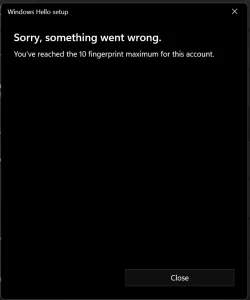
  • Re-installed Windows 2-3 times. Formatted the drive too.
  • Cleared TPM cache.
  • Fingerprint sensor driver was automatically getting installed. But still I updated the driver manually.
Nothing worked. I'm not sure why this is getting shown. It would be really helpful if someone can help me with this.

1736839809897.webp
 
Windows Build/Version
Windows 11 Pro 24H2 (OS Build 26100.2605)

My Computer My Computer

At a glance

Windows 11AMD Ryzen 7 5800X3DG.Skill TridentZ 2x16GB 3200MHz CL16MSI GeForce RTX 4090 Suprim
OS
Windows 11
Computer type
PC/Desktop
CPU
AMD Ryzen 7 5800X3D
Motherboard
MSI B450 Pro Carbon AC
Memory
G.Skill TridentZ 2x16GB 3200MHz CL16
Graphics Card(s)
MSI GeForce RTX 4090 Suprim
Monitor(s) Displays
ASUS ROG PG32UCDM 4K 32 inch 240Hz
Screen Resolution
3840x2160
Hard Drives
Samsung 990 Pro 4TB
Samsung 970 Evo 1TB
WD Blue 7200RPM 1TB HDD
PSU
Corsair RM1000e Shift
Case
NZXT H7 Flow
Cooling
Noctua NH-D15 Chromax Black
Keyboard
HyperX Alloy Elite 2
Mouse
Razer Basilisk
Remove your fingerprint, then set it up again. To remove your fingerprint, select Start > Settings > Accounts > Sign-in options > Windows Hello Fingerprint > Remove. After that, select Set up to set it up again.
 

My Computer My Computer

At a glance

Windows 11AMD Ryzen 7 5700GMicron Technology DDR4-3200 16GBNVIDIA GeForce RTX 3060
OS
Windows 11
Computer type
PC/Desktop
Manufacturer/Model
HP Pavilion
CPU
AMD Ryzen 7 5700G
Motherboard
Erica6
Memory
Micron Technology DDR4-3200 16GB
Graphics Card(s)
NVIDIA GeForce RTX 3060
Sound Card
Realtek ALC671
Monitor(s) Displays
Samsung SyncMaster U28E590
Screen Resolution
3840 x 2160
Hard Drives
SAMSUNG MZVLQ1T0HALB-000H1
Remove your fingerprint, then set it up again. To remove your fingerprint, select Start > Settings > Accounts > Sign-in options > Windows Hello Fingerprint > Remove. After that, select Set up to set it up again.
I don't have any fingerprints added. It is a fresh install. I only have a password and a PIN.
 

My Computer My Computer

At a glance

Windows 11AMD Ryzen 7 5800X3DG.Skill TridentZ 2x16GB 3200MHz CL16MSI GeForce RTX 4090 Suprim
OS
Windows 11
Computer type
PC/Desktop
CPU
AMD Ryzen 7 5800X3D
Motherboard
MSI B450 Pro Carbon AC
Memory
G.Skill TridentZ 2x16GB 3200MHz CL16
Graphics Card(s)
MSI GeForce RTX 4090 Suprim
Monitor(s) Displays
ASUS ROG PG32UCDM 4K 32 inch 240Hz
Screen Resolution
3840x2160
Hard Drives
Samsung 990 Pro 4TB
Samsung 970 Evo 1TB
WD Blue 7200RPM 1TB HDD
PSU
Corsair RM1000e Shift
Case
NZXT H7 Flow
Cooling
Noctua NH-D15 Chromax Black
Keyboard
HyperX Alloy Elite 2
Mouse
Razer Basilisk
How did you clear TPM chip?

What kind of computer are you using?
 

My Computer My Computer

At a glance

Windows 11AMD Ryzen 7 5700GMicron Technology DDR4-3200 16GBNVIDIA GeForce RTX 3060
OS
Windows 11
Computer type
PC/Desktop
Manufacturer/Model
HP Pavilion
CPU
AMD Ryzen 7 5700G
Motherboard
Erica6
Memory
Micron Technology DDR4-3200 16GB
Graphics Card(s)
NVIDIA GeForce RTX 3060
Sound Card
Realtek ALC671
Monitor(s) Displays
Samsung SyncMaster U28E590
Screen Resolution
3840 x 2160
Hard Drives
SAMSUNG MZVLQ1T0HALB-000H1

My Computers My Computers

  • At a glance

    Windows 11 2xH2 (latest update ... forever anal)Intel i5-124008GBNVIDIA GeForce GT730
    OS
    Windows 11 2xH2 (latest update ... forever anal)
    Computer type
    PC/Desktop
    Manufacturer/Model
    HP Slim S01
    CPU
    Intel i5-12400
    Memory
    8GB
    Graphics Card(s)
    NVIDIA GeForce GT730
    Sound Card
    OOBE
    Monitor(s) Displays
    Acer 32"
    Screen Resolution
    1920x1080
    Hard Drives
    512GB KIOXIA NVMe
    1TB SATA SSD
    PSU
    OOBE
    Case
    OOBE
    Cooling
    OOBE
    Keyboard
    BT
    Mouse
    BT
    Browser
    Brave FFox Chrome Opera
    Antivirus
    KIS
  • At a glance

    Windows 11 Pro 2xH2 (latest update ... 4ever ...i7-1165G7 @ 2.80GHzIntel Iris Xe Graphics
    Operating System
    Windows 11 Pro 2xH2 (latest update ... 4ever anal)
    Computer type
    Laptop
    Manufacturer/Model
    HP Pavillion 15
    CPU
    i7-1165G7 @ 2.80GHz
    Graphics card(s)
    Intel Iris Xe Graphics
    Hard Drives
    Samsung NVMe 512GB
    + numerous/multiple SSD Type C USB enclosures
    Internet Speed
    NBN FTTN 50
    Browser
    Brave
    Antivirus
    KIS
Fingerprint sensor driver was automatically getting installed. But still I updated the driver manually.
Does the problem exist before the additional manual update?
 

My Computers My Computers

  • At a glance

    Windows 11 2xH2 (latest update ... forever anal)Intel i5-124008GBNVIDIA GeForce GT730
    OS
    Windows 11 2xH2 (latest update ... forever anal)
    Computer type
    PC/Desktop
    Manufacturer/Model
    HP Slim S01
    CPU
    Intel i5-12400
    Memory
    8GB
    Graphics Card(s)
    NVIDIA GeForce GT730
    Sound Card
    OOBE
    Monitor(s) Displays
    Acer 32"
    Screen Resolution
    1920x1080
    Hard Drives
    512GB KIOXIA NVMe
    1TB SATA SSD
    PSU
    OOBE
    Case
    OOBE
    Cooling
    OOBE
    Keyboard
    BT
    Mouse
    BT
    Browser
    Brave FFox Chrome Opera
    Antivirus
    KIS
  • At a glance

    Windows 11 Pro 2xH2 (latest update ... 4ever ...i7-1165G7 @ 2.80GHzIntel Iris Xe Graphics
    Operating System
    Windows 11 Pro 2xH2 (latest update ... 4ever anal)
    Computer type
    Laptop
    Manufacturer/Model
    HP Pavillion 15
    CPU
    i7-1165G7 @ 2.80GHz
    Graphics card(s)
    Intel Iris Xe Graphics
    Hard Drives
    Samsung NVMe 512GB
    + numerous/multiple SSD Type C USB enclosures
    Internet Speed
    NBN FTTN 50
    Browser
    Brave
    Antivirus
    KIS
Try removing your device from your Microsoft account?

Then: (Found online)

1- Type "services.msc" in the Run prompt (Win+ R) and pressing Enter.
2- Locate "Windows Biometric Service", right-click, and stop it.
3- Navigate to "%windir%/system32/winbiodatabase" in explorer address bar.
4- Set show hidden system files in file explorer. Copy all files inside this folder to a different location، then Delete those files from the original folder.
5- Restart the Windows Biometric Serv in first/second step


My Computers My Computers

  • At a glance

    Windows 11 Pro 25H2 Build 26200.8655Intel(R) Core(TM) i7-4770K CPU @ 3.50GHz32.0 GB of I forget and the box is in storage.Gigabyte nVidia GeForce GTX 1660 Super OC 6GB
    OS
    Windows 11 Pro 25H2 Build 26200.8655
    Computer type
    PC/Desktop
    Manufacturer/Model
    Sin-built 2013
    CPU
    Intel(R) Core(TM) i7-4770K CPU @ 3.50GHz
    Motherboard
    ASUS ROG Maximus VI Formula
    Memory
    32.0 GB of I forget and the box is in storage.
    Graphics Card(s)
    Gigabyte nVidia GeForce GTX 1660 Super OC 6GB
    Sound Card
    ROG SupremeFX Formula 8-Channel High Definition Audio
    Monitor(s) Displays
    5 x LG 25MS500-B - 1 x 24MK430H-B - 1 x Wacom Pro 22" Touch Screen Tablet
    Screen Resolution
    All over the place
    Hard Drives
    Too many to list. OS on Samsung 1TB 870 QVO SATA
    PSU
    Silverstone 1500
    Case
    NZXT Phantom 820 Full-Tower Case
    Cooling
    Noctua NH-D15 Elite Class Dual Tower CPU Cooler / 6 x EziDIY 120mm / 2 x Corsair 140mm somethings / 1 x 140mm Thermaltake something / 2 x 200mm Corsair.
    Keyboard
    Corsair K95 / Logitech diNovo Edge Wireless
    Mouse
    Logitech: G402 / G502 / Mx Masters / Mx Air Cordless
    Internet Speed
    2000/500Mbps
    Browser
    All sorts
    Antivirus
    Kaspersky Premium
    Other Info
    ㅤㅤㅤㅤㅤㅤㅤㅤㅤㅤㅤㅤㅤㅤㅤㅤㅤㅤㅤㅤㅤㅤㅤㅤㅤㅤㅤㅤㅤㅤㅤㅤㅤㅤㅤㅤㅤㅤㅤㅤ⠀⠀⠀⠀⠀⠀⠀⠀⠀⠀
    TP-Link BE9300 WiFi 7 Bluetooth 5.4 (Archer TBE550E)
    TP-Link TX201 V1 2.5GB Lan

    Grandstream HT812 - VoIP
    ASUS DSL-AX82U - Mesh
    ASUS RT-AC68U - Mesh
    ASUS RT-BE88U Router

    Brother MFC-L2880DW Printer

    I’m on a horse.
  • At a glance

    Windows 11 Pro 25H2 Build 26200.8655 (Wifes)13th Generation Intel® Core™ i5-1340P Process...16GB LPDDR5-52001x Intel® Iris® Xe Graphics
    Operating System
    Windows 11 Pro 25H2 Build 26200.8655 (Wifes)
    Computer type
    Laptop
    Manufacturer/Model
    LENOVO Yoga 7 14IRL8 - Type 82YL
    CPU
    13th Generation Intel® Core™ i5-1340P Processor(Core™ i5-1340P)
    Memory
    16GB LPDDR5-5200
    Graphics card(s)
    1x Intel® Iris® Xe Graphics
    Sound Card
    Optimized with Dolby Atmos®
    Screen Resolution
    QHD 2880 x 1800 OLED
    Hard Drives
    M.2 512 GB SSD PCIe
    Mouse
    Logiteck MX Master 3S
    Internet Speed
    2000/500
    Antivirus
    Defender / Malwarebytes
    Other Info
    …still on a horse.


    Wireless Network: Wi-Fi 6E 2x2 AX; Bluetooth® 5.1 or above
    Ports: 1x 1 Novo button; 2 in 1 Audio Combo jack; Micro SD Card Reader; HDMI 1.4b; 2 x USB Type-C (TBT4)
    USB 3.2 Gen 2 DP 1.4a
    PD 3.0); 1 x USB 3.2 Gen1 Type A
    Camera
    1x 1080P FHD IR/RGB Hybrid with Privacy Shutter and Dual Array Microphone
    Graphics
    1x Intel® Iris® Xe Graphics
    Monitor
    14" WUXGA
    Form Factor
    Convertible Notebook
  • Windows 11 Pro 25H2 Build 26200.8655 (Wifes)

    Yoga 7 2-in-1 14IML9 - Type 83DJ

    Processor: Intel® Core™ Ultra 7 155H Processor(Core™ Ultra 7 155H)

    Memory: 32GB LPD5X-7467

    Hard Drive: 1 TB SSD PCIe

    Wireless Network: 1x Wi-Fi 6E 2x2 AX; Bluetooth® 5.1 or above

    Ports: 1 x HDMI 2.1 TMDS; 1 x Novo Button; 1 x Combo Audio Jack
    2 x USB-C (USB 4.0)
    1 x USB-A 3.2 Gen 1

    Camera: 1080P FHD IR Hybrid with Dual Microphone

    Graphics: Intel® Arc™ Graphics

    Monitor: 14" 2.8K

    ...Where's my horse?
How did you clear TPM chip?

What kind of computer are you using?
Cleared TPM by running tpm.msc. I'm using a desktop. Ryzen 7 5800X3D CPU.
 

My Computer My Computer

At a glance

Windows 11AMD Ryzen 7 5800X3DG.Skill TridentZ 2x16GB 3200MHz CL16MSI GeForce RTX 4090 Suprim
OS
Windows 11
Computer type
PC/Desktop
CPU
AMD Ryzen 7 5800X3D
Motherboard
MSI B450 Pro Carbon AC
Memory
G.Skill TridentZ 2x16GB 3200MHz CL16
Graphics Card(s)
MSI GeForce RTX 4090 Suprim
Monitor(s) Displays
ASUS ROG PG32UCDM 4K 32 inch 240Hz
Screen Resolution
3840x2160
Hard Drives
Samsung 990 Pro 4TB
Samsung 970 Evo 1TB
WD Blue 7200RPM 1TB HDD
PSU
Corsair RM1000e Shift
Case
NZXT H7 Flow
Cooling
Noctua NH-D15 Chromax Black
Keyboard
HyperX Alloy Elite 2
Mouse
Razer Basilisk
Does the problem exist before the additional manual update?
Yes.

In the fingerprint setup in the settings, there are no fingerprints added.
 

My Computer My Computer

At a glance

Windows 11AMD Ryzen 7 5800X3DG.Skill TridentZ 2x16GB 3200MHz CL16MSI GeForce RTX 4090 Suprim
OS
Windows 11
Computer type
PC/Desktop
CPU
AMD Ryzen 7 5800X3D
Motherboard
MSI B450 Pro Carbon AC
Memory
G.Skill TridentZ 2x16GB 3200MHz CL16
Graphics Card(s)
MSI GeForce RTX 4090 Suprim
Monitor(s) Displays
ASUS ROG PG32UCDM 4K 32 inch 240Hz
Screen Resolution
3840x2160
Hard Drives
Samsung 990 Pro 4TB
Samsung 970 Evo 1TB
WD Blue 7200RPM 1TB HDD
PSU
Corsair RM1000e Shift
Case
NZXT H7 Flow
Cooling
Noctua NH-D15 Chromax Black
Keyboard
HyperX Alloy Elite 2
Mouse
Razer Basilisk
Try removing your device from your Microsoft account?

Then: (Found online)

1- Type "services.msc" in the Run prompt (Win+ R) and pressing Enter.
2- Locate "Windows Biometric Service", right-click, and stop it.
3- Navigate to "%windir%/system32/winbiodatabase" in explorer address bar.
4- Set show hidden system files in file explorer. Copy all files inside this folder to a different location، then Delete those files from the original folder.
5- Restart the Windows Biometric Serv in first/second step

Thanks. Tried this now. But still shows the same error.
 

My Computer My Computer

At a glance

Windows 11AMD Ryzen 7 5800X3DG.Skill TridentZ 2x16GB 3200MHz CL16MSI GeForce RTX 4090 Suprim
OS
Windows 11
Computer type
PC/Desktop
CPU
AMD Ryzen 7 5800X3D
Motherboard
MSI B450 Pro Carbon AC
Memory
G.Skill TridentZ 2x16GB 3200MHz CL16
Graphics Card(s)
MSI GeForce RTX 4090 Suprim
Monitor(s) Displays
ASUS ROG PG32UCDM 4K 32 inch 240Hz
Screen Resolution
3840x2160
Hard Drives
Samsung 990 Pro 4TB
Samsung 970 Evo 1TB
WD Blue 7200RPM 1TB HDD
PSU
Corsair RM1000e Shift
Case
NZXT H7 Flow
Cooling
Noctua NH-D15 Chromax Black
Keyboard
HyperX Alloy Elite 2
Mouse
Razer Basilisk

My Computer My Computer

At a glance

Windows 11AMD Ryzen 7 5700GMicron Technology DDR4-3200 16GBNVIDIA GeForce RTX 3060
OS
Windows 11
Computer type
PC/Desktop
Manufacturer/Model
HP Pavilion
CPU
AMD Ryzen 7 5700G
Motherboard
Erica6
Memory
Micron Technology DDR4-3200 16GB
Graphics Card(s)
NVIDIA GeForce RTX 3060
Sound Card
Realtek ALC671
Monitor(s) Displays
Samsung SyncMaster U28E590
Screen Resolution
3840 x 2160
Hard Drives
SAMSUNG MZVLQ1T0HALB-000H1
^ Also, you could clear cmos or reflash the BIOS. Don’t know what dif it would make

Try removing the pin and trying again.
 

My Computers My Computers

  • At a glance

    Windows 11 Pro 25H2 Build 26200.8655Intel(R) Core(TM) i7-4770K CPU @ 3.50GHz32.0 GB of I forget and the box is in storage.Gigabyte nVidia GeForce GTX 1660 Super OC 6GB
    OS
    Windows 11 Pro 25H2 Build 26200.8655
    Computer type
    PC/Desktop
    Manufacturer/Model
    Sin-built 2013
    CPU
    Intel(R) Core(TM) i7-4770K CPU @ 3.50GHz
    Motherboard
    ASUS ROG Maximus VI Formula
    Memory
    32.0 GB of I forget and the box is in storage.
    Graphics Card(s)
    Gigabyte nVidia GeForce GTX 1660 Super OC 6GB
    Sound Card
    ROG SupremeFX Formula 8-Channel High Definition Audio
    Monitor(s) Displays
    5 x LG 25MS500-B - 1 x 24MK430H-B - 1 x Wacom Pro 22" Touch Screen Tablet
    Screen Resolution
    All over the place
    Hard Drives
    Too many to list. OS on Samsung 1TB 870 QVO SATA
    PSU
    Silverstone 1500
    Case
    NZXT Phantom 820 Full-Tower Case
    Cooling
    Noctua NH-D15 Elite Class Dual Tower CPU Cooler / 6 x EziDIY 120mm / 2 x Corsair 140mm somethings / 1 x 140mm Thermaltake something / 2 x 200mm Corsair.
    Keyboard
    Corsair K95 / Logitech diNovo Edge Wireless
    Mouse
    Logitech: G402 / G502 / Mx Masters / Mx Air Cordless
    Internet Speed
    2000/500Mbps
    Browser
    All sorts
    Antivirus
    Kaspersky Premium
    Other Info
    ㅤㅤㅤㅤㅤㅤㅤㅤㅤㅤㅤㅤㅤㅤㅤㅤㅤㅤㅤㅤㅤㅤㅤㅤㅤㅤㅤㅤㅤㅤㅤㅤㅤㅤㅤㅤㅤㅤㅤㅤ⠀⠀⠀⠀⠀⠀⠀⠀⠀⠀
    TP-Link BE9300 WiFi 7 Bluetooth 5.4 (Archer TBE550E)
    TP-Link TX201 V1 2.5GB Lan

    Grandstream HT812 - VoIP
    ASUS DSL-AX82U - Mesh
    ASUS RT-AC68U - Mesh
    ASUS RT-BE88U Router

    Brother MFC-L2880DW Printer

    I’m on a horse.
  • At a glance

    Windows 11 Pro 25H2 Build 26200.8655 (Wifes)13th Generation Intel® Core™ i5-1340P Process...16GB LPDDR5-52001x Intel® Iris® Xe Graphics
    Operating System
    Windows 11 Pro 25H2 Build 26200.8655 (Wifes)
    Computer type
    Laptop
    Manufacturer/Model
    LENOVO Yoga 7 14IRL8 - Type 82YL
    CPU
    13th Generation Intel® Core™ i5-1340P Processor(Core™ i5-1340P)
    Memory
    16GB LPDDR5-5200
    Graphics card(s)
    1x Intel® Iris® Xe Graphics
    Sound Card
    Optimized with Dolby Atmos®
    Screen Resolution
    QHD 2880 x 1800 OLED
    Hard Drives
    M.2 512 GB SSD PCIe
    Mouse
    Logiteck MX Master 3S
    Internet Speed
    2000/500
    Antivirus
    Defender / Malwarebytes
    Other Info
    …still on a horse.


    Wireless Network: Wi-Fi 6E 2x2 AX; Bluetooth® 5.1 or above
    Ports: 1x 1 Novo button; 2 in 1 Audio Combo jack; Micro SD Card Reader; HDMI 1.4b; 2 x USB Type-C (TBT4)
    USB 3.2 Gen 2 DP 1.4a
    PD 3.0); 1 x USB 3.2 Gen1 Type A
    Camera
    1x 1080P FHD IR/RGB Hybrid with Privacy Shutter and Dual Array Microphone
    Graphics
    1x Intel® Iris® Xe Graphics
    Monitor
    14" WUXGA
    Form Factor
    Convertible Notebook
  • Windows 11 Pro 25H2 Build 26200.8655 (Wifes)

    Yoga 7 2-in-1 14IML9 - Type 83DJ

    Processor: Intel® Core™ Ultra 7 155H Processor(Core™ Ultra 7 155H)

    Memory: 32GB LPD5X-7467

    Hard Drive: 1 TB SSD PCIe

    Wireless Network: 1x Wi-Fi 6E 2x2 AX; Bluetooth® 5.1 or above

    Ports: 1 x HDMI 2.1 TMDS; 1 x Novo Button; 1 x Combo Audio Jack
    2 x USB-C (USB 4.0)
    1 x USB-A 3.2 Gen 1

    Camera: 1080P FHD IR Hybrid with Dual Microphone

    Graphics: Intel® Arc™ Graphics

    Monitor: 14" 2.8K

    ...Where's my horse?
Ok, I had this issue a while back with my Dell Inspiron and after endless searching found a solution which if I remember correctly, I'll detail below:

1. Open explorer and select view/show/Hidden Items
2. Next navigate to Windows/System32/WinBioDatabase
3. There you will find one or more files ending with .DAT. DO NOT DELETE THEM!!!
4. Right click on each in turn and select 'Edit in Notepad'
5. Delete all contents of the file, it will look like gibberish but that's fine.
6. Save each file to the desktop PRESERVING THE FILE NAME!!!
7. Then copy and paste each file back into WinBioDatabase OVERWRITING the existing files.
8. Reboot and then you should find your fingerprint will enrol again.
 

My Computers My Computers

  • At a glance

    Windows 11 build 26200.7296 / WSL 2 running U...Intel i7-1355U16GBIntel Iris XE
    OS
    Windows 11 build 26200.7296 / WSL 2 running Ubuntu
    Computer type
    Laptop
    Manufacturer/Model
    Dell Inspiron 14 5430
    CPU
    Intel i7-1355U
    Motherboard
    Dell 0GMW80
    Memory
    16GB
    Graphics Card(s)
    Intel Iris XE
    Sound Card
    Realtek
    Monitor(s) Displays
    Dell 14", LG 32" Curved Wide screen monitor and LG Ultrawide 26"
    Screen Resolution
    1920 x 1200 @ 60Hz, 1920 x 1080 @ 100Hz and 2560 x 1080 @ 60Hz
    Hard Drives
    Samsung 990 Pro 1TB NVME Gen 4 M.2 SSD
    PSU
    Dell
    Case
    Dell
    Cooling
    Dell
    Keyboard
    Dell KM3322W
    Mouse
    Dell Trackpad or Dell KM3322W
    Internet Speed
    900mb down / 400mb up FTTP
    Browser
    Edge 142.0.3595.90
    Antivirus
    Windows Defender
    Other Info
    Windows 365
    1TB OneDrive
    Outlook Classic
    Visual Studio Code running in WSL
    Python 3.14
    Samsung Magician
    Garmin Express
    Dell TB16 Thunderbolt dock
    WSL
    WEI Score: 8.3
  • At a glance

    Windows 11Core i5 - 1035G48GBIntel Iris Plus
    Operating System
    Windows 11
    Computer type
    Tablet
    Manufacturer/Model
    Microsoft Surface Pro 7
    CPU
    Core i5 - 1035G4
    Motherboard
    Microsoft
    Memory
    8GB
    Graphics card(s)
    Intel Iris Plus
    Monitor(s) Displays
    Surface touch
    Screen Resolution
    2736 x 1824
    Hard Drives
    128GB
    PSU
    Microsoft
    Case
    Microsoft Keyboard
    Cooling
    None
    Keyboard
    Microsoft Surface Keyboard
    Mouse
    Microsoft Arc Intellimouse
    Internet Speed
    900mb / 400mb FTTP
    Browser
    Edge
    Antivirus
    Windows Defender
Ok, I had this issue a while back with my Dell Inspiron and after endless searching found a solution which if I remember correctly, I'll detail below:

1. Open explorer and select view/show/Hidden Items
2. Next navigate to Windows/System32/WinBioDatabase
3. There you will find one or more files ending with .DAT. DO NOT DELETE THEM!!!
4. Right click on each in turn and select 'Edit in Notepad'
5. Delete all contents of the file, it will look like gibberish but that's fine.
6. Save each file to the desktop PRESERVING THE FILE NAME!!!
7. Then copy and paste each file back into WinBioDatabase OVERWRITING the existing files.
8. Reboot and then you should find your fingerprint will enrol again.
@FreeBooter @antspants I reset the TPM and CMOS from BIOS. Still the same issue.

@markw51 I tried your solution. But still the same error. I stopped Windows Biometric Service. Saved the .DAT file to desktop and then overwrote the file in WinBioDatabase. After restarting the Biometric service or the PC, it is still showing the same.

Could it be because of 24H2? Before resetting my PC I had 23H2 and I didn't get update to 24H2. Could downgrading to 23H2 work?
 

My Computer My Computer

At a glance

Windows 11AMD Ryzen 7 5800X3DG.Skill TridentZ 2x16GB 3200MHz CL16MSI GeForce RTX 4090 Suprim
OS
Windows 11
Computer type
PC/Desktop
CPU
AMD Ryzen 7 5800X3D
Motherboard
MSI B450 Pro Carbon AC
Memory
G.Skill TridentZ 2x16GB 3200MHz CL16
Graphics Card(s)
MSI GeForce RTX 4090 Suprim
Monitor(s) Displays
ASUS ROG PG32UCDM 4K 32 inch 240Hz
Screen Resolution
3840x2160
Hard Drives
Samsung 990 Pro 4TB
Samsung 970 Evo 1TB
WD Blue 7200RPM 1TB HDD
PSU
Corsair RM1000e Shift
Case
NZXT H7 Flow
Cooling
Noctua NH-D15 Chromax Black
Keyboard
HyperX Alloy Elite 2
Mouse
Razer Basilisk
There is a known bug where certain fingerprint sensors are currently not working. I recall reading about it in known issues somewhere. Microsoft has generated a bunch of new bugs in recent Windows updates and this is one of them. Technically, it's possible that it may be the fingerprint sensor driver at fault, but the problem was introduced by MS, so more likely a Windows bug since these sensors worked in previous builds.

This problem has been ongoing for several months I believe. I have a Lenovo laptop affected by this issue. Since today (Jan 14) is patch Tuesday, it is my hope that this, along with some other annoying bugs that have been around for several months, will finally get fixed today. Since there were no Jan 2025 preview updates, i have no idea whether this issue finally gets fixed or not until I try the updates later today.

If you apply the updates today, or in the near future, post back here whether or not they resolve the issue. I'll post back how I do with my fingerprint sensor.

BTW, in my case, the sensor is a GoodIX sensor. I am lucky because my specific laptop has both a fingerprint sensor and Windows Hello camera, so the camera automatically logs me in so I pretty much never use the fingerprint sensor anyway. My plan is to wait for today's updates and if they don't resolve the issue I'll place a call to Lenovo to see if they have more info or a workaround.

I'll post updates here later today or tomorrow at the latest.
 

My Computers My Computers

  • At a glance

    Win11 Pro 25H2 (RTM+)Intel i7-14650HX32 GBNo GPU - Built-in Intel Graphics
    OS
    Win11 Pro 25H2 (RTM+)
    Computer type
    PC/Desktop
    Manufacturer/Model
    Acemagic
    CPU
    Intel i7-14650HX
    Memory
    32 GB
    Graphics Card(s)
    No GPU - Built-in Intel Graphics
    Sound Card
    Integrated
    Monitor(s) Displays
    Varies as machine will often be moved to locations with different monitors
    Screen Resolution
    Varies
    Hard Drives
    1 x 1TB Gen 4 NVMe SSD
    PSU
    120W Power Brick
    Keyboard
    Corsair K70 Max RGB Magnetic Keyboard
    Mouse
    Logitech MX Master 3
    Internet Speed
    1Gb Up / 1 Gb Down
    Browser
    Edge
    Antivirus
    Windows Defender
  • At a glance

    Win11 Pro 25H2 (RTM+)Intel i7-1255U16 GBIntel Iris Xe Graphics
    Operating System
    Win11 Pro 25H2 (RTM+)
    Computer type
    Laptop
    Manufacturer/Model
    Lenovo ThinkBook 13x Gen 2
    CPU
    Intel i7-1255U
    Memory
    16 GB
    Graphics card(s)
    Intel Iris Xe Graphics
    Sound Card
    Realtek® ALC3306-CG codec
    Monitor(s) Displays
    13.3-inch IPS Display
    Screen Resolution
    WQXGA (2560 x 1600)
    Hard Drives
    2 TB 4 x 4 NVMe SSD
    PSU
    USB-C / Thunderbolt 4 Power / Charging
    Keyboard
    Backlit, spill resistant keyboard
    Mouse
    Buttonless Glass Precision Touchpad
    Internet Speed
    1Gb Up / 1Gb Down
    Browser
    Edge
    Antivirus
    Windows Defender
    Other Info
    WiFi 6e / Bluetooth 5.1 / Facial Recognition / Fingerprint Sensor / ToF (Time of Flight) Human Presence Sensor
There is a known bug where certain fingerprint sensors are currently not working. I recall reading about it in known issues somewhere. Microsoft has generated a bunch of new bugs in recent Windows updates and this is one of them. Technically, it's possible that it may be the fingerprint sensor driver at fault, but the problem was introduced by MS, so more likely a Windows bug since these sensors worked in previous builds.

This problem has been ongoing for several months I believe. I have a Lenovo laptop affected by this issue. Since today (Jan 14) is patch Tuesday, it is my hope that this, along with some other annoying bugs that have been around for several months, will finally get fixed today. Since there were no Jan 2025 preview updates, i have no idea whether this issue finally gets fixed or not until I try the updates later today.

If you apply the updates today, or in the near future, post back here whether or not they resolve the issue. I'll post back how I do with my fingerprint sensor.

BTW, in my case, the sensor is a GoodIX sensor. I am lucky because my specific laptop has both a fingerprint sensor and Windows Hello camera, so the camera automatically logs me in so I pretty much never use the fingerprint sensor anyway. My plan is to wait for today's updates and if they don't resolve the issue I'll place a call to Lenovo to see if they have more info or a workaround.

I'll post updates here later today or tomorrow at the latest.
Thanks. My fingerprint sensor is Verimark IT. I'll update my PC and let you know.
 

My Computer My Computer

At a glance

Windows 11AMD Ryzen 7 5800X3DG.Skill TridentZ 2x16GB 3200MHz CL16MSI GeForce RTX 4090 Suprim
OS
Windows 11
Computer type
PC/Desktop
CPU
AMD Ryzen 7 5800X3D
Motherboard
MSI B450 Pro Carbon AC
Memory
G.Skill TridentZ 2x16GB 3200MHz CL16
Graphics Card(s)
MSI GeForce RTX 4090 Suprim
Monitor(s) Displays
ASUS ROG PG32UCDM 4K 32 inch 240Hz
Screen Resolution
3840x2160
Hard Drives
Samsung 990 Pro 4TB
Samsung 970 Evo 1TB
WD Blue 7200RPM 1TB HDD
PSU
Corsair RM1000e Shift
Case
NZXT H7 Flow
Cooling
Noctua NH-D15 Chromax Black
Keyboard
HyperX Alloy Elite 2
Mouse
Razer Basilisk
Thanks. My fingerprint sensor is Verimark IT. I'll update my PC and let you know.
I should just note that the updates should go live at about 12 Noon US Central time today (18:00 UTC).
 

My Computers My Computers

  • At a glance

    Win11 Pro 25H2 (RTM+)Intel i7-14650HX32 GBNo GPU - Built-in Intel Graphics
    OS
    Win11 Pro 25H2 (RTM+)
    Computer type
    PC/Desktop
    Manufacturer/Model
    Acemagic
    CPU
    Intel i7-14650HX
    Memory
    32 GB
    Graphics Card(s)
    No GPU - Built-in Intel Graphics
    Sound Card
    Integrated
    Monitor(s) Displays
    Varies as machine will often be moved to locations with different monitors
    Screen Resolution
    Varies
    Hard Drives
    1 x 1TB Gen 4 NVMe SSD
    PSU
    120W Power Brick
    Keyboard
    Corsair K70 Max RGB Magnetic Keyboard
    Mouse
    Logitech MX Master 3
    Internet Speed
    1Gb Up / 1 Gb Down
    Browser
    Edge
    Antivirus
    Windows Defender
  • At a glance

    Win11 Pro 25H2 (RTM+)Intel i7-1255U16 GBIntel Iris Xe Graphics
    Operating System
    Win11 Pro 25H2 (RTM+)
    Computer type
    Laptop
    Manufacturer/Model
    Lenovo ThinkBook 13x Gen 2
    CPU
    Intel i7-1255U
    Memory
    16 GB
    Graphics card(s)
    Intel Iris Xe Graphics
    Sound Card
    Realtek® ALC3306-CG codec
    Monitor(s) Displays
    13.3-inch IPS Display
    Screen Resolution
    WQXGA (2560 x 1600)
    Hard Drives
    2 TB 4 x 4 NVMe SSD
    PSU
    USB-C / Thunderbolt 4 Power / Charging
    Keyboard
    Backlit, spill resistant keyboard
    Mouse
    Buttonless Glass Precision Touchpad
    Internet Speed
    1Gb Up / 1Gb Down
    Browser
    Edge
    Antivirus
    Windows Defender
    Other Info
    WiFi 6e / Bluetooth 5.1 / Facial Recognition / Fingerprint Sensor / ToF (Time of Flight) Human Presence Sensor
Do this:


And then log back into the microsoft account on your pc after a reboot after a few minutes of removing it. Then try the fingerprint enrollment again.
 

My Computers My Computers

  • At a glance

    Windows 11 ProRyzen 7 5700 X3D64 GB DDR4 3600mhz Gskill Ripjaws VRTX 4070 Super , 12GB VRAM Asus EVO Overclock
    OS
    Windows 11 Pro
    Computer type
    PC/Desktop
    Manufacturer/Model
    Custom Built
    CPU
    Ryzen 7 5700 X3D
    Motherboard
    MSI MPG B550 GAMING PLUS
    Memory
    64 GB DDR4 3600mhz Gskill Ripjaws V
    Graphics Card(s)
    RTX 4070 Super , 12GB VRAM Asus EVO Overclock
    Monitor(s) Displays
    Gigabyte M27Q (rev. 2.0) 2560 x 1440 @ 170hz HDR
    Hard Drives
    2TB Samsung nvme ssd
    4TB Western Digital nvme ssd
    PSU
    CORSAIR RMx SHIFT Series™ RM750x 80 PLUS Gold Fully Modular ATX Power Supply
    Case
    CORSAIR 3500X ARGB Mid-Tower ATX PC Case – Black
    Cooling
    ID-COOLING FROSTFLOW X 240 CPU Water Cooler
    Keyboard
    Logitech G213
    Mouse
    Logitech G203
    Internet Speed
    1.2gbps Fiber 😎
  • At a glance

    Chrome OSIntel Pentium Quad Core4GB LPDDR4
    Operating System
    Chrome OS
    Computer type
    Laptop
    Manufacturer/Model
    HP Chromebook
    CPU
    Intel Pentium Quad Core
    Memory
    4GB LPDDR4
    Monitor(s) Displays
    14 Inch HD SVA anti glare micro edge display
    Hard Drives
    64 GB emmc
See if fingerprint device have software that you can use for login.
 

My Computer My Computer

At a glance

Windows 11AMD Ryzen 7 5700GMicron Technology DDR4-3200 16GBNVIDIA GeForce RTX 3060
OS
Windows 11
Computer type
PC/Desktop
Manufacturer/Model
HP Pavilion
CPU
AMD Ryzen 7 5700G
Motherboard
Erica6
Memory
Micron Technology DDR4-3200 16GB
Graphics Card(s)
NVIDIA GeForce RTX 3060
Sound Card
Realtek ALC671
Monitor(s) Displays
Samsung SyncMaster U28E590
Screen Resolution
3840 x 2160
Hard Drives
SAMSUNG MZVLQ1T0HALB-000H1
Back
Top Bottom