
Tilleomeni
Member
- Local time
- 9:39 PM
- Posts
- 1
- OS
- Windows 11
Hi everyone,
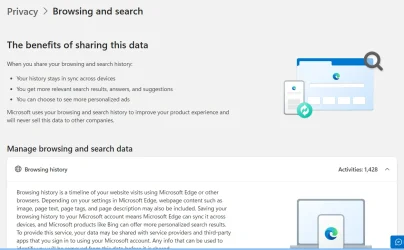
I recently reset my laptop, and since then, I can’t seem to reconfigure my privacy settings to stop Microsoft from collecting and saving my browsing and search history.
Before the reset, I had successfully turned off data collection so that:
After resetting the laptop, I’ve tried going through Microsoft Edge → Settings → Privacy, search, and services and adjusting the sync and personalization options, but it still looks like browsing activity is being stored and shown on my Microsoft account’s privacy page.
I’ve also checked Windows privacy settings, but I might be missing something.
Could anyone please remind me of the exact steps or settings needed to completely stop Microsoft from collecting or syncing browsing and search data (both in Edge and on my Microsoft account)?
Thanks in advance for your help!
I recently reset my laptop, and since then, I can’t seem to reconfigure my privacy settings to stop Microsoft from collecting and saving my browsing and search history.
Before the reset, I had successfully turned off data collection so that:
- My browsing and search activities didn’t appear on the Microsoft Privacy Dashboard
- My browsing history wasn’t synced across devices
- Microsoft Edge didn’t save or upload my activity data to my Microsoft account
After resetting the laptop, I’ve tried going through Microsoft Edge → Settings → Privacy, search, and services and adjusting the sync and personalization options, but it still looks like browsing activity is being stored and shown on my Microsoft account’s privacy page.
I’ve also checked Windows privacy settings, but I might be missing something.
Could anyone please remind me of the exact steps or settings needed to completely stop Microsoft from collecting or syncing browsing and search data (both in Edge and on my Microsoft account)?
Thanks in advance for your help!
- Windows Build/Version
- Windows 11 25H2, (OS Build 26200.6899)
Attachments
My Computer
System One
-
- OS
- Windows 11
- Computer type
- Laptop
- Manufacturer/Model
- Lenovo






