Unable to get my PC to boot from a USB drive


In my last post to Marie SWE, I displayed the main components of my laptop. After reading what RST does, it seems to me that I absolutely need it because disabling it could ruin the striping and corrupt my data. I know very little about these things so that may be total nonsense, but at this stage, I'm unwilling to take the risk.

I initially went for TAILS because the video I linked to earlier explained how you could surf the net without being tracked. With free speech under constant attack, that seemed to me to be a wise choice. That said, if I dare post replies to anything, I would instantly become visible anyway. Then there's the question of storage. If I could have gotten TAILS to run, I would have been able to unplug it after a session, but it seems to me that anything I download, which is usually documentaries, would need to be stored locally because the USB drive would not have enough space. Ergo, I lose the advantage of having been invisible, no?
Why don't you use a larger USB to create TAILS so it also has space for your data? Make sure you avoid DD mode which dedicates the whole disk to the image making it impossible to add data.
 

My Computers

System One System Two

  • OS
    Windows 11 Pro 23H2 (5699), 25H2 (8457)
    Computer type
    Laptop
    Manufacturer/Model
    Acer Extensa 5630EZ
    CPU
    Mobile DualCore Intel Core 2 Duo T7250, 2000 MHz
    Motherboard
    Acer Extensa 5630
    Memory
    4GB
    Graphics Card(s)
    Mobile Intel(R) GMA 4500M (Mobile 4 series)
    Sound Card
    Realtek ALC268 @ Intel 82801IB ICH9 - High Definition Audio Controller
    Monitor(s) Displays
    1
    Screen Resolution
    1280x800
    Hard Drives
    Samsung SSD 850 EVO 250GB SATA Device (250 GB, SATA-III)
    Internet Speed
    VDSL 50 Mbps
    Browser
    MICROSOFT EDGE
    Antivirus
    WINDOWS DEFENDER
    Other Info
    Legacy MBR installation, no TPM, no Secure Boot, no WDDM 2.0 graphics drivers, no SSE4.2, cannot get more unsupported ;) This is only my test laptop. I had installed Windows 11 here before upgrading my main PC. For my main PC I use everyday see my 2nd system specs.
  • Operating System
    Windows 11 Pro v25H2 (build 26200.8457)
    Computer type
    PC/Desktop
    Manufacturer/Model
    Custom-built PC
    CPU
    Intel Core-i7 3770 3.40GHz s1155 (3rd generation)
    Motherboard
    Asus P8H61 s1155 ATX
    Memory
    2x Kingston Hyper-X Blu 8GB DDR3-1600
    Graphics card(s)
    GIGABYTE GeForce RTX 3050 WINDFORCE OC V2 6GB (GV-N3050WF2OCV2-6GD)
    Sound Card
    Realtek HD audio (ALC887)
    Monitor(s) Displays
    Sony Bravia KDL-19L4000 19" LCD TV via VGA
    Screen Resolution
    1440x900 32-bit 60Hz
    Hard Drives
    WD Blue SA510 2.5 1000GB SSD as system disk, Western Digital Caviar Purple 4TB SATA III (WD40PURZ) as second
    PSU
    Thermaltake Litepower RGB 550W Full Wired
    Case
    SUPERCASE MIDI-TOWER
    Cooling
    Deepcool Gamma Archer CPU cooler, 1x 8cm fan at the back
    Keyboard
    Mitsumi 101-key PS/2
    Mouse
    Sunnyline OptiEye PS/2
    Internet Speed
    100Mbps
    Browser
    Microsoft Edge, Mozilla Firefox
    Antivirus
    Microsoft Windows Defender
    Other Info
    Legacy BIOS (MBR) installation, no TPM, no Secure Boot, WDDM 3.0 graphics drivers, WEI score 7.4
Why don't you use a larger USB to create TAILS so it also has space for your data? Make sure you avoid DD mode which dedicates the whole disk to the image making it impossible to add data.
TAILS would not run on my machine due to my graphics card. Unlike Ubuntu, there is no option at startup to change to safe graphics, therefore it loaded as far as the window for setting persistent storage space and then promptly black screened.

I don't know what DD mode is but TAILS persistent storage option creates a partition to allow for storage of anything downloaded. The largest USB pen drives I have come across are 512 Gb which is absolutely not enough for my needs. I am unaware of whether one can use an external HDD instead of a pen drive? Another question I am unaware of is whether, once in Linux, I will have access to all my other HDD's normally used by Windows?
 

My Computer

System One

  • OS
    Windows 11
    Computer type
    Laptop
    Manufacturer/Model
    Alienware A51M R2
    CPU
    Intel(R) Core(TM) i9-10900K CPU @ 3.70GHz
    Memory
    32,0 GB
    Graphics Card(s)
    Nvidia GeForce RTX2080 Super
    Sound Card
    Realtek
    Screen Resolution
    4K
    Hard Drives
    2TB (2x 1TB PCle M.2 SSD) RAID 0 [Boot] + 2TB (2x 1TB
    PCle M.2 SSD) Non-Raid [Storage]
Of course you can use an external USB hard disk, but why save all your videos in the USB flash drive? You can connect an external USB hard disk and save your work there. In that case even a 16GB USB flash drive just holding TAILS OS is enough. If you have another computer in the same network you could even use a network folder either shared on the other computer or a dedicated NAS instead of storing locally.
 

My Computers

System One System Two

  • OS
    Windows 11 Pro 23H2 (5699), 25H2 (8457)
    Computer type
    Laptop
    Manufacturer/Model
    Acer Extensa 5630EZ
    CPU
    Mobile DualCore Intel Core 2 Duo T7250, 2000 MHz
    Motherboard
    Acer Extensa 5630
    Memory
    4GB
    Graphics Card(s)
    Mobile Intel(R) GMA 4500M (Mobile 4 series)
    Sound Card
    Realtek ALC268 @ Intel 82801IB ICH9 - High Definition Audio Controller
    Monitor(s) Displays
    1
    Screen Resolution
    1280x800
    Hard Drives
    Samsung SSD 850 EVO 250GB SATA Device (250 GB, SATA-III)
    Internet Speed
    VDSL 50 Mbps
    Browser
    MICROSOFT EDGE
    Antivirus
    WINDOWS DEFENDER
    Other Info
    Legacy MBR installation, no TPM, no Secure Boot, no WDDM 2.0 graphics drivers, no SSE4.2, cannot get more unsupported ;) This is only my test laptop. I had installed Windows 11 here before upgrading my main PC. For my main PC I use everyday see my 2nd system specs.
  • Operating System
    Windows 11 Pro v25H2 (build 26200.8457)
    Computer type
    PC/Desktop
    Manufacturer/Model
    Custom-built PC
    CPU
    Intel Core-i7 3770 3.40GHz s1155 (3rd generation)
    Motherboard
    Asus P8H61 s1155 ATX
    Memory
    2x Kingston Hyper-X Blu 8GB DDR3-1600
    Graphics card(s)
    GIGABYTE GeForce RTX 3050 WINDFORCE OC V2 6GB (GV-N3050WF2OCV2-6GD)
    Sound Card
    Realtek HD audio (ALC887)
    Monitor(s) Displays
    Sony Bravia KDL-19L4000 19" LCD TV via VGA
    Screen Resolution
    1440x900 32-bit 60Hz
    Hard Drives
    WD Blue SA510 2.5 1000GB SSD as system disk, Western Digital Caviar Purple 4TB SATA III (WD40PURZ) as second
    PSU
    Thermaltake Litepower RGB 550W Full Wired
    Case
    SUPERCASE MIDI-TOWER
    Cooling
    Deepcool Gamma Archer CPU cooler, 1x 8cm fan at the back
    Keyboard
    Mitsumi 101-key PS/2
    Mouse
    Sunnyline OptiEye PS/2
    Internet Speed
    100Mbps
    Browser
    Microsoft Edge, Mozilla Firefox
    Antivirus
    Microsoft Windows Defender
    Other Info
    Legacy BIOS (MBR) installation, no TPM, no Secure Boot, WDDM 3.0 graphics drivers, WEI score 7.4
You can connect an external USB hard disk and save your work there.
So, I CAN access the external drives already connected to the PC. That is really important because none of the content I have downloaded is physically stored on the laptop's hard drives. Nonetheless, even though TAILS did not request me to disable RST, I still could not get past the graphics card issue. I assume that, if there was a way to start it in safe graphics mode, it should be possible to install the Nvidia driver for Linux (extension is .run) which I already downloaded, although I have no idea how to go about doing that?
 

My Computer

System One

  • OS
    Windows 11
    Computer type
    Laptop
    Manufacturer/Model
    Alienware A51M R2
    CPU
    Intel(R) Core(TM) i9-10900K CPU @ 3.70GHz
    Memory
    32,0 GB
    Graphics Card(s)
    Nvidia GeForce RTX2080 Super
    Sound Card
    Realtek
    Screen Resolution
    4K
    Hard Drives
    2TB (2x 1TB PCle M.2 SSD) RAID 0 [Boot] + 2TB (2x 1TB
    PCle M.2 SSD) Non-Raid [Storage]
I don't know exactly how, but on Grub boot loader (used by many Linux distributions) you see the boot list for a few seconds before booting the default entry (usually first). If you press E you can edit the boot entry before booting. Add the relevant parameters, such as nomodeset or xforcevesa. I don't know the exact parameters for TAILS, Google them.
 

My Computers

System One System Two

  • OS
    Windows 11 Pro 23H2 (5699), 25H2 (8457)
    Computer type
    Laptop
    Manufacturer/Model
    Acer Extensa 5630EZ
    CPU
    Mobile DualCore Intel Core 2 Duo T7250, 2000 MHz
    Motherboard
    Acer Extensa 5630
    Memory
    4GB
    Graphics Card(s)
    Mobile Intel(R) GMA 4500M (Mobile 4 series)
    Sound Card
    Realtek ALC268 @ Intel 82801IB ICH9 - High Definition Audio Controller
    Monitor(s) Displays
    1
    Screen Resolution
    1280x800
    Hard Drives
    Samsung SSD 850 EVO 250GB SATA Device (250 GB, SATA-III)
    Internet Speed
    VDSL 50 Mbps
    Browser
    MICROSOFT EDGE
    Antivirus
    WINDOWS DEFENDER
    Other Info
    Legacy MBR installation, no TPM, no Secure Boot, no WDDM 2.0 graphics drivers, no SSE4.2, cannot get more unsupported ;) This is only my test laptop. I had installed Windows 11 here before upgrading my main PC. For my main PC I use everyday see my 2nd system specs.
  • Operating System
    Windows 11 Pro v25H2 (build 26200.8457)
    Computer type
    PC/Desktop
    Manufacturer/Model
    Custom-built PC
    CPU
    Intel Core-i7 3770 3.40GHz s1155 (3rd generation)
    Motherboard
    Asus P8H61 s1155 ATX
    Memory
    2x Kingston Hyper-X Blu 8GB DDR3-1600
    Graphics card(s)
    GIGABYTE GeForce RTX 3050 WINDFORCE OC V2 6GB (GV-N3050WF2OCV2-6GD)
    Sound Card
    Realtek HD audio (ALC887)
    Monitor(s) Displays
    Sony Bravia KDL-19L4000 19" LCD TV via VGA
    Screen Resolution
    1440x900 32-bit 60Hz
    Hard Drives
    WD Blue SA510 2.5 1000GB SSD as system disk, Western Digital Caviar Purple 4TB SATA III (WD40PURZ) as second
    PSU
    Thermaltake Litepower RGB 550W Full Wired
    Case
    SUPERCASE MIDI-TOWER
    Cooling
    Deepcool Gamma Archer CPU cooler, 1x 8cm fan at the back
    Keyboard
    Mitsumi 101-key PS/2
    Mouse
    Sunnyline OptiEye PS/2
    Internet Speed
    100Mbps
    Browser
    Microsoft Edge, Mozilla Firefox
    Antivirus
    Microsoft Windows Defender
    Other Info
    Legacy BIOS (MBR) installation, no TPM, no Secure Boot, WDDM 3.0 graphics drivers, WEI score 7.4
Because that's how the laptop came when I bought it.

View attachment 141870
Hi again :-)
Then i understand why. ;-)
If you ever plan on a clean install, so strongly consider undo the Raid. You will have more options with two disks then two disks as one. Its easier to make a disk image on one then on a Raid array. Raid 0 is sensitive as if one disk fails all data is lost if you dont have a external backup.
Raid 0 is really good if you need high write/read speed and is often used in some servers that handles a lot of raw data 24/7
Raid 1 then the second disk becomes a mirror of the first one.. so if one die, the system keeps on going. Downside, you lose half of the data storage space as one disk is just a mirror of the first one.
So next time you considering a clean install.. keep this in mind. :-)

Not doable. I do have plenty of programs to reinstall. I am not looking to create a dual boot system. I was only looking to maximize privacy.
Dualboot system is the best way to privacy. It is totally doable to run Linux inside windows WSL Windows subsystem for Linux.. But this will become useless in privacy when Microsoft kickstart the Windows Recall.. Then its game over.

If you feel uncomfortable with messing with your Raid setup and wants to get the best of both worlds.. Then you can get an external USB SSD/M.2 disk that someone else mention instead of using USB sticks. Way-way-way better performance and longer lifespan as a USB stick will fail after to many writes compare to a SSD/M.2 disk.
One thing that Linux can that windows cant, is to install the operating system on an external harddrive. :-) so you can get a dual boot system without messing with your current setup. :-)


I have never used Linux, however TAILS is Linux based. I chose TAILS purely after it had been recommended in this video. Right now, I get the feeling I'm chasing rainbows.
I started with Linux in 2018 and i had never-ever even touched a computer with Linux before, so i can relate to what you feeling when it dont working out of the box as you want it too. :-)
As for Tails.. i would not recommend that for "stage 1" of privacy. And about now you wonder... stage1? :unsure:
I have been in the Privacy track since 1995.. the right to be anonymous online, so i have set it to 3 levels of privacy.
Stage1. is when you only want hide from Big tech to have the right to chose to who you share your data with.
This mean a OS that isn't collecting data about you, a web browser that isn't sending your userdata to big-tech (Chrome and edge is the evil ones)
And about here will some MS fanboy/girl will say something about edge and win dont collecting data... I just say dont,... start a separate thread if you want to have that discussion. ;-)
Stage2. you are a whistleblower or a journalist working around the world so you need to be able to have isolated communication that dont leave any traces.
Stage3. you are a real target with top secret work that governments around the world or criminal hackers want to target you as an individual, so you have to be able to be totally invisible and cant be traced by anyone, not even the NSA or other powerful entities or the worlds best hackers.
This last one is less then 0.5% of the worlds population and this stage for a normal person is just tinfoil hat warning.

With running Linux on an external drive with a VPN and two or three web browsers will leave you at stage 1.5.
Tails is more stage2 and is probibly overkill for you and will only create uncomfortable-ness for you.

As you have Nvidia i would recommend Pop_OS with Nvidia support Download Pop!_OS by System76
Look for the ISO ( Pop!_OS 22.04 LTS with NVIDIA )
Most all Linux versions can be run from an USB-stick without installing it... So make an USB stick with this one and try if that one will play a bit nicer with your computer :-)

As for the step to actually install Pop_OS on an external harddrive to really use for years to come.. We can take that step then when you see it works. :-)

I might have missed something.. I haven't woken up yet as I'm still drinking my morning coffee. *LOL* 😅
 

My Computers

System One System Two

  • OS
    Linux: Debian, Kali-linux, Alma, Win: 7, 8.1,2012R
    Manufacturer/Model
    HP Elitebook 840, AsusX53, Aspire E1-572. AsusUX32A, HP Pro3130mt+3010mt, HP Proliant ML150, 3xCustom-PC, i3, i5, i7
    CPU
    i3, i5 and i7 From 2gen to 9th gen... Server dual Xenon
    Hard Drives
    Sata, M.2, SAS
  • Operating System
    Retro: 2003server.XPpro, Win2000, Win98SE, Win95, Win3.11, MS-DOS, IBM-DOS
    Manufacturer/Model
    Commodore, AST, Fujitsu, Compaq, etc etc. etc Around 15 desktops and 20 laptops in the collection
    CPU
    Oldest intel 8088 up to P4 dual core
    Hard Drives
    MFM, IDE, SCSI
Hi,
I'm trying to boot my PC into a Linux OS on a USB drive.
From within Windows, I pressed the Windows key and then, while holding the shift key down, I selected restart. This presented me with the option to select a device to boot from. I selected IPv4 and then let it restart. A message came up saying it was checking for available hardware and then it booted into Windows. So, I restarted again, pressed F12 to enter the BIOS, and then set IPv4 to the #1 position, but still it loaded Windows. It used to be possible to select Removable Devices in the BIOS but that is no longer available. I only get the options of Windows Boot Manager, IPv4, or IPv6.

Should I have selected IPv6? If not, what am I doing wrong, please?
Your system will not boot to any OS except the one already installed unless you change secure boot mode from Deployed to Audit.
 

My Computer

System One

  • OS
    Windows 11 22H2 Pro (X-lite Micro 11 version)
    Computer type
    Laptop
    Manufacturer/Model
    Dell/ Precision 7680
    CPU
    i7 13850HX (20 cores, 28 threads)
    Motherboard
    Dell
    Memory
    32GB DDR5
    Graphics Card(s)
    Intel UHD/ RTX 1000 ADA
    Sound Card
    Realtek
    Monitor(s) Displays
    4K UHD Touchscreen
    Screen Resolution
    3840 x 2400
    Hard Drives
    Samsung 512GB system drive
    WD Blue 1TB game drive
    PSU
    240W AC adapter, 1800W when docked
    Internet Speed
    1 gigabit symmetrical
    Browser
    Firefox, Librewolf
    Antivirus
    None. Manully configured so nobody except me can change any critical system files. (Don't ask how, it's probably against some rule somewhere)
Its easier to make a disk image on one then on a Raid array. Raid 0 is sensitive as if one disk fails all data is lost if you dont have a external backup.
This machine runs twice daily backups using Macrium Reflect. Additionally, I copy all critical data to 2 external drives as soon as it is created. This, to most, may sound like paranoia, but I have already experienced data loss on an external drive. My worst ever experience was with an American host who I had a dedicated server with. This ran on RAID 5 and they guaranteed data loss was impossible because as soon as a disk fails, the others take over and the whole system returns to normal the instant a new disk is inserted into the array. 3 years later, the unthinkable happened, or so they claimed: 2 disks failed at the same time resulting in total data loss for all my clients. I won't go into what happened next because it ain't a pretty story. In short, yes, I am paranoid. 😵‍💫

As for the step to actually install Pop_OS on an external harddrive to really use for years to come.. We can take that step then when you see it works. :-)
Doing it now. TBH, I'm not a journalist or anything that requires hiding information. I'm just fed-up with anti free speech laws in the UK and Europe, so I'm looking for a way to call a spade a spade without receiving a knock on my door a few hours later.
 

My Computer

System One

  • OS
    Windows 11
    Computer type
    Laptop
    Manufacturer/Model
    Alienware A51M R2
    CPU
    Intel(R) Core(TM) i9-10900K CPU @ 3.70GHz
    Memory
    32,0 GB
    Graphics Card(s)
    Nvidia GeForce RTX2080 Super
    Sound Card
    Realtek
    Screen Resolution
    4K
    Hard Drives
    2TB (2x 1TB PCle M.2 SSD) RAID 0 [Boot] + 2TB (2x 1TB
    PCle M.2 SSD) Non-Raid [Storage]
Your system will not boot to any OS except the one already installed unless you change secure boot mode from Deployed to Audit.
There is no such option as Audit in my BIOS. Secure Boot is disabled. Pressing F12 at start-up allows me to select the USB drive and boot into it.
 

My Computer

System One

  • OS
    Windows 11
    Computer type
    Laptop
    Manufacturer/Model
    Alienware A51M R2
    CPU
    Intel(R) Core(TM) i9-10900K CPU @ 3.70GHz
    Memory
    32,0 GB
    Graphics Card(s)
    Nvidia GeForce RTX2080 Super
    Sound Card
    Realtek
    Screen Resolution
    4K
    Hard Drives
    2TB (2x 1TB PCle M.2 SSD) RAID 0 [Boot] + 2TB (2x 1TB
    PCle M.2 SSD) Non-Raid [Storage]
Look for the ISO ( Pop!_OS 22.04 LTS with NVIDIA )
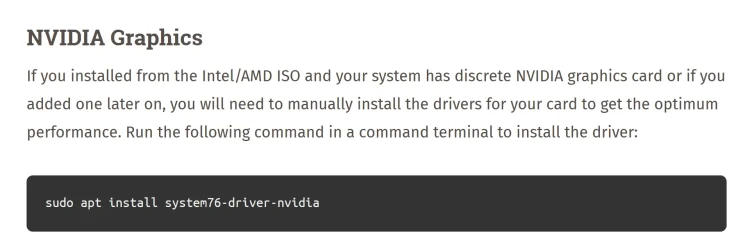
Before testing it, can you advise me on this little predicament, please.

nvidia-install.webp

I already have the latest nvidia driver for Linux on my C: drive. Its filename is NVIDIA-Linux-x86_64-570.153.02.run
How do I go about installing this, because I don't think the command line they provided is applicable. I'm guessing it would be something like:
sudo apt install C:\Users\xxxxx\Downloads\Alienware\Area51m R2\Drivers\NVIDIA-Linux-x86_64-570.153.02.run
 

My Computer

System One

  • OS
    Windows 11
    Computer type
    Laptop
    Manufacturer/Model
    Alienware A51M R2
    CPU
    Intel(R) Core(TM) i9-10900K CPU @ 3.70GHz
    Memory
    32,0 GB
    Graphics Card(s)
    Nvidia GeForce RTX2080 Super
    Sound Card
    Realtek
    Screen Resolution
    4K
    Hard Drives
    2TB (2x 1TB PCle M.2 SSD) RAID 0 [Boot] + 2TB (2x 1TB
    PCle M.2 SSD) Non-Raid [Storage]
This machine runs twice daily backups using Macrium Reflect. Additionally, I copy all critical data to 2 external drives as soon as it is created. This, to most, may sound like paranoia, but I have already experienced data loss on an external drive. My worst ever experience was with an American host who I had a dedicated server with. This ran on RAID 5 and they guaranteed data loss was impossible because as soon as a disk fails, the others take over and the whole system returns to normal the instant a new disk is inserted into the array. 3 years later, the unthinkable happened, or so they claimed: 2 disks failed at the same time resulting in total data loss for all my clients. I won't go into what happened next because it ain't a pretty story. In short, yes, I am paranoid. 😵‍💫


Doing it now. TBH, I'm not a journalist or anything that requires hiding information. I'm just fed-up with anti free speech laws in the UK and Europe, so I'm looking for a way to call a spade a spade without receiving a knock on my door a few hours later.
Yeah i have lost data too.. I had a server with 19disks in several Raid pools in the late 90's... and one pool was a backup pool of the others.
A thunderstorm fried the server and all 19 disks.. after that i never had a online-backup of the server.
So nowadays i backup my computers to the server, then i backup the server to external disks. and really-really-really important data, i also have offsite.

oh, you are in UK.. you have my condolences for the new UK laws. :(
Then the external drive with a linux distro is the way to go.
All linux distributions can be made as safe as Tails.. it all boils down to user behavior and using the right software and think twice of what to save on disk.
Pop_OS and a VPN will hide your IP address... install TOR browser and you will also hide from prying eyes, as long you dont use any identifiers (Logging in in on accounts that is connected to you as a person)
Browser isolation is a good way to keep the Big tech confused.. If you use Google accounts.. Use the Crome browser only for Google sites. Use TOR browser for things that is really sensitive.. Then use Brave or Firefox for other things like forum like this or reading the news etc.
But Linux with a VPN will hide most of what you want, as you can appear to be located in another countries.
 

My Computers

System One System Two

  • OS
    Linux: Debian, Kali-linux, Alma, Win: 7, 8.1,2012R
    Manufacturer/Model
    HP Elitebook 840, AsusX53, Aspire E1-572. AsusUX32A, HP Pro3130mt+3010mt, HP Proliant ML150, 3xCustom-PC, i3, i5, i7
    CPU
    i3, i5 and i7 From 2gen to 9th gen... Server dual Xenon
    Hard Drives
    Sata, M.2, SAS
  • Operating System
    Retro: 2003server.XPpro, Win2000, Win98SE, Win95, Win3.11, MS-DOS, IBM-DOS
    Manufacturer/Model
    Commodore, AST, Fujitsu, Compaq, etc etc. etc Around 15 desktops and 20 laptops in the collection
    CPU
    Oldest intel 8088 up to P4 dual core
    Hard Drives
    MFM, IDE, SCSI
Before testing it, can you advise me on this little predicament, please.

View attachment 141898

I already have the latest nvidia driver for Linux on my C: drive. Its filename is NVIDIA-Linux-x86_64-570.153.02.run
How do I go about installing this, because I don't think the command line they provided is applicable. I'm guessing it would be something like:
sudo apt install C:\Users\xxxxx\Downloads\Alienware\Area51m R2\Drivers\NVIDIA-Linux-x86_64-570.153.02.run
I just need to make a call... I will be back in 15minutes :-)
 

My Computers

System One System Two

  • OS
    Linux: Debian, Kali-linux, Alma, Win: 7, 8.1,2012R
    Manufacturer/Model
    HP Elitebook 840, AsusX53, Aspire E1-572. AsusUX32A, HP Pro3130mt+3010mt, HP Proliant ML150, 3xCustom-PC, i3, i5, i7
    CPU
    i3, i5 and i7 From 2gen to 9th gen... Server dual Xenon
    Hard Drives
    Sata, M.2, SAS
  • Operating System
    Retro: 2003server.XPpro, Win2000, Win98SE, Win95, Win3.11, MS-DOS, IBM-DOS
    Manufacturer/Model
    Commodore, AST, Fujitsu, Compaq, etc etc. etc Around 15 desktops and 20 laptops in the collection
    CPU
    Oldest intel 8088 up to P4 dual core
    Hard Drives
    MFM, IDE, SCSI
Before testing it, can you advise me on this little predicament, please.

View attachment 141898

I already have the latest nvidia driver for Linux on my C: drive. Its filename is NVIDIA-Linux-x86_64-570.153.02.run
How do I go about installing this, because I don't think the command line they provided is applicable. I'm guessing it would be something like:
sudo apt install C:\Users\xxxxx\Downloads\Alienware\Area51m R2\Drivers\NVIDIA-Linux-x86_64-570.153.02.run
Back again. :-)
It took a bit longer then i calculated..

Always be as lazy as you can if you dont have the goal to learn to dive in deeper into things.

The difference between (Pop!_OS 22.04 LTS) VS. (Pop!_OS 22.04 LTS with NVIDIA) is that the latter has the Nvidia driver already imbedded so you dont have to install it separately... Always be lazy if you can. :cool:

But to install a .run file is easiest to have the file in the same directory you have open the terminal in, so you dont have to write the whole path to the file.
When installing a .run file, it is not apt install.. Then you first has to allow the file to be run. That you do with the command: chmod +x filename.run
Then to run the file, you type: ./filename.run
When in an installed system and as the pop os example above, sudo apt install and the package name.. then it will install the software from the linux distribution's own repo.
Also a lot of software dont need to be installed with terminal command.. Linux has like Microsoft Store.. They had it before windows had it.. I think Microsoft took that idea from Linux. 😅

When using Linux i always recommend to stay away from the drives Windows is using.. as windows use fastboot the drives get locked as read only, so you need to disable fast boot to get write access.. and it is also easy to do damage to the windows OS if you isn't 100% sure of what you are doing while taking the first steps in to the linux world. So until you get a feel for it, leave the windows partitions be from inside Linux.
I often use Windows partitions when I'm on linux.. so it is totally safe as long you dont do things windows dont like. :-)

Did i missed something? I still feel i need more coffee to wake up today. *LOL* 😅
 

My Computers

System One System Two

  • OS
    Linux: Debian, Kali-linux, Alma, Win: 7, 8.1,2012R
    Manufacturer/Model
    HP Elitebook 840, AsusX53, Aspire E1-572. AsusUX32A, HP Pro3130mt+3010mt, HP Proliant ML150, 3xCustom-PC, i3, i5, i7
    CPU
    i3, i5 and i7 From 2gen to 9th gen... Server dual Xenon
    Hard Drives
    Sata, M.2, SAS
  • Operating System
    Retro: 2003server.XPpro, Win2000, Win98SE, Win95, Win3.11, MS-DOS, IBM-DOS
    Manufacturer/Model
    Commodore, AST, Fujitsu, Compaq, etc etc. etc Around 15 desktops and 20 laptops in the collection
    CPU
    Oldest intel 8088 up to P4 dual core
    Hard Drives
    MFM, IDE, SCSI
I often use Windows partitions when I'm on linux.. so it is totally safe as long you dont do things windows dont like.
Is copying and pasting from an existing HDD to the USB Pop OS is installed on something Windows doesn't like?
 

My Computer

System One

  • OS
    Windows 11
    Computer type
    Laptop
    Manufacturer/Model
    Alienware A51M R2
    CPU
    Intel(R) Core(TM) i9-10900K CPU @ 3.70GHz
    Memory
    32,0 GB
    Graphics Card(s)
    Nvidia GeForce RTX2080 Super
    Sound Card
    Realtek
    Screen Resolution
    4K
    Hard Drives
    2TB (2x 1TB PCle M.2 SSD) RAID 0 [Boot] + 2TB (2x 1TB
    PCle M.2 SSD) Non-Raid [Storage]
Is copying and pasting from an existing HDD to the USB Pop OS is installed on something Windows doesn't like?
It is totally safe to copy from windows partitions to Linux/usb. It is the write to disk part that can complicate things. But if you haven't disabled fastboot on Windows, you will only have read access anyway, so you cant write to disk unless you really use extra ordinary commands to try bypass the read only lock. :-)


I'm soon off to start lunch/dinner, so you know i will disappear for an hour or so at 7pm
 

My Computers

System One System Two

  • OS
    Linux: Debian, Kali-linux, Alma, Win: 7, 8.1,2012R
    Manufacturer/Model
    HP Elitebook 840, AsusX53, Aspire E1-572. AsusUX32A, HP Pro3130mt+3010mt, HP Proliant ML150, 3xCustom-PC, i3, i5, i7
    CPU
    i3, i5 and i7 From 2gen to 9th gen... Server dual Xenon
    Hard Drives
    Sata, M.2, SAS
  • Operating System
    Retro: 2003server.XPpro, Win2000, Win98SE, Win95, Win3.11, MS-DOS, IBM-DOS
    Manufacturer/Model
    Commodore, AST, Fujitsu, Compaq, etc etc. etc Around 15 desktops and 20 laptops in the collection
    CPU
    Oldest intel 8088 up to P4 dual core
    Hard Drives
    MFM, IDE, SCSI
As far as I know Linux and Mac OS have read only access to NTFS partitions, unless you enable read/write access. This should be used with caution as they might corrupt data.
 

My Computers

System One System Two

  • OS
    Windows 11 Pro 23H2 (5699), 25H2 (8457)
    Computer type
    Laptop
    Manufacturer/Model
    Acer Extensa 5630EZ
    CPU
    Mobile DualCore Intel Core 2 Duo T7250, 2000 MHz
    Motherboard
    Acer Extensa 5630
    Memory
    4GB
    Graphics Card(s)
    Mobile Intel(R) GMA 4500M (Mobile 4 series)
    Sound Card
    Realtek ALC268 @ Intel 82801IB ICH9 - High Definition Audio Controller
    Monitor(s) Displays
    1
    Screen Resolution
    1280x800
    Hard Drives
    Samsung SSD 850 EVO 250GB SATA Device (250 GB, SATA-III)
    Internet Speed
    VDSL 50 Mbps
    Browser
    MICROSOFT EDGE
    Antivirus
    WINDOWS DEFENDER
    Other Info
    Legacy MBR installation, no TPM, no Secure Boot, no WDDM 2.0 graphics drivers, no SSE4.2, cannot get more unsupported ;) This is only my test laptop. I had installed Windows 11 here before upgrading my main PC. For my main PC I use everyday see my 2nd system specs.
  • Operating System
    Windows 11 Pro v25H2 (build 26200.8457)
    Computer type
    PC/Desktop
    Manufacturer/Model
    Custom-built PC
    CPU
    Intel Core-i7 3770 3.40GHz s1155 (3rd generation)
    Motherboard
    Asus P8H61 s1155 ATX
    Memory
    2x Kingston Hyper-X Blu 8GB DDR3-1600
    Graphics card(s)
    GIGABYTE GeForce RTX 3050 WINDFORCE OC V2 6GB (GV-N3050WF2OCV2-6GD)
    Sound Card
    Realtek HD audio (ALC887)
    Monitor(s) Displays
    Sony Bravia KDL-19L4000 19" LCD TV via VGA
    Screen Resolution
    1440x900 32-bit 60Hz
    Hard Drives
    WD Blue SA510 2.5 1000GB SSD as system disk, Western Digital Caviar Purple 4TB SATA III (WD40PURZ) as second
    PSU
    Thermaltake Litepower RGB 550W Full Wired
    Case
    SUPERCASE MIDI-TOWER
    Cooling
    Deepcool Gamma Archer CPU cooler, 1x 8cm fan at the back
    Keyboard
    Mitsumi 101-key PS/2
    Mouse
    Sunnyline OptiEye PS/2
    Internet Speed
    100Mbps
    Browser
    Microsoft Edge, Mozilla Firefox
    Antivirus
    Microsoft Windows Defender
    Other Info
    Legacy BIOS (MBR) installation, no TPM, no Secure Boot, WDDM 3.0 graphics drivers, WEI score 7.4
As far as I know Linux and Mac OS have read only access to NTFS partitions, unless you enable read/write access. This should be used with caution as they might corrupt data.
I keep all my data and photos in my OneDrive folder. In addition to my two Windows 11 computers, I also use an iPad 13 and an iPad Mini. I manage and use my data and photos on all devices with OneDrive installed on all devices. For data accuracy and reliability, am I missing anything?

And to keep this post on track, I have never had a problem booting from a USB drive by tapping F12 while booting and then choosing to boot from a USB drive.
 

My Computers

System One System Two

  • OS
    Windows 11 Pro
    Computer type
    Laptop
    Manufacturer/Model
    Dell XPS 16 DA16260
    CPU
    Intel Series 3 Core Ultra X9 388H
    Memory
    64GB LPDDR5x 9600 MT/s
    Graphics Card(s)
    Intel Arc graphics B390 Panther Lake
    Monitor(s) Displays
    16" 3.2K Tandem OLED Infinity Edge
    Screen Resolution
    3200 x 2000 16:10 236 PPI
    Hard Drives
    1 Terabyte M.2 PCIe NVMe SSD
    Case
    Black Anodized Aluminum
    Cooling
    Vapor Chamber Cooling
    Mouse
    None
    Internet Speed
    942 Mbps Netgear Mesh + 2 Satellites
    Browser
    Microsoft Edge (Chromium)
    Antivirus
    Windows Security (Defender)
    Other Info
    NPU delivering 67 TOPS
    Microsoft 365 subscription
    Microsoft OneDrive 1TB Cloud
    Microsoft Visual Studio
    Microsoft Visual Studio Code
    Microsoft Sysinternals Suite
    Microsoft BitLocker
    Microsoft Copilot
    Dell Support Assist
    Dell Command | Update
    Macrium Reflect X subscription
    1Password Password Manager
    Amazon Kindle for PC
    Lightroom/Photoshop subscription
    Interactive Brokers Trader Workstation
  • Operating System
    Windows 11 Pro
    Computer type
    Laptop
    Manufacturer/Model
    Microsoft Surface Laptop 7
    CPU
    Snapdragon® X Elite (12 Core) with Hexagon NPU delivering 45 TOPS
    Memory
    32GB LPDDR5x 8448 MT/s
    Graphics card(s)
    Integrated Adreno GPU
    Sound Card
    Omnisonic speakers with Dolby Atmos spatial sound
    Monitor(s) Displays
    13.8″ PixelSense Flow touchscreen 120 Hz 600 NIT
    Screen Resolution
    2304 × 1536 (201 PPI), 3:2 aspect ratio
    Hard Drives
    1 TB PCIe NVMe Gen 4 SSD
    Case
    Black Anodized Aluminum
    Cooling
    Vapor Chamber Cooling
    Mouse
    None
    Internet Speed
    942 Mbps Netgear Mesh + 2 Satellites
    Browser
    Microsoft Edge (Chromium)
    Antivirus
    Windows Security (Defender)
    Other Info
    Microsoft 365 subscription (Office)
    Microsoft OneDrive 1TB Cloud
    Microsoft Visual Studio 2026
    Microsoft Visual Studio Code
    Interactive Brokers Trader Workstation
    Lightroom/Photoshop subscription
    1Password Password Manager
    Microsoft Sysinternals
    Amazon Kindle for PC
    Microsoft BitLocker
    Microsoft Copilot
Because that's how the laptop came when I bought it.

You should copy/paste this information to the Hard Drives section in your System Specs.
It's an important feature of your laptop.

2TB (2x 1TB PCle M.2 SSD) RAID 0 [Boot] + 2TB (2x 1TB
PCle M.2 SSD) Non-Raid [Storage]
 

My Computers

System One System Two

  • OS
    Win 11 Pro 25H2 26200.8524
    Computer type
    PC/Desktop
    Manufacturer/Model
    Self Built
    CPU
    Intel® Core™ i7-14700K
    Motherboard
    ASUS TUF Z690-PLUS WIFI BIOS 4505 11/29/25
    Memory
    G.SKILL Ripjaws S5 Series 64GB (2 x 32GB) DDR5
    Graphics Card(s)
    ASUS GeForce RTX 4070 Super 12GB
    Sound Card
    Sound Blaster AE-5 Plus
    Monitor(s) Displays
    ASUS TUF Gaming 27" 2K HDR Gaming
    Screen Resolution
    2560 x 1440
    Hard Drives
    Samsung 990 Pro 1TB NVMe (Win 11 25H2)
    SK hynix P41 500GB NVMe 25H2 DEV/Games
    SK hynix P41 2TB NVMe (x3)
    Crucial P3 Plus 4TB
    PSU
    Corsair RM850x Shift
    Case
    Antec Dark Phantom DP502 FLUX
    Cooling
    Corsair Nautilus 360 RS AIO
    Keyboard
    Logitech MK 320
    Mouse
    Razer Basilisk V3
    Internet Speed
    350Mbs
    Browser
    Firefox
    Antivirus
    Winows Security
    Other Info
    MR 8.1 Home

    System 3 Specs
    Win 11 Pro 25H2 26200.8524
    ASUS PRIME Z370-P II BIOS 3004 7/12/21
    Intel Core i7-8700 CPU @ 3.20GHz
    32GB DDR4 RAM (4x8)
    iGPU Intel UHD Graphics 630
  • Operating System
    Win 11 Pro 25H2 26200.8524
    Computer type
    PC/Desktop
    Manufacturer/Model
    Self Built
    CPU
    Intel Core i7-11700F
    Motherboard
    Asus TUF Gaming Z590 Plus WiFi (BIOS 2803)
    Memory
    64 GB DDR4
    Graphics card(s)
    MSI GeForce RTX 3060 Ventus 2X 12GB
    Sound Card
    SoundBlaster Audigy Fx V2
    Monitor(s) Displays
    Samsung F27T350
    Screen Resolution
    1920x1080
    Hard Drives
    Samsung 980 Pro 1TB
    Samsung 970 EVO Plus 2TB
    Samsung 870 EVO 500GB SSD
    PSU
    Corsair HX750
    Case
    Cougar MX330-G Window
    Cooling
    Thermalright Frozen Edge 240 Black AIO
    Internet Speed
    350Mbps
    Browser
    Firefox
    Antivirus
    Windows Security
But if you haven't disabled fastboot on Windows, you will only have read access anyway, so you cant write to disk unless you really use extra ordinary commands to try bypass the read only lock. :-)
The whole thing went very badly. It started showing tons of what looked like MS-DOS code which I assume was normal except that I kept seeing errors being reported in the code. After about 15 minutes, it came to an abrupt halt with just a flashing cursor. I waited for around 10 minutes but there was no change, however the USB was continually flashing which indicates it was busy, so I left it to do its thing. An hour later I returned to a black screen. Nothing would respond. Eventually I had no choice than to hard shutdown.

Would this be because I had failed to disable fast boot?

I have to leave now so will not be able to reply until tomorrow morning.
 

My Computer

System One

  • OS
    Windows 11
    Computer type
    Laptop
    Manufacturer/Model
    Alienware A51M R2
    CPU
    Intel(R) Core(TM) i9-10900K CPU @ 3.70GHz
    Memory
    32,0 GB
    Graphics Card(s)
    Nvidia GeForce RTX2080 Super
    Sound Card
    Realtek
    Screen Resolution
    4K
    Hard Drives
    2TB (2x 1TB PCle M.2 SSD) RAID 0 [Boot] + 2TB (2x 1TB
    PCle M.2 SSD) Non-Raid [Storage]
This is because it tried to use a resolution not supported by the laptop or tried to enable it the wrong way since it doesn't have proper graphics drivers. That's why I said to enable VESA mode which uses standard resolutions that work on all graphics cards. I have seen that when booting Android-x86, if the computer graphics card cannot be detected properly, you are stuck in the text screen with the message about loading Android. In that case the only way to proceed and load the GUI is to use VESA mode, since Android doesn't have user installable drivers.
 

My Computers

System One System Two

  • OS
    Windows 11 Pro 23H2 (5699), 25H2 (8457)
    Computer type
    Laptop
    Manufacturer/Model
    Acer Extensa 5630EZ
    CPU
    Mobile DualCore Intel Core 2 Duo T7250, 2000 MHz
    Motherboard
    Acer Extensa 5630
    Memory
    4GB
    Graphics Card(s)
    Mobile Intel(R) GMA 4500M (Mobile 4 series)
    Sound Card
    Realtek ALC268 @ Intel 82801IB ICH9 - High Definition Audio Controller
    Monitor(s) Displays
    1
    Screen Resolution
    1280x800
    Hard Drives
    Samsung SSD 850 EVO 250GB SATA Device (250 GB, SATA-III)
    Internet Speed
    VDSL 50 Mbps
    Browser
    MICROSOFT EDGE
    Antivirus
    WINDOWS DEFENDER
    Other Info
    Legacy MBR installation, no TPM, no Secure Boot, no WDDM 2.0 graphics drivers, no SSE4.2, cannot get more unsupported ;) This is only my test laptop. I had installed Windows 11 here before upgrading my main PC. For my main PC I use everyday see my 2nd system specs.
  • Operating System
    Windows 11 Pro v25H2 (build 26200.8457)
    Computer type
    PC/Desktop
    Manufacturer/Model
    Custom-built PC
    CPU
    Intel Core-i7 3770 3.40GHz s1155 (3rd generation)
    Motherboard
    Asus P8H61 s1155 ATX
    Memory
    2x Kingston Hyper-X Blu 8GB DDR3-1600
    Graphics card(s)
    GIGABYTE GeForce RTX 3050 WINDFORCE OC V2 6GB (GV-N3050WF2OCV2-6GD)
    Sound Card
    Realtek HD audio (ALC887)
    Monitor(s) Displays
    Sony Bravia KDL-19L4000 19" LCD TV via VGA
    Screen Resolution
    1440x900 32-bit 60Hz
    Hard Drives
    WD Blue SA510 2.5 1000GB SSD as system disk, Western Digital Caviar Purple 4TB SATA III (WD40PURZ) as second
    PSU
    Thermaltake Litepower RGB 550W Full Wired
    Case
    SUPERCASE MIDI-TOWER
    Cooling
    Deepcool Gamma Archer CPU cooler, 1x 8cm fan at the back
    Keyboard
    Mitsumi 101-key PS/2
    Mouse
    Sunnyline OptiEye PS/2
    Internet Speed
    100Mbps
    Browser
    Microsoft Edge, Mozilla Firefox
    Antivirus
    Microsoft Windows Defender
    Other Info
    Legacy BIOS (MBR) installation, no TPM, no Secure Boot, WDDM 3.0 graphics drivers, WEI score 7.4
Back
Top Bottom