UniGetUI - Conhost


CLS

Well-known member
Member
Local time
7:26 PM
Posts
163
Location
Malmo
OS
Windows 11 Pro 25H2
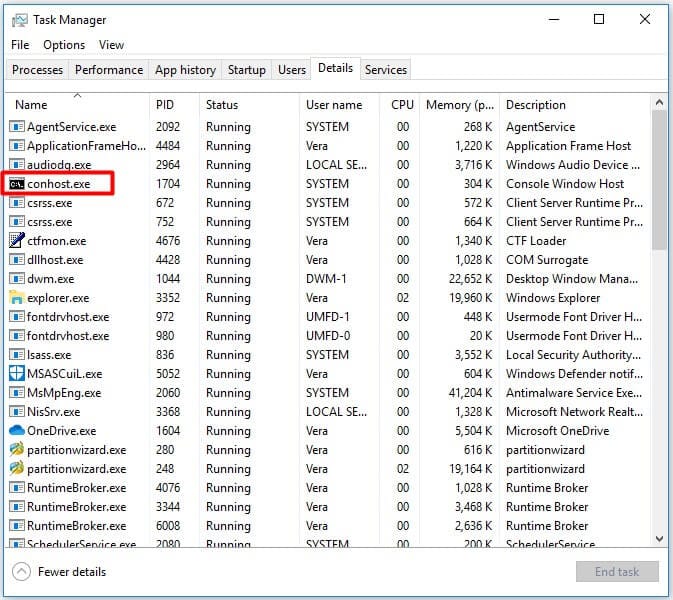
When I going in to the task manager and then to startup apps, I can see a multiple files named "Conhost", do you know what this is?

Screenshot 2024-08-31 111115.png
 

My Computer My Computer

At a glance

Windows 11 Pro 25H2Ryzen 7 6800HKingston Fury Impact DDR5 32GBAMD Radeon 680M (AMD Rembrandt)
OS
Windows 11 Pro 25H2
Computer type
PC/Desktop
Manufacturer/Model
ASUS ExpertCenter PN53
CPU
Ryzen 7 6800H
Motherboard
ASUS PN53
Memory
Kingston Fury Impact DDR5 32GB
Graphics Card(s)
AMD Radeon 680M (AMD Rembrandt)
Sound Card
AMD audio
Monitor(s) Displays
Dell U3223QE (32")
Screen Resolution
4K (3840x2160)
Hard Drives
Samsung NVMe SSD 990 Pro 1 TB (internal)
Samsung NVMe SSD 980 Pro 1 TB (internal)
Western Digital Black SN7100 2 TB (External)
PSU
External power supply 150W
Case
Mini PC
Cooling
Build-in fan (speed 1600 RPM Normal mode)
Keyboard
Logitech MX Keys Mini (graphite)
Mouse
Logitech M705
Internet Speed
1000/1000 Mbit
Browser
Microsoft Edge
Antivirus
Windows Defender
The "conhost.exe" aka "Console Window Host" is responsible Windows Command Prompt or any other command-line interface applications. The conhost.exe process provides an interface for these applications to interact with the user and manages the input and output of the console window.

If conhost.exe is signed by Microsoft then it should be a completely safe and common process to see running in your Task Manager.


My Computer My Computer

At a glance

Windows 11AMD Ryzen 7 5700GMicron Technology DDR4-3200 16GBNVIDIA GeForce RTX 3060
OS
Windows 11
Computer type
PC/Desktop
Manufacturer/Model
HP Pavilion
CPU
AMD Ryzen 7 5700G
Motherboard
Erica6
Memory
Micron Technology DDR4-3200 16GB
Graphics Card(s)
NVIDIA GeForce RTX 3060
Sound Card
Realtek ALC671
Monitor(s) Displays
Samsung SyncMaster U28E590
Screen Resolution
3840 x 2160
Hard Drives
SAMSUNG MZVLQ1T0HALB-000H1
The "conhost.exe" aka "Console Window Host" is responsible Windows Command Prompt or any other command-line interface applications. The conhost.exe process provides an interface for these applications to interact with the user and manages the input and output of the console window.

If conhost.exe is signed by Microsoft then it should be a completely safe and common process to see running in your Task Manager.

Thanks for the explanation.
 

My Computer My Computer

At a glance

Windows 11 Pro 25H2Ryzen 7 6800HKingston Fury Impact DDR5 32GBAMD Radeon 680M (AMD Rembrandt)
OS
Windows 11 Pro 25H2
Computer type
PC/Desktop
Manufacturer/Model
ASUS ExpertCenter PN53
CPU
Ryzen 7 6800H
Motherboard
ASUS PN53
Memory
Kingston Fury Impact DDR5 32GB
Graphics Card(s)
AMD Radeon 680M (AMD Rembrandt)
Sound Card
AMD audio
Monitor(s) Displays
Dell U3223QE (32")
Screen Resolution
4K (3840x2160)
Hard Drives
Samsung NVMe SSD 990 Pro 1 TB (internal)
Samsung NVMe SSD 980 Pro 1 TB (internal)
Western Digital Black SN7100 2 TB (External)
PSU
External power supply 150W
Case
Mini PC
Cooling
Build-in fan (speed 1600 RPM Normal mode)
Keyboard
Logitech MX Keys Mini (graphite)
Mouse
Logitech M705
Internet Speed
1000/1000 Mbit
Browser
Microsoft Edge
Antivirus
Windows Defender
Many installers will run CMD scripts or commands in the background, inside the context of a separate conhost process. After they're done installing, those processes should disappear.

Console hosts allow you to do input/output redirection. For example, to capture output to a log file: "program.exe -option 2>&1 > logfile.txt"
 

My Computer My Computer

At a glance

Windows 7
OS
Windows 7
Back
Top Bottom