Unable to install or uninstall Davinci Resolve


Memnon

Member
Local time
7:06 PM
Posts
13
OS
W11
W11 v25H2
Davinci Resolve 64bit standalone install


Opened Resolve this morning, it advised upgrade available …. So downloaded and installed 21.01 Run as administrator.
It completed, rebooted PC (W11) but as usual did not create any startup icon
Went to C:\Program Files\Blackmagic Design\DaVinci Resolve
And double-clicked on Resolve.exe ( I normally create a desktop shortcut to this)

It failed to start with error C:\Program Files\Blackmagic Design\DaVinci Resolve\cudnn64_9.dll is not designed to run on windows or contains an error.
Error status 0x000012f


I downloaded and installed it again – tried uninstalling, same thing

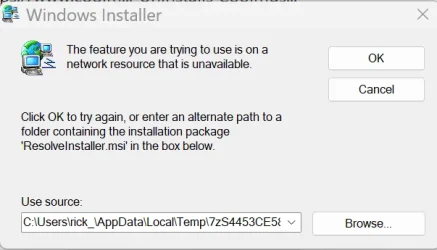
I then tried to uninstall using Revo Uninstaller - it failed with error (pic attached)
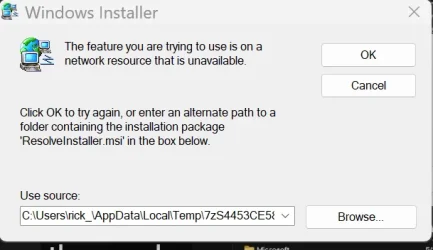
Screenshot 2026-06-28 134612.webp
I then tried uninstalling using settings > apps > installed apps and right clicked on apps to delete ..... several apps deleted (all under Davinci Blackmagaic ) but one remains - Resolve it shows as 5Gb but when I try to delete same error as above.

If I try a new install (as admin) it now fails with error 'A newer version of Resolve is installed; uninstall it in Control panel first'

If I try to remove in 'Control Panel\All Control Panel Items\Programs and Features', I get the same error about can't remove as its on a network resource,

It has only ever been a local install, never networked.

Anybody know a way to clean this out ?
 

My Computer My Computer

At a glance

W11AMD Ryzen 9 7900X 4.7 GHz 12-CoreCORSAIR VENGEANCE DDR5 64GB (2x32GB) DDR5 600...Gigabyte Radeon RX 7800 XT GAMING OC 16GB
OS
W11
Computer type
PC/Desktop
Manufacturer/Model
Home Build
CPU
AMD Ryzen 9 7900X 4.7 GHz 12-Core
Motherboard
Gigabyte Aorus Master X670e
Memory
CORSAIR VENGEANCE DDR5 64GB (2x32GB) DDR5 6000MHz
Graphics Card(s)
Gigabyte Radeon RX 7800 XT GAMING OC 16GB
Monitor(s) Displays
1 x Alienware AW2725QF 27" 1 x Dell P2422HD 23"
Screen Resolution
4K
Hard Drives
2 x 2TB Crucial T700 2TB SSD PCIe Gen5 NVMe M.2 I
PSU
Thermaltake TOUGHPOWER GF A3 1050W Modular
Case
Fractal Define 7 Mid Tower Gaming Case
Cooling
Thermalright Phantom Spirit 1230 EVO
Internet Speed
8GB full fibre
Are you sure you downloaded the correct version? If there is a x64 and an ARM64 version you should download the former for a standard PC. I would use Revo Uninstaller, let the original uninstall fail and then search and remove all traces of the application. Then reinstall the application carefully choosing the correct version. In worst case I would reinstall the previous version and ignore the update.
 

My Computers My Computers

  • At a glance

    Windows 11 Pro 23H2 (5699), 25H2 (8737)Mobile DualCore Intel Core 2 Duo T7250, 2000 MHz4GBMobile Intel(R) GMA 4500M (Mobile 4 series)
    OS
    Windows 11 Pro 23H2 (5699), 25H2 (8737)
    Computer type
    Laptop
    Manufacturer/Model
    Acer Extensa 5630EZ
    CPU
    Mobile DualCore Intel Core 2 Duo T7250, 2000 MHz
    Motherboard
    Acer Extensa 5630
    Memory
    4GB
    Graphics Card(s)
    Mobile Intel(R) GMA 4500M (Mobile 4 series)
    Sound Card
    Realtek ALC268 @ Intel 82801IB ICH9 - High Definition Audio Controller
    Monitor(s) Displays
    1
    Screen Resolution
    1280x800
    Hard Drives
    Samsung SSD 850 EVO 250GB SATA Device (250 GB, SATA-III)
    Internet Speed
    VDSL 50 Mbps
    Browser
    MICROSOFT EDGE
    Antivirus
    WINDOWS DEFENDER
    Other Info
    Legacy MBR installation, no TPM, no Secure Boot, no WDDM 2.0 graphics drivers, no SSE4.2, cannot get more unsupported ;) This is only my test laptop. I had installed Windows 11 here before upgrading my main PC. For my main PC I use everyday see my 2nd system specs.
  • At a glance

    Windows 11 Pro v25H2 (build 26200.8737)Intel Core-i7 3770 3.40GHz s1155 (3rd generat...2x Kingston Hyper-X Blu 8GB DDR3-1600GIGABYTE GeForce RTX 3050 WINDFORCE OC V2 6GB...
    Operating System
    Windows 11 Pro v25H2 (build 26200.8737)
    Computer type
    PC/Desktop
    Manufacturer/Model
    Custom-built PC
    CPU
    Intel Core-i7 3770 3.40GHz s1155 (3rd generation)
    Motherboard
    Asus P8H61 s1155 ATX
    Memory
    2x Kingston Hyper-X Blu 8GB DDR3-1600
    Graphics card(s)
    GIGABYTE GeForce RTX 3050 WINDFORCE OC V2 6GB (GV-N3050WF2OCV2-6GD)
    Sound Card
    Realtek HD audio (ALC887)
    Monitor(s) Displays
    Sony Bravia KDL-19L4000 19" LCD TV via VGA
    Screen Resolution
    1440x900 32-bit 60Hz
    Hard Drives
    WD Blue SA510 2.5 1000GB SSD as system disk, Western Digital Caviar Purple 4TB SATA III (WD40PURZ) as second
    PSU
    Thermaltake Litepower RGB 550W Full Wired
    Case
    SUPERCASE MIDI-TOWER
    Cooling
    Deepcool Gamma Archer CPU cooler, 1x 8cm fan at the back
    Keyboard
    Mitsumi 101-key PS/2
    Mouse
    Sunnyline OptiEye PS/2
    Internet Speed
    100Mbps
    Browser
    Microsoft Edge, Mozilla Firefox
    Antivirus
    Microsoft Windows Defender
    Other Info
    Legacy BIOS (MBR) installation, no TPM, no Secure Boot, WDDM 3.0 graphics drivers, WEI score 7.4
Are you sure you downloaded the correct version? If there is a x64 and an ARM64 version you should download the former for a standard PC. I would use Revo Uninstaller, let the original uninstall fail and then search and remove all traces of the application. Then reinstall the application carefully choosing the correct version. In worst case I would reinstall the previous version and ignore the update.
Yep I downloaded the correct version (not ARM)
I have tried REVO Installer it reports :


REVO screen shot.webp
 

My Computer My Computer

At a glance

W11AMD Ryzen 9 7900X 4.7 GHz 12-CoreCORSAIR VENGEANCE DDR5 64GB (2x32GB) DDR5 600...Gigabyte Radeon RX 7800 XT GAMING OC 16GB
OS
W11
Computer type
PC/Desktop
Manufacturer/Model
Home Build
CPU
AMD Ryzen 9 7900X 4.7 GHz 12-Core
Motherboard
Gigabyte Aorus Master X670e
Memory
CORSAIR VENGEANCE DDR5 64GB (2x32GB) DDR5 6000MHz
Graphics Card(s)
Gigabyte Radeon RX 7800 XT GAMING OC 16GB
Monitor(s) Displays
1 x Alienware AW2725QF 27" 1 x Dell P2422HD 23"
Screen Resolution
4K
Hard Drives
2 x 2TB Crucial T700 2TB SSD PCIe Gen5 NVMe M.2 I
PSU
Thermaltake TOUGHPOWER GF A3 1050W Modular
Case
Fractal Define 7 Mid Tower Gaming Case
Cooling
Thermalright Phantom Spirit 1230 EVO
Internet Speed
8GB full fibre
This type of error usually means that the Package Cache folder has been corrupted or the .msi file is now missing from
Code:
C:\ProgramData\Package Cache

The generic error referring to a network is misleading but it does not mean the installation was performed from a network drive.
Not finding the file, it then uses the user's LocalTemp folder as an option, which is always wrong.
Revo uses the Windows uninstaller so the error will be the same.

There is a rather quite involved way to correct this which is to delete the folder where the program resides and then do a registry search
using registry finder to locate and delete any references to the program. That will let you start anew.

An easier way would be to restore from a restore point or a backup assuming that the Package Cache folder had not been compromised prior to the backups.
 

My Computers My Computers

  • At a glance

    All Branches but ReleaseAMD Ryzen 7 7735HS 3200-4500 Mhz 8 cores x 232 GB DDR5Radeon Graphic / NVIDIA GeForce RTX 4060 8 GB...
    OS
    All Branches but Release
    Computer type
    Laptop
    Manufacturer/Model
    Acer Nitro ANV15-51
    CPU
    AMD Ryzen 7 7735HS 3200-4500 Mhz 8 cores x 2
    Motherboard
    Sportage_RBH
    Memory
    32 GB DDR5
    Graphics Card(s)
    Radeon Graphic / NVIDIA GeForce RTX 4060 8 GB GDDR6
    Sound Card
    AMD/Realtek(R) Audio
    Monitor(s) Displays
    Integrated Monitor (15.3"vis)
    Screen Resolution
    FHD 1920X1080 16:9 144Hz
    Hard Drives
    KINGSTON OM8SEP4512Q-AA 1TB
    Western Digital 256GB
    PSU
    19V DC 6.32 A 120 W
    Cooling
    Dual Fans
    Mouse
    MS Bluetooth
    Internet Speed
    Fiber 1GB Cox -us & 1GB Orange-fr
    Browser
    Edge Canary- Firefox Nightly-Chrome Dev-Chrome Dev
    Antivirus
    Windows Defender
  • At a glance

    Windows 11 BetaAMD A9-94208 GB of DDR4AMD Radeon R5
    Operating System
    Windows 11 Beta
    Computer type
    Laptop
    Manufacturer/Model
    Asus X751BP
    CPU
    AMD A9-9420
    Memory
    8 GB of DDR4
    Graphics card(s)
    AMD Radeon R5
    Screen Resolution
    1600x900
    Hard Drives
    Seagate 1 TB
What if you click cancel to stop the uninstaller and then let Revo find all traces and delete them? Revo first runs the standard uninstaller of the application and then it searched for remaining traces. It doesn't matter if the standard uninstaller doesn't work. Revo will find all traces and remove them anyway. I have done this before.
 

My Computers My Computers

  • At a glance

    Windows 11 Pro 23H2 (5699), 25H2 (8737)Mobile DualCore Intel Core 2 Duo T7250, 2000 MHz4GBMobile Intel(R) GMA 4500M (Mobile 4 series)
    OS
    Windows 11 Pro 23H2 (5699), 25H2 (8737)
    Computer type
    Laptop
    Manufacturer/Model
    Acer Extensa 5630EZ
    CPU
    Mobile DualCore Intel Core 2 Duo T7250, 2000 MHz
    Motherboard
    Acer Extensa 5630
    Memory
    4GB
    Graphics Card(s)
    Mobile Intel(R) GMA 4500M (Mobile 4 series)
    Sound Card
    Realtek ALC268 @ Intel 82801IB ICH9 - High Definition Audio Controller
    Monitor(s) Displays
    1
    Screen Resolution
    1280x800
    Hard Drives
    Samsung SSD 850 EVO 250GB SATA Device (250 GB, SATA-III)
    Internet Speed
    VDSL 50 Mbps
    Browser
    MICROSOFT EDGE
    Antivirus
    WINDOWS DEFENDER
    Other Info
    Legacy MBR installation, no TPM, no Secure Boot, no WDDM 2.0 graphics drivers, no SSE4.2, cannot get more unsupported ;) This is only my test laptop. I had installed Windows 11 here before upgrading my main PC. For my main PC I use everyday see my 2nd system specs.
  • At a glance

    Windows 11 Pro v25H2 (build 26200.8737)Intel Core-i7 3770 3.40GHz s1155 (3rd generat...2x Kingston Hyper-X Blu 8GB DDR3-1600GIGABYTE GeForce RTX 3050 WINDFORCE OC V2 6GB...
    Operating System
    Windows 11 Pro v25H2 (build 26200.8737)
    Computer type
    PC/Desktop
    Manufacturer/Model
    Custom-built PC
    CPU
    Intel Core-i7 3770 3.40GHz s1155 (3rd generation)
    Motherboard
    Asus P8H61 s1155 ATX
    Memory
    2x Kingston Hyper-X Blu 8GB DDR3-1600
    Graphics card(s)
    GIGABYTE GeForce RTX 3050 WINDFORCE OC V2 6GB (GV-N3050WF2OCV2-6GD)
    Sound Card
    Realtek HD audio (ALC887)
    Monitor(s) Displays
    Sony Bravia KDL-19L4000 19" LCD TV via VGA
    Screen Resolution
    1440x900 32-bit 60Hz
    Hard Drives
    WD Blue SA510 2.5 1000GB SSD as system disk, Western Digital Caviar Purple 4TB SATA III (WD40PURZ) as second
    PSU
    Thermaltake Litepower RGB 550W Full Wired
    Case
    SUPERCASE MIDI-TOWER
    Cooling
    Deepcool Gamma Archer CPU cooler, 1x 8cm fan at the back
    Keyboard
    Mitsumi 101-key PS/2
    Mouse
    Sunnyline OptiEye PS/2
    Internet Speed
    100Mbps
    Browser
    Microsoft Edge, Mozilla Firefox
    Antivirus
    Microsoft Windows Defender
    Other Info
    Legacy BIOS (MBR) installation, no TPM, no Secure Boot, WDDM 3.0 graphics drivers, WEI score 7.4
Resolved
I opened a thread on MS Community, an MS guy pointed me to the Program Install and Uninstall Troubleshooter.
MS has retired W11 tool, but the legacy W10 tool is still available on W10 tab

I then downloaded and run Microsoft's Program Install and Uninstall Troubleshooter

I allowed me to select each of the install programmes, and it deleted them, advising on Registry repair it undertook.
Fully installed, and now reinstalled and working
 

My Computer My Computer

At a glance

W11AMD Ryzen 9 7900X 4.7 GHz 12-CoreCORSAIR VENGEANCE DDR5 64GB (2x32GB) DDR5 600...Gigabyte Radeon RX 7800 XT GAMING OC 16GB
OS
W11
Computer type
PC/Desktop
Manufacturer/Model
Home Build
CPU
AMD Ryzen 9 7900X 4.7 GHz 12-Core
Motherboard
Gigabyte Aorus Master X670e
Memory
CORSAIR VENGEANCE DDR5 64GB (2x32GB) DDR5 6000MHz
Graphics Card(s)
Gigabyte Radeon RX 7800 XT GAMING OC 16GB
Monitor(s) Displays
1 x Alienware AW2725QF 27" 1 x Dell P2422HD 23"
Screen Resolution
4K
Hard Drives
2 x 2TB Crucial T700 2TB SSD PCIe Gen5 NVMe M.2 I
PSU
Thermaltake TOUGHPOWER GF A3 1050W Modular
Case
Fractal Define 7 Mid Tower Gaming Case
Cooling
Thermalright Phantom Spirit 1230 EVO
Internet Speed
8GB full fibre

Latest Support Threads

Back
Top Bottom