W11 v25H2
Davinci Resolve 64bit standalone install
Opened Resolve this morning, it advised upgrade available …. So downloaded and installed 21.01 Run as administrator.
It completed, rebooted PC (W11) but as usual did not create any startup icon
Went to C:\Program Files\Blackmagic Design\DaVinci Resolve
And double-clicked on Resolve.exe ( I normally create a desktop shortcut to this)
It failed to start with error C:\Program Files\Blackmagic Design\DaVinci Resolve\cudnn64_9.dll is not designed to run on windows or contains an error.
Error status 0x000012f
I downloaded and installed it again – tried uninstalling, same thing
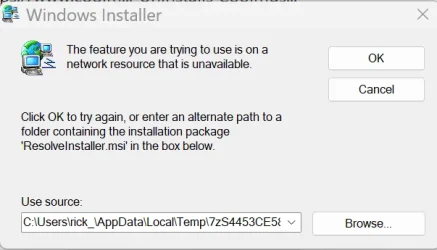
I then tried to uninstall using Revo Uninstaller - it failed with error (pic attached)
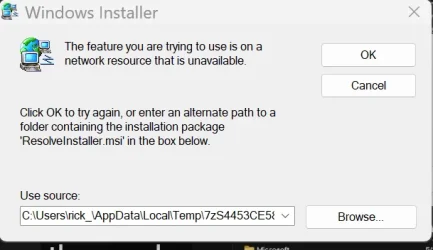
I then tried uninstalling using settings > apps > installed apps and right clicked on apps to delete ..... several apps deleted (all under Davinci Blackmagaic ) but one remains - Resolve it shows as 5Gb but when I try to delete same error as above.
If I try a new install (as admin) it now fails with error 'A newer version of Resolve is installed; uninstall it in Control panel first'
If I try to remove in 'Control Panel\All Control Panel Items\Programs and Features', I get the same error about can't remove as its on a network resource,
It has only ever been a local install, never networked.
Anybody know a way to clean this out ?
Davinci Resolve 64bit standalone install
Opened Resolve this morning, it advised upgrade available …. So downloaded and installed 21.01 Run as administrator.
It completed, rebooted PC (W11) but as usual did not create any startup icon
Went to C:\Program Files\Blackmagic Design\DaVinci Resolve
And double-clicked on Resolve.exe ( I normally create a desktop shortcut to this)
It failed to start with error C:\Program Files\Blackmagic Design\DaVinci Resolve\cudnn64_9.dll is not designed to run on windows or contains an error.
Error status 0x000012f
I downloaded and installed it again – tried uninstalling, same thing
I then tried to uninstall using Revo Uninstaller - it failed with error (pic attached)
I then tried uninstalling using settings > apps > installed apps and right clicked on apps to delete ..... several apps deleted (all under Davinci Blackmagaic ) but one remains - Resolve it shows as 5Gb but when I try to delete same error as above.
If I try a new install (as admin) it now fails with error 'A newer version of Resolve is installed; uninstall it in Control panel first'
If I try to remove in 'Control Panel\All Control Panel Items\Programs and Features', I get the same error about can't remove as its on a network resource,
It has only ever been a local install, never networked.
Anybody know a way to clean this out ?
My Computer
At a glance
W11AMD Ryzen 9 7900X 4.7 GHz 12-CoreCORSAIR VENGEANCE DDR5 64GB (2x32GB) DDR5 600...Gigabyte Radeon RX 7800 XT GAMING OC 16GB
- OS
- W11
- Computer type
- PC/Desktop
- Manufacturer/Model
- Home Build
- CPU
- AMD Ryzen 9 7900X 4.7 GHz 12-Core
- Motherboard
- Gigabyte Aorus Master X670e
- Memory
- CORSAIR VENGEANCE DDR5 64GB (2x32GB) DDR5 6000MHz
- Graphics Card(s)
- Gigabyte Radeon RX 7800 XT GAMING OC 16GB
- Monitor(s) Displays
- 1 x Alienware AW2725QF 27" 1 x Dell P2422HD 23"
- Screen Resolution
- 4K
- Hard Drives
- 2 x 2TB Crucial T700 2TB SSD PCIe Gen5 NVMe M.2 I
- PSU
- Thermaltake TOUGHPOWER GF A3 1050W Modular
- Case
- Fractal Define 7 Mid Tower Gaming Case
- Cooling
- Thermalright Phantom Spirit 1230 EVO
- Internet Speed
- 8GB full fibre