- Local time
- 12:06 AM
- Posts
- 271
- OS
- win10 64 bit 20h2 ver. now it is 22h2
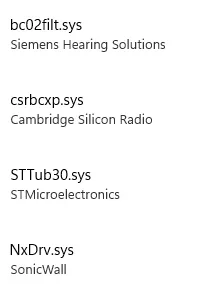
ok i had this setup once but i had a fire and had to get another pc. and i reinstalled win10 and had the pc then let me update to win11 just as before. then i got the core isolation to turn on but this time it will not turn on so i ran the drivers causing the issue and when i did a search for them and found them i can't delete them. i uninstalled the program those driver are in and it still happens. i'm the administrator and i also did the cmd and set up another admin and signed into that account and i still can't delete these files. so how do you go about deleting files when your the admin and signed in as the admin?
it seems i went thru this about 6 months ago and i had to actually format the drive and reinstall win10 and then let it got to win11 and before i put any programs on the drive setup the core isolation and then i could do the programs and the core isolation stayed on.
but before i go thru all that work maybe there is a way around it. thanks
it seems i went thru this about 6 months ago and i had to actually format the drive and reinstall win10 and then let it got to win11 and before i put any programs on the drive setup the core isolation and then i could do the programs and the core isolation stayed on.
but before i go thru all that work maybe there is a way around it. thanks
My Computer
At a glance
win10 64 bit 20h2 ver. now it is 22h2AMD A4-3310MX APU with Ra16gb
- OS
- win10 64 bit 20h2 ver. now it is 22h2
- Computer type
- Laptop
- Manufacturer/Model
- hp elitebook
- CPU
- AMD A4-3310MX APU with Ra
- Memory
- 16gb