uninstalling drivers to get core isolation to turn on


corvairbob

Well-known member
Member
VIP
Local time
5:18 AM
Posts
254
OS
win10 64 bit 20h2 ver. now it is 22h2
ok i had this setup once but i had a fire and had to get another pc. and i reinstalled win10 and had the pc then let me update to win11 just as before. then i got the core isolation to turn on but this time it will not turn on so i ran the drivers causing the issue and when i did a search for them and found them i can't delete them. i uninstalled the program those driver are in and it still happens. i'm the administrator and i also did the cmd and set up another admin and signed into that account and i still can't delete these files. so how do you go about deleting files when your the admin and signed in as the admin?

it seems i went thru this about 6 months ago and i had to actually format the drive and reinstall win10 and then let it got to win11 and before i put any programs on the drive setup the core isolation and then i could do the programs and the core isolation stayed on.

but before i go thru all that work maybe there is a way around it. thanks
 

My Computer My Computer

At a glance

win10 64 bit 20h2 ver. now it is 22h2AMD A4-3310MX APU with Ra16gb
OS
win10 64 bit 20h2 ver. now it is 22h2
Computer type
Laptop
Manufacturer/Model
hp elitebook
CPU
AMD A4-3310MX APU with Ra
Memory
16gb
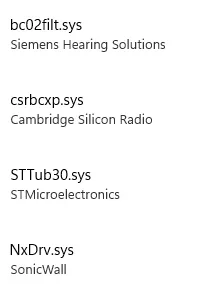
these are the drivers giving me fits. i uninstalled the siemens hearing aid fitting program but the others look more like the wifi and a couple other items on the pc that are giving me fits.
1733671965825.webp
 

My Computer My Computer

At a glance

win10 64 bit 20h2 ver. now it is 22h2AMD A4-3310MX APU with Ra16gb
OS
win10 64 bit 20h2 ver. now it is 22h2
Computer type
Laptop
Manufacturer/Model
hp elitebook
CPU
AMD A4-3310MX APU with Ra
Memory
16gb
After uninstalling the programs that require those drivers, the DriverStore still retains a copy.

Use DriverStoreExplorer
--https://github.com/lostindark/DriverStoreExplorer/releases/latest--

Backup your system AND create a new Restore Point.
Run DSE as Admin.
Sort by Driver Class or by Provider to identify the drivers you want to remove.
Delete Drivers. (If that doesn't work, check the box 'Force Deletion' and Delete Drivers again.
Test your system to see if you can activate Core Isolation in Security. You may have to reboot first to unload the drivers from memory.
If all is well, go back to DSE and Select Old Drivers and Delete (removes outdated/superseded drivers).
 

My Computer My Computer

At a glance

W11 Proi7-12700128GB DDR4NVIDIA GeForce GTX 1050Ti, 4GB discrete memory
OS
W11 Pro
Computer type
PC/Desktop
Manufacturer/Model
Gigabyte
CPU
i7-12700
Motherboard
B760M G P WIFI DDR4
Memory
128GB DDR4
Graphics Card(s)
NVIDIA GeForce GTX 1050Ti, 4GB discrete memory
Sound Card
Realtek HD switching output between each monitor, a soundbar, headphones, earphones
Monitor(s) Displays
2 Vizio 40" D-series LED Smart TV in Monitor-Mode
Screen Resolution
1080p 1920 x 1080
Hard Drives
Internal: Bootdrive WD_Black SN850X Gen4 NVMe 1TB SSD; secondary WD_Black SN770 NVMe SSD GAME DRIVE 2 TB PCI Gen 4 x4
External: 2 Seagate 6TB Backup Hubs, 2 Seagate 6TB Expansion Drives
NAS: WD EX2 Ultra 16TB Cloud Server, with WD 8TB HD attached
PSU
ATX - RM750e-Modular
Case
CORSAIR 4000D AIRFLOW Tempered Glass Mid-Tower ATX Case
Cooling
Laminar CPU Cooler plus two CORSAIR 120mm AirGuide fans, utilizing anti-vortex vanes
Keyboard
Logitech K740 Illuminated Keyboard
Mouse
LogiTech M720 Triathlon Multi-3-Device BT & Wireless
Internet Speed
1 Gbps
ok i reinstalled win10 and then overnight got permission to update to win11. and now all but 1 file is preventing me from turning on core isolation. that file is NxDRV.sys it seems it is some type of vpn file. anyway when i go to settings and accounts it shows me as the admin but when i try to delete that file it tells me i need admin permission. yesterday i tried setting up an admin account but even that would not let me delete the files i wanted to delete.

also tell me why i can't change the attributes again i'm the admin per the accounts. so it seems i should be able to at least change those.

i have another pc just like this one and was able to turn on core isolation on that pc. same model as this so something is preventing this.

i'm not signed to microsoft and have one drive turned off so is that one reason? it seems i should not have to let microsoft have all that access to my pc to be able to do this work. thanks
 

My Computer My Computer

At a glance

win10 64 bit 20h2 ver. now it is 22h2AMD A4-3310MX APU with Ra16gb
OS
win10 64 bit 20h2 ver. now it is 22h2
Computer type
Laptop
Manufacturer/Model
hp elitebook
CPU
AMD A4-3310MX APU with Ra
Memory
16gb
ok i finally got it. what trip to get signed in as admin. but now the core isolation is turned on again. thanks
 

My Computer My Computer

At a glance

win10 64 bit 20h2 ver. now it is 22h2AMD A4-3310MX APU with Ra16gb
OS
win10 64 bit 20h2 ver. now it is 22h2
Computer type
Laptop
Manufacturer/Model
hp elitebook
CPU
AMD A4-3310MX APU with Ra
Memory
16gb

My Computer My Computer

At a glance

Windows 11Ryzen 5 5600T-Force Vulcan Z - 32 GB (2x16) @ 3600 MHzSapphire RX 7600
OS
Windows 11
Computer type
PC/Desktop
CPU
Ryzen 5 5600
Motherboard
MSI B550 Tomahawk
Memory
T-Force Vulcan Z - 32 GB (2x16) @ 3600 MHz
Graphics Card(s)
Sapphire RX 7600
Monitor(s) Displays
Sansui ES-G27F2Q
Screen Resolution
2560 x 1440P
Hard Drives
XPG SX8200 240GB M.2 PCIe Gen3x4 NVMe
Samsung 850 EVO 250 GB
Adata SU800 1 TB
WD Black SN750 500GB
PSU
EVGA SuperNOVA 650 G3
Case
Deepcool CK500WH
Cooling
Thermalright Frozen Warframe 240 SE, plus 3 140 MM case fans (2 in front, 1 in rear)
Keyboard
Logitech G213 Prodigy
Mouse
Logitech ERGO M575
stormy i think i found that link and used it. but thanks for posting it. it took some time to get that gone. even after i setup admin only even though i was the admin. also even after i signed in as the admin i still could not change attributes and delete those entries. wow. again thanks much
 

My Computer My Computer

At a glance

win10 64 bit 20h2 ver. now it is 22h2AMD A4-3310MX APU with Ra16gb
OS
win10 64 bit 20h2 ver. now it is 22h2
Computer type
Laptop
Manufacturer/Model
hp elitebook
CPU
AMD A4-3310MX APU with Ra
Memory
16gb
Back
Top Bottom