Universal Intel Chipset Device Updater


Someone recently ran Driver Genius and that update flagged 3 additional devices as needing an update, which my system didn't detect.

UPDATE

I have created a copy of this report as an issue in my GitHub repository, where I've documented the full technical investigation and analysis of the discrepancy.
github.com/FirstEverTech/Universal-Intel...et-Updater/issues/26

My tool enumerates only live Plug and Play devices (Get-PnpDevice) with Status = OK, then matches the detected Hardware IDs against Intel's INF database before launching Intel's official SetupChipset installer.

DriverGenius reports three additional Skylake-related devices (1901, 1911 and Host Bridge), but I currently have no evidence that these devices actually exist in the live PnP tree.

During my analysis I also corrected one of my earlier assumptions: the A29x hardware IDs detected by my updater identify Intel 200 Series PCH devices, not the CPU generation itself.

Therefore, the remaining question is no longer why my updater did not install those INF files, but why Driver Genius reports three Skylake CPU-integrated devices that are absent from live Plug and Play enumeration.

At this point I cannot conclude which tool is correct without additional evidence.

Could you please provide:
  • CPU-Z (CPU tab)
  • Device Manager → View → Show hidden devices → System devices
  • the output of:
PowerShell:
Get-PnpDevice -PresentOnly:$false | Where-Object InstanceId -like 'PCI\VEN_8086*'
  • or
PowerShell:
pnputil /enum-devices /class System

This will allow us to determine whether Driver Genius is reporting non-present devices, cached entries, or whether my live enumeration is missing something.
 
Last edited:

My Computer My Computer

At a glance

Windows 11 Pro Insider PreviewIntel Xeon E5-1680 v2 OC @ 4.4GHzCorsair Quad DDR3-2400MHz CL10ASUS TUF Gaming GeForce RTX 4070 Ti OC
OS
Windows 11 Pro Insider Preview
Computer type
PC/Desktop
Manufacturer/Model
ASUS-ish Build
CPU
Intel Xeon E5-1680 v2 OC @ 4.4GHz
Motherboard
ASUS P9X79 Pro (Modded Bios)
Memory
Corsair Quad DDR3-2400MHz CL10
Graphics Card(s)
ASUS TUF Gaming GeForce RTX 4070 Ti OC
Sound Card
Realtek ALC898
Monitor(s) Displays
ASUS ROG Swift OLED PG48UQ OC @ 138Hz
Screen Resolution
3840 x 2160 (4K)
Hard Drives
Samsung SSD 990 Pro 4TB (NVMe)
Samsung SSD 870 QVO 8TB (SATA)
PSU
Cooler Master Silent Pro M2 1500W
Case
Cooler Master MasterCase SL600M Black
Cooling
ARCTIC Liquid Freezer II 240
Keyboard
Logitech G915 LIGHTSPEED
Mouse
Logitech G900 Chaos Spectrum
Internet Speed
Download: 930 Mbps / Upload: 105 Mbps
Other Info
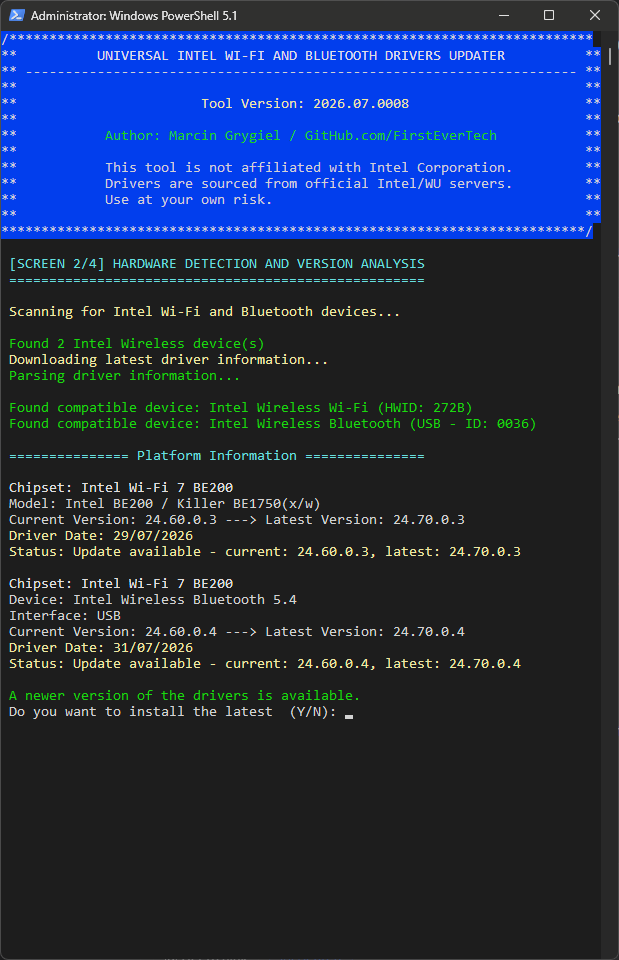
Added PCIe cards: Intel WiFi 7 BE200 (with BT 5.4) and USB 3.2 Gen 2 10Gbps
Release: v2026.08.0017

🆕 What's New

Detection Fix — FriendlyName Keyword Filter Silently Dropped Legitimate Devices


The device detection step (Get-IntelChipsetHWIDs) used to pre-filter every candidate Intel device by checking whether its FriendlyName contained one of a handful of keywords: "Chipset", "LPC", "PCI Express Root Port", "PCI-to-PCI bridge", "Motherboard Resources". Any live, fully functioning Intel System-class device whose FriendlyName didn't happen to contain one of those words was silently dropped — before it was ever even checked against the HWID database.

This surfaced through a user report (thanks again to rvail for the detailed logs): Driver Genius Free Edition flagged three Intel System devices as outdated on a Z270 desktop — 1901 (PCIe Controller x16), 191F (Host Bridge/DRAM Registers), and 1911 (Gaussian Mixture Model) — while my updater reported the system as fully up to date. A full, unfiltered PnP device dump confirmed all three were live and functioning (Status: OK) — the updater's own name-based filter was the reason they never showed up, nothing else.

  • Filter removed entirely — every Intel (VEN_8086) System-class device with Status: OK is now passed straight to database matching, no keyword pre-check
  • Same class of gap affected other device-name families across multiple generations, not just this one case: the GMM (Gaussian Mixture Model), Thermal, Northpeak, LPSS, and DmaSecExtension device families — none of these FriendlyNames contain the old keyword list
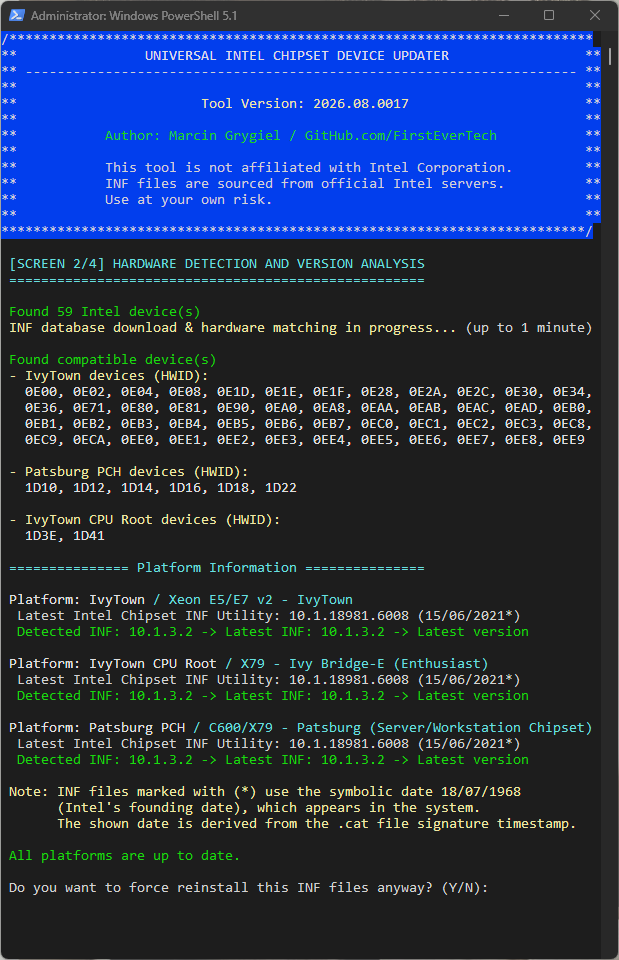
  • Tested on a triple-platform X79 system (IvyTown / Patsburg PCH / IvyTown CPU Root): detected device count went from 12 → 59, all correctly matched to the same three known platforms
Why this matters: the keyword list was a rough heuristic from before I had a complete HWID database — a leftover from when the tool had to guess which devices looked chipset-related. Now that detection is matched purely by hardware ID against the full database, that guesswork isn't needed anymore, and neither is a filter that can silently exclude real hardware.

Performance Improvement

Version-checking (Get-CurrentINFVersion) previously re-scanned every PnP device on the system, from scratch, for every single detected Intel device — an O(n²) cost. On the X79 system above, going from 12 to 59 correctly-detected devices meant this re-scan ran roughly 5x more often, and detection time went from ~30s to over 2 minutes. Fixed by reusing the device object already collected during initial enumeration instead of searching for it again — detection is now O(n).

Display Improvements

  • HWID lists now wrap at 12 per line instead of one unreadable wall of text (some platforms report 40+ HWIDs now that detection is complete)
  • Platform names highlighted in yellow for easier scanning
  • Download/parsing status merged into a single, more accurate progress message

Release Changelog: here
Full Changelog: here

Screenshot2026-07-29145009.png


P.S.
The next release will include a `-download` parameter for downloading detected Intel Chipset Device Software installers.
This will be useful for legacy chipsets, as newer versions of the installers are no longer being produced.
 

My Computer My Computer

At a glance

Windows 11 Pro Insider PreviewIntel Xeon E5-1680 v2 OC @ 4.4GHzCorsair Quad DDR3-2400MHz CL10ASUS TUF Gaming GeForce RTX 4070 Ti OC
OS
Windows 11 Pro Insider Preview
Computer type
PC/Desktop
Manufacturer/Model
ASUS-ish Build
CPU
Intel Xeon E5-1680 v2 OC @ 4.4GHz
Motherboard
ASUS P9X79 Pro (Modded Bios)
Memory
Corsair Quad DDR3-2400MHz CL10
Graphics Card(s)
ASUS TUF Gaming GeForce RTX 4070 Ti OC
Sound Card
Realtek ALC898
Monitor(s) Displays
ASUS ROG Swift OLED PG48UQ OC @ 138Hz
Screen Resolution
3840 x 2160 (4K)
Hard Drives
Samsung SSD 990 Pro 4TB (NVMe)
Samsung SSD 870 QVO 8TB (SATA)
PSU
Cooler Master Silent Pro M2 1500W
Case
Cooler Master MasterCase SL600M Black
Cooling
ARCTIC Liquid Freezer II 240
Keyboard
Logitech G915 LIGHTSPEED
Mouse
Logitech G900 Chaos Spectrum
Internet Speed
Download: 930 Mbps / Upload: 105 Mbps
Other Info
Added PCIe cards: Intel WiFi 7 BE200 (with BT 5.4) and USB 3.2 Gen 2 10Gbps
Release: v2026.08.0018

🛡️ Safety Improvement
  • Added: warning and safeguards for Intel SST/cAVS audio INF conflicts — Some chipset packages (particularly EOL/mobile PCH packages) include `SystemcAVS.inf` files for Intel Smart Sound Technology (SST) device identification. On systems with a non-Intel audio codec (Realtek, Creative, etc.), applying these INFs can cause Windows to reassign the audio controller to an Intel SST device, breaking the third-party audio driver. Reported on a Gigabyte Skylake desktop (Realtek disabled) and an EVGA X299 Dark (Creative Sound Blaster Recon3Di broken by the `KabyLakePCH-H` EOL package). Interactive mode now warns and requires confirmation before any changes are made (and again if the System Restore point can't be created); unattended mode (`-auto` / `-quiet`) now **aborts before any changes** on cAVS detection and exits with code `3`, since no one is available to accept the risk.

🆕 New Feature
  • Added: explicit choice for installing legacy (EOL) INF packages — Some detected HWIDs are only covered by an older, EOL chipset INF package because the latest package no longer lists them (Intel sometimes moves the HWID into a separate installer, e.g. Intel Serial IO Drivers). Interactive mode now asks whether to (1) install everything, EOL included, or (2) skip EOL and install the rest; unattended mode (`-auto` / `-quiet`) skips EOL packages by default. If the installed INF for a device is already newer than the matching EOL package — meaning a separate, newer Intel package already covers that HWID — that EOL package is now blocked outright in both modes, since installing it would downgrade the INF file.
Release Changelog: here
Full Changelog: here
 

My Computer My Computer

At a glance

Windows 11 Pro Insider PreviewIntel Xeon E5-1680 v2 OC @ 4.4GHzCorsair Quad DDR3-2400MHz CL10ASUS TUF Gaming GeForce RTX 4070 Ti OC
OS
Windows 11 Pro Insider Preview
Computer type
PC/Desktop
Manufacturer/Model
ASUS-ish Build
CPU
Intel Xeon E5-1680 v2 OC @ 4.4GHz
Motherboard
ASUS P9X79 Pro (Modded Bios)
Memory
Corsair Quad DDR3-2400MHz CL10
Graphics Card(s)
ASUS TUF Gaming GeForce RTX 4070 Ti OC
Sound Card
Realtek ALC898
Monitor(s) Displays
ASUS ROG Swift OLED PG48UQ OC @ 138Hz
Screen Resolution
3840 x 2160 (4K)
Hard Drives
Samsung SSD 990 Pro 4TB (NVMe)
Samsung SSD 870 QVO 8TB (SATA)
PSU
Cooler Master Silent Pro M2 1500W
Case
Cooler Master MasterCase SL600M Black
Cooling
ARCTIC Liquid Freezer II 240
Keyboard
Logitech G915 LIGHTSPEED
Mouse
Logitech G900 Chaos Spectrum
Internet Speed
Download: 930 Mbps / Upload: 105 Mbps
Other Info
Added PCIe cards: Intel WiFi 7 BE200 (with BT 5.4) and USB 3.2 Gen 2 10Gbps
Last edited:

My Computer My Computer

At a glance

Windows 11 Pro Insider PreviewIntel Xeon E5-1680 v2 OC @ 4.4GHzCorsair Quad DDR3-2400MHz CL10ASUS TUF Gaming GeForce RTX 4070 Ti OC
OS
Windows 11 Pro Insider Preview
Computer type
PC/Desktop
Manufacturer/Model
ASUS-ish Build
CPU
Intel Xeon E5-1680 v2 OC @ 4.4GHz
Motherboard
ASUS P9X79 Pro (Modded Bios)
Memory
Corsair Quad DDR3-2400MHz CL10
Graphics Card(s)
ASUS TUF Gaming GeForce RTX 4070 Ti OC
Sound Card
Realtek ALC898
Monitor(s) Displays
ASUS ROG Swift OLED PG48UQ OC @ 138Hz
Screen Resolution
3840 x 2160 (4K)
Hard Drives
Samsung SSD 990 Pro 4TB (NVMe)
Samsung SSD 870 QVO 8TB (SATA)
PSU
Cooler Master Silent Pro M2 1500W
Case
Cooler Master MasterCase SL600M Black
Cooling
ARCTIC Liquid Freezer II 240
Keyboard
Logitech G915 LIGHTSPEED
Mouse
Logitech G900 Chaos Spectrum
Internet Speed
Download: 930 Mbps / Upload: 105 Mbps
Other Info
Added PCIe cards: Intel WiFi 7 BE200 (with BT 5.4) and USB 3.2 Gen 2 10Gbps

Latest Support Threads

Back
Top Bottom