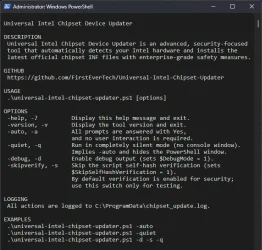
Universal Intel Chipset Device Updater


Looks like a useful utility. :-)
 

My Computers

System One System Two

  • OS
    Win 11 Pro 25H2, Build 26200.8524
    Computer type
    PC/Desktop
    Manufacturer/Model
    Home Brew
    CPU
    Intel Core i5 14500
    Motherboard
    Gigabyte B760M G P WIFI
    Memory
    64GB DDR4
    Graphics Card(s)
    GeForce RTX 4060
    Sound Card
    Chipset Realtek
    Monitor(s) Displays
    LG 45" Ultragear, Acer 24" 1080p
    Screen Resolution
    5120x1440, 1920x1080
    Hard Drives
    Crucial P310 2TB 2280 PCIe Gen4 3D NAND NVMe M.2 SSD (O/S)
    Silicon Power 2TB US75 NVMe PCIe Gen4 M.2 2280 SSD (backup)
    Crucial BX500 2TB 3D NAND (2nd backup)
    Seagate 4TB Ironwolf, rotating HDD archive files
    External off-line backup Drives: 2 NVMe 4TB drives in external enclosures
    PSU
    Thermaltake Toughpower GF3 750W
    Case
    LIAN LI LANCOOL 216 E-ATX PC Case
    Cooling
    Lots of fans!
    Keyboard
    Microsoft Comfort Curve 2000
    Mouse
    Logitech G305
    Internet Speed
    Verizon FiOS 1GB
    Browser
    Firefox
    Antivirus
    Malware Bytes & Windows Defender Security
  • Operating System
    Win 11 Pro 25H2, Build 26200.8524
    Computer type
    PC/Desktop
    Manufacturer/Model
    Home Brew
    CPU
    Intel Core i5 14400
    Motherboard
    Gigabyte B760M DS3H AX
    Memory
    32GB DDR5
    Graphics card(s)
    Intel 700 Embedded GPU
    Sound Card
    Realtek Embedded
    Monitor(s) Displays
    27" HP 1080p
    Screen Resolution
    1920x1080
    Hard Drives
    Crucial P310 2TB 2280 PCIe Gen4 eD NAND PCIe SSD
    Samsung EVO 990 2TB NVMe Gen4 SSD
    Samsung 2TB SATA SSD
    PSU
    Thermaltake Smart BM3 650W
    Case
    Okinos Micro ATX Case
    Cooling
    Fans
    Keyboard
    Microsoft Comfort Curve 2000
    Mouse
    Logitech G305
    Internet Speed
    Verizon FiOS 1GB
    Browser
    Firefox
    Antivirus
    Malware Bytes & Windows Defender Security
Hi everyone! 😊

Just a quick update on the Universal Intel Chipset Updater.

The tool has been running absolutely flawlessly for quite some time now — no new bug reports, no issues, despite being used by thousands of people. Most questions I get turn out to be related to the users' own systems, not the updater itself.


Error 1603 during MSI installation

Since everything has been stable, I recently took some time to help a user who was struggling with a corrupted previous installation of the Intel Chipset Device Software. Because of that corruption, they couldn't install any newer versions — even those offered by my updater — and kept running into Error 1603.

I helped them clean up the broken installation manually, and in the end, they were finally able to use the updater successfully. 🎯

This issue isn't limited to Intel Chipset Device Software — Error 1603 can affect any MSI package when the old installation is damaged. So I documented the entire solution, hoping it might help others in the future.

Full case and solution here:
github.com/FirstEverTech/Universal-Intel-Chipset-Updater/issues/14#issuecomment-4010882232

Hope this helps someone!
 

My Computer

System One

  • OS
    Windows 11 Pro Insider Preview
    Computer type
    PC/Desktop
    Manufacturer/Model
    ASUS-ish Build
    CPU
    Intel Xeon E5-1680 v2 OC @ 4.4GHz
    Motherboard
    ASUS P9X79 Pro (Modded Bios)
    Memory
    Corsair Quad DDR3-2400MHz CL10
    Graphics Card(s)
    ASUS TUF Gaming GeForce RTX 4070 Ti OC
    Sound Card
    Realtek ALC898
    Monitor(s) Displays
    ASUS ROG Swift OLED PG48UQ OC @ 138Hz
    Screen Resolution
    3840 x 2160 (4K)
    Hard Drives
    Samsung SSD 990 Pro 4TB (NVMe)
    Samsung SSD 870 QVO 8TB (SATA)
    PSU
    Cooler Master Silent Pro M2 1500W
    Case
    Cooler Master MasterCase SL600M Black
    Cooling
    ARCTIC Liquid Freezer II 240
    Keyboard
    Logitech G915 LIGHTSPEED
    Mouse
    Logitech G900 Chaos Spectrum
    Internet Speed
    Download: 930 Mbps / Upload: 105 Mbps
    Other Info
    Added PCIe cards: Intel WiFi 7 BE200 (with BT 5.4) and USB 3.2 Gen 2 10Gbps

Heads-up for Admins: Upcoming Update with Admin-Friendly Features​

I’m happy to announce that tomorrow I’ll be releasing a new version of the Universal Intel Chipset Device Updater with several enhancements specifically designed for administrators and automated deployments.

What’s new?

The script will now include dedicated command-line options. These allow for fully unattended execution, silent operation, and fine-grained control – perfect for integrating into MDM solutions like Microsoft Intune, SCCM, Workspace ONE, or PDQ Deploy.

Key improvement:

The PowerShell script (.ps1) can now be used completely independently – no more need for the batch wrapper (Run.bat). Of course, if you’re already using the .bat file, it will continue to work without any issues; the script is fully backward compatible.

Why this matters for admins:

By using the .ps1 directly, you avoid the common pitfalls associated with self-extracting executables (SFX) – no more concerns about unsigned code, local certificate warnings, or antivirus false positives. The script is just plain text, easily reviewable, and can be executed with your preferred execution policy settings.

Once the new version is live, you’ll be able to grab it from the usual place (GitHub) and soon also from the PowerShell Gallery.

Stay tuned!

1773112462874.webp
 

My Computer

System One

  • OS
    Windows 11 Pro Insider Preview
    Computer type
    PC/Desktop
    Manufacturer/Model
    ASUS-ish Build
    CPU
    Intel Xeon E5-1680 v2 OC @ 4.4GHz
    Motherboard
    ASUS P9X79 Pro (Modded Bios)
    Memory
    Corsair Quad DDR3-2400MHz CL10
    Graphics Card(s)
    ASUS TUF Gaming GeForce RTX 4070 Ti OC
    Sound Card
    Realtek ALC898
    Monitor(s) Displays
    ASUS ROG Swift OLED PG48UQ OC @ 138Hz
    Screen Resolution
    3840 x 2160 (4K)
    Hard Drives
    Samsung SSD 990 Pro 4TB (NVMe)
    Samsung SSD 870 QVO 8TB (SATA)
    PSU
    Cooler Master Silent Pro M2 1500W
    Case
    Cooler Master MasterCase SL600M Black
    Cooling
    ARCTIC Liquid Freezer II 240
    Keyboard
    Logitech G915 LIGHTSPEED
    Mouse
    Logitech G900 Chaos Spectrum
    Internet Speed
    Download: 930 Mbps / Upload: 105 Mbps
    Other Info
    Added PCIe cards: Intel WiFi 7 BE200 (with BT 5.4) and USB 3.2 Gen 2 10Gbps

New versions = lots of improvements!​

Bonus - completely rebuilt Universal Intel Wi-Fi and Bluetooth Drivers Updater

Now you can install it from PowerShell Gallery (Run PowerShell as Administrator):
Code:
Install-Script universal-intel-chipset-device-updater

Manual update from PowerShell Gallery for v2026.03.0012 or older (Run PowerShell as Administrator):
Code:
Update-Script -Name universal-intel-chipset-device-updater

Run from PowerShell Gallery (Run PowerShell as Administrator):
Code:
universal-intel-chipset-device-updater

Options:​

Code:
| Option | Description |
|--------|-------------|
| `-help`, `-?` | Display help and exit. |
| `-version`, `-v` | Display the tool version and exit. |
| `-auto`, `-a` | Automatically answer all prompts with Yes — no user interaction required. |
| `-quiet`, `-q` | Run in completely silent mode (no console window). Implies `-auto` and hides the PowerShell window. |
| `-beta` | Use beta database for new hardware testing (available from version 2026.03.0013). |
| `-debug`, `-d` | Enable debug output. |
| `-skipverify`, `-s` | Skip the script self-hash verification. **Use only for testing!** |

Changelog:​

v2026.03.0013

Improvements​

  • Added multi-database support with -beta and -developer flags for early testing of new Intel hardware platforms
  • Implemented automatic script update via PowerShell Gallery when new version is detected
  • Improved console exit behavior: screen clears after credits, showing clean thank you message before returning to prompt
  • Removed unnecessary 5-second wait at the end of -auto / -quiet runs for faster execution

Technical​

  • Added warning banner when running in non-default database modes
  • Updated update detection logic to leverage native PowerShell Gallery commands
  • Console output refinements for better user experience in different launch modes
  • Internal cleanup of auto-mode exit routine

v2026.03.0012

Improvements​

  • Improved internal version handling and update detection logic
  • Minor refinements in console output formatting
  • General stability improvements

Technical​

  • Internal script cleanup
  • Minor workflow optimizations

v2026.03.0011

Improvements​

  • Improved platform detection reliability
  • Refined progress and status messages

Technical​

  • Code refactoring for maintainability
  • Minor performance improvements in detection routines

v2026.03.0010

Improvements​

  • Improved INF database processing reliability
  • Better handling of edge cases during chipset platform detection

Technical​

  • Script logic refinements for chipset platform mapping
  • Minor logging improvements
 

My Computer

System One

  • OS
    Windows 11 Pro Insider Preview
    Computer type
    PC/Desktop
    Manufacturer/Model
    ASUS-ish Build
    CPU
    Intel Xeon E5-1680 v2 OC @ 4.4GHz
    Motherboard
    ASUS P9X79 Pro (Modded Bios)
    Memory
    Corsair Quad DDR3-2400MHz CL10
    Graphics Card(s)
    ASUS TUF Gaming GeForce RTX 4070 Ti OC
    Sound Card
    Realtek ALC898
    Monitor(s) Displays
    ASUS ROG Swift OLED PG48UQ OC @ 138Hz
    Screen Resolution
    3840 x 2160 (4K)
    Hard Drives
    Samsung SSD 990 Pro 4TB (NVMe)
    Samsung SSD 870 QVO 8TB (SATA)
    PSU
    Cooler Master Silent Pro M2 1500W
    Case
    Cooler Master MasterCase SL600M Black
    Cooling
    ARCTIC Liquid Freezer II 240
    Keyboard
    Logitech G915 LIGHTSPEED
    Mouse
    Logitech G900 Chaos Spectrum
    Internet Speed
    Download: 930 Mbps / Upload: 105 Mbps
    Other Info
    Added PCIe cards: Intel WiFi 7 BE200 (with BT 5.4) and USB 3.2 Gen 2 10Gbps
What a mess... unfortunately, you can't edit the main post on this forum :-(
The original Intel Wi-Fi & Bluetooth Driver Updater post has been renamed to Universal Intel Chipset Device Updater, but the content still refers to the old post.

Currently, my two projects have been updated, and I don’t know where to post the updates...

I think the best solution would be to delete this post and create two separate ones:
  • Universal Intel Chipset Device Updater
  • Universal Intel Wi-Fi & Bluetooth Drivers Updater
In the main post, I would only include information about the project and links, and the latest versions would appear in newly added replies.

Other forums allow editing, so it’s easy to update the version in the main post :/

Just in case, I'm posting the links...

Universal Intel Chipset Device Updater: GitHub | v2026.03.0013 | Download: Direct Download
Universal Intel Wi-Fi & Bluetooth Drivers Updater: GitHub | v2026.03.0002 | Download: Direct Download
 

My Computer

System One

  • OS
    Windows 11 Pro Insider Preview
    Computer type
    PC/Desktop
    Manufacturer/Model
    ASUS-ish Build
    CPU
    Intel Xeon E5-1680 v2 OC @ 4.4GHz
    Motherboard
    ASUS P9X79 Pro (Modded Bios)
    Memory
    Corsair Quad DDR3-2400MHz CL10
    Graphics Card(s)
    ASUS TUF Gaming GeForce RTX 4070 Ti OC
    Sound Card
    Realtek ALC898
    Monitor(s) Displays
    ASUS ROG Swift OLED PG48UQ OC @ 138Hz
    Screen Resolution
    3840 x 2160 (4K)
    Hard Drives
    Samsung SSD 990 Pro 4TB (NVMe)
    Samsung SSD 870 QVO 8TB (SATA)
    PSU
    Cooler Master Silent Pro M2 1500W
    Case
    Cooler Master MasterCase SL600M Black
    Cooling
    ARCTIC Liquid Freezer II 240
    Keyboard
    Logitech G915 LIGHTSPEED
    Mouse
    Logitech G900 Chaos Spectrum
    Internet Speed
    Download: 930 Mbps / Upload: 105 Mbps
    Other Info
    Added PCIe cards: Intel WiFi 7 BE200 (with BT 5.4) and USB 3.2 Gen 2 10Gbps
Caution:
v2026.03.0002 users: If you encounter a hash verification error when updating, please download v2026.03.0003 manually.
This was caused by an incorrect filename in the auto-update URL — fixed in v2026.03.0003.
All notable changes to the Universal Intel Wi-Fi and Bluetooth Drivers Updater project will be documented in this file.
The format is based on Keep a Changelog, and this project adheres to Semantic Versioning.


Release Notes: Release v2026.03.0003 - Release Notes · FirstEverTech/Universal-Intel-WiFi-BT-Updater
Direct Download: WiFi-BT-Updater-2026.03.0003-Win10-Win11.exe
  • Microsoft WHCP Digital Signature Verification: All downloaded CAB driver packages are now verified against the Microsoft Windows Hardware Compatibility Publisher certificate before installation — after SHA-256 hash check and before expand.exe extraction; installation is aborted on any failure; security architecture is now fully symmetric with Universal Intel Chipset Device Updater
  • Legacy Device Support: Database files (intel-bt-driver-latest.md, intel-wifi-driver-latest.md) now support optional per-device Latest Version and Release Date columns; a dedicated ## Legacy Devices section tracks EOL devices with their last available driver version; script displays [LEGACY] indicator and installs the correct last-available CAB automatically — no script update required when Intel discontinues a device
  • First Legacy Entry: Intel AX200 Bluetooth (PID 0029) — dropped by Intel in 24.10.0.4 (11/10/2025); Wi-Fi for AX200 remains fully supported
  • Per-DEV Wi-Fi Download Blocks: intel-wifi-drivers-download.txt rebuilt to support per-device CAB blocks, mirroring the existing BT parser structure; global header ensures full backward compatibility with v2026.03.0002
  • Auto-Launch After Update Download: After downloading a newer version, the updater now prompts to exit and launch the new version automatically (Start-Process + exit 100) — consistent with Universal Intel Chipset Device Updater behavior
  • Expanded Wi-Fi Hardware Coverage: Added 5 previously missing adapter DEV IDs — AX203 (2030), AX101 (1010), Wireless-AC 9260 (9260), Wireless-AC 9461 (9461), Wireless-AC 9462 (31DC)
  • .ICONURI in PSScriptInfo: PowerShell Gallery listing now displays the project icon
  • pnputil Exit Code Handling: Both pnputil /add-driver and pnputil /update-device calls now correctly handle all real-world exit codes — 259 (driver already staged), 1 (device already on best driver, relevant for force reinstall), 3010 (success, reboot required); force reinstall now works correctly in all scenarios
  • Auto-Update Filename: Download URL corrected from WiFiBT-Updater-* to WiFi-BT-Updater-* to match actual release filenames; v2026.03.0002 users who encounter a hash error during auto-update should download v2026.03.0003 manually
  • $isSFX Detection Pattern: Pattern corrected to match actual script filename universal-intel-wifi-bt-driver-updater*
  • WHCP Digital Signature Verification: See Added section above
 

My Computer

System One

  • OS
    Windows 11 Pro Insider Preview
    Computer type
    PC/Desktop
    Manufacturer/Model
    ASUS-ish Build
    CPU
    Intel Xeon E5-1680 v2 OC @ 4.4GHz
    Motherboard
    ASUS P9X79 Pro (Modded Bios)
    Memory
    Corsair Quad DDR3-2400MHz CL10
    Graphics Card(s)
    ASUS TUF Gaming GeForce RTX 4070 Ti OC
    Sound Card
    Realtek ALC898
    Monitor(s) Displays
    ASUS ROG Swift OLED PG48UQ OC @ 138Hz
    Screen Resolution
    3840 x 2160 (4K)
    Hard Drives
    Samsung SSD 990 Pro 4TB (NVMe)
    Samsung SSD 870 QVO 8TB (SATA)
    PSU
    Cooler Master Silent Pro M2 1500W
    Case
    Cooler Master MasterCase SL600M Black
    Cooling
    ARCTIC Liquid Freezer II 240
    Keyboard
    Logitech G915 LIGHTSPEED
    Mouse
    Logitech G900 Chaos Spectrum
    Internet Speed
    Download: 930 Mbps / Upload: 105 Mbps
    Other Info
    Added PCIe cards: Intel WiFi 7 BE200 (with BT 5.4) and USB 3.2 Gen 2 10Gbps
Update: 21/04/2026
  • Added new Intel Chipset Device Software installer 10.1.20490.8818 (06/02/2026)
  • Reduced EXE installer size from 107MB to 11MB - MSI file (or 5MB - ZIP version used by the updater)
  • Updated Intel Chipset INF Files database: intel-chipset-infs-latest.md
  • No need to change the updater code
 

My Computer

System One

  • OS
    Windows 11 Pro Insider Preview
    Computer type
    PC/Desktop
    Manufacturer/Model
    ASUS-ish Build
    CPU
    Intel Xeon E5-1680 v2 OC @ 4.4GHz
    Motherboard
    ASUS P9X79 Pro (Modded Bios)
    Memory
    Corsair Quad DDR3-2400MHz CL10
    Graphics Card(s)
    ASUS TUF Gaming GeForce RTX 4070 Ti OC
    Sound Card
    Realtek ALC898
    Monitor(s) Displays
    ASUS ROG Swift OLED PG48UQ OC @ 138Hz
    Screen Resolution
    3840 x 2160 (4K)
    Hard Drives
    Samsung SSD 990 Pro 4TB (NVMe)
    Samsung SSD 870 QVO 8TB (SATA)
    PSU
    Cooler Master Silent Pro M2 1500W
    Case
    Cooler Master MasterCase SL600M Black
    Cooling
    ARCTIC Liquid Freezer II 240
    Keyboard
    Logitech G915 LIGHTSPEED
    Mouse
    Logitech G900 Chaos Spectrum
    Internet Speed
    Download: 930 Mbps / Upload: 105 Mbps
    Other Info
    Added PCIe cards: Intel WiFi 7 BE200 (with BT 5.4) and USB 3.2 Gen 2 10Gbps

🚀 Release: v2026.05.0014​

🆕 What's New​

Intel Platform Scanner 7.1 (Database Generation)​

The scanner script (Intel-Platform-Scanner.ps1) has been significantly improved to produce a cleaner, more accurate intel-chipset-infs-latest.md database:

  • Fixed ArrowLake generation – now correctly shows 15th Gen Core/Core Ultra 200 (was 14th Gen)
  • Added missing generic platforms – ArrowLake, RaptorLake, AlderLake, TigerLake, CometLake, IceLake, Lakefield, CoffeeLake, KabyLake, Skylake, Crystalwell now have proper Order values and appear in correct chronological order
  • PCH Family sorting – all PCH entries (including LynxPoint, PantherPoint, CougarPoint, Wellsburg, Patsburg, Lewisburg, Emmitsburg, etc.) now follow a consistent newest-to-oldest order
  • MeteorLake PCH moved – MeteorLake PCH-N/H/S relocated from CLIENT - Core to PCH Family (correct logical category)
  • DmaSec extensions – six *_Extension-Dmasec entries moved to PCH Family with proper generation descriptions
  • IceLakeX reclassified – moved from XEON / SERVER to WORKSTATION / HEDT
  • Legend cleanup – platforms without dedicated INF files (e.g., Emerald Rapids, Ice Lake-SP, Cascade Lake-X) now have a * and an explanatory note in the footer
  • New notes in MD footer:
    • Wildcat Lake shares HWIDs with Panther Lake
    • Panther Lake H/U are merged into a single entry (same INF)
    • 16th generation (Lunar Lake) is classified under ATOM / LOW POWER
    • Platforms marked with * have no dedicated INF (handled by adjacent INF or inbox drivers)
  • Fixed duplicate type suffix – Generation field no longer ends with redundant - Desktop/Mobile

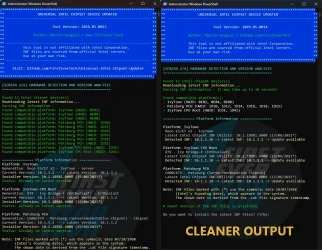
Universal Intel Chipset Device Updater (Display Improvements)​

The console output in [SCREEN 2/4] is now much cleaner and more readable:

  • Grouped HWID display – instead of one line per device, platforms are shown with their HWID list (e.g., - IvyTown (HWID: 0E02, 0E04, 0E08))
  • Compact platform information– each platform uses only 3 lines:
    • Platform name (white)
    • Generation text (gray) – without the word Generation: (prevents long names from wrapping)
    • Latest Intel Chipset INF Utility (gray)
    • Detected → Latest → Status (colored: green/yellow/magenta)
  • Parsing hint – Parsing INF information - it may take up to 30 seconds! (replaces the old ambiguous ...)
  • Simplified header banner – removed redundant separator lines and the Visit: row; author line now includes GitHub link
  • Better Windows Inbox handling – inbox platforms are shown in a compact grouped list, not interleaved with regular updates
  • Extra blank lines removed – no more double empty lines before the platform information section
image

📋 Release Files​

  • universal-intel-chipset-device-updater.ps1 – Main updater script (v2026.05.0014)
  • ChipsetUpdater-2026.05.0014-Win10-Win11.exe – Self-extracting package (includes updated script)
 

Attachments

  • 1778849635374.webp
    1778849635374.webp
    213.5 KB · Views: 2

My Computer

System One

  • OS
    Windows 11 Pro Insider Preview
    Computer type
    PC/Desktop
    Manufacturer/Model
    ASUS-ish Build
    CPU
    Intel Xeon E5-1680 v2 OC @ 4.4GHz
    Motherboard
    ASUS P9X79 Pro (Modded Bios)
    Memory
    Corsair Quad DDR3-2400MHz CL10
    Graphics Card(s)
    ASUS TUF Gaming GeForce RTX 4070 Ti OC
    Sound Card
    Realtek ALC898
    Monitor(s) Displays
    ASUS ROG Swift OLED PG48UQ OC @ 138Hz
    Screen Resolution
    3840 x 2160 (4K)
    Hard Drives
    Samsung SSD 990 Pro 4TB (NVMe)
    Samsung SSD 870 QVO 8TB (SATA)
    PSU
    Cooler Master Silent Pro M2 1500W
    Case
    Cooler Master MasterCase SL600M Black
    Cooling
    ARCTIC Liquid Freezer II 240
    Keyboard
    Logitech G915 LIGHTSPEED
    Mouse
    Logitech G900 Chaos Spectrum
    Internet Speed
    Download: 930 Mbps / Upload: 105 Mbps
    Other Info
    Added PCIe cards: Intel WiFi 7 BE200 (with BT 5.4) and USB 3.2 Gen 2 10Gbps

Latest Support Threads

Back
Top Bottom