Unknown user


Bikeit

Well-known member
Member
VIP
Local time
6:59 PM
Posts
259
OS
Windows 11 pro
Anyone know why i would have an unknown user S-1-5-21 set up on my PC? is it safe to remove this user?

Screenshot 2026-01-04 125204.webp Screenshot 2026-01-04 125907.webp
 

My Computer

System One

  • OS
    Windows 11 pro
    Computer type
    Laptop
    Manufacturer/Model
    HP Zbook
    CPU
    Intel(R) Core(TM) i7-8850H CPU @ 2.60GHz 2.59 GHz
    Motherboard
    HP 842D
    Memory
    32GB
    Graphics Card(s)
    Nvidia Quadro P3200
    Hard Drives
    Samsung 980 1TB M.2
    Toshiba KXG50ZNV512G M.2
    Crucial P5 Plus 2TB M.2
    Mouse
    MX Master 3
    Internet Speed
    500MBPS
    Browser
    Chrome, Edge
    Antivirus
    Windows defender
No don't remove that, it's an important system identifier. Microsoft magic at work here.
 

My Computers

System One System Two

  • OS
    Windows 11 Enterprise 25H2 26200 7462
    Computer type
    PC/Desktop
    Manufacturer/Model
    Custom Build
    CPU
    Intel XEON E5-2699 v3
    Motherboard
    ASUS X99-A
    Memory
    64GB Teamgroup UD4-3600
    Graphics Card(s)
    NVIDIA GeForce GTX 1080 Ti
    Sound Card
    Integrated
    Monitor(s) Displays
    ACER X34 Predator
    Screen Resolution
    3440 x 1440
    Hard Drives
    Crucial CT1000P 3P SSD8 1TB
    Crucial CT1000 BX500 SSD 1TB
    PSU
    GameMax Pro
    Case
    Fractal Design
    Cooling
    Corsair H110iGT + 6 140mm Fans
    Keyboard
    Corsair K4
    Mouse
    G-Skill G502
    Internet Speed
    300MBs
    Browser
    Chrome
    Antivirus
    OEM
    Other Info
    ASUS RT-AC87U Router
  • Operating System
    25H2 26200.5074
    Computer type
    Laptop
    Manufacturer/Model
    ASUS X555LA
    Memory
    8GB
    Browser
    Chrome
    Antivirus
    OEM

My Computer

System One

  • OS
    Windows 11 pro
    Computer type
    Laptop
    Manufacturer/Model
    HP Zbook
    CPU
    Intel(R) Core(TM) i7-8850H CPU @ 2.60GHz 2.59 GHz
    Motherboard
    HP 842D
    Memory
    32GB
    Graphics Card(s)
    Nvidia Quadro P3200
    Hard Drives
    Samsung 980 1TB M.2
    Toshiba KXG50ZNV512G M.2
    Crucial P5 Plus 2TB M.2
    Mouse
    MX Master 3
    Internet Speed
    500MBPS
    Browser
    Chrome, Edge
    Antivirus
    Windows defender
why i would have
Do you have it?
All you know is that you had that user at some stage and it was used in setting permissions for that folder.
You do not show the full name for that user ID. The last group of digits are what would identify it [500 / 1001/1002+].

Have you ever deleted a user account?
Or enabled & later disabled the Built-in Admin after having done some work on folders? That's the user ID ending in 500.

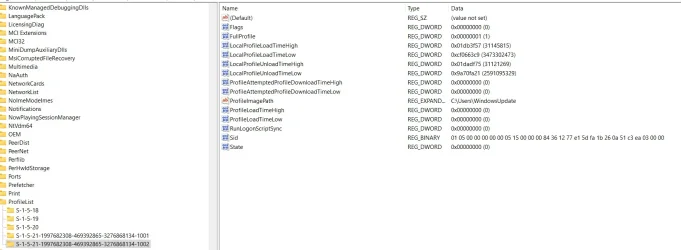
Is the user profile listed in
HKEY_LOCAL_MACHINE\SOFTWARE\Microsoft\Windows NT\CurrentVersion\ProfileList
If so, what is its ProfileImagePath entry?
And does that folder still exist?


Denis
 

My Computer

System One

  • OS
    Windows 11 Home x64 Version 25H2 Build 26200.8037
There is only one user on the PC and that is me, recently there was a windowsupdater in the remote desktop users, i deleted it. The last group of digits are 1002. I had to do a system image restore with Acronis True image a couple of weeks ago as it wouldnt boot into windows.
 

Attachments

  • Screenshot 2026-01-04 134110.webp
    Screenshot 2026-01-04 134110.webp
    76.5 KB · Views: 1

My Computer

System One

  • OS
    Windows 11 pro
    Computer type
    Laptop
    Manufacturer/Model
    HP Zbook
    CPU
    Intel(R) Core(TM) i7-8850H CPU @ 2.60GHz 2.59 GHz
    Motherboard
    HP 842D
    Memory
    32GB
    Graphics Card(s)
    Nvidia Quadro P3200
    Hard Drives
    Samsung 980 1TB M.2
    Toshiba KXG50ZNV512G M.2
    Crucial P5 Plus 2TB M.2
    Mouse
    MX Master 3
    Internet Speed
    500MBPS
    Browser
    Chrome, Edge
    Antivirus
    Windows defender
Did you ever solve the mystery of how WindowsUpdate achieved the Admin authority to add itself to your remote access list?
Remote desktop user list - ElevenForum

Whilst you could delete that profile in the Registry, I think the more serious issue is finding out what else WindowsUpdate got up to.
Delete User Profile - ElevenForumTutorials

Do you have a prior system image you could restore? One that does not have that WindowsUpdate user?

I do not use Pro. If any Pro users chip in about remote access they are likely to be more help than me.


Denis
 
Last edited:

My Computer

System One

  • OS
    Windows 11 Home x64 Version 25H2 Build 26200.8037

My Computers

System One System Two

  • OS
    Windows 11 Enterprise 25H2 26200 7462
    Computer type
    PC/Desktop
    Manufacturer/Model
    Custom Build
    CPU
    Intel XEON E5-2699 v3
    Motherboard
    ASUS X99-A
    Memory
    64GB Teamgroup UD4-3600
    Graphics Card(s)
    NVIDIA GeForce GTX 1080 Ti
    Sound Card
    Integrated
    Monitor(s) Displays
    ACER X34 Predator
    Screen Resolution
    3440 x 1440
    Hard Drives
    Crucial CT1000P 3P SSD8 1TB
    Crucial CT1000 BX500 SSD 1TB
    PSU
    GameMax Pro
    Case
    Fractal Design
    Cooling
    Corsair H110iGT + 6 140mm Fans
    Keyboard
    Corsair K4
    Mouse
    G-Skill G502
    Internet Speed
    300MBs
    Browser
    Chrome
    Antivirus
    OEM
    Other Info
    ASUS RT-AC87U Router
  • Operating System
    25H2 26200.5074
    Computer type
    Laptop
    Manufacturer/Model
    ASUS X555LA
    Memory
    8GB
    Browser
    Chrome
    Antivirus
    OEM
But WindowsUpdate has the SID in question. It is not a Capability SID.


Denis
 

My Computer

System One

  • OS
    Windows 11 Home x64 Version 25H2 Build 26200.8037
Did you ever solve the mystery of how WindowsUpdate achieved the Admin authority to add itself to your remote access list?
Remote desktop user list - ElevenForum

Whilst you could delete that profile in the Registry, I think the more serious issue is finding out what else WindowsUpdate got up to.
Delete User Profile - ElevenForumTutorials

Do you have a prior system image you could restore? One that does not have that WindowsUpdate user?

I do not use Pro. If any Pro users chip in about remote access they are likely to be more help than me.


Denis
Never found out how windowsupdater achieved Admin authority, its now deleted.
Im not sure about a system image without windowsupdater on it, how could i check?
 

My Computer

System One

  • OS
    Windows 11 pro
    Computer type
    Laptop
    Manufacturer/Model
    HP Zbook
    CPU
    Intel(R) Core(TM) i7-8850H CPU @ 2.60GHz 2.59 GHz
    Motherboard
    HP 842D
    Memory
    32GB
    Graphics Card(s)
    Nvidia Quadro P3200
    Hard Drives
    Samsung 980 1TB M.2
    Toshiba KXG50ZNV512G M.2
    Crucial P5 Plus 2TB M.2
    Mouse
    MX Master 3
    Internet Speed
    500MBPS
    Browser
    Chrome, Edge
    Antivirus
    Windows defender
how could i check?
All I can think of is mounting each image and looking for the item whose permissions you illustrated in your OP.
Restore the latest one that does not show the SID-------1002 entry.

Somebody set up remote access for a reason. They could have done something less trivial than mess with permissions on a Taskbar item [all of which I suggest you check / delete & re-create].


Denis
 

My Computer

System One

  • OS
    Windows 11 Home x64 Version 25H2 Build 26200.8037
Back
Top Bottom