Microsoft SharePoint Blog:
In 2016, we introduced modern SharePoint and the SharePoint Framework to our online service – a cloud-born user experience & developer extensibility framework. Ten years later, we continue to invest in this stable platform to provide reliable, well-governed, AI-ready, mobile-friendly, and secure-by-default foundations for customers’ publishing and content management needs.
Also in 2016, we renamed our previous publishing and UX extensibility system to “classic”. These features were designed to ease our customers’ transition from on premises environment to the cloud service. Now, ten years later, these classic features are used by fewer than 5% of our monthly active tenant base, and the classic SharePoint page content is not participating in the latest ways content should be secured, managed, and shared. Classic pages are also not fully represented in the content formats that power Microsoft 365 Copilot, which can reduce the coverage and accuracy of Copilot responses that draw on classic content. As such, over the next two years, we will take steps to retire classic SharePoint pages and custom scripting add/update capability in SharePoint Online from Microsoft 365 – below you will find details on timelines, assessment tooling, and migration guidance.
Overview
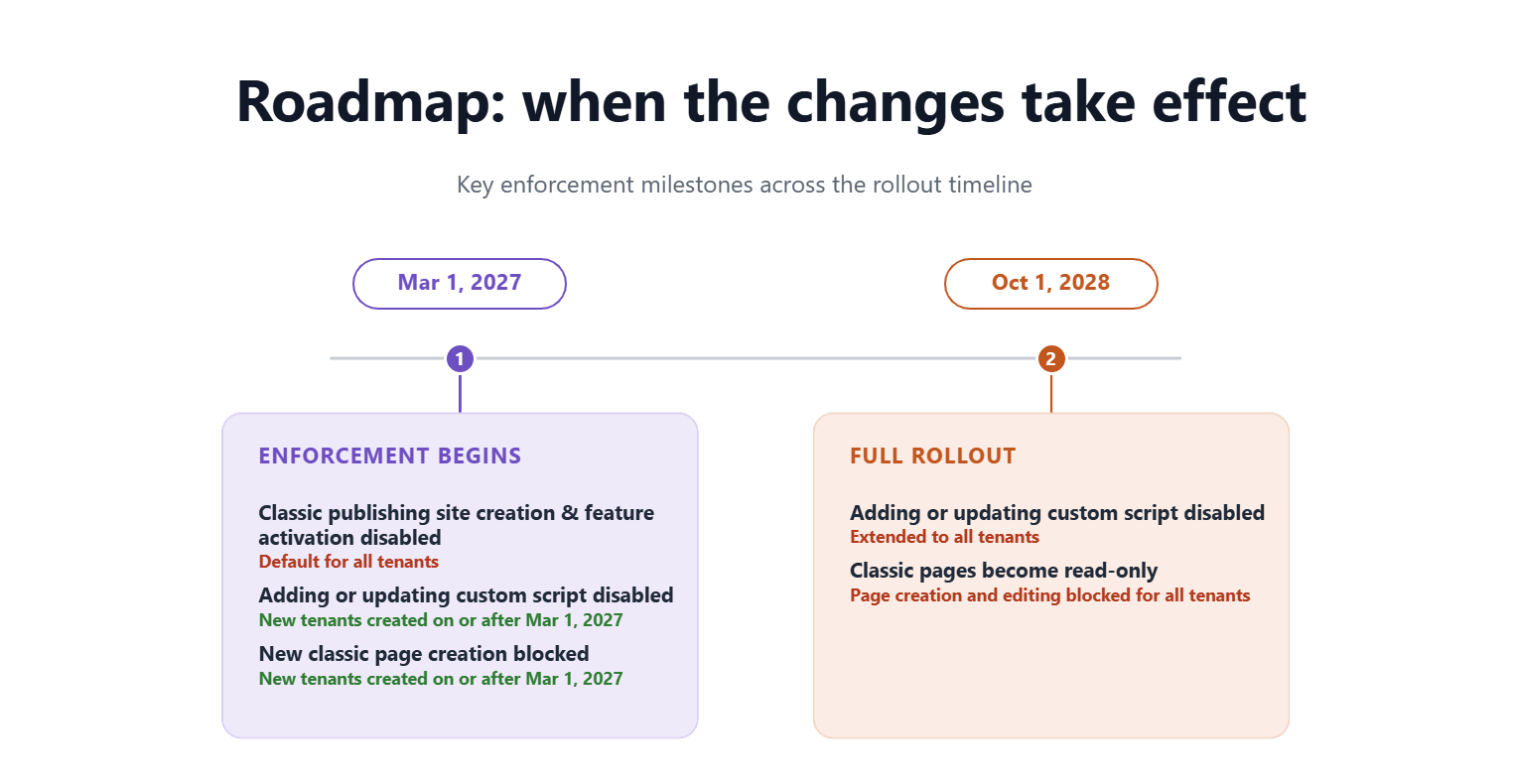
We are introducing a set of changes to classic experiences in SharePoint Online across two phases.No classic page content or data will be deleted by Microsoft in these phases. Existing pages will remain accessible in a read-only form.
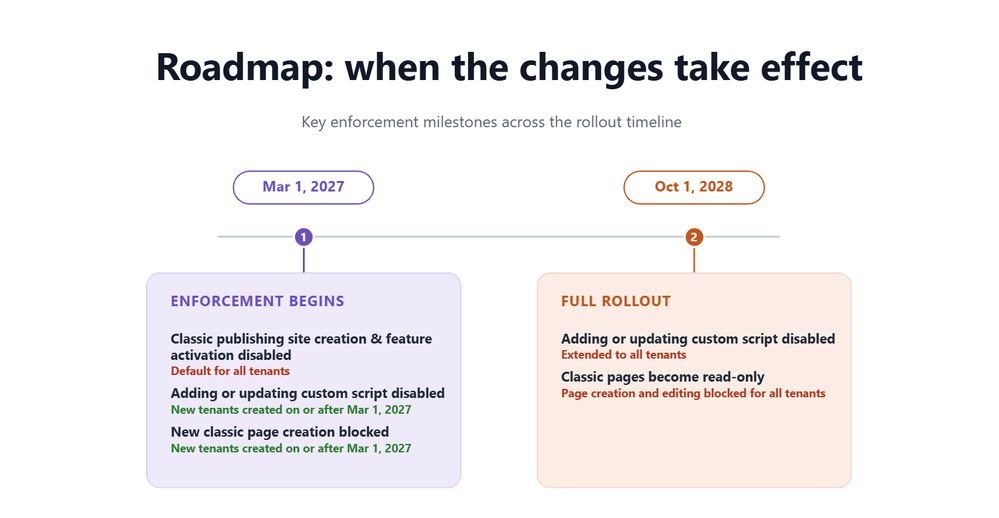
Phase 1 – Beginning March 1, 2027
The following changes will take effect:
For all tenants
- Creation of new classic publishing sites and activation of the classic publishing feature will be disabled for site collection and sub sites.
- The AllowClassicPublishingSiteCreation tenant setting will be enforced as False and cannot be changed.
- Users cannot create new classic pages — including wiki pages, web part pages, blog pages, publishing pages, and custom ASPX pages.
- The ability to add or update custom scripts will be disabled by default, and the site setting DenyAddAndCustomizePages will be enforced as True and cannot be changed. Note that this setting applies only to classic pages — modern SharePoint pages are not affected, and custom solutions built on the SharePoint Framework (SPFx) will continue to work under your organization's existing governance.
The following changes will extend to all tenants:
- Classic user-created pages — including wiki pages, web part pages, blog pages, publishing pages, and custom ASPX pages — will become read-only. Users will no longer be able to create or edit these classic pages.
- The ability to add or update custom scripts will be disabled and the DenyAddAndCustomizePages site setting will be enforced as True and cannot be changed.
What you should do now
For SharePoint administrators:- No data or content will be deleted by Microsoft as part of this change, and all existing data governance features will continue to be honored and continue to function.
- Discover and assess your classic SharePoint environment
Identify usage of classic sites and pages across your tenant. Use the “SharePoint Classic Activities” Purview Audit log category - included in Audit (Standard) and available to all organizations, and events (ClassicPageCreated, ClassicPageEdited, and ClassicPageViewed) to identify active classic page usage, and leverage the Microsoft 365 Assessment Tool to understand the overall classic scope and modernization feasibility. - Prioritize based on business importance and usage
If your assessment finds no classic content, none of these changes apply to your organization — no action needed. Otherwise, focus first on high-value or frequently updated classic sites and pages, and identify where modernization will have the greatest impact. Classifying content by business criticality can help guide a phased migration plan. - Transform to modern SharePoint experiences before enforcement deadlines
SharePoint administrators should use modernization tools such as SharePoint PnP Modernization and SharePoint Page Modernization Agent to convert classic pages into modern SharePoint experiences where applicable. Microsoft will continue enhancing the tooling to accelerate page modernization with best-effort fidelity reservation, but it may not fully automate complex scenarios; modernization is a project that typically requires planning, resourcing, and highly customized pages often need redesign or manual rebuilding. - Adopt a phased migration strategy
Combine centralized IT-led planning and prioritization with distributed execution by site owners over time. Most organizations find success by modernizing page content in waves rather than attempting a single large-scale migration.
For site owners and content authors:
Site owners should work with their SharePoint administrators to identify classic sites and pages that are still actively used and determine which content should be modernized, retired, or replaced. Documentation, assessment tools, and migration guidance linked below can help organizations understand available modernization options and prepare for the transition.
How do I get help?
Refer to the following documentation, tools, and Microsoft partner resources to support your migration from classic SharePoint experiences:- Modernize your classic SharePoint sites | Microsoft Learn
- Transform classic pages to modern pages | Microsoft Learn
- Microsoft 365 Assessment Tool
- Microsoft Solution Providers
Learn more
For complete details, timelines, FAQs, and ongoing updates, see the Microsoft Learn announcement.A Message Center post in the Microsoft 365 admin center has been sent to all tenants. (MC1464926 & MC1464924)
Source:
Upcoming changes to classic experiences in SharePoint Online | Microsoft Community Hub
For the latest details, timelines, FAQs, and implementation guidance, read the full Microsoft Learn article. In 2016, we introduced modern SharePoint...
 techcommunity.microsoft.com