Microsoft 365 Insider Blog:
As SharePoint Online has evolved, our team has heard consistent feedback from screen reader and keyboard-only users about permalinks. We’re thrilled to announce a new, upgraded experience that’s more accessible and efficient.
A more efficient and accessible permalinks experience
For years, permalinks have been a core part of the SharePoint Online page experience. From the earliest days of SharePoint, heading permalinks have helped users quickly copy and share direct links to specific sections within a page. Whether referencing documentation, onboarding guidance, or long-form knowledge content, permalinks make collaboration easier and navigation more precise.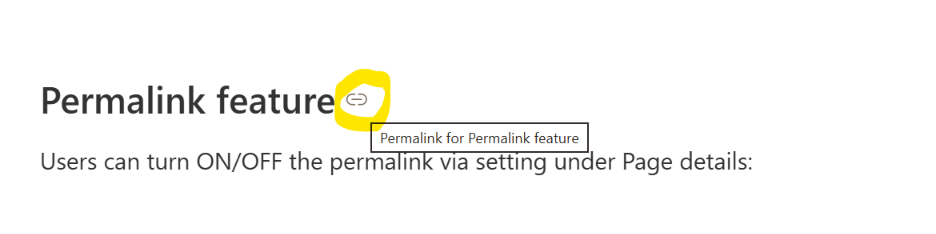
Many customers using keyboard navigation or assistive technologies told us that automatic permalinks on headings introduced additional tab stops at every heading level on a page, creating extra navigation overhead. On pages with many headings, navigating through repeated permalink controls could become inefficient and disruptive to the reading experience.
“As we create pages in SharePoint Online, we’re seeing permalinks appear everywhere — and it quickly becomes overwhelming. Is there a way to reduce the noise and turn some of them off?”
The SharePoint Online team listened carefully to this feedback and worked with accessibility considerations in mind to improve the experience, while preserving flexibility for organizations that still want permalink functionality enabled.
To give customers greater control, SharePoint Online is introducing a new tenant-level setting called “Use permalinks.” This new toggle allows organizations to choose whether heading permalinks should appear on SharePoint pages. Administrators or site owners can turn the feature on or off based on their organization’s accessibility preferences and user needs.
Why it matters
Accessibility is not a one-size-fits-all experience. Some organizations value heading permalinks for deep linking and knowledge sharing, while others prioritize streamlined keyboard navigation and reduced interaction complexity.By introducing this configurable setting, SharePoint Online enables customers to:
- Reduce extra tab stops for keyboard users.
- Improve navigation efficiency for screen reader users.
- Customize page behavior to match organizational accessibility goals.
- Preserve existing permalink functionality when needed.
How it works
1. In a SharePoint Online page, locate Page details.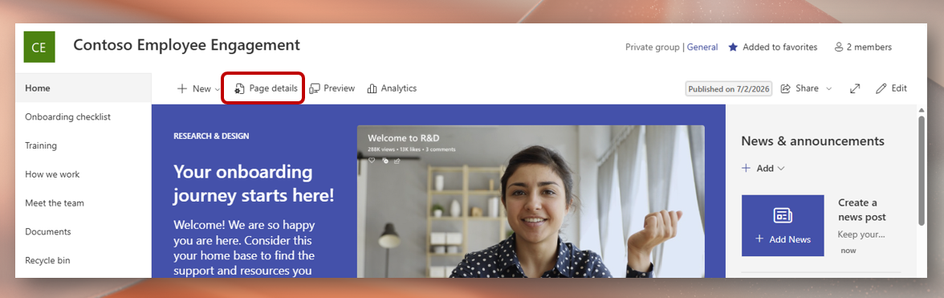
2. Toggle on or off Use permalinks.
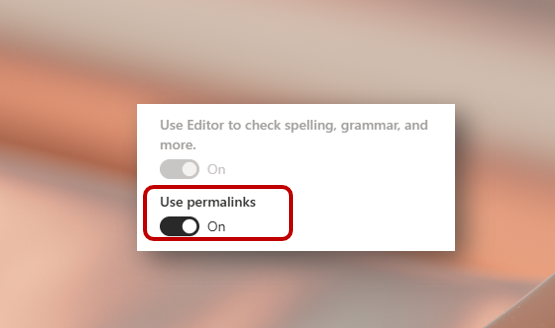
When disabled, permalink navigation controls will no longer appear at each heading level, helping reduce unnecessary tab stops and creating a more streamlined experience for keyboard and screen reader users.
Availability
This feature is rolling out to all SharePoint Online users with an enterprise tenant account.More accessibility enhancements are coming soon to SharePoint Online, so stay tuned!
Feedback
Accessibility improvements are most impactful when they are informed by real-world usage and customer insights. The introduction of the “Use permalinks” toggle is another example of how feedback from the community directly influences the SharePoint experience. Source: