Solved Update (KB5019980) makes folders disappear in file explorer


Harpernight

Active member
Local time
5:29 PM
Posts
7
OS
Windows 11 Pro x64
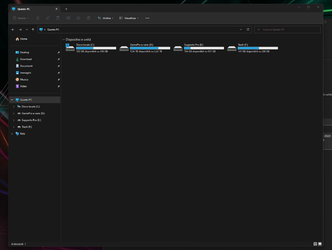
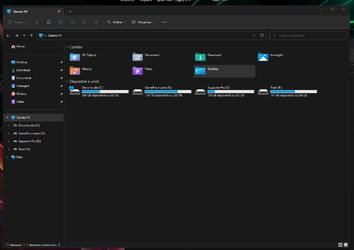
Salve a tutti, son nuovo su questo forum, e chissa' magari c'è qualcuno che risolvera il problema. E gia da tempo che installo e disinstallo questo fastidisissimo aggiornamento, per la precisione questo: 2022-11 Aggiornamento cumulativo per Windows 11 Version 22H2 per sistemi basati su x64 (KB5019980). Una volta installato mi fa' sparire le cartelle documenti, video, immagini, musica e desktop, insomma tutte in Questo Pc, dove vi sono gli hard disk. Disinstallando questo aggiornamento le cartelle come per magia ritornano al loro posto. Il bello sapete qual'è? Che non me lo fa' piu' disinstalklare, perchè non compare piu', nemmeno via cmd. Ho win 11 pro x64 con chiave originale. Iso dalla microsoft. Qualcuno di voi sara' in grado di risolvere?
 
Windows Build/Version
Windows 11 Pro x64 22H2 build 22621.963

My Computer My Computer

At a glance

Windows 11 Pro x64Intel Core i9-9900KF @5.1GHz32GB G.Skill Trident Z RGBMSI Ventus 3X RTX 3080 10GB GDDR6X
OS
Windows 11 Pro x64
Computer type
PC/Desktop
Manufacturer/Model
ALIENWARE T-1000
CPU
Intel Core i9-9900KF @5.1GHz
Motherboard
Asus Rog Strix z390 e-gaming Aura sync
Memory
32GB G.Skill Trident Z RGB
Graphics Card(s)
MSI Ventus 3X RTX 3080 10GB GDDR6X
Sound Card
X-Fi Titanium Fatal1ty Pro Series
Monitor(s) Displays
ASUS MG279 Gaming
Screen Resolution
2560x1440 (2K) 144Hz
Hard Drives
Ssd Nvme Samsung 980 Pro 1TB
PSU
Seasonic Platinum 1000w Full Mod.
Case
Thermaltake Tower 900 + MOD
Cooling
Custom Liquid + 2 pump very very fast
Keyboard
G510
Mouse
Rat4+
I'm on Version 22H1 Build 22621.900 but getting something new today.

This is an English only site but I offer this Web translation, hope it helps getting a response to the problem:

Hi everyone, I'm new to this forum, and who knows' maybe there is someone who will solve the problem. And for some time I have been installing and uninstalling this annoying update, to be precise this: 2022-11 Cumulative Update for Windows 11 Version 22H2 for x64-based Systems (KB5019980). Once installed it makes me disappear the folders documents, videos, images, music and desktop, in short, all in this PC, where there are hard disks. Uninstalling this update magically returns the folders to their place. Do you know what beauty is? That does not make me 'more' disinstalklare, because it does not appear more', not even via cmd. I win 11 pro x64 with original key. Iso from microsoft. Will any of you be able to solve?
 

My Computers My Computers

  • At a glance

    Win11 Pro RTM Version 24H2 Build 26100.4202Intel Core i5 11th Gen. 2.40GHz12GB
    OS
    Win11 Pro RTM Version 24H2 Build 26100.4202
    Computer type
    Laptop
    Manufacturer/Model
    Dell Vostro 3400
    CPU
    Intel Core i5 11th Gen. 2.40GHz
    Memory
    12GB
    Hard Drives
    256GB SSD NVMe M.2
  • At a glance

    Win11 Pro RTM Version 24H2 Build 26100.4202Intel Core i5 10th Gen. 2.90GHz16GBOnboard, no VGA, using a DisplayPort-to-VGA a...
    Operating System
    Win11 Pro RTM Version 24H2 Build 26100.4202
    Computer type
    PC/Desktop
    Manufacturer/Model
    Dell Vostro 5890
    CPU
    Intel Core i5 10th Gen. 2.90GHz
    Memory
    16GB
    Graphics card(s)
    Onboard, no VGA, using a DisplayPort-to-VGA adapter
    Monitor(s) Displays
    24" Dell
    Hard Drives
    512GB SSD NVMe, 4TB Seagate HDD
    Browser
    Firefox, Edge
    Antivirus
    Windows Defender/Microsoft Security
Salve a tutti, son nuovo su questo forum, e chissa' magari c'è qualcuno che risolvera il problema. E gia da tempo che installo e disinstallo questo fastidisissimo aggiornamento, per la precisione questo: 2022-11 Aggiornamento cumulativo per Windows 11 Version 22H2 per sistemi basati su x64 (KB5019980). Una volta installato mi fa' sparire le cartelle documenti, video, immagini, musica e desktop, insomma tutte in Questo Pc, dove vi sono gli hard disk. Disinstallando questo aggiornamento le cartelle come per magia ritornano al loro posto. Il bello sapete qual'è? Che non me lo fa' piu' disinstalklare, perchè non compare piu', nemmeno via cmd. Ho win 11 pro x64 con chiave originale. Iso dalla microsoft. Qualcuno di voi sara' in grado di risolvere?

As you can see in the first image here those folders (shell folders) have been moved from "questo PC" to the pinned section (Home\Accesso Rapido). What's nice is that you are able to pin your own folders and they will be together with the usual documenti, video, immagini etc. Questo PC now only displays the actual drives connected to the PC

Do you at least see the shell folders as pinned on the left menu?
 

My Computer My Computer

At a glance

Windows 11intel 9th gen8GB LOLnvidia
OS
Windows 11
Computer type
Laptop
Manufacturer/Model
Dell g5 5590
CPU
intel 9th gen
Memory
8GB LOL
Graphics Card(s)
nvidia
Hard Drives
C: nVME kioxia SSD
D: SATA toshiba HDD
Browser
Firefox
Antivirus
Defender (if it hasn't been disabled yet)
This is an English speaking site. Please post in English.
 

My Computers My Computers

  • At a glance

    Windows 11 Pro 25H2Intel Core i7-10700K16GB (8GB PC4-19200 DDR4 SDRAM x2)NVIDIA GeForce GTX 1050 TI
    OS
    Windows 11 Pro 25H2
    Computer type
    PC/Desktop
    Manufacturer/Model
    PowerSpec B746
    CPU
    Intel Core i7-10700K
    Motherboard
    ASRock Z490 Phantom Gaming 4/ax
    Memory
    16GB (8GB PC4-19200 DDR4 SDRAM x2)
    Graphics Card(s)
    NVIDIA GeForce GTX 1050 TI
    Sound Card
    Realtek Audio
    Monitor(s) Displays
    #1. LG ULTRAWIDE 34" #2. AOC Q32G2WG3 32"
    Screen Resolution
    #1. 3440 X 1440 #2. 1920 x 1080
    Hard Drives
    NVMe WDC WDS100T2B0C-00PXH0 1TB
    Samsung SSD 860 EVO 1TB
    PSU
    750 Watts (62.5A)
    Case
    PowerSpec/Lian Li ATX 205
    Keyboard
    Logitech K270
    Mouse
    Logitech M185
    Browser
    Microsoft Edge and Firefox
    Antivirus
    Webroot SecureAnywhere CE 26.1
  • At a glance

    Windows 11 Canary ChannelIntel Core i5-8400 CPU @ 2.80GHz16 MB DDR 4-2666
    Operating System
    Windows 11 Canary Channel
    Computer type
    PC/Desktop
    Manufacturer/Model
    PowerSpec G156
    CPU
    Intel Core i5-8400 CPU @ 2.80GHz
    Motherboard
    AsusTeK Prime B360M-A
    Memory
    16 MB DDR 4-2666
    Monitor(s) Displays
    23" Speptre HDMI 75Hz
    Screen Resolution
    1920x1080
    Hard Drives
    Samsung 970 EVO 500GB NVMe
    Keyboard
    Logitek K270
    Mouse
    Logitek M185
    Browser
    Firefox, Edge and Edge Canary
    Antivirus
    Windows Defender
First of all thank you for your quick reply, then sorry if I wrote in Italian and thanks for the translation. I didn't quite understand what they did, I just know that I would like the folders there, in their place. Is there any way to put those folders back there? I don't know if it's needed but I have Onedrive disabled it. I am attaching screenshots.
I hope it's a good translation.
 

Attachments

  • Immagine 2022-12-13 005726.png
    Immagine 2022-12-13 005726.png
    40 KB · Views: 1

My Computer My Computer

At a glance

Windows 11 Pro x64Intel Core i9-9900KF @5.1GHz32GB G.Skill Trident Z RGBMSI Ventus 3X RTX 3080 10GB GDDR6X
OS
Windows 11 Pro x64
Computer type
PC/Desktop
Manufacturer/Model
ALIENWARE T-1000
CPU
Intel Core i9-9900KF @5.1GHz
Motherboard
Asus Rog Strix z390 e-gaming Aura sync
Memory
32GB G.Skill Trident Z RGB
Graphics Card(s)
MSI Ventus 3X RTX 3080 10GB GDDR6X
Sound Card
X-Fi Titanium Fatal1ty Pro Series
Monitor(s) Displays
ASUS MG279 Gaming
Screen Resolution
2560x1440 (2K) 144Hz
Hard Drives
Ssd Nvme Samsung 980 Pro 1TB
PSU
Seasonic Platinum 1000w Full Mod.
Case
Thermaltake Tower 900 + MOD
Cooling
Custom Liquid + 2 pump very very fast
Keyboard
G510
Mouse
Rat4+
 

My Computers My Computers

  • At a glance

    Win 11 Pro 25H2 26200.9445Intel® Core™ i7-14700KG.SKILL Ripjaws S5 Series 64GB (2 x 32GB) DDR5ASUS GeForce RTX 4070 Super 12GB
    OS
    Win 11 Pro 25H2 26200.9445
    Computer type
    PC/Desktop
    Manufacturer/Model
    Self Built
    CPU
    Intel® Core™ i7-14700K
    Motherboard
    ASUS TUF Z690-PLUS WIFI (BIOS 4505)
    Memory
    G.SKILL Ripjaws S5 Series 64GB (2 x 32GB) DDR5
    Graphics Card(s)
    ASUS GeForce RTX 4070 Super 12GB
    Sound Card
    Sound Blaster AE-5 Plus
    Monitor(s) Displays
    ASUS TUF Gaming 27" 2K HDR Gaming
    Screen Resolution
    2560 x 1440
    Hard Drives
    Samsung 990 Pro 1TB NVMe (Win 11 25H2)
    SK hynix P41 500GB NVMe
    SK hynix P41 2TB NVMe (x3)
    Crucial P3 Plus 4TB
    PSU
    Corsair RM850x Shift
    Case
    Antec Dark Phantom DP502 FLUX
    Cooling
    Corsair Nautilus 360 RS AIO
    Keyboard
    Logitech MK 320
    Mouse
    Razer Basilisk V3
    Internet Speed
    750Mbs
    Browser
    Firefox
    Antivirus
    Winows Security
    Other Info
    MR 8.1 Home
  • At a glance

    Win 11 Pro 25H2 26200.9445Intel Core i5-1140064 GB DDR4MSI GeForce RTX 3060 Ventus 2X 12GB
    Operating System
    Win 11 Pro 25H2 26200.9445
    Computer type
    PC/Desktop
    Manufacturer/Model
    Self Built
    CPU
    Intel Core i5-11400
    Motherboard
    Asus TUF Gaming Z590 Plus WiFi (BIOS 2803)
    Memory
    64 GB DDR4
    Graphics card(s)
    MSI GeForce RTX 3060 Ventus 2X 12GB
    Sound Card
    SoundBlaster Audigy Fx V2
    Monitor(s) Displays
    Samsung F27T350
    Screen Resolution
    1920x1080
    Hard Drives
    Samsung 980 Pro 1TB
    Samsung 970 EVO Plus 2TB
    Samsung 870 EVO 500GB SSD
    PSU
    Corsair HX750
    Case
    Cougar MX330-G Window
    Cooling
    Thermalright Frozen Edge 240 Black AIO
    Internet Speed
    350Mbps
    Browser
    Firefox
    Antivirus
    Windows Security
  • System Three
    Win 11 Pro 25H2 26200.9445
    ASUS PRIME Z370-P II BIOS 3004 7/12/21
    Intel Core i7-8700 CPU @ 3.20GHz
    32GB DDR4 RAM (4x8)
    EVGA RTX 2060 (used)
    iGPU Intel UHD Graphics 630 (backup)
    Cooler Master Hyper 212
    Mid-Tower Desktop
You are great, thank you very much, I solved it with these registry keys, I knew it was a question of registry keys, but I didn't know where to put my hand. Already at the first problem, a solution immediately, great forum! Thanks again. It can be closed as resolved.
 

Attachments

  • Immagine ok.png
    Immagine ok.png
    32.9 KB · Views: 1

My Computer My Computer

At a glance

Windows 11 Pro x64Intel Core i9-9900KF @5.1GHz32GB G.Skill Trident Z RGBMSI Ventus 3X RTX 3080 10GB GDDR6X
OS
Windows 11 Pro x64
Computer type
PC/Desktop
Manufacturer/Model
ALIENWARE T-1000
CPU
Intel Core i9-9900KF @5.1GHz
Motherboard
Asus Rog Strix z390 e-gaming Aura sync
Memory
32GB G.Skill Trident Z RGB
Graphics Card(s)
MSI Ventus 3X RTX 3080 10GB GDDR6X
Sound Card
X-Fi Titanium Fatal1ty Pro Series
Monitor(s) Displays
ASUS MG279 Gaming
Screen Resolution
2560x1440 (2K) 144Hz
Hard Drives
Ssd Nvme Samsung 980 Pro 1TB
PSU
Seasonic Platinum 1000w Full Mod.
Case
Thermaltake Tower 900 + MOD
Cooling
Custom Liquid + 2 pump very very fast
Keyboard
G510
Mouse
Rat4+
I'm glad it helped! If you scroll to the top, you see a "mark as resolved" button.
 

My Computers My Computers

  • At a glance

    Win 11 Pro 25H2 26200.9445Intel® Core™ i7-14700KG.SKILL Ripjaws S5 Series 64GB (2 x 32GB) DDR5ASUS GeForce RTX 4070 Super 12GB
    OS
    Win 11 Pro 25H2 26200.9445
    Computer type
    PC/Desktop
    Manufacturer/Model
    Self Built
    CPU
    Intel® Core™ i7-14700K
    Motherboard
    ASUS TUF Z690-PLUS WIFI (BIOS 4505)
    Memory
    G.SKILL Ripjaws S5 Series 64GB (2 x 32GB) DDR5
    Graphics Card(s)
    ASUS GeForce RTX 4070 Super 12GB
    Sound Card
    Sound Blaster AE-5 Plus
    Monitor(s) Displays
    ASUS TUF Gaming 27" 2K HDR Gaming
    Screen Resolution
    2560 x 1440
    Hard Drives
    Samsung 990 Pro 1TB NVMe (Win 11 25H2)
    SK hynix P41 500GB NVMe
    SK hynix P41 2TB NVMe (x3)
    Crucial P3 Plus 4TB
    PSU
    Corsair RM850x Shift
    Case
    Antec Dark Phantom DP502 FLUX
    Cooling
    Corsair Nautilus 360 RS AIO
    Keyboard
    Logitech MK 320
    Mouse
    Razer Basilisk V3
    Internet Speed
    750Mbs
    Browser
    Firefox
    Antivirus
    Winows Security
    Other Info
    MR 8.1 Home
  • At a glance

    Win 11 Pro 25H2 26200.9445Intel Core i5-1140064 GB DDR4MSI GeForce RTX 3060 Ventus 2X 12GB
    Operating System
    Win 11 Pro 25H2 26200.9445
    Computer type
    PC/Desktop
    Manufacturer/Model
    Self Built
    CPU
    Intel Core i5-11400
    Motherboard
    Asus TUF Gaming Z590 Plus WiFi (BIOS 2803)
    Memory
    64 GB DDR4
    Graphics card(s)
    MSI GeForce RTX 3060 Ventus 2X 12GB
    Sound Card
    SoundBlaster Audigy Fx V2
    Monitor(s) Displays
    Samsung F27T350
    Screen Resolution
    1920x1080
    Hard Drives
    Samsung 980 Pro 1TB
    Samsung 970 EVO Plus 2TB
    Samsung 870 EVO 500GB SSD
    PSU
    Corsair HX750
    Case
    Cougar MX330-G Window
    Cooling
    Thermalright Frozen Edge 240 Black AIO
    Internet Speed
    350Mbps
    Browser
    Firefox
    Antivirus
    Windows Security
  • System Three
    Win 11 Pro 25H2 26200.9445
    ASUS PRIME Z370-P II BIOS 3004 7/12/21
    Intel Core i7-8700 CPU @ 3.20GHz
    32GB DDR4 RAM (4x8)
    EVGA RTX 2060 (used)
    iGPU Intel UHD Graphics 630 (backup)
    Cooler Master Hyper 212
    Mid-Tower Desktop
Back
Top Bottom